

You already know peak weeks bury the edit queue. The payment page shows five annual tiers and a long list of perks—what you actually need is a clear inventory: which backgrounds, AI Lab passes, vCredits, and cloud months are included in your tier so you stop guessing at checkout.
The Evoto creator growth bundle on Evoto ships on eligible Built for Your Peak Season purchases when you apply MY2026 during July 9–23, 2026 (your local market time). This Peak Season Promotion is global—same window whether July is your crunch month or your quieter mid-year stretch. Every eligible annual tier gets the background sets, AI Lab, Video vCredits, cloud storage, and device seats that scale with the plan you pick.
This article answers one question only: what is in the bundle at 800, 1600, 3600, 9000, and 24000? Dates and pricing overview: Peak Season Promotion hub. Which product to buy and how to enter codes: MY2026 buying guide.
Download the sets from Assets Hub on evoto.ai after checkout, then apply them in Backdrop Replacement (Background Replacement on the feature page)—batch-friendly when Friday folders stack. New to Desktop? Download Evoto 7.2+ first.
What Is the Creator Growth Bundle?
During Built for Your Peak Season, eligible purchases on Evoto pricing unlock the Creator Growth Bundle—a limited-time stack of tools and assets built for delivery spikes. The AI Photo Editor handles the portrait queue; these backgrounds handle the client-facing upsell. Think three layers:
| Layer | What it is | Why studios care right now |
|---|---|---|
| Creative assets | Five background sets | Sell premium looks without renting a second location |
| Processing headroom | AI Lab free uses (tiered) | People Removal / Smart Removal without burning portrait credits |
| Delivery infrastructure | Cloud windows + Video vCredits | Second-seat sync + short social cutdowns |
Every annual tier in the promotion also earns double Evoto Smart Points on qualifying purchases—earn/redeem rules live in the MY2026 buying guide.
Eligibility in plain: buy a qualifying annual plan with MY2026 during the promotion and the bundle attaches. Referral codes can stack; other coupon codes cannot. Expect the full gift pack on your first qualifying purchase—not on every repeat checkout in the same window.
Once you know the three layers, the next question is practical: how much lands on an 800 plan versus a 3600?
Creator Growth Bundle Tier Comparison: 800 Through 24000
The bundle scales with your annual credit tier. The five background sets are identical on every eligible plan: AI Lab counts, Video vCredits, cloud duration, device seats, and the subscription discount climb with spend.
| Annual plan (payment page) | Promo discount | First-year price | Annual credits | Devices | AI Lab | Video vCredits | Cloud storage | Also includes |
|---|---|---|---|---|---|---|---|---|
| Starter Plan-800 | 25% OFF | US$67 (was US$89) | 800 | 2 | 30 | — | 500GB × 1 month | 5 background sets · 2× Smart Points |
| Basic Plan-1600 | 25% OFF | US$112 (was US$149) | 1,600 | 3 | 40 | 180 | 500GB × 2 months | Same five backgrounds |
| Basic Plus Plan-3600 ★ | 20% OFF | US$215 (was US$269) | 3,600 | 4 | 50 | 300 | 500GB × 2 months | Same five backgrounds |
| Standard Plan-9000 | 20% OFF | US$463 (was US$579) | 9,000 | 5 | 80 | 360 | 500GB × 3 months | Same five backgrounds |
| Standard Plus Plan-24000 | 15% OFF | US$1,138 (was US$1,339) | 24,000 | 6 | 100 | 500 | 500GB × 6 months | Same five backgrounds |
★ Most Popular on the payment page—usually the lane where two editors stop fighting over who gets the seat and who waits on a drive.
Bundle in Action: Three Studios That Would Feel “Paid For”
Mini-session seller (Basic Plan-1600, US$112 first year)
Maria books 18 peak-season minis with a three-look Better client package—soft studio seamless for parents who want “classic,” sheer daylight loft for the romantic card, Scandi lifestyle room for the shareable family feed (Campus & Grad for seniors who book the same block). She culls to ~35 keepers per family (~630 exports)—comfortably inside 1,600 credits. She still gets 40 AI Lab tries for park-crowd cleanup, 180 Video vCredits for a 15-second reel, and the same five background sets every higher tier receives. Download once from Assets Hub; batch Background Replacement on Friday folders.
Weekend wedding team (Basic Plus Plan-3600, US$215 first year)
James and a second shooter clear ~2,800 edited portraits across three stacked weekends. 3,600 credits leave room for client markup re-exports. 50 AI Lab passes chew reception clutter; 300 Video vCredits cover same-day teasers; 500GB cloud for two months keeps both laptops honest. The five backgrounds are their engagement/bridal upsell—not the church gallery itself. Paying US$215 first year for that stack is usually cheaper than one second-location rental day.
Volume league/picture day (Standard Plan-9000, US$463 first year)
A contractor exports 4,000+ IDs in two weeks. Here the win is credits + five device seats + 80 AI Lab—backgrounds matter less than finishing Friday. Soft Studio Neutrals still ship for teams that sell a clean composite upgrade card. You are not buying mood boards; you are buying permission to finish the queue without begging for another license.
Credits still matter: one exported still ≈ one credit on standard portrait workflows. The bundle adds parallel tools—backgrounds, AI Lab, video, cloud—not a replacement for your annual credit pool. Unused yearly credits can roll over on renewal up to five times your active plan cap (with a 30-day grace if a sub lapses)—see pricing FAQ and Peak Season T&C.
Add-on credit packs during the promotion: 10% off plus double Smart Points—they refill portrait credits, not your AI Lab / vCredits band. Perfect when one weekend exploded and you refuse to upgrade your whole year out of panic.
Here is a visual of how AI Lab, vCredits, cloud, and devices scale across the same annual ladder:
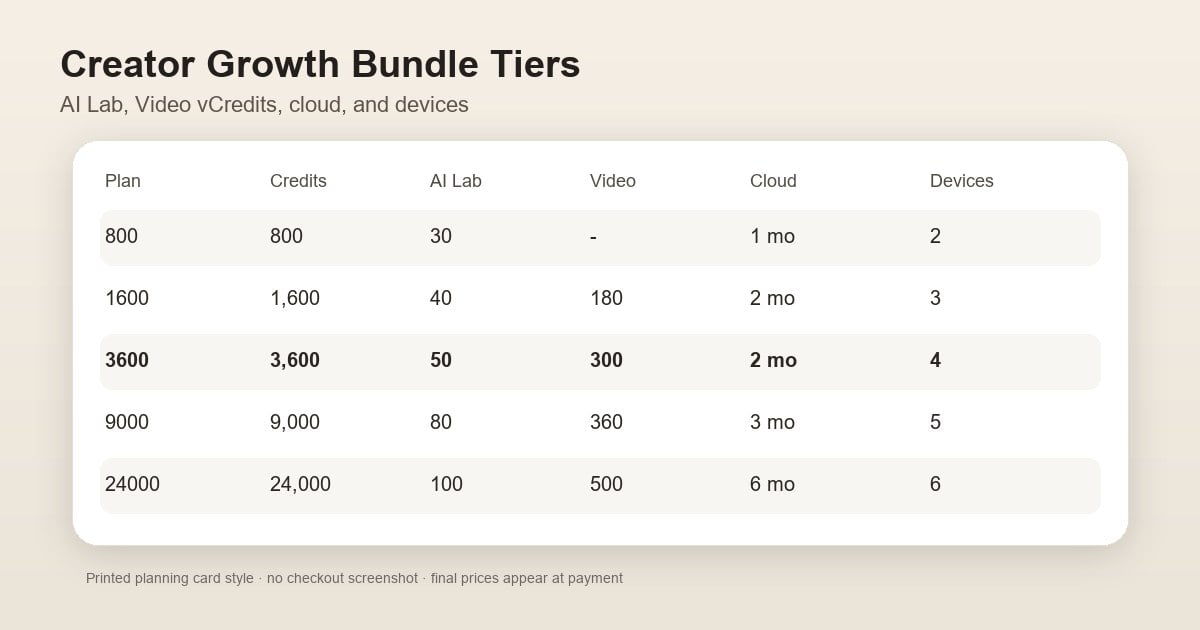
The tier table tells you how many AI Lab passes and cloud months you get. Every row still includes the same five background sets—here is what each one looks like and who it sells to.
Five Background Sets: What You Actually Get
All eligible annual tiers receive the same five background sets for Background Replacement—grey-room captures become sellable interiors, and studio looks without a second location fee. Download from Assets Hub on evoto.ai after a successful paid purchase with MY2026; free accounts and unfinished checkouts do not unlock the pack.
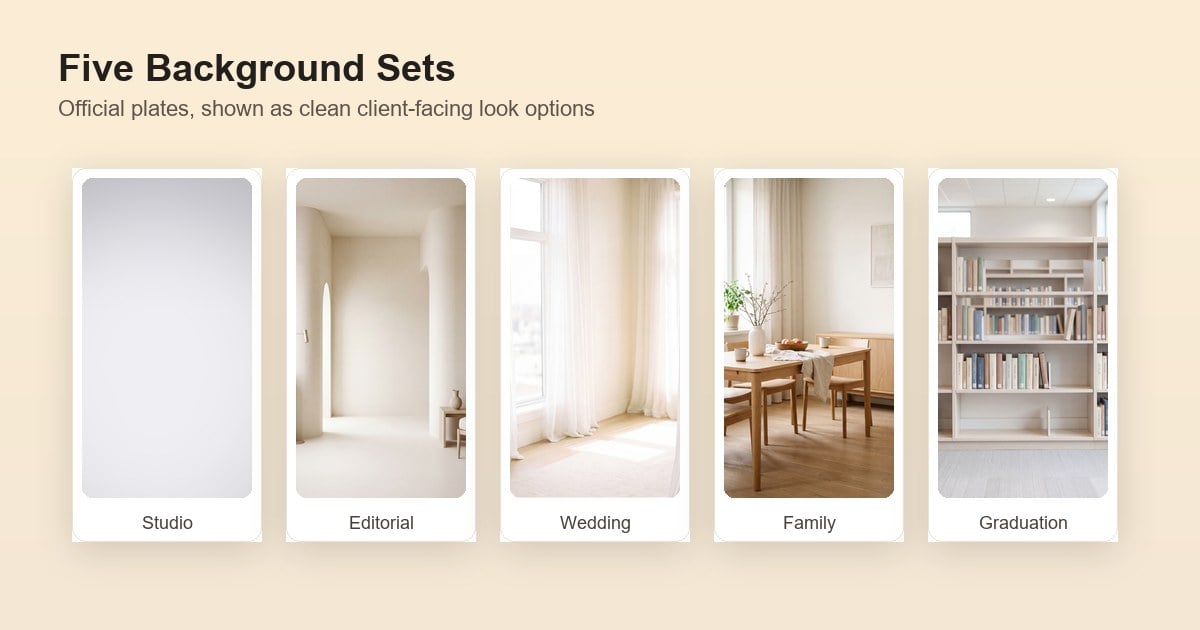
Below is what the plates feel like in production (moods drawn from the live Peak Season background library):
Soft Studio Neutrals
Clean seamless paper looks in soft grey-to-white and cool slate-blue gradients, with a gentle center glow and quiet vignette. This is your volume workhorse: headshots, school/league formals, e-commerce, anyone who wants the photo to look “professional” without a trendy set swallowing the subject. Match rim light lightly; these plates forgive mixed skin tones.
Editorial Quiet Lux
Quiet-luxury interiors: curved plaster arches, cream pillars, limestone lounge walls, slim brass lamps, camel leather chairs. Fashion, branding, and clean bridal clients pay for this “private studio day” vibe—you deliver it from a grey Cyc. Watch floor contact; keep subject scale believable against the furniture.
Sheer Daylight Loft
High-key rooms flooded with window light, floor-to-ceiling sheer curtains, pale wood, and soft rugs. Couples, maternity, and bridal upsells live here. If a client books a “natural light studio” look but your rental was full, this set is the honest shortcut—keep white balance cool and edges soft so it does not read like a pasted cutout.
Scandi Lifestyle Rooms
Bright home interiors: oak dining tables with linen runners, nursery/playroom corners with pastel wood toys and woven baskets, uncluttered cream walls. Family minis and lifestyle branding love these because the frame already sells “real home” without staging your own Airbnb. Leave breathing room in the composite for kids’ motion.
Campus & Grad Milestone
Bright scholarly interiors (library aisles, soft-focus stacks, pale wood study tables) plus golden-hour campus field/stadium plates—turf, track edge, goalposts, bleachers under warm low sun. Senior and graduation studios use this when clients want “campus energy” without fighting parking, field permits, or lunchtime crowds. Match subject scale to the aisle depth or keep turf horizon soft so grads do not float.
| Background set | Visual cue | Strongest persona |
|---|---|---|
| Soft Studio Neutrals | Soft grey / slate seamless | School · headshot · volume |
| Editorial Quiet Lux | Plaster arches · stone lounge | Fashion · branding · clean bridal |
| Sheer Daylight Loft | Sheer curtains · high-key windows | Couples · maternity · bridal |
| Scandi Lifestyle Rooms | Dining / nursery home sets | Family · lifestyle minis |
| Campus & Grad Milestone | Library aisle · campus field / stadium | Seniors · grads · sports portraits |
Before you promise looks on a client card, update Desktop against release notes (7.2+ recommended), pay with MY2026, then download the pack from Assets Hub.
After checkout, the most common question is not what you bought—it is where do I click to actually use it?
Where to Find Each Perk after You Buy
Most “missing bundle” tickets are really a wrong-screen problem. After a successful MY2026 purchase, perks are split into two simple groups: things you download once, and things that show up inside your account.
| What you get | Where to find it | Quick check |
|---|---|---|
| Five background sets | Evoto website → Assets Hub (also called Resource Hub) | Log in on desktop browser → download the background pack → import into Desktop before your first batch |
| AI Lab free uses | Evoto Desktop app (update to 7.2+ first) | Open AI Lab—your free-use counter appears on supported tools |
| Cloud storage | My Account → My Billing and Usage on evoto.ai | Storage window starts on your purchase date; duration depends on tier |
| Video vCredits | Evoto Video app (same login as portrait) | Open Evoto Video after purchase—balance shows in-app |
| Double Smart Points | My Account → SmartPoints Dashboard | Points post automatically on qualifying orders—no extra code |
Background sets: think of Assets Hub like downloading a preset pack—save to your studio drive, then point Background Replacement at the library folder.
Everything else: AI Lab, cloud, vCredits, and Smart Points turn on by themselves after payment. If AI Lab still reads zero, update Desktop first, refresh billing, then contact support with your order ID.
Two-minute sanity check: backgrounds in Assets Hub · AI Lab counter in Desktop · cloud line in Billing · vCredits in Evoto Video. Peak traffic can lag a few minutes—refresh once before you panic.
The backgrounds are your client-facing upsell. AI Lab is a separate cleanup lane that keeps those exports from eating extra credits.
AI Lab Free Uses: What Counts and What Does Not
AI Lab covers advanced tools—People Removal, Smart Removal, and related generative cleanup—outside your normal per-export credit meter. Selected Peak Season tiers include free AI Lab uses with no extra portrait credits for those Lab actions.
| Tier | AI Lab free uses | Real-world use |
|---|---|---|
| 800 | 30 | Small outdoor batch crowd cleanup |
| 1600 | 40 | Mini-day exit-sign / passerby passes |
| 3600 | 50 | Weekly venue clutter for wedding week |
| 9000 | 80 | Second-shooter clutter queue |
| 24000 | 100 | Month of Lab exceptions without credit panic |
What counts: each Lab action ticks the free-use counter—functions share one pool. What does not: standard portrait exports still spend annual credits one per still unless a feature page says otherwise.
Desktop 7.2+ is mandatory for current Lab counters and peak-season tooling. When Lab uses run out, you are back to normal credit math—or you upgrade on a future cycle, not mid-bundle magic.
Higher tiers also unlock Video vCredits and longer cloud windows—useful when you deliver reels or edit on two machines.
Video vCredits and Cloud Storage by Tier
Video vCredits (Evoto Video)
vCredits power Evoto Video—portrait-oriented video retouch and short social cutdowns. They are not portrait still credits.
| Tier | vCredits | Rough capacity mindset* |
|---|---|---|
| 1600 | 180 | Several short vertical reels |
| 3600 | 300 | Mini-day highlight batch |
| 9000 | 360 | Wedding teaser + mini reels |
| 24000 | 500 | Peak-month video add-on menu |
*Exact burn depends on resolution and tools inside Evoto Video—capacity planning, not a quote.
Delivery: auto-issued to the same account as the Evoto portrait. Log into Evoto Video after purchase; no separate SKU redemption.
Cloud storage windows
Cloud keeps multi-machine studios sane when one editor culls on a laptop and another retouches on a tower.
| Tier | Cloud grant | Typical pattern |
|---|---|---|
| 800 | 500GB × 1 month | Trial sync for a busy mini week |
| 1600–3600 | 500GB × 2 months | Mini month + one wedding |
| 9000 | 500GB × 3 months | Bridge two stacked months |
| 24000 | 500GB × 6 months | Half-year second-seat sync |
Start date = purchase date. Expired cloud enters a 30-day retention window per pricing FAQ—promo storage is not archival backup. Active jobs only; archive delivered galleries to your NAS as usual.
Smart Points are a nice checkout bonus—but they should not drive tier choice. Here is the quick version before we talk about selling the backgrounds to clients.
Smart Points and Referral: Nice Bonus—Not Why You Pick a Tier
Every bundle row includes 2× Evoto Smart Points on your qualifying purchase—automatic after checkout (Loyalty). A separate Referral path can add 3× when you invite first-time buyers or enter a colleague’s code.
Pick your tier for credits, backgrounds, AI Lab, and devices—not for points math. Stacking rules and wallet redeem rates live in the MY2026 buying guide.
The bundle only pays off on your books if clients book the extra looks. That is where your client price sheet comes in—not Evoto’s checkout page.
Turn Five Backgrounds Into Client Packages (Good / Better / Best)
Good / Better / Best is not Evoto jargon. It is the tiered menu on your website and booking form—the options your clients pick when they reserve a mini, senior session, or family shoot.
You shoot once on a grey seamless. Background Replacement delivers multiple “locations” in post. During Built for Your Peak Season, all five plates ship on every eligible tier—so you can build a menu before peak bookings open, not after you rent a second studio.
How photographers use the five sets on a client price sheet
| Your client package (what they book) | Backgrounds you deliver | Example listing copy | Why you earn more |
|---|---|---|---|
| Good (entry mini) | 1 look — usually Soft Studio Neutrals | “Classic studio portrait — one finished background” | Lowest price point; still beats plain grey because the plate looks intentional |
| Better (most-booked upsell) | 3 looks — e.g. Soft Studio + Sheer Daylight Loft + Campus & Grad for seniors, or Soft Studio + Scandi Lifestyle + Sheer Daylight for families | “Three-location mini — same session, three delivered looks” | Same shoot day, +$75–150 on many US mini menus—no second location fee for you |
| Best (premium card) | All 5 looks, including Editorial Quiet Lux | “Full Peak Season collection — five curated backgrounds” | Highest average order; parents and couples love “collection” language on IG |
The math that matters: you are not reselling Evoto credits to clients. You are selling finished looks. One grey-room session + five bundle backgrounds can support a Best package that feels like five location days—while your hard cost is one rental block and one export batch per look.
Practical launch checklist before you print July booking cards:
- Buy with MY2026 during Jul 9–23 so the five sets unlock in Assets Hub.
- Download once; test one hero frame per background (exposure + edge QA).
- Publish Good / Better / Best on your site with preview thumbnails—clients choose at booking, not in the edit bay.
- Batch Background Replacement Friday night; deliver Saturday.
Cull-to-export rhythm and one-hero preview discipline are step-by-step in the summer mini photoshoot sessions workflow—the title says “summer mini,” but the Friday batch pattern works for any peak mini block.
Already on an annual plan and just need credits—not a bigger client menu?
Add-on Packages During the Promotion
Already annual and just short on credits? Add-on packs (200 / 500 / 1,200 / 3,600 / 9,000 / 24,000) during Peak Season: 10% off, double Smart Points—they refill portrait credits at your subscription unit rate. They do not bump your AI Lab or vCredits band. Need more Lab/video? Step the annual tier on a future purchase—not a second bundle fairy tale.
Match your client package depth to the tier that covers your export volume, claim perks once after checkout, and stop leaving the five backgrounds unused on the payment page. Ready? Apply MY2026 on the payment page. Overview: Peak Season Promotion hub. Checkout walkthrough: MY2026 buying guide.
FAQ
1. What is the Evoto creator growth bundle?
It is the Built for Your Peak Season gift pack on eligible purchases through July 23, 2026: five background sets, tiered AI Lab uses, Video vCredits (1600+), cloud storage windows, device seats, and 2× Smart Points. Contents scale by plan; the five backgrounds are the same on every eligible annual option.
2. How does the 800 plan bundle differ from 3600?
4Both include the same five background sets. 800 adds 30 AI Lab uses, 500GB cloud for one month, 2 devices, and 25% off—no vCredits. 3600 adds 50 AI Lab uses, 300 vCredits, 500GB for two months, 4 devices, and 20% off with a larger annual credit pool (3,600). Pick 3600 when two editors share peak minis and short reels.
3. Where do I download the five background sets?
Only after a successful paid purchase with MY2026 on a qualifying plan. Then: sign in on evoto.ai → Assets Hub → download the background pack → import into Evoto Desktop 7.2+ and use with Background Replacement. Sets are not emailed as attachments.
4. Do AI Lab free uses spend my portrait credits?
No—while your Lab counter has free uses, Lab features draw from that pool, not your per-export still credits. Standard portrait exports still consume annual credits. Update Desktop to 7.2+ or the counter may not appear.
5. Will I receive the bundle twice if I buy again during the promo?
Campaign rules typically grant promo bundle perks on the first eligible purchase per account window—repeat buys may still earn promo pricing or Smart Points per offer terms but do not assume a second background drop. Read Peak Season T&C before a second checkout.
6. Which tier fits a three-look Better client package?
1600 or 3600 annual plans cover most studios selling a Better tier (three delivered backgrounds per session) with 40–50 AI Lab passes and meaningful vCredits. Solo operators on a one-look Good package can start at 800 if cloud and devices match your floor.
7. Do add-on credit packs include AI Lab or vCredits?
No. Add-ons during the promo include 10% off and double Smart Points—they top up portrait credits, not the full bundle ladder. Upgrade the annual tier if you need more AI Lab or vCredits.


Powerful AI Photo Editor



