

For professional photographers and photo editing enthusiasts, finding the right AI photo editor that balances flexibility, power, and value is crucial. This Black Friday and Cyber Monday, Evoto—your trusted AI photo editor—unlocks exclusive Evoto Black Friday offers 2025 on its subscription plan, including game-changing add-on pack options that let you extend existing base packages seamlessly.
If you’re new to Evoto Add-On Pack and want to make the most of this holiday sale, this guide will break down everything you need to know, from what add-on packages are to how to choose the best option for your photography needs.
What Are Evoto Add-on Packs?
Ever hit a wall in the middle of a big wedding shoot, commercial project, or urgent client request because you ran out of export credits? Evoto add-on packs are built to solve exactly that problem—they’re your flexible boost for creative freedom, ensuring you never have to pause your photo editing to wait for subscription renewals.
By definition, Evoto add-on package is a bundle of extra export credits that you can purchase at any time to complement your existing annual Evoto subscription plan.
Why You Need Evoto Add-on Packages?
Unlike rigid all-inclusive package options that force you to pay for more than you need, add-on packs let you extend existing base packages with just the extra credits you require—no unnecessary features, no wasted budget. Whether you’re facing a “creative spike” where inspiration hits and you want to export freely, or you need to handle a large project without delay, add-on packs keep your workflow smooth.
The best part? Your add-on pack price is tied to your current Evoto subscription plan’s per-photo cost—so you get the same discounted rate you already enjoy with your base plan.
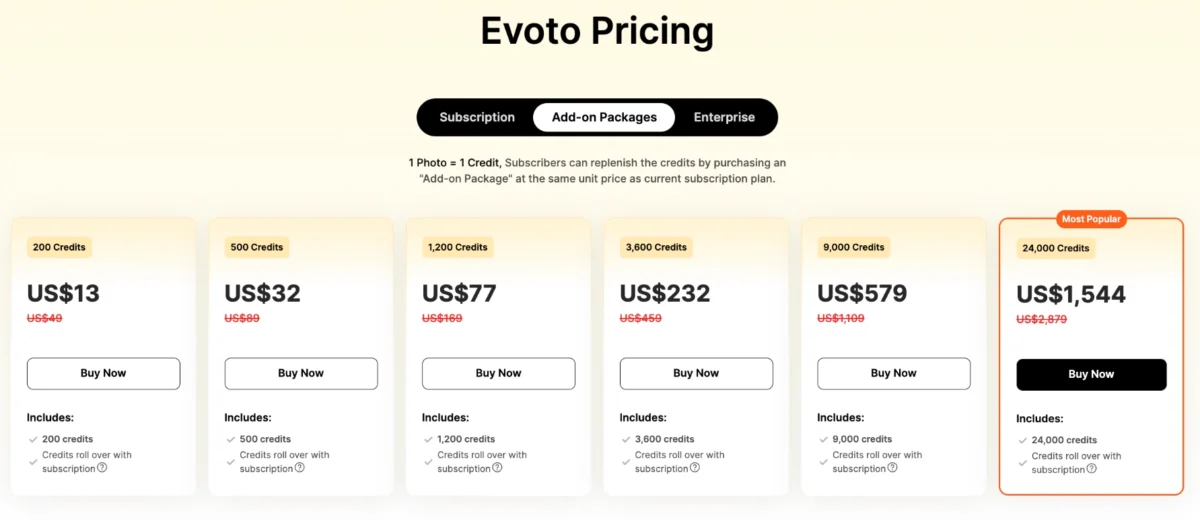
For example, if you’re on Evoto Starter Plan (which costs $89 for 800 credits, working out to ~$0.111 per photo), a 200-photo addon package would only cost ~$22, and a 500-photo addon pack ~$55. It’s simple, transparent, and designed to keep your photo editing on track.
And the savings get even bigger this Evoto Black Friday—don’t miss Evoto’s exclusive holiday deals to unlock extra discounts on subscriptions and add-on packs, making your photo editing workflow more cost-effective than ever.


Powerful AI Photo Editor
Situation to Use Evoto Add-on Packs: Perfect Scenarios for Every Photographer
Add-on packs are designed to solve credit shortages without long-term commitments—here are the key situations where they shine:
1. Large or Urgent Projects
Wedding shoots, commercial campaigns, or last-minute client requests often require editing dozens (or hundreds) of photos at once. An addon package ensures you have enough credits to deliver on time, no matter how big the project.
2. Creative Spikes & Unplanned Edits
When inspiration strikes—whether you’re experimenting with new editing styles or refining a portfolio—you don’t want to pause to wait for subscription renewals. Add-on packs let you export freely, turning creative bursts into finished work.
3. Occasional Credit Shortages
If you only exceed your base plan’s credits once in a while (not monthly), an addon package is cheaper and more flexible than upgrading your evoto subscription plan. It’s pay-as-you-need, so you never waste money on unused credits.
4. Seasonal Peaks
Photographers often face busy seasons (e.g., holiday shoots, graduation season). Add-on packs let you stock up on credits temporarily, handling high demand without locking into a more expensive plan year-round.
How to Purchase & Use Evoto Add-on Packs: A Step-by-Step Guide
Buying and using add-on packs is quick and seamless—here’s how to get started:
Step 1: Meet the Eligibility Requirements
To access add-on packs, you need an active annual Evoto subscription plan and must log into your Evoto account. Top-up options won’t appear if you’re not logged in or have an inactive subscription.
Step 2: Choose Your Purchase Channel
You can buy add-on packs through multiple channels:
- Evoto’s official website (Pricing page)
- PC software (click “Buy Now” in the top-right menu)
Note: The Evoto iPad does not support the sale of add-on packages.
Step 3: Select Your Add-on Pack
On the Pricing page, click the “Additional Packs” tab to view options (200, 500, or other quantities based on your needs). Select the pack that matches your credit needs—remember, Evoto’s 20% discount on Black Friday is automatically applied to the calculated original price when you check out.
Step 4: Complete Payment & Access Credits
Choose your payment method and confirm your purchase. Credits are reflected in your account instantly—check “Remaining Credits” in the official webpage/software’s “Account” menu to verify.
Step 5: Use Your Credits
Credits are consumed when you export photos (1 credit = 1 exported photo, with free re-exports).
Evoto Black Friday & Cyber Monday 2025: Deals to Maximize Your Savings
The event runs from November 24 to December 1—8 days to save on add-on packs, Evoto subscription plan, and more. What’s more, grab the free Evoto bonus pack of presets and backgrounds in this Evoto Black Friday deal!
Powerful AI Photo Editor
Here’s how to tailor the deals to your needs:
For First-Time Subscribers
- Pick a recommended Evoto subscription plan that fits your usage:
- Hobbyists: Snag 1,000 total credits (800 from Starter Plan + 200-credit addon) this Black Friday—save up to $35.6 total by getting the Starter Plan (original $89) 35% off and the addon (original $22.25) 20% off, grabbing more editing power for less!
- Emerging Pros: Score Evoto’s most popular Basic Plus Plan (3,600 credits, original $269) + 500-credit addon (original $37.36) — save a total of up to $74.7 with 35% off the plan & 20% off the addon, getting 4,100 credits for client projects at unbeatable value!
- Use the promo code to stack Black Friday discounts with referral rewards (if you have a referral code).
For Existing Subscribers
- Occasional Shortages: Grab a discounted add-on package (20% off) to top up credits without upgrading.
- Consistent Overages: Upgrade your Evoto subscription plan (e.g., Basic to Basic Plus) for the 1st time on the official website for more discounts. For packages purchased through the official website, first-time purchasers/upgrade users will enjoy a 10% discount on the package through the automatically applied discount code.
- Bonus Perk: Unused credits roll over when your subscription renews, and old credits remain valid for 1 year—so you can stock up now and use later.
Final Words
Don’t let credit shortages slow down your photo editing this Black Friday. Whether you’re looking to extend existing base packages with an add-on pack or upgrade your Evoto subscription plan, Evoto’s deals are built for photographers who value flexibility and quality. Check out Evoto Black Friday deal now to lock in your savings—offers end December 1!
Evoto Add-On Packs & Black Friday Deals
Frequently Asked Questions
Q1: How long are add-on pack credits valid?
Credits expire on the same date as your annual Evoto subscription plan. Unused credits roll over automatically if you renew your subscription.
Q2: Why can’t I see add-on pack options?
Ensure you’re logged into your account and have an active annual subscription. Top-up options are exclusive to existing annual subscribers.
Q3: Can I use add-on packs with Pay-as-You-Go (PAYG) plans?
No—add-on packs are only for annual Evoto subscription plan users. PAYG users can purchase credits (also discounted 25% for 200/500-credit pack during Black Friday).
Q4: What are “credits” in Evoto Add-on Packs, and how is the price calculated?
In Evoto, 1 credit = 1 exported photo (you can re-edit and re-export the same photo for free—credits are only consumed once per unique export). Add-on Pack prices are based on your current annual plan’s “per-photo (per-credit) cost,” so you get the same discounted rate as your base plan. See the simple calculation example below for Plan A:
| Add-on Pack Size | Calculation (Plan A: ~$0.11/credit) | Total Price |
|---|---|---|
| 200-credit | $0.11 × 200 | $22 |
| 500-credit | $0.11 × 500 | $55 |
Note: Plan A details: $89/year for 800 included credits, so per-credit cost = $89 ÷ 800 ≈ $0.11.
*All final charges are governed by the prices listed on the official website.
Q5: Should I buy an Add-on Pack or upgrade my annual subscription plan?
The choice depends on your credit usage frequency and long-term needs. Use this table to decide:
| Factor | Choose Add-on Pack | Choose Upgrade to a Higher Annual Plan |
|---|---|---|
| Credit Shortage Frequency | Occasional (e.g., 1–2 times a year, or during seasonal peaks) | Consistent (e.g., monthly overages, or regular high-volume editing) |
| Cost Efficiency | Cheaper for short-term needs (no long-term commitment to a pricier plan) | More cost-effective long-term (lower per-photo cost than base plan + add-ons) |
| Flexibility | High—buy only when you need extra credits; no plan changes | Lower—locks you into a higher plan for 12 months, but includes more device support |
| Ideal User | Hobbyists, part-time photographers, or those with variable editing needs | Full-time professionals, studios, or users with steady high-volume projects |
| Example Scenario | A wedding photographer who needs 500 extra credits once a quarter for busy weekends | A commercial photographer who uses 2,000+ credits monthly for client campaigns |
Q6: How does Evoto’s “roll over credit” policy work for Add-on Packs?
Evoto’s roll over credit policy lets you carry unused credits (including those from Add-on Packs) to the next subscription cycle, but rules vary by plan type. Here’s a clear breakdown:
| Plan Type | Roll Over Credit Rules | Validity After Subscription Changes |
|---|---|---|
| Annual/Monthly Subscription | Unused credits (your current plan + Add-on Packs) roll over when you remain subscribed. The total rolled-over credits are capped at 5x of your current plan credits (e.g., Starter Plan-800: max 800×5=4000 rolled-over credits). | – Cancel subscription: All credits expire on the plan’s end date.- Want to renew after cancellation: 30-day “window period” to renew and retain unused credits. |
| PAYG (Pay-As-You-Go) | No roll over credits available for Pay As You Go packages. Credits are valid for 2 years from the date of purchase. | Credits expire 2 years after buying, even if you don’t use them. |
Example for Annual Subscription: If you have a Starter Plan-800 (800 included credits) and 4500 unused credits (base + Add-on Packs) when your plan renews, only 4000 credits (800×5) will roll over to the next cycle.
Powerful AI Photo Editor



