Fashion photography and editorial photography are the backbone of capturing the essence of 2026’s most anticipated runway moments. As fashion week 2026 approaches—with key events like New York fashion week runway kicking off in February (check the New York fashion week calendar for exact dates)—photographers face unique challenges: unpredictable lighting, fast-paced model walks, and the pressure to deliver editorial-worthy shots that align with 2026 spring fashion trends.
Whether you’re a seasoned pro or aspiring to join the ranks of famous fashion photographers, mastering both on-site techniques and post-production workflows is critical.
This guide breaks down how to conquer 2026’s runway demands, with a focus on high fashion editorial photography and leveraging tools like AI photo editor to streamline your process.
2026 Fashion Week: Core Concepts & Runway Dynamics
What Is Runway Editorial Photography?
Fashion editorial photography goes beyond capturing clothes—it tells a story, highlighting a designer’s vision, fabric movement, and model presence for magazines, lookbooks, and brand campaigns. For the 2026 spring fashion week, this means embracing trends like sustainable luxury, retro-futurism, and jewel tones colors (named 2026’s color of the year), while adapting to diverse venue setups.
2026 Trends & Venue Lighting Challenges
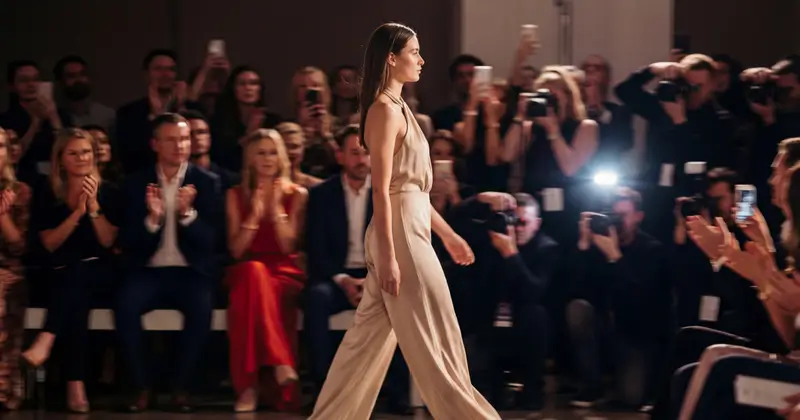
This season’s runways are set to feature dramatic contrasts: soft pastels for daytime shows, bold jewel tones for evening collections, and textures like silk, velvet, and 3D-printed fabrics that demand precise lighting. Venue challenges abound—mixed warm/cool LEDs, spotlights that create harsh shadows, and glare from metallic garments (a staple of runway fashion).
For example, Valentino’s 2026 Paris Fashion Week show is rumored to use immersive red lighting, while Michael Kors’ New York presentation will lean into natural golden-hour light. These variations require photographers to be agile, as lighting can shift drastically with model pacing.
Key Pain Points of 2026 Runway Photography
On-Site Shooting Challenges
- Lighting inconsistencies: Red stage lights casting color casts on white garments, or dimly lit venues (common in Paris Fashion Week’s intimate shows) that force high ISO use.
- Fast model movement: Blurry lace details or missed poses for flowy dresses, especially during high-energy shows like Simone Rocha’s chaotic yet artistic presentations.
- Venue constraints: Crowded photo pits limiting angles, and strict no-flash rules (flash disrupts the show’s lighting design and distracts attendees).
Post-Production Pressures
- Color consistency: Matching the 2026 color of the year across dozens of shots, or ensuring Digital Lavender hues stay true to designer intent.
- Editorial quality demands: Refined skin that retains texture, sharp fabric details (like embroidery on bridal gowns), and unified tonal balance for magazine editorial photography.
- Tight deadlines: Same-day delivery for clients like Vogue Runway or social media teams, leaving no room for lengthy manual edits.
What Makes a High-Quality 2026 Runway Photo?
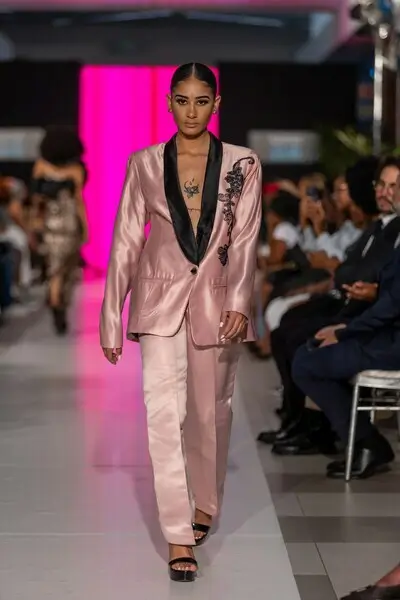
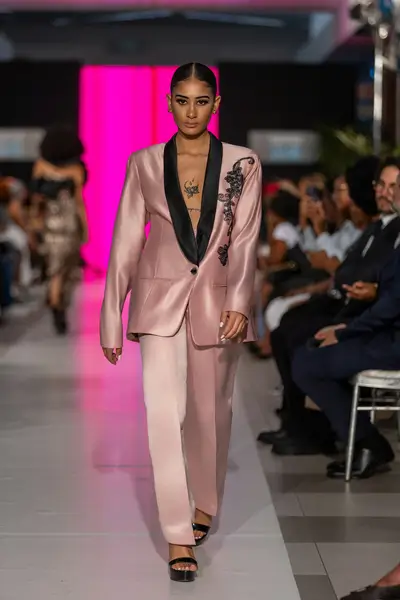
4 Core Criteria for Editorial-Worthy Shots
- Garment Detail Precision: Crisp reproduction of fabrics—think the sheen of silk blouses from Dior’s spring collection or the pile of velvet jackets from Bottega Veneta. No distortion, and clear visibility of buttons, beading, or structural seams.
- Color Authenticity: Exact match to the designer’s palette, whether it’s the vibrant jewel tones of Valentino’s evening gowns or the soft pastels of the latest spring fashion from New York brands.
- Refined Portraiture: Model expressions that align with the collection’s mood, with skin retouched using preserve skin texture AI smoothing to avoid artificiality. Techniques like Dodge & Burn and Frequency Separation are non-negotiable for editorial-grade results.
- Lighting Balance: Even exposure that enhances the garment’s sense of depth —no clipped highlights on metallic sequins or lost shadow detail in tailored blazers from Givenchy’s black-on-black collection.
Evoto Workflows for 2026 Runway Photography
Workflow 1: Real-Time Editorial Coverage (Evoto Instant)
For live reporting during fashion week in February, speed is key. Evoto Instant’s seamless workflow for professional AI photography keeps you ahead:
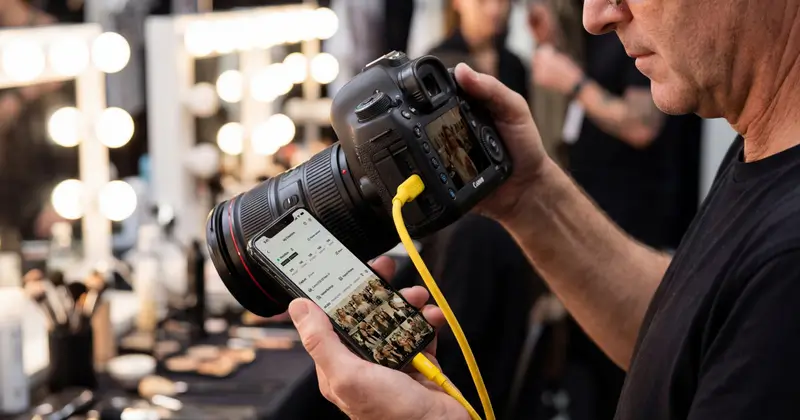
Step 1. Tethered Shooting: Connect your camera (Canon R5, Sony A1, etc.) via wired/wireless tethering to Instant and capture every runway moment in RAW or JPEG.
Step 2. AI Culling: Let Evoto Instant’s best AI photo culling filter out blurry, overexposed, or off-pose shots—critical for high-volume events like spring fashion show marathons.
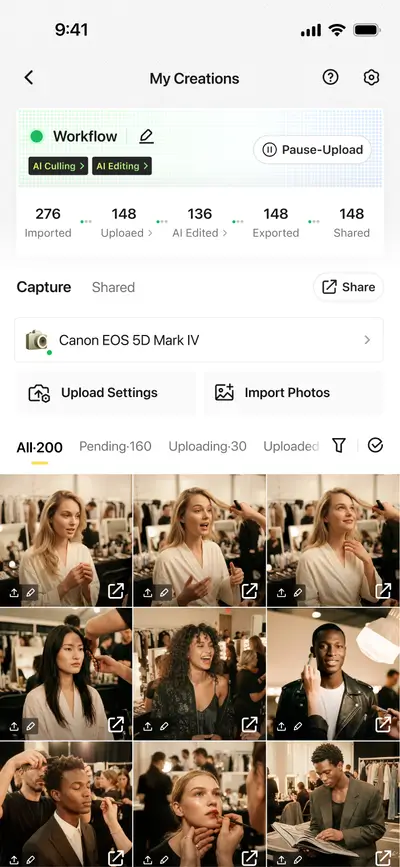
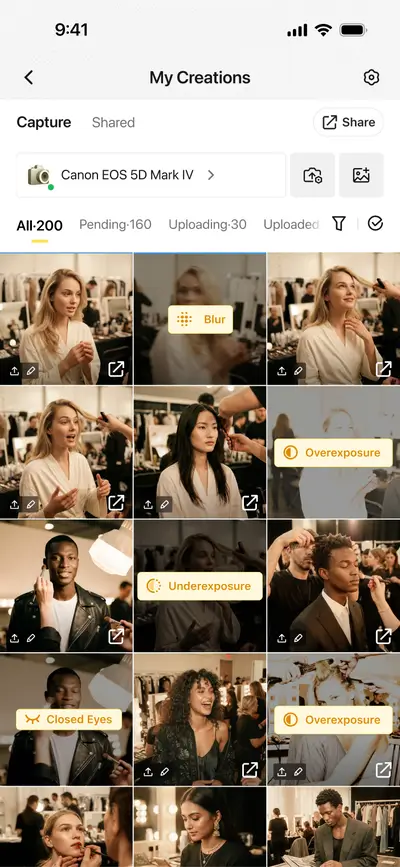
Step 3. Batch Preset Application: Use 2026 trend-aligned presets (e.g., jewel tone enhancement, neutral skin smoothing) to polish shots instantly.
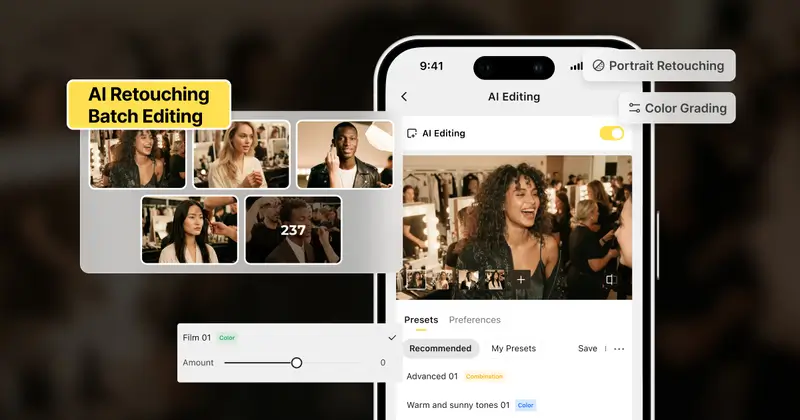
Step 4. Secure Cloud Sync: Share real-time edits with editorial teams, which prioritizes privacy protection and user data protection for sensitive client work. Generate branded galleries with unique access codes for secure delivery.
Evoto Fashion Week 2026 Bonus

Workflow 2: Post-Show High-End Retouching (Evoto Desktop)
For high fashion editorial photography that demands precision:
Step 1. Import RAW Files: Evoto Desktop’s best AI RAW photo editor for professional photography supports high-res RAW files, preserving maximum detail for edits.
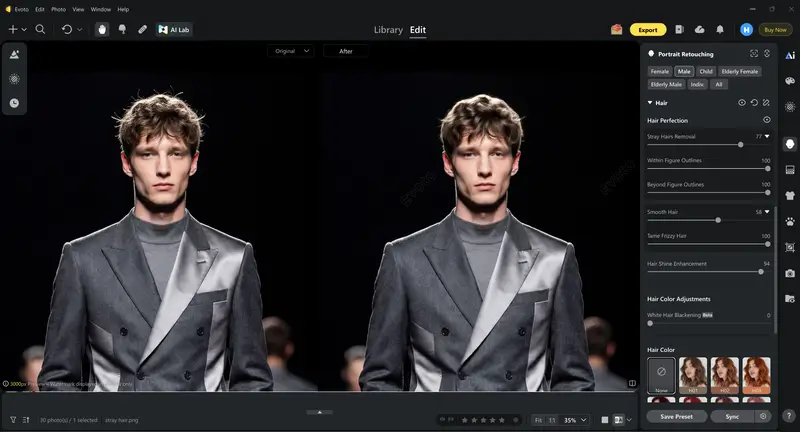
Step 2. Refine Portrait: Use Dodge & Burn to sculpt facial contours and Frequency Separation to smooth skin while retaining texture (ideal for editorial authenticity). Remove blemishes and delete stray hairs with Evoto’s targeted tools.
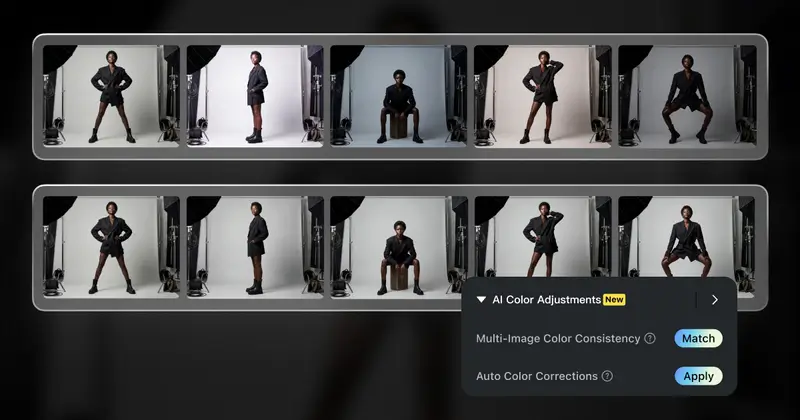
Step 3. Color Consistency: Leverage AI Color Consistency to unify tones across a series—essential for ensuring Digital Lavender looks consistent across 50+ shots from a single show. Use Control Mode in AI Color Match for precise adjustments.
Step 4. Garment Retouching: Eliminate lint, dust, or wrinkles with the AI clothing wrinkle removal tool, while preserving fabric texture (e.g., silk sheen or velvet depth).
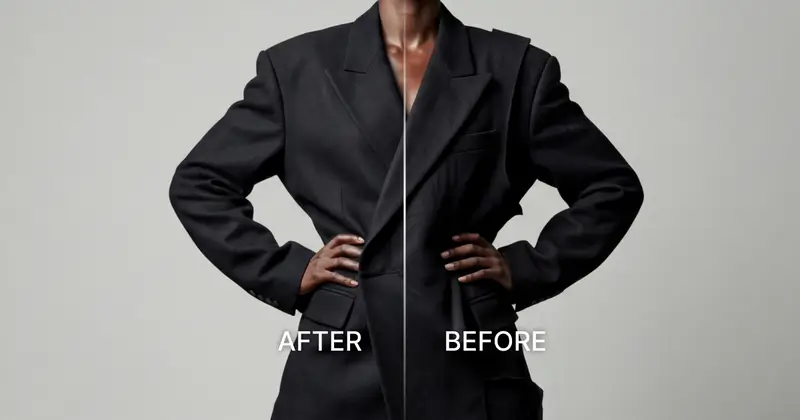
Step 5. Delivery: Sync via Cloud to Evoto Instant for live delivery or export high-res files for print editorial. Evoto Desktop’s output sharpening ensures shots look crisp for both screen and print.


Powerful AI Photo Editor
Pro Tips for 2026 Runway Shooting & Retouching
On-Site Shooting Strategies
- Prep gear for lighting: Use fast shutter speeds (≥1/500s) to freeze tulle movement, and bring reflectors to mitigate harsh shadows on linen suits. For low-light venues, trust your camera’s high ISO—noise is preferable to motion blur.
- Study the collection: Anticipate key poses (e.g., dramatic sleeve flips for Simone Rocha, trailing hems for Givenchy) and fabric behaviors to capture defining moments.
- Position strategically: Secure a spot to capture 360° details—back cutouts, train movement—during model turns. Avoid the center pit if overcrowded; off-center angles add uniqueness to runway photos.
Read More:
- Fashion Ecommerce 2026: Translate Catwalk Trends to High-Converting Clothing Photography
- Street Fashion Photography: How to Create Viral 2026 Fashion Week Content Fast
Evoto Retouching Hacks
- Preserve luxury textures: Adjust Evoto’s clothing edge smoothing tool to avoid flattening velvet piles or 3D-printed patterns.
- Fix lighting flaws: Use AI to correct color casts from stage lights and remove glare from glasses naturally with AI glasses glare remover.
- Batch edit efficiently: Create a custom 2026 trend preset (jewel tones + warm undertones) to speed up post-production for high volume studios.
Common Mistakes to Avoid
- Over-retouching: Losing fabric texture (e.g., making lace appear blurry) or over-smoothing skin—editorial photography values naturalness.
- Ignoring color accuracy: Straying from the designer’s palette, such as dulling jewel tones for a Gucci collection.
- Neglecting detail shots: Focusing only on full outfits, missing close-ups of beaded cuffs or embroidered collars that elevate fashion editorial spreads.
- Poor workflow management: Failing to back up RAW files on-site, leading to missed deadlines for same-day submissions.
Powerful AI Photo Editor
Conclusion
2026’s fashion week demands mastery of both on-site agility and post-production precision. Fashion photography, editorial photography, and fashion editorial photography thrive when you combine technical shooting skills with tools like Evoto, offering an all-in-one AI photo editing platform, secure cloud sync, and real-time delivery. By prepping trend-aligned presets, leveraging AI culling, and prioritizing color consistency, you’ll deliver shots that stand out to clients like Runway Magazine and Vogue Runway. Don’t just capture the runway—tell a story that resonates with 2026’s biggest trends.
FAQs
1. How does Evoto ensure color consistency for 2026 Pantone trends like Digital Lavender in runway photos?
Evoto’s AI Color Consistency feature uses a reference image to unify tones across shots, while Control Mode in AI Color Match lets you fine-tune sliders for precise alignment with Pantone standards. It’s ideal for maintaining consistency across 2026 spring fashion trends.
2. Is Evoto’s cloud sync secure for sharing editorial work with clients during fashion week?
Yes—Evoto Cloud prioritizes secure data transfer, privacy protection, and user data protect. Branded galleries with unique access codes ensure only authorized parties view or download images, making it safe for sensitive editorial projects.
3. Can Evoto handle high-volume shoots, like covering multiple shows in a day?
Absolutely. Evoto’s Bulk background removal for commercial photos and batch editing tools streamline workflows, while AI Culling reduces time spent sorting through hundreds of shots. It’s designed for the fast-paced demands of fashion week timetable marathons.
4. How does Evoto compare to Lightroom for runway retouching?
Evoto Desktop outperforms Lightroom for high-volume studios with faster RAW processing, AI-powered garment retouching, and seamless integration with Evoto Instant for live delivery. Its focus on fashion-specific tools (e.g., fabric texture preservation) makes it more tailored to runway needs.
5. Can Evoto fix common runway photo flaws like closed eyes or harsh lighting?
Yes—Evoto’s Perfect Shot feature fixes closed eyes in group shots, while AI Exposure Adjustment corrects underexposed/overexposed images. Tools like Fix lighting in outdoor portraits AI and red-eye removal address on-site lighting mishaps efficiently.