- In negatives photography, the film captures a negative image — lights are dark and darks are light, and colors are reversed into their complements. Chemical development fixes that latent image onto the film.
- You can turn any photo to negative (or negative to positive) digitally by color inversion: each pixel is replaced by its complement (e.g. red → cyan, green → magenta). No darkroom needed.
- To recreate a negative photo look or to restore a scanned film negative, use an online image color inverter: upload, invert, and download. We link to one option below (once).
Negatives photography is the foundation of analog film. When you shoot on film, the camera produces a negative image — the tones and colors are reversed. Skin looks greenish, skies look orange, and you need a second step (printing or scanning plus inversion) to get a normal-looking positive. Today, you don’t need a darkroom to work with that look.
This guide covers a short history of film negatives, the science behind why negatives look the way they do, and how to turn any photo to negative (or a scanned negative back to positive) using inverted colors and a simple digital tool.
Whether you’re scanning old negatives, learning about negative photography for the first time, or just want the negative photo aesthetic on a digital image, you’ll get the basics here, plus a fast way to try color inversion yourself. For the color theory behind inversion (e.g. the opposite color of green), see What Are Opposite Colors? A Complete Color Theory Guide on the Evoto blog.
A Short History of Film Negatives
In negatives photography, the piece of film that comes out of the camera is the negative: it’s the first, inverted record of the scene. That idea dates back to the early 1800s. Nicéphore Niépce and Louis Daguerre worked with materials that darkened where light hit them, producing a direct positive (see history of photography for more). Later, William Henry Fox Talbot and others used papers and plates that produced a negative image first; from that negative, many positive prints could be made. That “negative then positive” process became the standard for both black-and-white and color negatives photography.
With color film, the negative doesn’t just flip light and dark — it also flips colors. The emulsion layers record the scene in complementary hues. So the negative image you see (orange skin, green sky) is the inverted color version of the final print. In the darkroom, printing that negative onto paper with the right chemistry (or, later, scanning and inverting it digitally) flips everything back to a normal-looking positive. So when we talk about negatives photography, we’re talking about that intermediate negative and the step that turns it into a viewable image.
The Science of Negatives: Why Colors Invert
A negative image on film looks inverted because of how the chemistry and light interact. In simple terms:
- Exposure — Light hits the film and triggers a reaction in the emulsion. Bright areas cause more change, dark areas less. So the “latent” image is already reversed in terms of light and dark.
- Development — Development turns that latent image into a visible one. In black-and-white film, the exposed areas become dark (silver or dye), so you get a negative image: dark where the scene was bright, light where it was dark.
- Color — In color film, each layer is sensitive to one primary color (red, green, or blue). The negative stores the complement of each color. So what was red in the scene appears as cyan on the negative; what was green appears magenta; what was blue appears yellow. That’s the same idea as inverted colors on a screen: every hue is replaced by its opposite on the color wheel.
So the negative photo you hold up to the light isn’t a mistake — it’s the necessary intermediate. To get a normal-looking picture, you either print it (in a darkroom or with a lab) or scan it and apply color inversion so that each inverted color is flipped back to the original. Understanding that one step (inversion) is enough to turn a photo to negative or a negative to positive is the key to working with negatives photography in the digital age.
From Negative to Positive: How Inversion Works
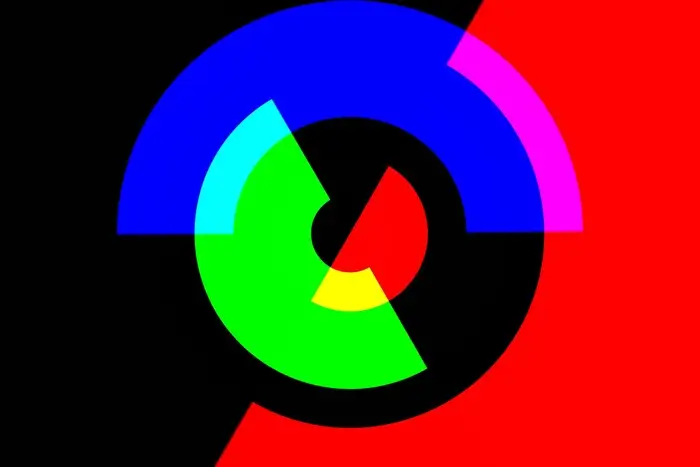
Turning a negative image into a positive (or a normal photo to negative) is the same operation in both directions: color inversion. In the RGB model, each pixel has a red, green, and blue value from 0 to 255. Inversion replaces each value with “255 minus that value.” So:
- Red (255, 0, 0) becomes cyan (0, 255, 255).
- Green (0, 255, 0) becomes magenta (255, 0, 255).
- Blue (0, 0, 255) becomes yellow (255, 255, 0).
That’s exactly the relationship you see on a film negative: warm tones look cool, blue sky looks orange. When you invert a scan of that negative, you’re applying the same math — and the inverted colors snap back to a normal-looking positive. The operation is lossless: no detail is thrown away, only the color values are flipped. So whether you’re restoring an old negative or creating a negative photo look from a normal image, one inversion does the job. A tool that applies a negative photo filter or an image color inverter is doing this same 255-minus operation on every pixel.
How to Recreate the Negative Look Digitally
You don’t need a darkroom or film to get the negative photo look. You can start from a normal photo and turn it photo to negative, or start from a scanned negative and turn it into a positive. Here’s a simple workflow with clear steps. For a phone-friendly guide, see How to Invert Colors on iPhone: 3 Easy Methods Compared.
Option A: Turn a Normal Photo Into a Negative-Style Image
Step 1: Open the Tool and Upload Your Photo
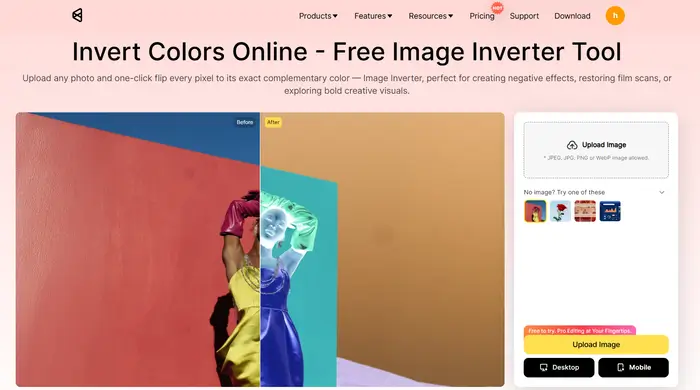
Open an online image color inverter in your browser. Evoto offers a free image color inverter that runs in any modern browser. Tap or click the upload area and select your photo from your device. Supported formats usually include JPG, PNG, and WebP. Wait for the file to finish uploading.
Step 2: Apply the Inversion
Click Invert Colors. The preview will update immediately to show the inverted colors — your negative image or negative photo look. Every pixel is now the complement of the original (e.g. red → cyan, green → magenta). Review the result on screen before downloading.
Step 3: Download the Result
Click Download. You get a full-resolution file with the negative photo filter effect applied. No account or installation required; the image is only processed for your session and is not stored.
This is the digital equivalent of negatives photography in the sense that you’re seeing the inverted color version of your shot. Use it for album art, social posts, or to understand how negatives relate to positives.
Option B: Restore a Scanned Film Negative to a Positive
Step 1: Scan Your Negative
Scan your negative with a flatbed scanner or dedicated film scanner. Save the scan as a standard image file (e.g. JPG or PNG). The file will look like a negative image — orange skin, green sky. Keep the resolution high enough for your intended use.
Step 2: Upload the Scan to the Inverter
Open the same image color inverter in your browser and upload the scanned file. The tool will display the negative as-is.
Step 3: Click Invert to Get the Positive
Click Invert. The inverted colors will turn the negative back into a positive: skin tones and skies return to normal. The same 255-minus math that defines color inversion reverses the complementary storage in the film.
Step 4: Download and Optional Edit
Download the result. If you like, fine-tune in your usual editor (exposure, contrast, color balance). You now have a positive image from your negatives photography scan without a darkroom.
So negatives photography in the analog sense (shoot film → get negative → print or scan and invert) is mirrored digitally by “scan → upload → invert.” The same color inversion that explains what opposite colors in color theory are is what turns a negative image into a viewable positive.
Common Questions About Negatives and Inversion
Will inverting reduce quality?
No. Color inversion is a lossless math operation. Your negative image or negative photo output has the same resolution as the input. Quality is only affected by the format you choose when you export (e.g. JPG compression).
Can I use a negative photo filter on my phone?
Yes. Many image color inverter tools work in the mobile browser. Open the tool in Safari or Chrome on your iPhone, upload a photo, tap invert, and download. You get a negative photo file without installing an app. For a step-by-step, see our guide on how to invert colors on iPhone.
Why do film negatives look orange and green?
Because they store inverted colors. In the RGB/complementary model, warm tones (red, orange) are recorded as their opposites (cyan, blue-green), and blue sky is recorded as orange. So the negative image you see is the complement of the final scene. Inverting it once brings it back to a normal-looking positive.
Get the Full Evoto Workflow
For more than one-off inversion, try the Evoto AI Photo Editor for batch editing and portrait retouching. To download Evoto for desktop or mobile, use the official link: Download Evoto. You’ll get access to the image color inverter plus the full editing workflow. Start with the free trial to test all features.


Powerful AI Photo Editor
Summary
Negatives photography relies on a negative image — lights and darks reversed, colors stored as inverted colors (complements). You can turn any photo to negative (or negative to positive) with color inversion: each pixel is replaced by its complement. To recreate the negative photo look or to restore a scanned negative, use an online image color inverter: upload, invert, and download. No darkroom, no extra software.
FAQ
What is a negative image in photography?
A negative image is one where light and dark are reversed and, in color film, hues are stored as their complements. In negatives photography, the film strip you get from the camera is the negative; printing or scanning and inverting turns it into a positive.
How do I turn a photo to negative?
Use color inversion. Upload your photo to an image color inverter, click Invert, and download. The result is a negative image (or negative photo look). The same tool can turn a scanned negative back to a positive.
What is the negative photo filter?
A negative photo filter (or negative filter) is an effect that inverts the image so it looks like a film negative: inverted colors, light and dark flipped. It’s the same as applying color inversion once. Many apps and image color inverter tools offer this in one click.
Why do negatives photography and color inversion give the same look?
Because both use the same idea: each color is replaced by its opposite (complement). Film chemistry does it in the emulsion; digital color inversion does it with the formula 255 minus each RGB value. So a negative image from film and an inverted digital image follow the same inverted color logic.
Is it safe to upload my film scans to an online inverter?
Choose a tool that states it doesn’t store images after your session. Evoto’s image color inverter processes your file only for the current request and doesn’t use it for training or sharing. Check the provider’s privacy policy before uploading.