The decision to look for a Pixieset alternative usually happens mid-season, somewhere between a wedding where the gallery took too long to populate and a school job where AI Culling would have saved a Sunday. Most comparisons still treat client galleries as a delivery problem and rank storage tiers and proofing toggles. The interesting comparison in 2026 is what happens before delivery, and how cleanly capture, culling, editing, and three audience-facing gallery surfaces hand off to the gallery the client actually opens. That is where Evoto Instant changes the math.

Why Photographers Look for a Pixieset Alternative in 2026
Searches for “Pixieset alternative”, “websites like Pixieset”, and “Pixieset competitors” stay stable year over year: photographers look for a way out at a steady rate, not in spikes. Five patterns recur.
Storage-tier creep. Pixieset’s Client Gallery is gated on storage (Free 3 GB, Basic 10 GB, Plus 100 GB, Pro 1 TB), and a working wedding studio outgrows 10 GB in the first few full-resolution deliveries. Bulk Share Collections, the feature that saves real time at 15+ events a month, only unlocks at Pro.
AI culling sits in a separate Pixieset product. Pixieset Photo Editor is a standalone subscription from Client Gallery, so culling is either an extra Pixieset bill or an outside tool such as ImagenAI, Aftershoot, or Narrative.
Batch retouch lives outside the gallery too. Whether you pick Pixieset Photo Editor or Lightroom, exported JPEGs get dragged back into Client Gallery; the retouching state never sits next to the gallery state.
One audience-facing surface per Collection. Couples want one gallery, parents want a second, the wedding party wants a third. Pixieset answers this through duplicated Collections or Sets rather than three independently configured gallery surfaces sharing one project state.
Face match runs inside the gallery, not at the door. Guests still scroll the full gallery before tapping the face filter. For 800-photo events, this kills the per-guest experience.
What “Better” Should Actually Mean: Five Dimensions
The same critique applies to any Pixieset alternative comparison, and to most SmugMug alternative or Zenfolio alternative discussions that copy the same template: matching the incumbent’s feature list is the wrong target. Five structural dimensions matter more.
Bundled AI culling. The culling tool and the gallery host should be one product, because culling decisions are gallery decisions. Externalizing one to a third-party app is what creates the Friday export-and-re-upload every photographer hates.
Bundled AI editing. Retouching next to the gallery means a client request for “more like frame 47” stays inside one tool, with no Lightroom roundtrip.
Multi-gallery from one project. A single shoot should expose three independent gallery surfaces from one project state: a full gallery for the buyer, a face-locked gallery for individual guests, and a curated personal gallery for VIPs. Duplicating projects is not the same thing.
Face-locked entry, not in-gallery filtering. When guest privacy matters in school photos, weddings with minors, or corporate events with NDA scenes, the gallery should be gated at the door by a face scan, with each guest seeing only their own photos.
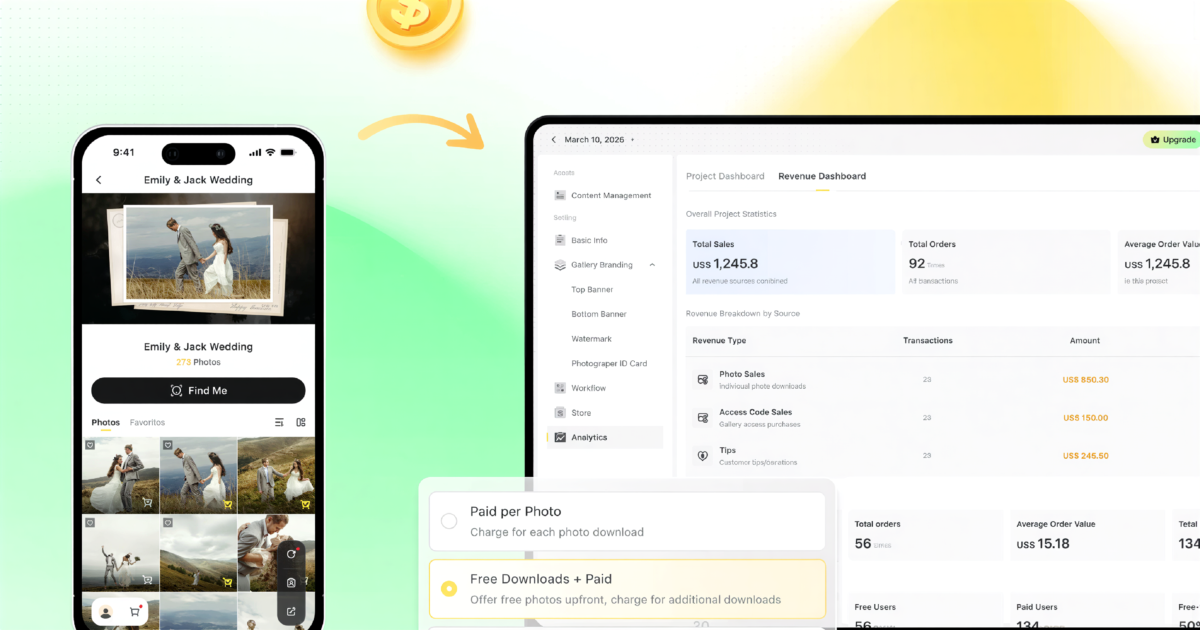
In-gallery checkout that covers more than prints and downloads. Integrated print sales and download purchases are table stakes; Pixieset’s Store already does this inside Client Gallery, commission-free on paid plans. Where most platforms stop short is full-gallery unlock as a distinct pricing mode, Tips for service-based gratuity, and a Revenue dashboard tying downloads, paid unlocks, and Tips back to the same project as gallery visits.
How Evoto Instant Compares to Pixieset
Inside Evoto Instant, the gallery itself is the checkout. Pay-per-photo, free downloads with paid overage, full-gallery unlock, and Tips run through a secure in-gallery checkout, with sales, orders, ARPU, and free-to-paid conversion reporting in the same workspace as gallery visits. The financial side of delivery is a configurable property of the gallery, not an external link bolted on.


and Share Photos in Real Time
That commercial layer sits on top of a single-project model covering capture, optional AI Culling and AI Editing, and three independently configured galleries: Full Gallery (one link for everyone), FaceKey Gallery (each guest scans their face at the door and sees only their own photos), and Personal Gallery (hand-curated VIP slices shared as their own link). All three share branding, pricing, and project state. The photographer configures them once.
Pixieset ships Client Gallery, Photo Editor, Studio Manager, Website, and Store as separate products, sold individually or as a Suite bundle. Evoto Instant takes the opposite stance: capture, culling, editing, three gallery surfaces, and monetization live as one connected project. For studios counting how many subscriptions a move replaces, that consolidation is the central argument.
A Day-of-Event Reality Check: One Wedding, Two Stacks
Run this against your last big shoot. Saturday wedding, 2,400 frames between getting ready and the reception, the family wants something to share that night.
Pixieset-only stack. Shoot, ingest to laptop after the ceremony, cull manually that night or Sunday morning, edit Sunday and Monday, batch upload Monday night, send the gallery link Tuesday. The family gets the gallery on Wednesday at the earliest. The weekend is gone.
Evoto Instant stack. Tethered or FTP ingest sends every frame into the live project. AI Culling drops obvious rejects during cocktail hour. A FaceKey Gallery is already live when the auntie at the cocktail table scans the QR on the place card and sees only the photos she is in, while a Full Gallery for the buying couple is one tap away. After the reception, batch AI Editing runs overnight; the final edited gallery is ready Sunday morning. The weekend exists.
The galleries themselves are both fine. The difference is whether the workflow leading into the gallery is compressing your week or stealing it.
Pixieset vs Evoto Instant: Pricing and Total Cost of Ownership
Plan-by-plan price comparisons date quickly. The more durable lens for any Pixieset alternative decision is total cost of ownership for a working studio.
A typical Pixieset stack is Client Gallery plus Pixieset Photo Editor (sold separately) or an external tool like ImagenAI or Aftershoot, often with Lightroom on top. The Pixieset Suite bundle (Client Gallery + Website + Studio Manager, up to 37% off) lowers the inside-Pixieset spend, but only if you actually need Website and Studio Manager too.
Evoto Instant bundles AI Culling, batch AI Editing, and three gallery surfaces into the same plan you pay for hosting. The Revenue dashboard ties downloads, paid unlocks, and Tips back to the same project, so TCO comparisons should include what you make back, not only what you pay out. Studios that monetize delivery directly see the gap close fastest.
and Share Photos in Real Time
Migrating from Pixieset to Evoto Instant
A switch does not have to be a hard cutover. Leave existing Pixieset galleries live for clients who already have the link, and open a fresh Evoto Instant project for your next shoot. Drag your edited JPEGs in, set Top and Bottom Banners once, decide whether AI Culling runs, and choose Full Gallery alone or all three surfaces. The first delivery becomes the side-by-side reference.
For existing collections, batch-export from Pixieset, drag into an Instant project named after the event, and re-share. Old Pixieset galleries stay live until you cancel, so no active client link breaks.
Who Should Switch, and Who Should Stay
Switching makes sense for wedding photographers running 15+ events a year, school and sports photographers who need face-locked per-guest delivery, portrait studios that bill per-edit, and event photographers who monetize the gallery directly. Staying on Pixieset still makes sense for print-sales-first studios whose print-lab integrations drive revenue, part-time photographers who ship 1–3 galleries a month, or any client base built around the Pixieset URL pattern.
and Share Photos in Real Time
If you are searching for a Pixieset alternative because workflow has outgrown what a gallery host can do, the answer usually lands on the first list.
Set Up Your First Gallery on Evoto Instant
For the side-by-side test, the setup is short.
- Create the project. Drag your last delivered JPEGs into a fresh Evoto Instant project; web drag-and-drop dedups in the background.
- Pick your galleries. Full Gallery for the buyer, FaceKey Gallery for guests, Personal Gallery for VIPs.
- Configure branding once. Top Banner, Bottom Banner, watermark, and Activity Settings (Allow Favorites, Notes, Download).
- Configure pricing. Pay-per-photo, free downloads with paid overage, or full-gallery unlock; toggle Tips if relevant.
- Preview, then share. Preview Gallery shows the guest view; send the link, the QR poster, an SMS, or an email.
Final note
The Pixieset alternative question is really a workflow question dressed as a gallery question. The fastest test of whether Evoto Instant is the right one for your studio is to run one event through it side by side. Drag your last delivered shoot into a fresh project this week, post a Full Gallery and a FaceKey link next to your usual Pixieset gallery, and compare end to end. Pick the workflow, not the gallery; most studios decide where their next ten deliveries live within two weeks.
How to Sell Photos Online (2026 Photographer’s Guide)

What’s New in Evoto Instant V1.7.0: Three Galleries + Cloud AI Editing
Pixieset Alternative for 2026: A Smarter Client Gallery for Photographers

Online Photo Gallery: How to Deliver Client Photos Fast and Professionally

Wedding Photo App for Guests: A 2026 Photographer’s Guide