

Your calendar is already brutal. The last thing you need is a checkout screen that eats twenty minutes—or a promo window that closes while you are still debating 800 vs 3600.
Built for Your Peak Season is Evoto‘s global Peak Season Promotion: up to 25% off annual plans, the Creator Growth Bundle on your first qualifying order, and a straight path through the cart. This AI Photo Editor buying guide covers evoto peak season promotion how to buy—where to type MY2026, how referral codes stack, which product type matches your studio, and where the five background sets land after payment.
Dates, tier pricing, and bundle overview: Peak Season Promotion hub. Per-tier bundle inventory: Creator Growth Bundle explained.
The promotion runs July 9–23, 2026, based on your local market time, and ends at 11:59 PM on July 23. Complete checkout with MY2026 before then—no hemisphere guessing, same window worldwide.
You know the window—here is the click path that actually unlocks the deal.
How to Apply MY2026 at Checkout
Follow these steps on desktop or mobile browser—download Evoto on iPad or Desktop; in-app purchase follows the same code field.
| Step | Action |
|---|---|
| 1 | Sign in to your Evoto account (create one if needed). |
| 2 | Open Evoto pricing and select Annual Subscription, Add-on Package, or Cloud Storage. |
| 3 | Choose the tier that matches your credit forecast (persona section below). |
| 4 | At checkout, enter MY2026 in the discount code field and apply. |
| 5 | If you have a referral code, enter it in the separate referral field—after MY2026. Confirm the order total, then complete payment. |
MY2026 is the official Built for Your Peak Season code. Skip it, and you may still check out—but you will miss the Creator Growth Bundle tied to discount-code purchases, including the five background sets every eligible annual tier receives.
After payment, portrait credits and account perks (AI Lab trials, Video vCredits, temporary cloud access) show under My Account → My Billing and Usage. The five background sets need a separate download from Assets Hub—walkthrough below.
Code applied? Good. Now the rules that keep checkout from backfiring.
Promotion Rules: MY2026, Referral, and Coupon Stacking
One wrong field at checkout costs more than a support ticket—it costs a week of edits at the wrong credit ceiling.
| Rule | What happens |
|---|---|
| MY2026 + referral | Yes—they stack. Apply MY2026 first, then your referral code. |
| MY2026 + coupon code | No—coupon codes do not stack. Only one eligible coupon per order unless the offer page states otherwise. |
| First purchase/upgrade | Promotional discount applies to qualifying first-time purchases of the current plan and eligible upgrades during the promotion. |
| Auto-renew | Does not receive the promotional discount price on the renewal charge. Bundle components may still apply per tier when purchased with a qualifying code—see T&C. |
| Creator Growth Bundle | Granted on first qualifying purchase with a discount code during the promo—not on every repeat purchase under the same promotion. |
If a colleague shares a random coupon from last year’s campaign, assume it will not stack with MY2026. Referral is the only stack partner worth hunting down—generate yours at Evoto Referral before Jul 23 for 3× referral Smart Points on each successful invite.
Rules sorted—next, pick the product type that matches your bottleneck, not your anxiety.
Which Product Should You Buy?
Three product types solve three different problems. Most studios need only one on day one.
| Product type | Best for | Peak-season role | Sale discount (MY2026) |
|---|---|---|---|
| Annual subscription | Studios with predictable monthly volume | Base credits, device seats, rollover up to 5× plan cap | 15–25% off on payment-page tiers (Starter 800 through Standard Plus 24000) |
| Add-on package | Active subscribers hitting a one-time spike | Top-up credits at your subscription unit price | 10% off all add-on sizes on the payment page |
| Cloud storage pack | Multi-device teams syncing projects | Pay-as-you-go storage; no auto-renewal | No % discount on storage tiers |
Add-on or upgrade? A photographer’s cheat sheet
Use this when you are staring at the cart and cannot tell whether you need a bigger annual plan or a one-time top-up:
| Factor | Choose Add-on Pack | Choose Higher Annual Plan |
|---|---|---|
| How often you run out | Once or twice a season (one wedding weekend, one school delivery) | Most months—you consistently exceed your cap |
| Cost logic | Cheaper for a short burst; 10% off with MY2026; same per-credit rate as your plan | Lower long-term per-credit cost; more devices, AI Lab, vCredits in the bundle |
| Flexibility | Buy only when client volume spikes | Locks you into a higher tier for 12 months—but credits roll over up to 5× plan cap on renewal |
| Real scenario | You are on Basic Plan-1600 and peak week needs 500 extra exports—grab a 500-credit add-on (US$90 with 10% off on the page, was US$100) | You cleared 1,600 credits two months running—step up to Basic Plus Plan-3600 (US$215 first year) before the next booking wave |
Choose Subscription when
You can estimate annual keeper exports. Starter Plan-800 (US$67 first year) fits solo peak minis; Basic Plan-1600 (US$112) fits growing portrait work; Basic Plus Plan-3600 (US$215, Most Popular) fits two-person wedding + mini studios.
Choose Add-on when
You already hold an active annual plan and one project will blow this month’s allowance—exact top-up prices appear on the payment page Add-on Packages tab after you sign in.
Choose Cloud Storage When
Editors on different machines must sync projects—not when you merely need more export credits. 500GB Cloud Storage Pack is US$239/year on the payment page (pay-as-you-go, no renewal).
Product type picked? Match it to the studio shape you actually run.
Which Plan Fits Your Studio?
This section interprets which Evoto product type fits which studio shape—not how you should price your clients. If you are mapping a peak season photography workflow, buy before your heaviest batch-export week so credits and bundle tools are loaded when folders land.
School and volume portrait studios
Picture day is not a creative retreat—it is a conveyor belt. One league Saturday can mean 800 raws and 600 keeper exports before Monday’s upload deadline.
| Your week looks like… | Payment-page pick |
|---|---|
| One or two picture days per month, under 3,000 exports | Basic Plus Plan-3600 (US$215 first year) or Standard Plan-9000 (US$463) |
| Daily lab-style throughput all peak month | Standard Plus Plan-24000 (US$1,138); stage a 3,600-credit add-on (10% off) before the busiest week |
| Second editor on a separate laptop | Annual sub + 1TB Cloud Storage Pack (US$379/year on payment page) for sync—not a substitute for credits |
Wedding and event studios
You do not run out of creativity mid-reception—you run out of credits at 11 p.m. when the bride asks for “just ten more” family combinations.
| Your peak month looks like… | Payment-page pick |
|---|---|
| 2–3 weddings/month, ~900 deliverables each | Basic Plus Plan-3600—300 Video vCredits for teasers, 50 AI Lab passes for crowd shots |
| Four stacked weekends in one month | Standard Plan-9000 (US$463); add 500-credit top-up (US$90 with 10% off) before the double-header |
| Teaser reels for every gallery | Higher tiers carry more Video vCredits—see Creator Growth Bundle tier table |
Mini session and boutique portrait studios
Peak minis are short shoots but heavy exports—three looks per family adds up fast when you are selling a Good / Better / Best client menu off one grey-room session.
| Your booking calendar… | Payment-page pick |
|---|---|
| 15–20 minis/month, ~35 exports each (~700 total) | Starter Plan-800 (US$67 first year)—all five background sets sell the upsell |
| Three looks + reel per mini, growing social volume | Basic Plan-1600 (US$112)—40 AI Lab + 180 Video vCredits |
| Selling a five-look Best package | Basic Plan-1600 or higher; download all five background sets from Assets Hub after first MY2026 purchase |
First purchase tip: bundle perks fire once with MY2026—size your annual tier correctly the first time. Mid-promo credit hunger? Buy an Add-on, not a second subscription.
Tier chosen? Two checkout extras are worth five minutes—Loyalty and Referral use the same wallet but have different triggers.
MY2026 Checkout Extras: Loyalty, Referral, and Smart Points
Photographers often mix up Loyalty and Referral at checkout. Same wallet, different trigger:
| Evoto Loyalty | Evoto Referral | |
|---|---|---|
| What it rewards | Your own qualifying purchase | A friend’s first eligible purchase using your link or code |
| What you do | Pay with MY2026—points accrue automatically | Enter a friend’s referral code at checkout or share your link before Jul 23 |
| Peak-season rate | 2× Smart Points | 3× referral points for both of you |
| Stacks with MY2026? | Automatic on purchase | Yes—referral field is separate from the discount code |
| Works on upgrades? | Yes | No—referral targets first purchases |
Quick examples at checkout:
- Solo buyer, no referral code: enter MY2026 only—you still earn 2× Loyalty points on the order.
- First-time buyer, colleague shared a code: MY2026 first, then their referral code—both can earn 3× referral when your purchase completes.
- Workshop instructor with a peer list: grab your link from Evoto Referral and share before Jul 23—each friend’s first purchase earns 3× for both accounts, on top of your own 2× purchase points.
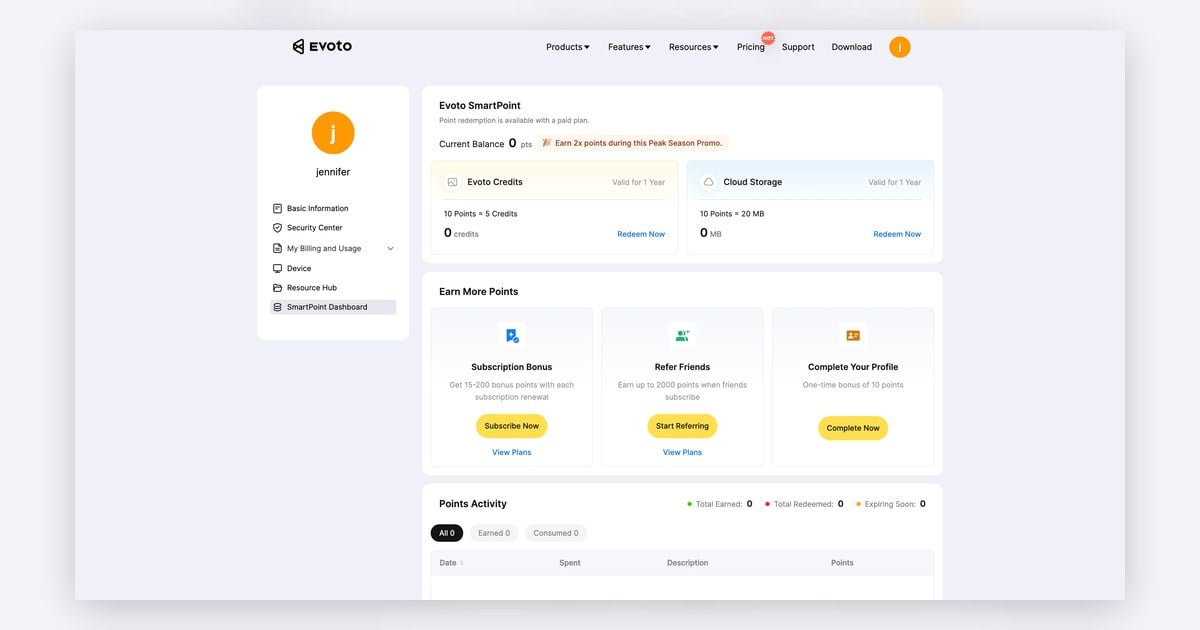
Redeem points for credits (~0.5 per point) or cloud storage (~2 MB per point) from My Account → SmartPoints Dashboard. Points stay valid for two years; redemption requires an active paid plan.
Points are a nice cherry on top—the Creator Growth Bundle is the main reason to size your first checkout carefully. Here is what a Smart Points view looks like after a Peak Season order:
Creator Growth Bundle: First Purchase Only
The Creator Growth Bundle is the limited-time perk set—five background sets, AI Lab trial uses, Video vCredits on higher tiers, and temporary cloud access—detailed tier by tier in Creator Growth Bundle explained.
Critical rule for evoto peak season promotion how to buy: bundle delivery is tied to using a qualifying discount code (MY2026) and fires on your first eligible purchase during the promotion. Buying again with MY2026 on the same account during Jul 9–23 does not grant a second full bundle.
| Purchase type | Bundle expectation |
|---|---|
| First subscription with MY2026 | Full tier-matched bundle |
| Eligible upgrade with MY2026 | Bundle per upgrade tier rules |
| Second add-on same week | Discount may apply; bundle does not repeat |
| Auto-renew charge | No sale discount; bundle rules per T&C |
If you are torn between 1,600 and 3,600, decide before first checkout—step-up later still upgrades service, but you will not get two bundles.
Paid? The backgrounds do not auto-install—here is the two-minute download path.
After Purchase: Download Your Five Background Sets
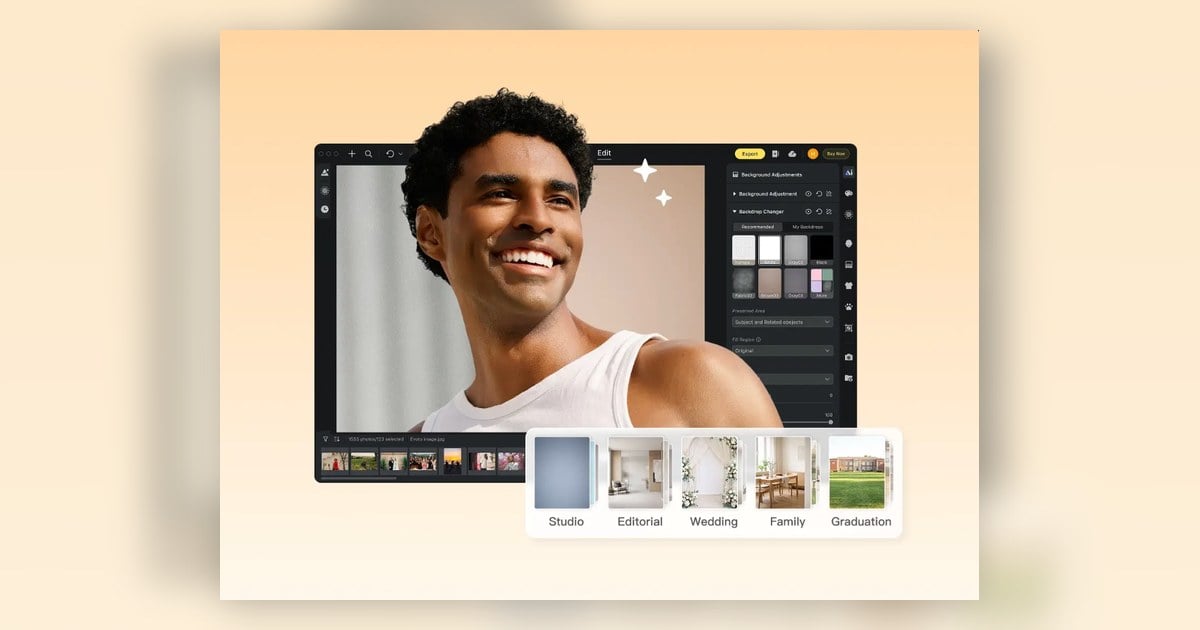
The five background sets do not land inside Desktop by magic. After a successful MY2026 purchase, download them once from Assets Hub on evoto.ai, then apply with Backdrop Replacement—the same tool named Background Replacement on the feature page.
Every eligible annual tier receives the same five sets:
| Background set | What it looks like | Strongest fit |
|---|---|---|
| Soft Studio Neutrals | Soft grey-to-white seamless with gentle center glow | Headshots · school · volume |
| Editorial Quiet Lux | Curved plaster arches · limestone lounge · brass accents | Fashion · branding · clean bridal |
| Sheer Daylight Loft | Sheer curtains · high-key window light · pale wood | Couples · maternity · bridal |
| Scandi Lifestyle Rooms | Oak dining · nursery corners · cream walls | Family · lifestyle minis |
| Campus & Grad Milestone | Library aisles · campus field/stadium golden hour | Seniors · grads · sports portraits |
Download once, then run one hero preview before you batch Friday folders:
| Step | Action |
|---|---|
| 1 | Complete purchase with MY2026 on an eligible tier. |
| 2 | Update Evoto Desktop to 7.2+ (release notes). |
| 3 | Sign in on evoto.ai → open Assets Hub (also labeled Resource Hub in some menus). |
| 4 | Download the Peak Season background pack (all five sets). |
| 5 | Import into Desktop; run one hero frame per set before batching a client folder. |
| 6 | Batch Background Replacement on Friday; deliver Saturday. |
AI Lab trials, Video vCredits, and cloud months do not use Assets Hub—they appear in My Billing and Usage or in-app counters automatically.
Full per-set production notes and how to turn them into Good / Better / Best client packages live in Creator Growth Bundle explained. What the download + finished looks look like together:
Before you click pay one last time, skim the mistakes that burn studios every promo cycle.
Common Buying Mistakes to Avoid
| Mistake | Why it hurts | Fix |
|---|---|---|
| Skipping MY2026 | Pay full price; miss the bundle unlock | Always apply the code before paying |
| Stacking a legacy coupon | Checkout error or ignored code | Use referral only |
| Confusing Loyalty with Referral | Miss 3× invite bonus or enter the wrong code type | Loyalty = your purchase (2× auto); Referral = invite or friend’s code (3× on first purchase) |
| Buying cloud instead of credits | Storage does not export portraits | Match product to actual bottleneck |
| Expecting auto-renew sale price | Renewal bills at standard rate | Time initial purchase; read T&C |
| Second checkout for “another bundle” | Bundle is once per promo | Size the subscription correctly first |
| Downloading backgrounds before the v7.2 update | Assets or AI Lab counters are missing | Update Desktop, then Assets Hub |
| Promising five looks before download | Client menu outruns your library | Buy with MY2026, download once, test hero frames |
One more: purchasing on Jul 24. The pricing page returns to standard offers—MY2026 window closed.
Evoto peak season promotion how to buy boils down to four moves: forecast credits by studio type, open Peak Season pricing, apply MY2026 plus referral if you have one, and download the five background sets from Assets Hub before your first peak mini batch.
Built for Your Peak Season ends Jul 23. If checkout is still open on your screen, finish the purchase—you can read bundle details later; you cannot time-travel a closed promo window.
Shop annual plans — up to 25% off with MY2026 · Creator Growth Bundle included · Jul 9–23 only
FAQ
FAQ
1. Can I stack MY2026 with a referral code?
Yes. Enter MY2026 in the discount field first, then apply your referral code in its separate field. Referral and MY2026 are designed to stack during Built for Your Peak Season. Generic coupon codes do not stack with MY2026—only one coupon per order.
2. What is the difference between Evoto Loyalty and Referral during the Peak Season Promotion?
Loyalty rewards your own qualifying purchases with 2× Smart Points Jul 9–23—automatic after checkout, no extra code.
Referral rewards successful invites: when a friend completes their first eligible purchase with your link or code, both accounts earn 3× referral Smart Points.
Both credit the same SmartPoints Dashboard balance. Official pages: Loyalty · Referral.
3. Should I enter a referral code or just rely on Loyalty 2× points?
Enter a referral code if a trusted colleague gave you one—it stacks with MY2026 and can unlock 3× referral for both of you on your first purchase. If you have no code, proceed with MY2026 alone; Loyalty 2× still applies on your order. If you run a peer network, grab your referral link and share it before Jul 23—that is a separate earn path from your own checkout.
4. Does auto-renew get the Peak Season Promotion discount?
No. Automatic renewal charges process at the standard renewal price, not the promotional first-year discount. You may still receive applicable Creator Growth Bundle components per tier rules when auto-renewal qualifies under T&C—but do not expect the same % off on the renewal line item.
5. What is the difference between first purchase and upgrade during the promotion?
The first purchase of an eligible annual tier receives promotional pricing plus the first-purchase bundle when you use MY2026. Eligible upgrades to a higher tier during Jul 9–23 can also receive promotional pricing and tier-matched bundle items. Same-tier repeat purchases or add-on-only buys do not behave like a first subscription—see the promotion hub for eligibility detail.
6. Can I get the Creator Growth Bundle on a second purchase during the same promo?
No. The bundle is granted once on your first qualifying purchase with a discount code during the promotion. A second MY2026 checkout for add-on credits may still receive the add-on discount, but it will not duplicate the full bundle.
7. Which plan tier fits a volume studio—school, wedding, or mini sessions?
School/league: Standard Plan-9000 (US$463) or Standard Plus Plan-24000 (US$1,138) for picture-day weeks; add 10% off top-ups before peak.
Wedding: Basic Plus Plan-3600 (US$215, Most Popular) with a 500-credit add-on before stacked weekends.
Minis: Starter Plan-800 (US$67) or Basic Plan-1600 (US$112) for 15–20 peak mini sessions. Credit guidance only—not how to price your clients.
8. How do I download the five background sets after purchase?
Only after a successful paid purchase with MY2026 on a qualifying plan. Then: sign in on evoto.ai → Assets Hub → download the Peak Season background pack → update Desktop to 7.2+ → apply with Background Replacement. Files are not emailed; they must be claimed on the website.
9. Do coupon codes stack with MY2026?
No. Only referral codes stack with MY2026. If you hold a third-party coupon, assume it replaces—not combines with—the Peak Season code unless the offer page explicitly says otherwise.
10. Can I use a referral code on a plan upgrade?
No. Referral applies to first eligible purchases, not upgrades. Use MY2026 for promotional upgrade pricing; earn 2× Loyalty on that order. Referral invite rewards come from new buyers you refer—not from your own tier change.
11. Do Loyalty and Referral points go to the same balance?
Yes. Both programs credit Evoto Smart Points in My Account → SmartPoints Dashboard. Redeem for credits (~0.5 per point) or cloud storage (~2 MB per point) with an active paid plan. Points stay valid for two years from the earn date.


Powerful AI Photo Editor



