

TL;DR
- Definition: A dreamy photo overlay for delivery = highlight bloom inside the file—not a PNG sticker.
- Cast: White Mist / Black Mist / Halation by lighting chapter, then Sync.
- QC: Eyes, lace, crops; strength nearer 1/8 than a crushed 1/2.
If your search for dreamy photo overlay landed on a PNG pack, close the tab. Stock overlays leave seams, ignore the photo’s real highlights, and refuse to Sync across a wedding gallery. Couples who ask for a dreamy look almost never mean “paste frosting on the file.” They mean clinical digital edges softened where light already lives—skin still readable, lace still lace.
How do I get a dreamy photo overlay look for wedding gallery delivery? Build highlight bloom inside the photograph, cast it by lighting chapter, then match it across selects. Global Clarity fog and marketplace stickers are the usual shortcuts; both miss the delivery job.
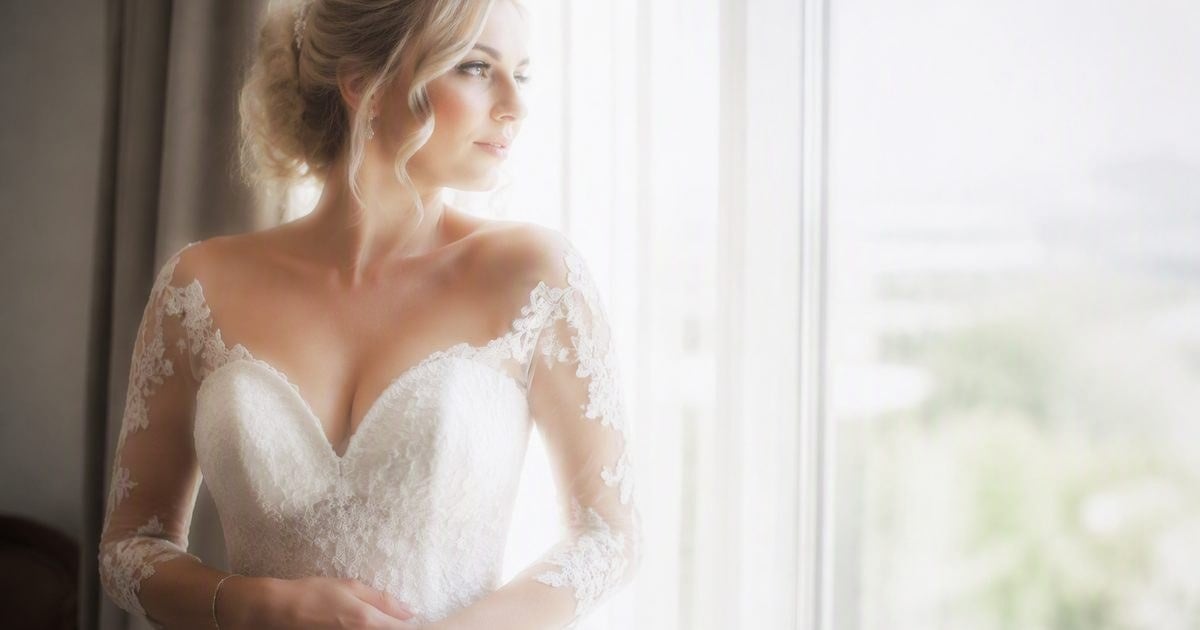
This article is the delivery chapter—not a Photoshop click-along and not a Lightroom Dehaze night desk. For those craft paths, use the Photoshop and Lightroom companions in this Glow Effect series once they are live on the blog. Here the desk is Evoto Glow Effect, because galleries ship on consistency.
What a Dreamy Photo Overlay Is Not (PNG, Presets, One Filter All Day)
How do I make digital wedding photos less clinical without looking hazy? Soften the light’s edges, not the person. A “dreamy” preset that milks the whole frame, or a PNG dreamy overlay stamped like frosting, fails for the same reason: neither reads the photo’s highlights, and neither shows you where glow lives. Physical mist glass is lovely—and leaving a heavy 1/4 on from getting-ready through sparklers is how nights go radioactive. Post styles change per chapter; that is the point of delivery control.
Build a Dreamy Photo Overlay Finish for Gallery Delivery
That is why wedding delivery glow belongs in Evoto on Desktop, with the product path on AI Glow Effect. Prefer exploring the wider suite once? Use the AI Photo Editor, then stay on Desktop when Sync matters.


Powerful AI Photo Editor
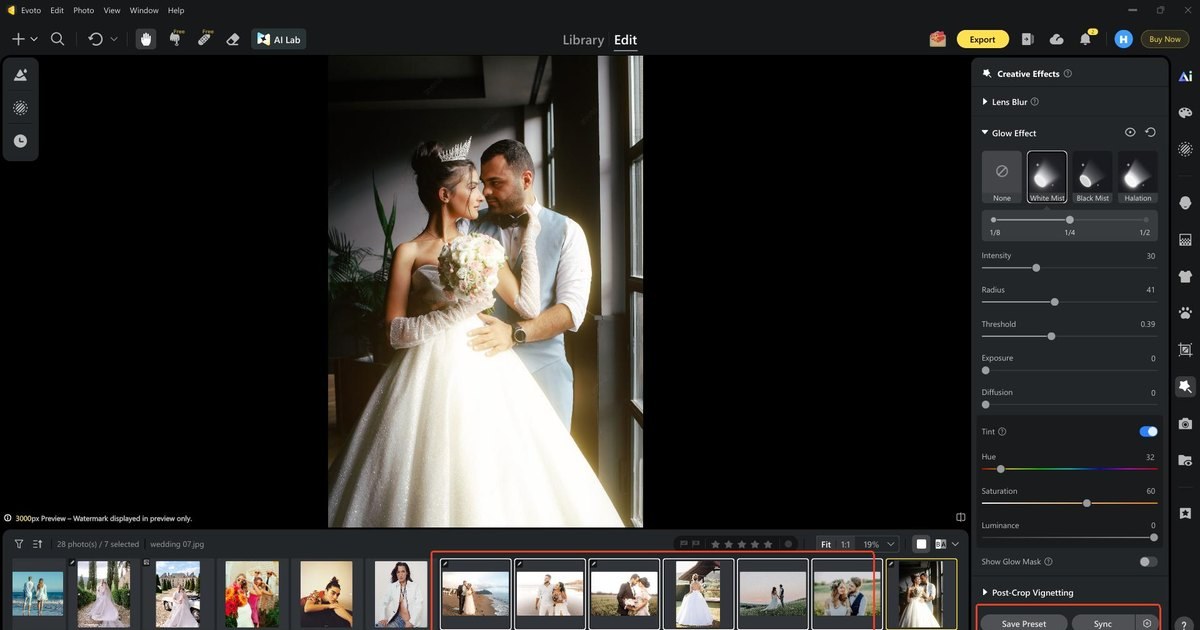
This section is the delivery click-along: cast by lighting chapter, protect lace, then Sync a look that survives album and square crops. UI labels match Creative Effects; keep numbers gentle on skin-forward frames.
Step 1. Open the Hero Chapter in Creative Effects
Import the gallery selects you are finishing for send—not a random dump of the whole card. In “Edit”, open “Creative Effects” and expand “Glow Effect”. Confirm “None”, “White Mist”, “Black Mist”, and “Halation” before you commit. You are staging a dreamy photo overlay finish inside the file, not shopping for a PNG sticker.
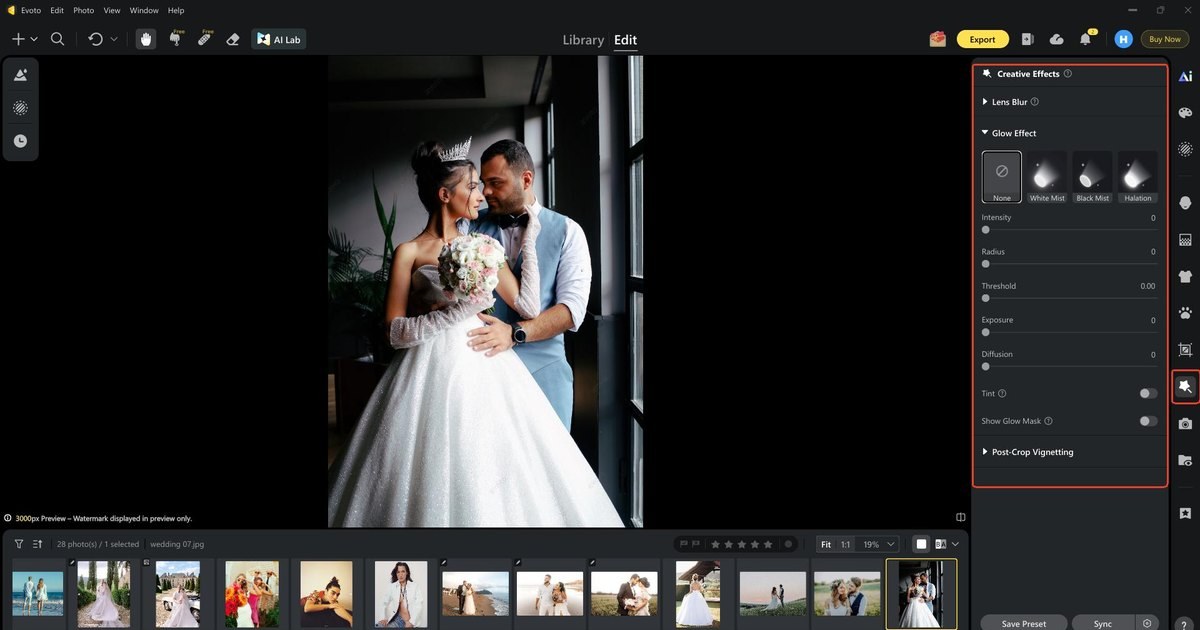
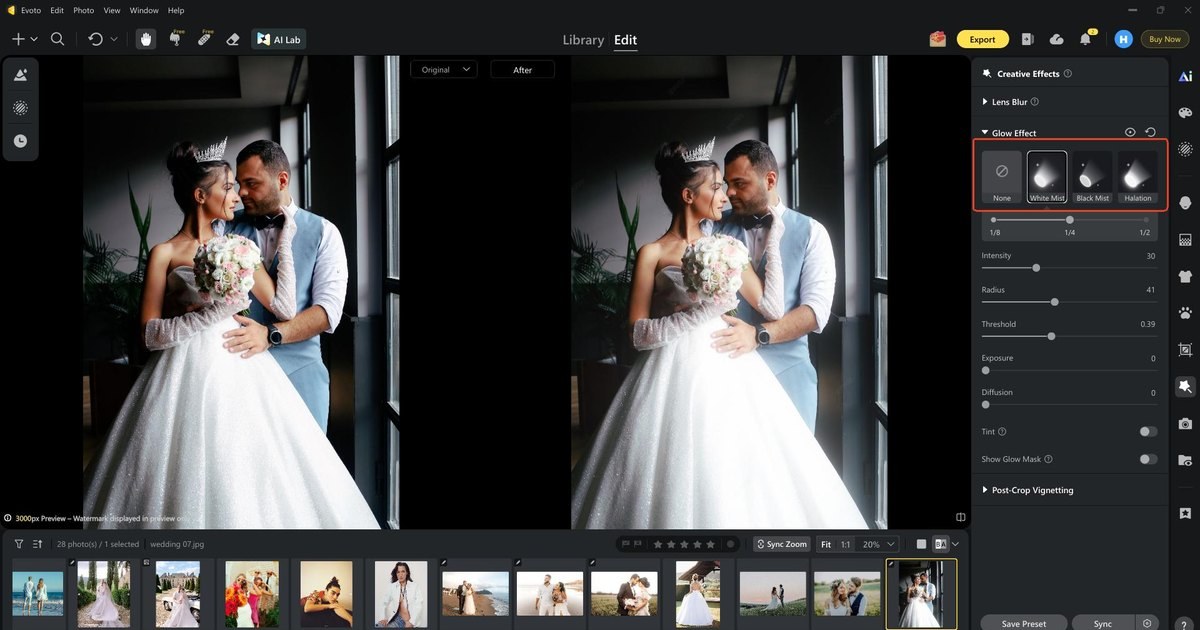
Step 2. Cast White Mist on Getting-Ready Window Light
For soft window chapters and dress speculars, choose “White Mist”—the cast couples usually mean when they ask for dreamy without saying “frost my face.” Start at “1/8” or “1/4”. Read the Before/After split like a delivery QC: lace highlights may bloom; eyes must stay awake. That is a real dreamy photo overlay language—glow written into the pixels, not stamped on top.
Step 3. Adjust the Sliders for a Better Look
Shape “Intensity”, “Radius”, and “Threshold” so bloom stays on highlights—the practical test behind bloom highlights without softening skin. Under tungsten receptions, optional “Tint” keeps spill matching the room instead of fighting the grade. Always run “Show Glow Mask” on a hero: if faces soften with the lamps, pull strength back before Sync. Only then touch “Exposure” and “Diffusion”.
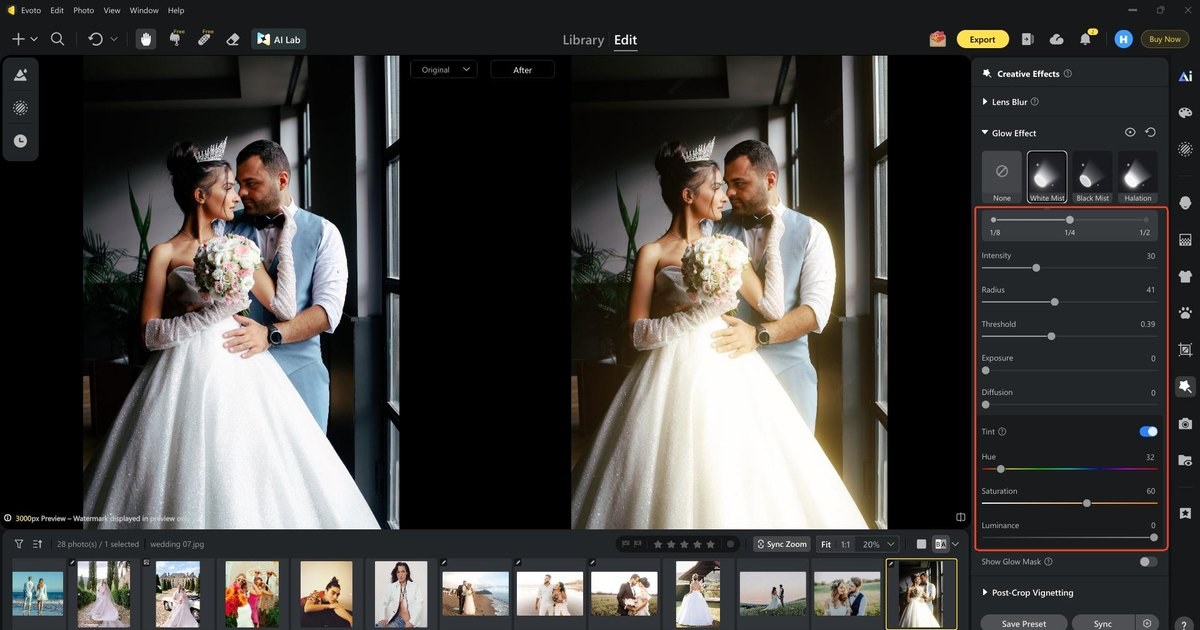
Toggle “Show Glow Mask” off when the check is done. You are shipping a chapter look, not a beauty fog.
Step 4. Save Preset, Sync, or Export
When the hero chapter looks right, “Save Preset” locks the score so you are not reinventing sliders at 1 a.m. You can also “Sync” across selects that share that light—window room to window room—not noon and midnight as one filter. Spot-check an album spread and an Instagram square: crops change which bloom stays in frame. Then, export the photo.
Ready to sync the edits? Download Evoto if you still need the install page.
Powerful AI Photo Editor
Casting by Light — White Mist, Black Mist, Halation
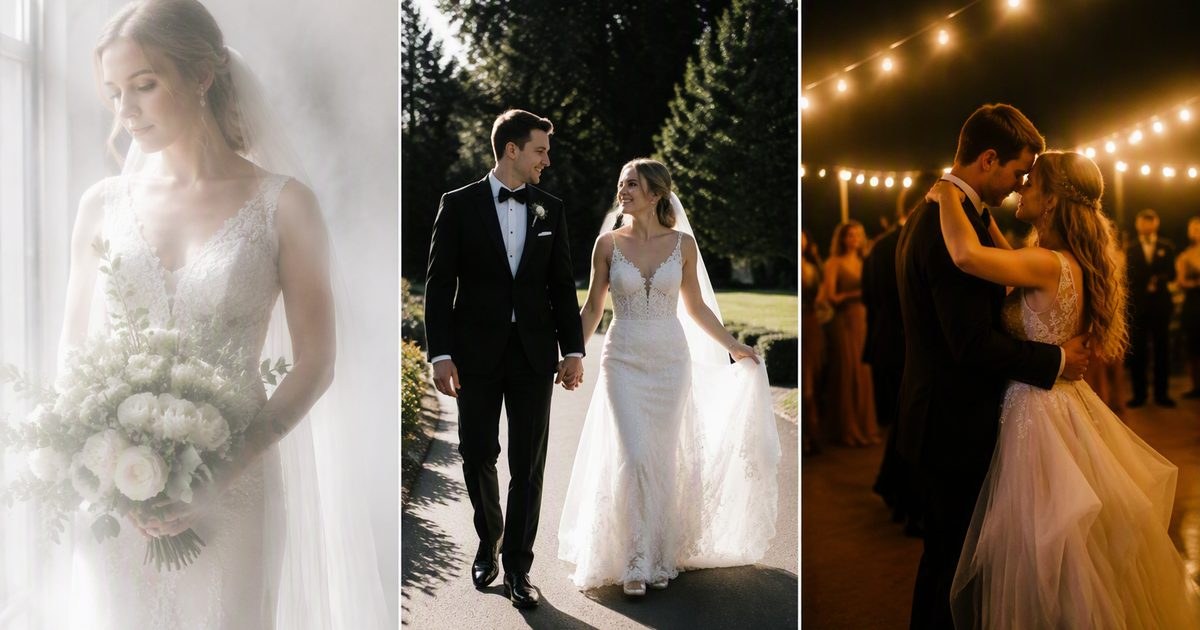
White Mist vs Black Mist vs Halation—which for window light, harsh sun, and reception lights? Cast by the chapter, not by a mood-board word. One style for the whole wedding day is how clinical sharpness and radioactive nights happen in the same gallery.
| When the day feels… | Cast | Why it fits |
|---|---|---|
| Soft window / getting ready | “White Mist” | Clinical sharpness without frosting faces |
| Harsh sun, specular dress | “Black Mist” | Bloom with better shadow hold |
| Dance floor / string lights | “Halation” | Let lamps breathe |
| Flash indoors | Lighter Black Mist or mild Halation | Editable strength beats stacking glass all night |
Give the table a breath, then look at how those casts read as finished frames—not as another UI dump.
The Gallery Chorus — Syncing a Dreamy Photo Overlay Across Crops
How do I keep dreamy glow consistent across a wedding gallery after Sync? Treat the hero dial as a score, not a one-off mood. Once “White Mist” (or “Black Mist” / “Halation”) feels right on a chapter hero, “Save Preset” locks the language so you are not recreating slider poetry at 1 a.m. “Sync” then carries that language across the selects that share the same light—window room to window room, or reception bay to reception bay—not blindly across noon and midnight as if they were one filter.
Hand-matching every file, or hoping an old Lightroom preset still “feels dreamy,” fails because glow feel drifts while color grades stay put. Sync is the on-purpose answer for the glow layer. After Sync, open a few album crops and a few square social crops. A bloom that sang in a landscape spread can vanish—or crowd a face—when Instagram takes the center. That is why crop QA belongs in the same breath as Sync, and why optional “Post-Crop Vignetting” is a quiet edge tool after the crop, not a substitute for checking the glow.
Album and social crops deserve their own glance after the Sync pass—not a second UI dump in the same scroll.
Thirty-Second QC — Eyes, Lace, and the “Too Much Movie” Dial
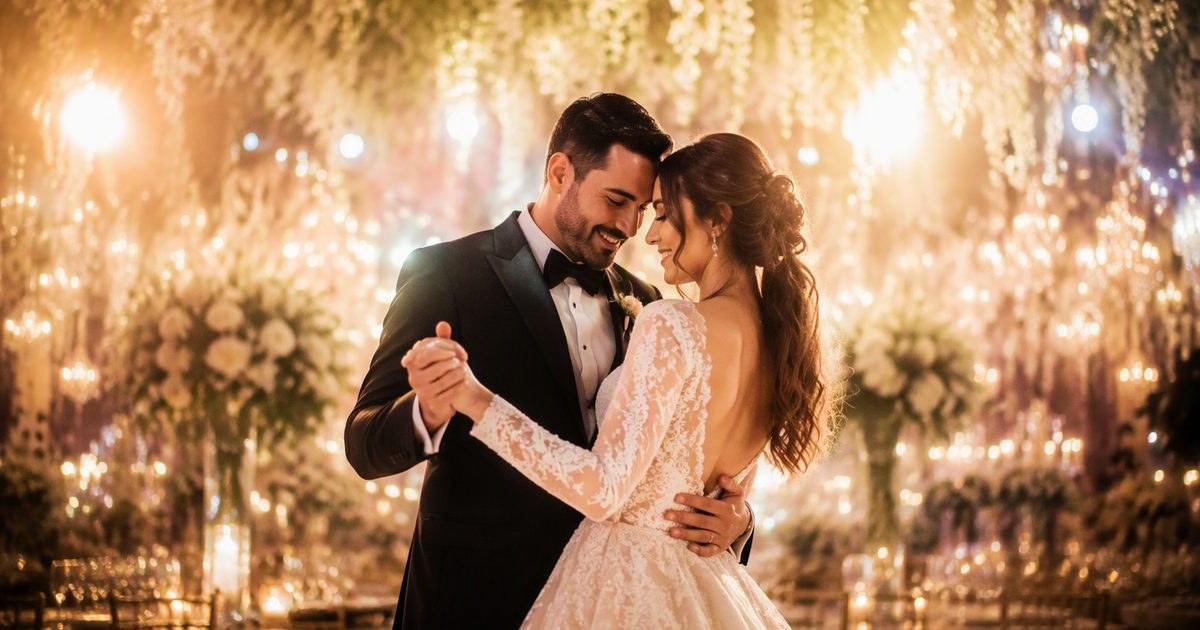
Before send, slow down for thirty seconds that protect the gallery more than another slider pass. Ask whether eyes and lashes still read crisp, and whether lace and rings remain readable—the practical test behind bloom highlights without softening skin. Lamps may bloom; the midtones should not look rinsed. If the frame feels like a crushed 1/2 mist when the story only needed a subtle 1/8 sensibility, step strength back and re-check “Show Glow Mask” on a hero.
Dreamy wedding portraits without looking hazy is a client phrase with a production meaning: atmosphere on the light, honesty on the person. If your brand is not “dreamy” at all, keep Glow Effect off by default and flip it on for the few chapters that need lamp bloom. Trends shift; a switch stays useful longer than a forced identity.
After the look is locked, keep glow work inside your turnaround discipline—the blur effect guide is a useful reminder that global softness is a different job than highlight bloom, and neither should blow the delivery clock.
Powerful AI Photo Editor
Wrap
A dreamy photo overlay for wedding delivery—your shippable dreamy photo overlay finish—is controlled bloom—cast by scene, Synced for the gallery, checked in the crop—not a PNG from a search result. Evoto Glow Effect is the desk where those chapters stay editable.
FAQ
1. Is a dreamy photo overlay the same as downloading a dreamy overlay PNG?
No. Delivery glow is built inside the photograph so it can Sync with the gallery. A PNG sticker is a marketplace layer with seams and no chapter logic. If a couple sent a PNG reference, translate the feeling, then rebuild it as Mist/Halation bloom—not as a stamped texture.
2. Noon ceremony, White Mist or Black Mist?
Start “Black Mist” when the sun is harsh, and you still want shadow hold. Save “White Mist” for softer window chapters. Using White Mist at noon “because dreamy” is how dresses bleach and faces rinse.
3. How hard should Halation go on flash reception?
Mild first—think “1/8” sensibility. Flash plus strong spill turns theatrical fast. Toggle “Show Glow Mask”, step back from the monitor, and ask whether the lamps are breathing or shouting.
4. Can I Sync on the Web trial?
You can trial the look controls on Web. Sync across a gallery is a Desktop finish habit. When the chorus matters, finish on Desktop.
5. What if my brand isn’t “dreamy”?
Keep Glow Effect off by default. Flip it on for the few chapters that need lamp bloom—reception practicals, candle tables—without rewriting your whole visual identity.
6. Does Evoto train on my wedding photos?
Evoto states it does not train public models on customer photo data. Confirm on the Privacy Policy linked above before you upload a full wedding.
7. How do I decide if Evoto Glow Effect is ethical for wedding delivery?
Use a short decision test: Does the tool stay under your direction (style, strength, Sync scope)? Can you turn it off without losing the grade? Have you reviewed privacy—including Evoto’s stated policy that customer photos are not used to train public models? Will a human still QC eyes, lace, and crops? If yes, you are using assistive AI ethically for client galleries—not outsourcing judgment.



