
Wedding second shooter energy. The hero group frame is clean. One bridesmaid still has dark hair. The client wants only her gold, and the face has to stay hers. Someone drops a FaceApp crop in the chat. The jaw already moved. What you need is a blonde hair try on you can deliver, not another stranger.
Search pages for AI blonde tools mix selfie filters, prompt rewrites, and hair-only gold. This shortlist scores six paths the way a studio would on deadline. It does not replace the product page for a blonde hair filter. It does not clone a ten-app color rack. A preview is not bleach. The FDA hair dyes page covers real dye safety. A file cannot answer that question.
Quick answer
- Six tools. Same five delivery scores. Effect first, menus light.
- Evoto online tool for a fast gold look. Evoto Desktop when hair has to meet skin, clothes, and the rest of the edit.
- One warm gold from “Golden Blonde Hair”. Honey, platinum, dirty blonde, strawberry, ash, or a light fashion color: gold first, then “Hair Color”.
- Photoshop when you already own a hair mask. Phone racks for a selfie check, not a print file.
A serious blonde hair try on shortlist starts with standards, not with a logo wall. Read the rubric, scan the table, then judge each tool by the crop you would actually send.
How We Score a Blonde Hair Try On for Delivery
A blonde hair try on that ships has to recolor hair and leave the sitter. If the cut or the jaw moves, you made a new picture. Photographers on Reddit already flag the “helmet” look when color spills onto skin. We score five things. Each one is a delivery question, not a lab badge.
- Identity. Braces, makeup, and the jawline still look like that person.
- Hair-only edges. Hairline, flyaways, and collar stay clean. Yellow on the forehead fails.
- Shade job. Full-head warm gold, a bleach hair filter cold lift, and a blonde highlights filter are three different jobs. Do not score them as one.
- Group control. Can you change one person and leave everyone else as shot?
- Privacy. Does the product explain uploads in plain language? Prefer tools with a clear privacy policy over mystery cloud edits.
Use those five rows while you read. Glowing ads still have to pass a 100% crop on the face. We scored the way a studio would on deadline: open a group frame, open a headshot, zoom until you can see flyaways. If Identity slips, the tool fails even when marketing looks sharp. No stopwatch claims. No invented user counts. Just those crops and the five questions.
People also type “try on blonde hair” and “virtual blonde hair try on” for the same delivery worry. This page treats those queries as a hair-only preview job, not as a dye recipe and not as a ten-color app parade.
Studio reality check: the client rarely asks which neural net you used. They ask whether the guest still looks like the guest, whether the hairline is clean, and whether the rest of the gallery still matches. Those three questions map straight onto Identity, Hair-only edges, and Group control. Shade job and Privacy finish the card so you do not confuse a highlight mode with a full-head gold, and so you do not upload a wedding gallery into a black box with no policy language.
When you score, keep the original RAW or a high-quality JPEG nearby. Chat compressions invent yellow blocks that were never in the edit. Prove the tool on the file you will export, not on a screenshot someone sent at 40% size.
TOP 6 AI Blonde Hair Tools at a Glance
This is not a ten-app rainbow list. For reds, browns, and a full color rack, see Evoto’s best hair color change apps guide. Stay here when the brief is gold on a portrait you already shot.
| Tool | Best for | Identity | Hair-only | Shade job | Group | Notes |
|---|---|---|---|---|---|---|
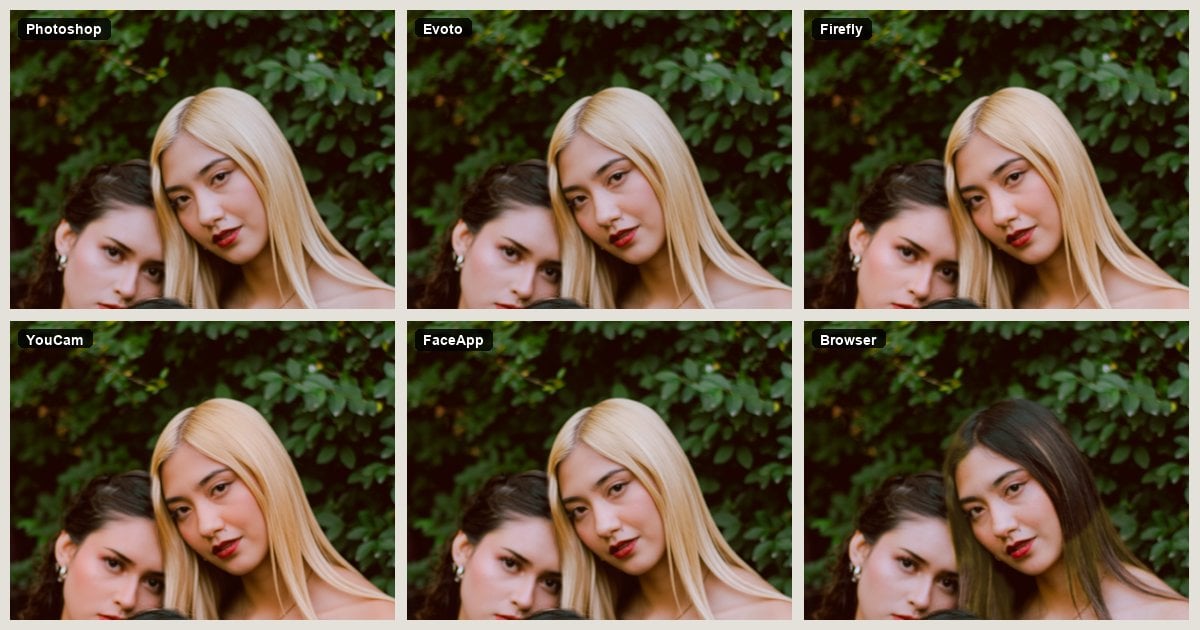
| Evoto Golden Blonde Hair | Delivery warm gold | Strong | Strong | One warm gold; other golds via “Hair Color” | Person by person | Web look, Desktop finish |
| Adobe Photoshop | Masked print control | Strong if the mask holds | Strong if the mask holds | Any shade you paint | Manual | Slow |
| Adobe Firefly | Prompt shade names | Watch the jaw | Varies | Honey/platinum by prompt | Weak | Generative rewrite |
| YouCam Makeup | Phone shade rack | Fair for selfies | Fair | Full head or highlights | Weak | Consumer app |
| FaceApp | One-tap selfie gold | Often slips | Fair | Fast gold | Weak | Identity risk |
| Browser one-click gold | Mood preview | Weak | Weak | Instant yellow | Rare | Not a studio desk |
Read that table like a call sheet, not like an awards list. Marketing slides do not replace the Identity column. If two tools tie on gold beauty, the one that keeps braces and flyaways wins the delivery seat. Use this glance table to shortlist, then read the reviews before you promise a blonde hair try on on a client deadline.
Blonde Hair Try On Tools, Reviewed
Judge the effect first. Steps stay light. Only Evoto keeps two short steps. You can also download Evoto for Desktop finishing, or open Evoto as an AI Photo Editor when the rest of the portrait still needs work.


Powerful AI Photo Editor
1. Evoto: Hair-Only Gold
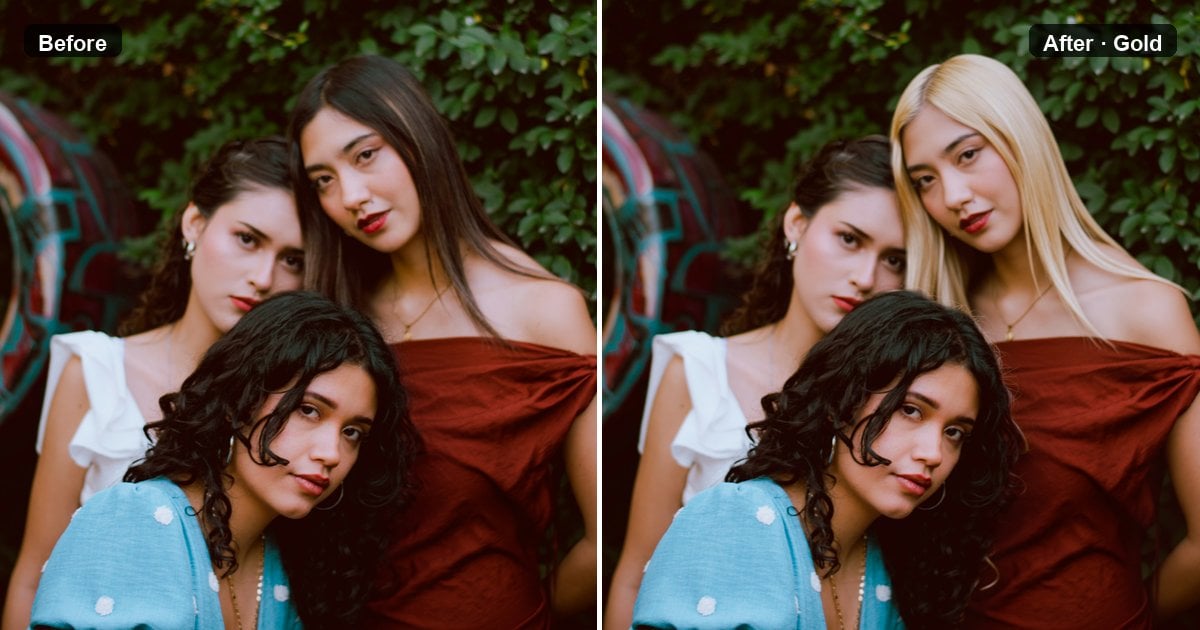
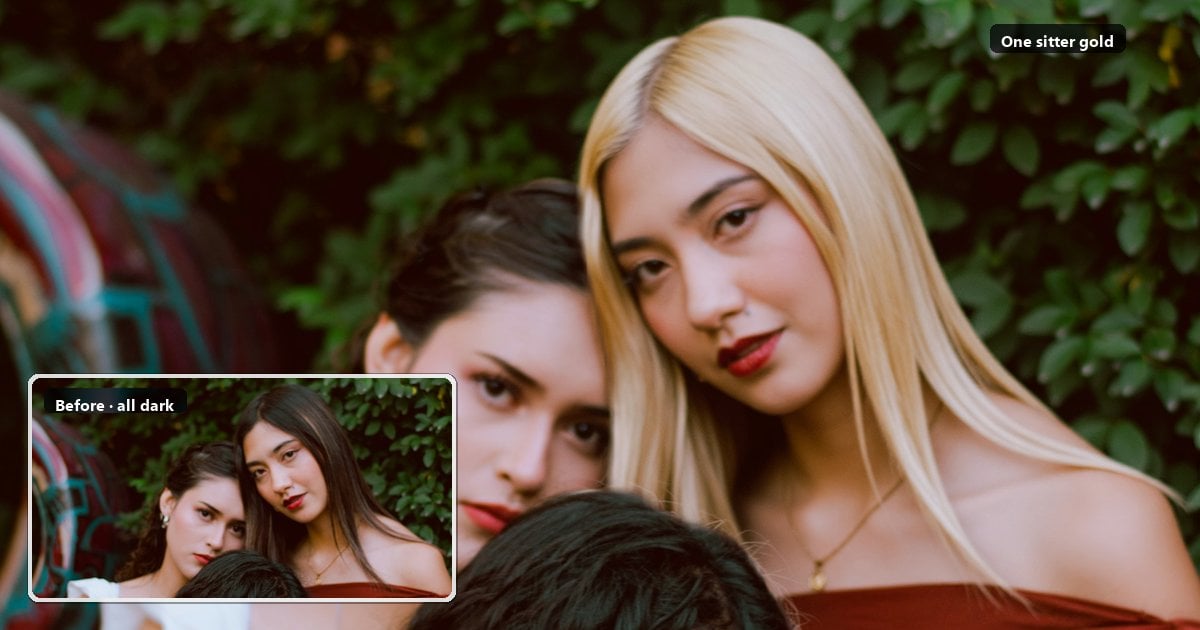
Three hair colors in one wedding frame. The client wants only the middle sitter gold, and she still has to look like herself. That is the job this card is built for. If your blonde hair try on brief sounds like that sentence, start here before you open a prompt box.
After one “Generate”, you should see the same warm gold on hair that was already in the file. The cut stays. Other people stay. Clean hairline and an unchanged jaw mean you can keep going. Flat dull gold, a moved face, or a whole frame gone yellow means you are not ready to deliver.
This path fits fashion, wedding, and headshot delivery when you need a gold preview on photographed hair. “Golden Blonde Hair” itself is not a full shade rack. Evoto keeps one-click warm gold there, then hands other shades to “Hair Color” when you need to deepen, match, or unify tone across a set. Web shows the look. Desktop finishes the portrait so skin and clothes can meet the new hair.
Two tools, more than one gold
- Stop on “Golden Blonde Hair” when golden blonde is enough.
- Run gold, then open Portrait Retouching → Hair → “Hair Color” for honey, platinum, dirty blonde, strawberry blonde, ash, or a light fashion color such as soft pink or red. Gold first, then the color pass, so lighter fashion colors sit more naturally.
- Painting a pastel straight onto dark hair often looks dirty. Lift with gold first.
- Still a creative preview, not a salon bleach promise. For the wider board and sliders, open Hair Color Changer. Web is fine for the first gold look. The shade board finish lives on Desktop.
Compared with Photoshop, you trade pixel masks for speed. Compared with FaceApp, you keep more of the face. Compared with a one-click browser filter, you can still connect gold to the rest of a portrait edit and to “Hair Color”.
- Pros. Delivery minded. Person-by-person control. Same warm gold on Web and Desktop. Gold can act as a lift before another shade.
- Cons. The warm-gold tool is one warm look, so other blonde names need a second pass in “Hair Color”. Web is best for a quick check, not a full retouch stack.
| Entry | Use it when | Skip it when |
|---|---|---|
| Web | You need a fast golden blonde look in the browser, a client wants one side-by-side still on site, or you will not install software | You need honey or platinum from the shade board, or a full retouch stack |
| Desktop | The portrait is already in “Edit”, you will pick sitters, join hair to skin and clothes, and optionally run “Hair Color” across a set | You only want a thirty-second glance and will not open a project |
A Web blonde hair try on is for speed and proof. A Desktop pass is for the file you will actually export. Tell the client which path you used so nobody expects a full shade-board finish from a browser glance.
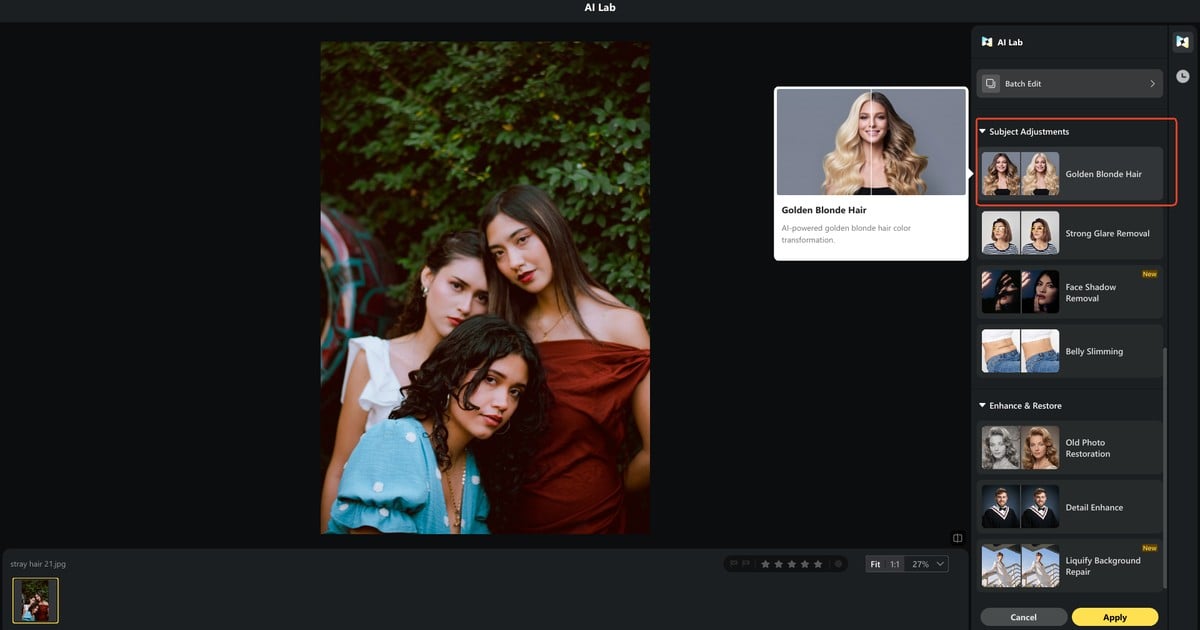
Step 1: On Desktop, keep the portrait in “Edit”. Click “AI Lab” in the top bar, then open “Golden Blonde Hair” under “Subject Adjustments”. On Web tool, upload a portrait with visible hair and run the same gold look.
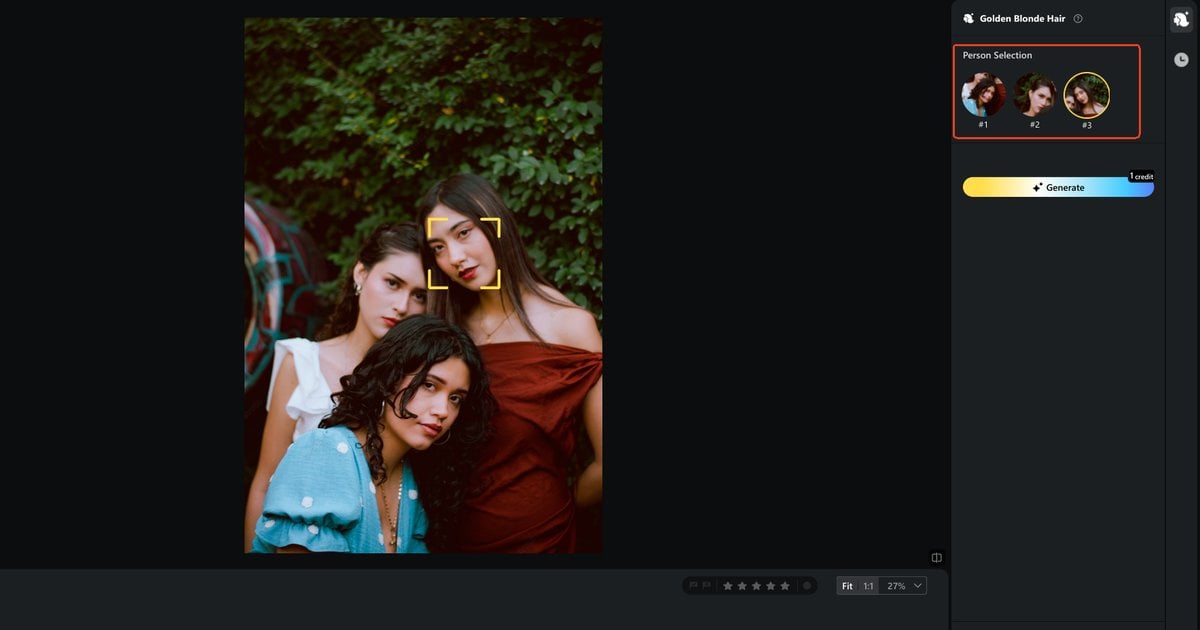
Step 2: In a group, pick the sitter in “Person Selection”. Click “Generate”. Check the face and the cut. Need honey, platinum, or another gold? Go to “Hair Color” next. “Save” only if the hairline is clean.
Try the look on Web, or finish on Desktop. Limits include transparent files, frames with no detected hair, and hats that hide the hairline. Face-adjacent flyaways may stay incomplete. Hair accessories can shift.
When a whole gallery needs the same guest matched, run gold for a shared warm base first, then use “Hair Color” with one shade and one intensity. Do not fake the match with a global white-balance swing that also drifts skin.
For a wedding gallery on Desktop, finish basic skin and wardrobe notes first if those are already locked. Open “AI Lab” for gold on the hero frames. Run “Hair Color” only on keepers that need honey or ash. Export a before-and-after proof on the same sitter.
If the client picks honey after seeing golden, you already have the lifted base.
Fashion sets follow the same order when a mood board asks for platinum next.
Headshot days often stop earlier: one clean golden blonde on a single sitter is enough when LinkedIn crops punish tiny face changes.
Pass that proof when one sitter goes gold and everyone else stays as shot. Fail it when the whole frame yellows, the jaw moves, or two guests shift together. That before-and-after crop is the delivery check for a group frame, not another menu screenshot.
2. Photoshop: Mask and Lift
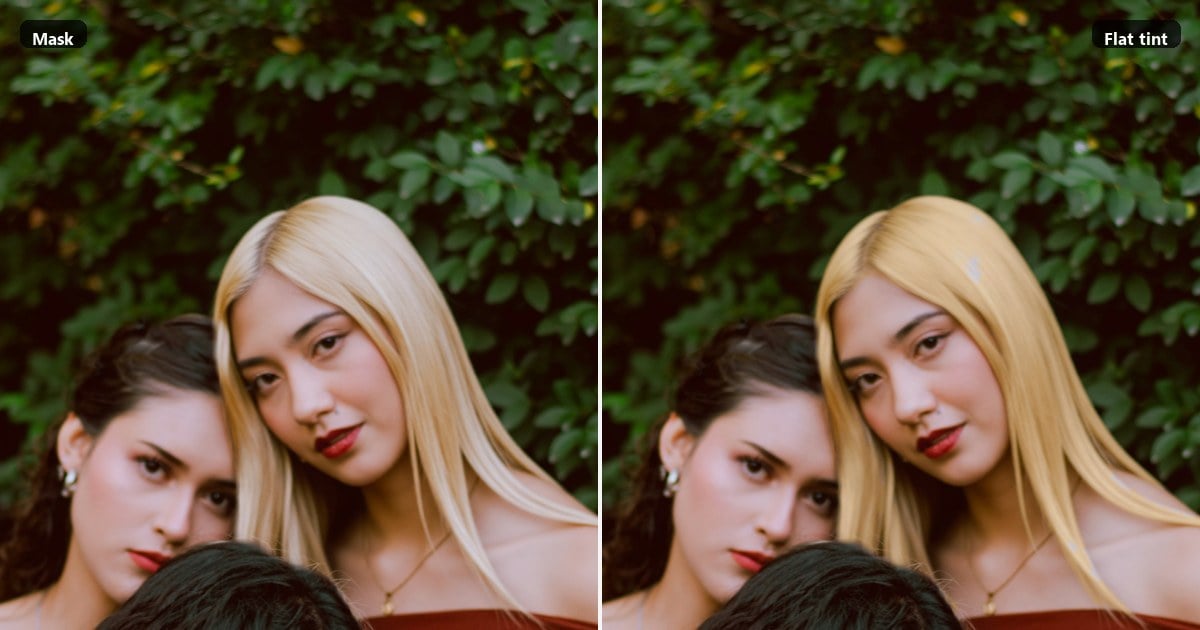
Phlearn’s teaching lands first. Turning dark hair blonde is a lift problem, not a yellow wash. Adobe’s own change hair color workflow starts with a selection, Colorize, then mask cleanup. That matches how print files actually survive. If you skip the lift and only spin hue, dark hair turns into brass paint.
A good mask keeps edges honest. A group means you rebuild the selection person by person. Pass when strand highlights still read and skin never took the Colorize. Fail when you see a helmet or a yellow forehead. Graduation-day threads on Reddit still show the same spill when yellow correction hits skin.
- Pros. Print-level control when the mask is already there. You can match a brand swatch if the selection holds.
- Cons. Slow. Easy to overpaint. This shortlist does not teach Hue/Saturation click-by-click. Plan time for selection work if Photoshop is your delivery path.
A blonde hair try on in Photoshop is really a masked lift. Treat it that way when the file already lives in a layered PSD and time is on your side.
3. Firefly: Prompt Blonde
You can type honey or platinum into a prompt. If the jaw shifts, you no longer have a preview. You have a new photo. Adobe Firefly’s hair color tools say face and composition should hold. Delivery still means a 100% check on braces and eyes.
This is an AI blonde rewrite, not a hair-only card. Shade names feel flexible. Small face drift is the trade-off. Zoom the mouth before you send. Concept boards can live here. A yearbook headshot usually cannot. When a client asks for a blonde hair try on that still matches the passport face, generative drift is the first reason to walk away.
4. YouCam Makeup: Phone Shades
You flip shades on a phone before you leave the house. That is not a studio desk. Full head and a blonde highlights filter mode both exist in that consumer lane. Partial lift can look less fake than a full bleach wash on dark hair, which is why highlights stay in the Shade job column as their own score. Print files, one-person group control, and watermark-free delivery are usually not the promise. Confirm the live plan before you quote a client.
Price shape is in-app subscription. Check the store page when you write the invoice. Use it as a mood check, then move a keeper frame into a delivery tool if the job is real. A phone blonde hair try on is research. It is not a print proof.
5. FaceApp: One-Tap Blonde
Reddit threads still mention FaceApp when people ask which app edits hair. Gold can appear in seconds. Slimming, teeth, and age tricks often ride along. Fine for a selfie experiment. Risky for a delivered portrait until you match the jaw.
Read FaceApp’s privacy policy before you upload client faces. If Identity fails, the shade debate does not matter. Compare that failure mode with Evoto’s hair-only goal: gold on strands, face left alone. That contrast is why FaceApp sits lower on a delivery blonde hair try on table even when the tap feels magical.
6. Browser Filters: Instant Gold
Zero install. Upload, one click, yellow hair. Useful as a mood hit or a fast answer when someone searched a bleach hair filter. It is not Evoto Web. Evoto Web still aims at the same warm gold look, then you can finish on Desktop and open “Hair Color”. Browser filters rarely offer person picks or a path into skin and wardrobe retouch.
A casual blonde hair try on can stop here. A print file should not. If the only brief is “make it blonder for a chat reaction,” an instant filter is enough. If the brief is a gallery export, keep scrolling.
Six scores later, pick by job. There is no single trophy. Evoto’s path ends when Web was enough, or when Desktop closed the set. The scene table decides which ending you need.
Price language stays structural on purpose. Evoto uses credits per generate. Photoshop and Firefly often ride a Creative Cloud seat you may already pay. Phone apps lean on subscriptions. Browser filters lean on free tiers with watermarks or daily caps. Check the live page before you quote.
Do not paste a blog’s old dollar number onto a client estimate. Studios that bill by the gallery usually pick one delivery path and stick to it for the whole set, so the proof language stays consistent from first look to final export. Write that path into the job ticket: Web proof only, Desktop finish, or Photoshop mask. It saves a late-night tool swap when the client asks for one more frame from the same sitting.
Which Blonde Hair Try On Fits the Job
Match the live brief, not the ad. Each row below is a delivery scene where a blonde hair try on either saves the night or wastes an hour. Flyaways and dry ends are a different article. See retouch hair in a photo when the problem is strand cleanup, not shade.
| Scene | Start here | Skip this |
|---|---|---|
| Wedding group, one person gold | Evoto Desktop, person by person | FaceApp whole-frame rewrite |
| Client wants one look on site | Evoto Web | Opening Photoshop for a mask |
| Headshot or ID-adjacent feel | Evoto Desktop or a Photoshop mask | Generative micro face drift |
| Client only wants highlight lift | YouCam highlight mode | Full bleach filter |
| Dark hair that should “read gold” | Evoto Web first, Desktop to finish. Honest: not a bleach proof | Promising one-pass platinum |
| Honey, platinum, dirty blonde, strawberry, ash, or light fashion color | “Golden Blonde Hair”, then “Hair Color” | Pastel straight on dark hair; treating “Hair Color” as the warm-gold tool |
Wedding groups reward person control. Headshots reward Identity. On-site client checks reward Web speed. Dark-hair lifts reward honesty about preview limits. When golden and honey fight on skin and curl, read golden blonde vs honey blonde. That piece is about how shade reads in the file. This page stays a tool shortlist for delivery gold.
If two tools tie on shade, break the tie with edges and group control. A pretty gold that paints the collar still fails. A slower masked lift that keeps the forehead clean still wins a print job. That is the whole point of scoring tools like delivery work instead of like an App Store carousel.
One more scene that trips teams: the “just make her blonder” Slack note with no shade name. Ask whether they mean warm gold, honey depth, or cold platinum before you open five apps. A thirty-second clarification saves an hour of mismatched proofs. If they only need a chat reaction, a browser filter may be enough. If they need album pages, start on Evoto Desktop or a Photoshop mask and keep FaceApp out of the export folder.
Powerful AI Photo Editor
Closing
A deliverable blonde hair try on keeps the face, recolors hair, and names the result as a preview. Same warm gold: open Blonde Hair Filter. Other gold depths, gloss, or light fashion color: gold first, then “Hair Color”. Pick the path that survives 100% on the jaw, then ship only the crop you would sign.
FAQ
What is a blonde hair try on that still looks like the sitter?
Hair changes. The jaw, braces, and cut do not. If those move, you created a new portrait. Score Identity before you argue about honey versus gold. A usable blonde hair try on fails the moment the sitter becomes a lookalike.
Which tool should I pick for a group portrait?
Need one person gold and everyone else as shot? Prefer a person picker such as Evoto Desktop “Person Selection”. Avoid whole-frame selfie rewrites when other guests must stay untouched. Group control is often the real reason studios keep a hair-only blonde hair try on on the shortlist.
Is a bleach hair filter the same as bleaching hair?
No. A filter is a file look. Bleach is chemistry on real hair. The FDA discusses dye product safety for living hair. A JPEG cannot tell you whether bleach is safe.
Do blonde highlights filters look less fake on dark hair?
Sometimes. Partial lift can spare a full yellow helmet. It still fails if edges spill onto skin. Judge at 100%, not in a compressed chat crop.
Evoto Web, Evoto Desktop, or Photoshop for a print file?
Web for a fast gold look. Desktop when gold must meet the rest of the retouch, person picks, and “Hair Color”. Photoshop when you already trust a hair mask and have time.
Can Evoto do honey, platinum, or other golds, not just one gold?
“Golden Blonde Hair” returns one warm golden blonde. For honey, platinum, dirty blonde, strawberry, ash, or a light fashion color, run gold first, then “Hair Color” with intensity control. That order usually keeps light fashion colors cleaner on already lifted hair.
Are my uploads handled securely, and does Evoto train AI on my photos?
Uploads are processed on encrypted servers, then deleted. Evoto does not use your content to train generative AI models without explicit opt in. Live terms sit in the Privacy Policy.
How should I use an AI blonde preview ethically on a client’s face?
Treat the result as retouching, not proof of real hair. Disclose the edit on delivery when the job calls for it. Confirm portrait rights for wedding guests and commercial faces before you publish.
Does a Web or Desktop generate use a credit?
Yes. Each generate uses 1 credit on the paths described in the product. Confirm the live credit table in the app or on the pricing page.
Why might gold skip a file?
Transparent canvases, frames with no detected hair, and hats that hide the hairline can block the run. Use a portrait with visible hair.
Methodology
Scored six tools on identity, hair-only edges, shade job, group control, and privacy. Evoto warm-gold and `”Hair Color”` steps follow the live product labels. Photoshop and Firefly checked against Adobe Help. Phlearn for lift versus tint. FDA for dye safety scope. No invented prices, user counts, or average retouch times.