
Fashion delivery night. The client sends two exports in chat and asks why the golds do not match. One frame holds warm light on the barrels. The other sits deeper, with amber in the shadows. On a phone, they look close. At 100%, the honey frame also stained the forehead. That is a golden blonde vs honey blonde problem on a portrait file, not a box-dye argument.
This is photo work: light, highlight shape, and spill. It is not a salon formula page. The FDA hair dyes material covers living-hair product safety. A retouched JPEG cannot tell you whether bleach is safe on a guest.
TL;DR
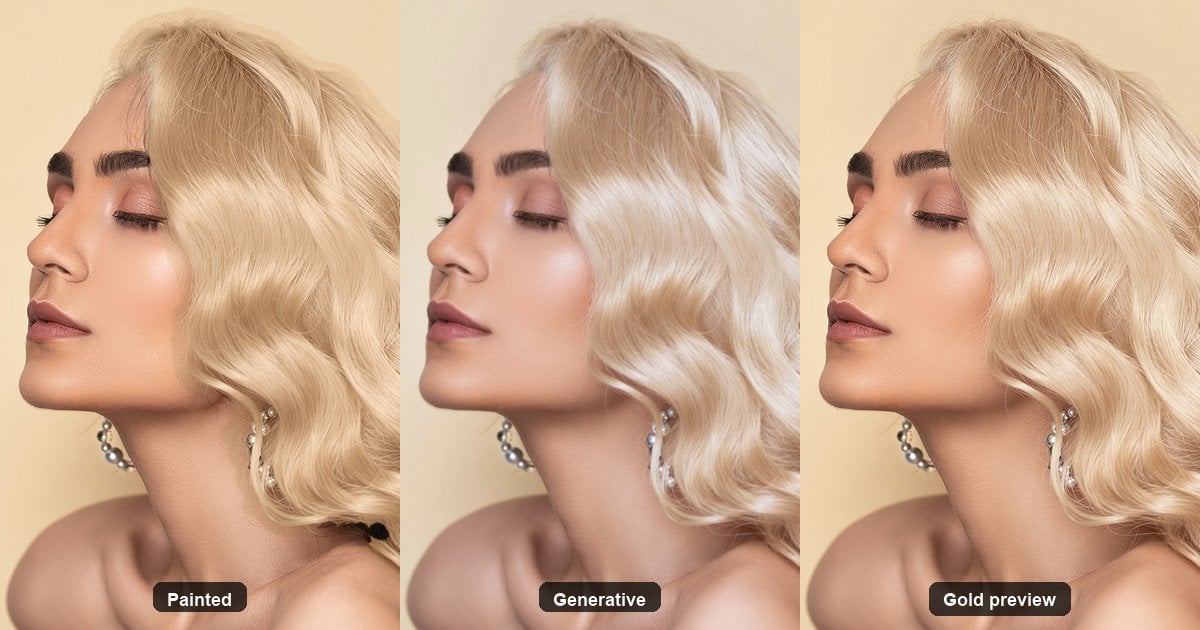
- Separate three jobs first: painted layer, generative rewrite, warm gold preview.
- Then read four shade behaviors: golden, honey, ash, platinum.
- Deliver with face, hairline, and highlight checks at full size on the same display.
- One Evoto warm-gold tool is one warm gold. For honey and other golds, or a mismatched set, use gold first, then “Hair Color”.
Methods table first. Shade table second. No software tour until you know which job you are in. Clients often reverse honey blonde vs golden blonde in chat because phones crush depth. Your job is to put both crops on one calibrated screen before anyone renames the file. A clean shade call starts with method, not with a dye aisle nickname.
Retouch desks see the same argument every peak season. A fashion client wants “the warmer one.” A wedding planner wants “the softer one.” Neither phrase maps cleanly to pixels until you show highlight shape and shadow fill side by side. This page is a diagnosis sheet for golden blonde vs honey blonde on files, not a salon encyclopedia or Top 10 app list.
Three Jobs People Mix Up When Hair Goes Blonde
Photographers often mix three different jobs. Put them in one table so you stop arguing shade names on the wrong method.
| Method | What you change | Does the face hold? | Best fit |
|---|---|---|---|
| Painted layer (Hue/Saturation Colorize, brush) | Hue and lightness of existing pixels | Usually, if the mask is clean | You already have a strong selection. See how to change hair color in a photo. |
| Generative rewrite | New pixels, sometimes with features | Often small face drift | Concept frames, not ID-style headshots |
| Warm gold preview (Evoto “Golden Blonde Hair”) | One warm gold on hair already shot; can lift before “Hair Color” | Goal is a recognizable sitter | Same warm gold, or gold first then honey/ash/platinum/light fashion color |
Picking the app is a shortlist job. This article only helps you name the job. Adobe’s hair-color help stresses the importance of selection quality. Phlearn is blunt: dark-to-blonde is mostly a lift, not a hue spin. If you are still arguing tools while the forehead is yellow, fix the spill first.
Shade names are the next fight. Golden blonde vs honey blonde only matters after the method is right. Paint a bad mask, and both names look like jaundice. Rewrite the face and neither name belongs on a delivery invoice. Desk order: method first, then shade, then the face/hairline/highlight checks below. Skip that order, and you will argue color names while the real fail is still a helmet or a new jaw.
Golden Blonde vs Honey Blonde on a Portrait File
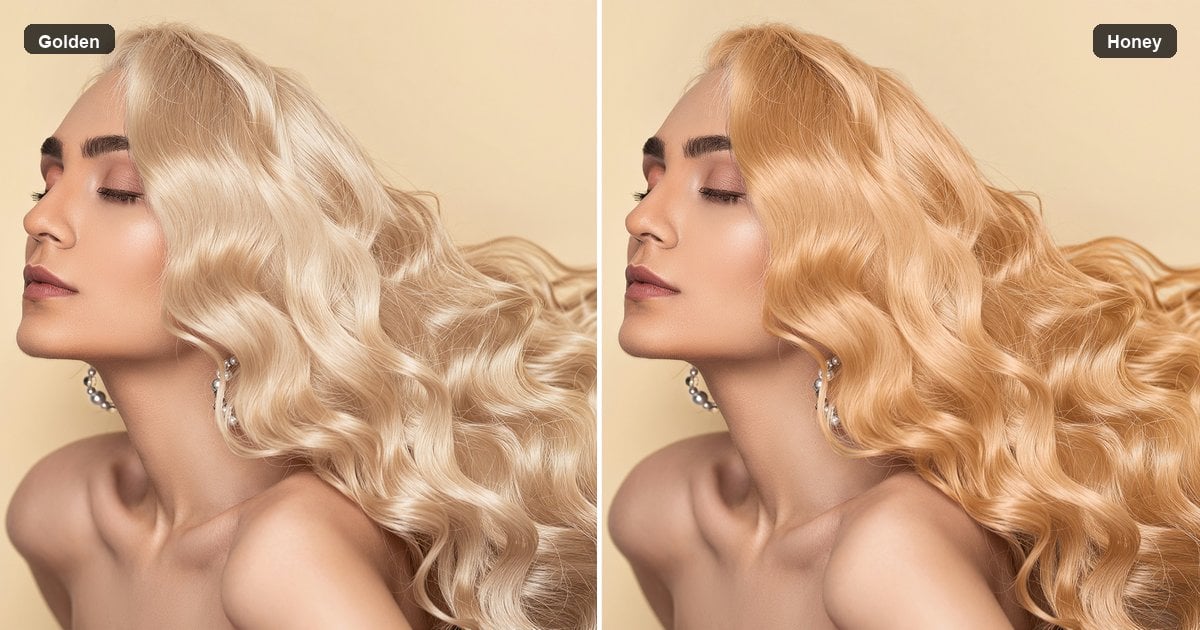
On a file, these are depth and shadow reads, not “real versus fake.” Saying golden blonde vs honey blonde out loud should point at highlight shape, not at a carton from the drugstore aisle.
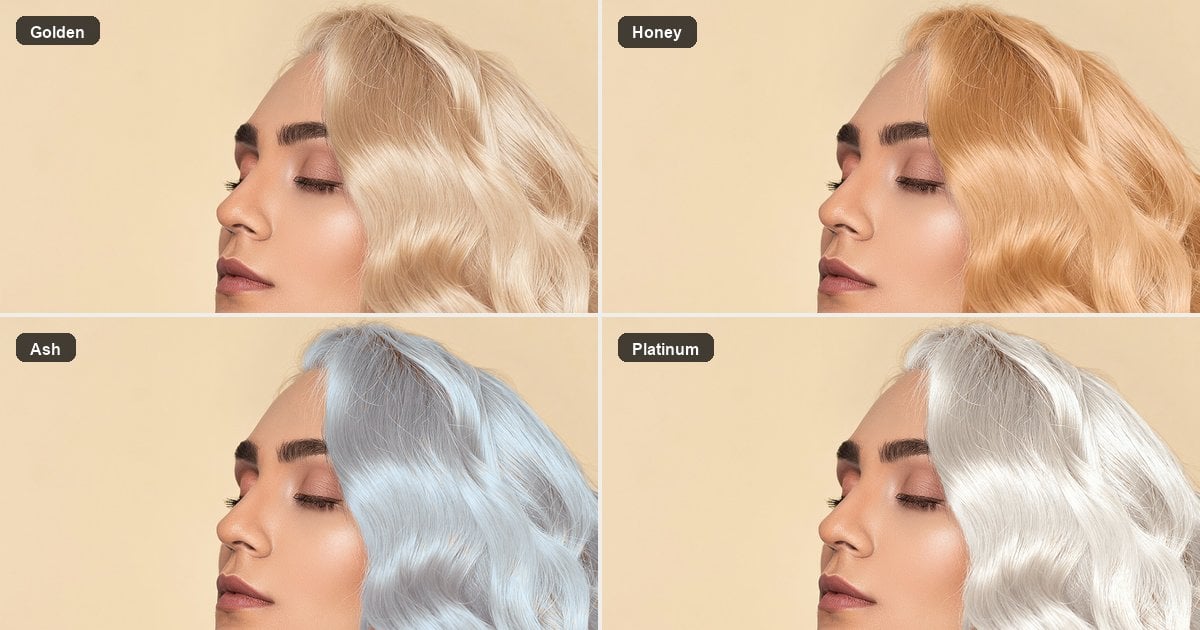
- Golden: warm, bright highlights that follow existing strand light, shadows still open.
- Honey: one step deeper, more amber, fuller shadows. Easy to read as a yellow block on skin when it spills.
- Both are warm. The fight is depth, not authenticity. Warm skin under daylight can make golden feel “right” while honey feels heavy. Cool window light can make the same honey look muddy. Judge the pair in the light you will deliver.
| In the file | Highlights | Shadows | Common fail |
|---|---|---|---|
| Golden | Bright, track original speculars | Parting still visible | Overexposed plastic yellow |
| Honey | Fewer dead whites | Fuller amber | Forehead spill that looks like jaundice |
| Ash (ash blonde vs golden blonde) | Cool, yellow suppressed | Can go grey or green | Overcorrecting graduation-day brass (r/photoshop) |
| Platinum (golden blonde vs platinum) | Very bright, little chroma | Empty, dirt shows | Fine in studio, grey on a cold display (r/Hair lighting mismatch) |
Evoto “Golden Blonde Hair” lands in the golden row: one warm gold on photographed hair. For honey, platinum, dirty blonde, strawberry, ash, or a soft fashion tint, treat gold as the lift, then open “Hair Color” and set intensity. Gold first makes light fashion colors look cleaner. Pastel on untouched dark hair often reads muddy. “Hair Color” is the follow-up when a wedding, fashion, or headshot set needs deeper tone or one matched look across many frames.
That is why the second pass exists. This section is about why the order matters. For where to click, see Blonde Hair Filter or the blonde hair try on tools guide.
If a client flips the shade call after you already delivered gold, do not stack yellow paint on the export. Return to the lifted base, then dial “Hair Color”. The second tool is for depth and matching. It is not a second coat of house paint.
Photographers who already know Hue/Saturation still benefit from that order on dark bases. Lifting with a hair-aware gold pass preserves strand speculars that a flat Colorize layer often kills. Once speculars survive, honey can sit deeper without turning into a yellow helmet. Platinum can go brighter without copying noise into empty shadows. Ash can cool brass without greening the temples if skin stays masked out. Those are file mechanics, not seasonal color trends.
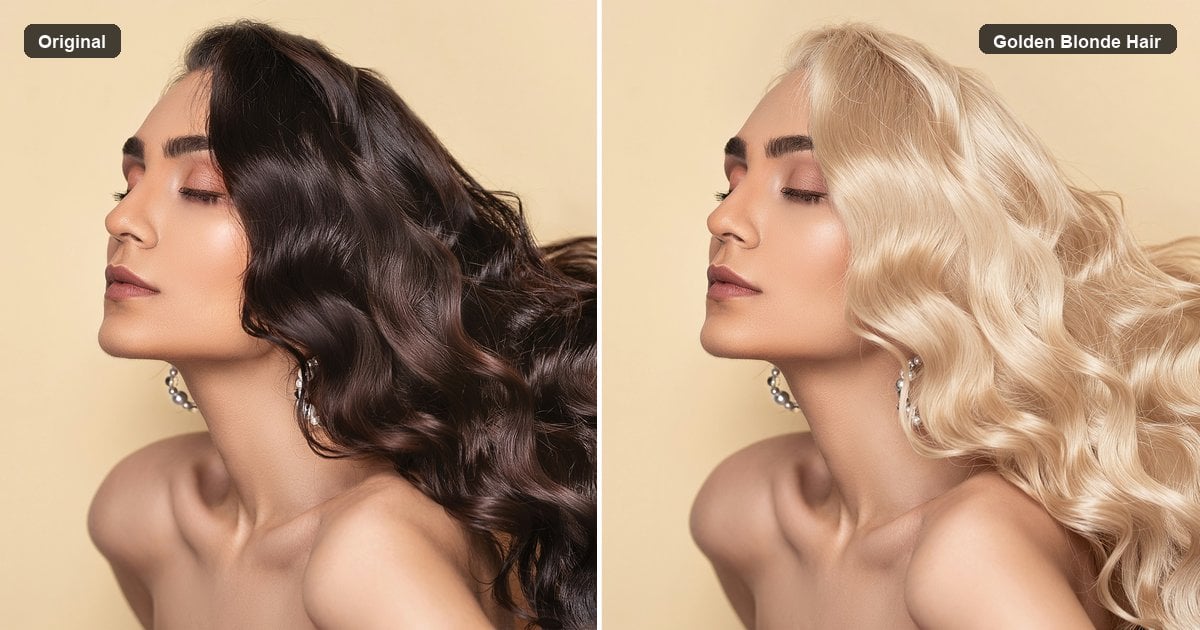
Same sitter, same studio light: dark glossy waves on the left, warm golden blonde on the right after “Golden Blonde Hair”. Keep the face and the wave barrels. That is the warm gold base. After it lands, “Hair Color” can deepen toward honey or shift to a light fashion tint.
Shade names still have to read on skin. Use the four-crop check below before you argue golden against honey in chat.
Brass, Ash, and Light That Lies
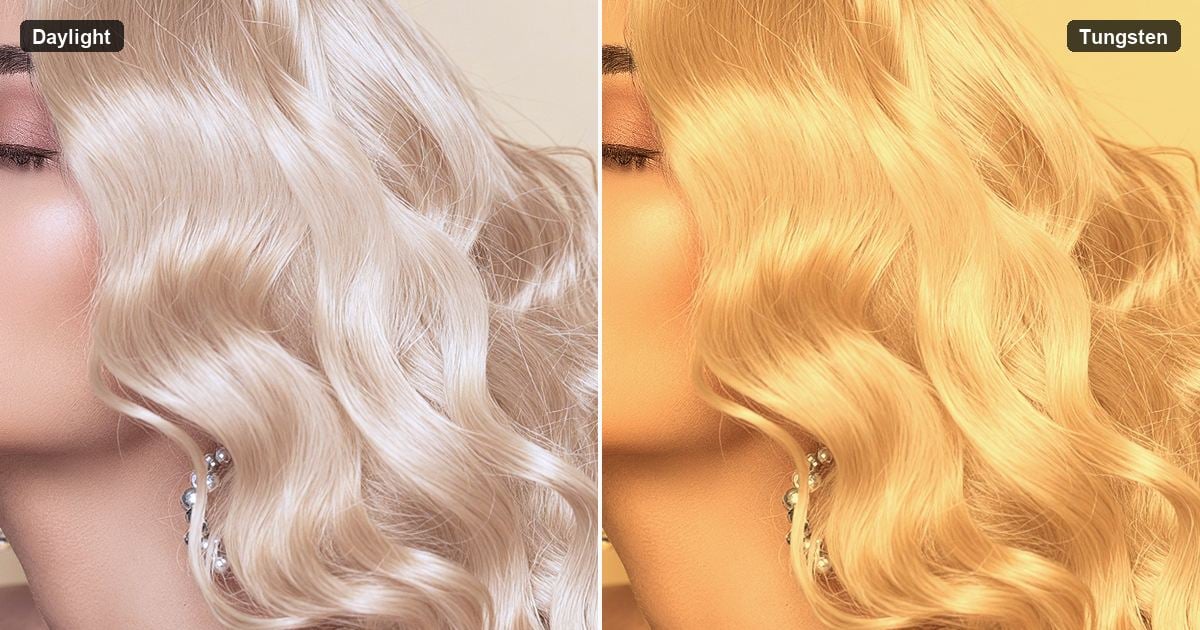
Cambridge in Colour on white balance is the lighting primer. White balance decides what counts as white. Tungsten pushes gold warmer. Shade or a cold monitor pulls platinum toward grey. That is why studio proofing and phone chat rarely agree on the two warm shades, even when the pixels did not change.
Rules for the desk:
- Argue golden against honey on the same file, same display, near a neutral reference.
- Do not compare a salon after photo under store lights with a warm living-room selfie.
- When you cool brass, keep skin out of the selection. Otherwise, “ash blonde” is just a green face.
- Separating ash blonde vs golden blonde is a chroma decision. Separating honey from golden is mostly a depth decision. Do not solve depth with a green cast.
If / then (not steps):
- If only hair looks yellow and skin looks normal, the color lives in the hair. You can talk gold, honey, or ash.
- If forehead, collar, and teeth went yellow, you have spill. Fix the edge before shade names.
- If the look flips on another monitor, calibrate before you deliver.
- If platinum looked fine under softboxes and grey on a laptop, trust the lighting lesson before you rebuild the shade.
What to Check at Full Size Before You Send Gold
Copy these three looks into a studio note. Letters, not numbered steps.
Look A · Face
Is this still the same person? Generative tools fail here first. If Identity breaks, change methods. Do not tune honey on a wrong face.
Look B · Hairline and skin
Hairline, temples, flyaways. Spill equals fake, no matter the shade name. The same complaint shows up when people hunt apps for hair edits and get a helmet.
Look C · Barrels and part
Highlights should still ride the curl barrels. Flat yellow means paint went too far, or a filter acted like house paint. Strand cleanup is separate; see retouch hair in a photo when the issue is flyaways, not chroma. A calm retouch blonde hair pass protects shine instead of burying it. If Look C fails, golden blonde vs honey blonde debates are noise. Fix the speculars first.
If / then exits:
- Face changed → generative path; switch to a face-safe tool from the blonde hair try on tools guide.
- Only spill → repair the mask or use a hair-aware gold preview.
- Shade right, gloss dead → do not add saturation; check whether you flattened speculars.
- Gold is right, client wants honey, platinum, or another gold → gold already lifted the hair; open “Hair Color”. Do not stack another yellow paint on the gold result.
- Same guest looks brassy in one frame and grey in another → unify to a warm gold base first, then dial “Hair Color” with one shade and one intensity across the set. Do not fake hair matching with a global white-balance swing that also shifts skin and wardrobe.
Keep a printed or digital checklist beside the monitor. Look A stops fake faces. Look B stops helmets. Look C stops wig shine. Together they keep shade talk honest.
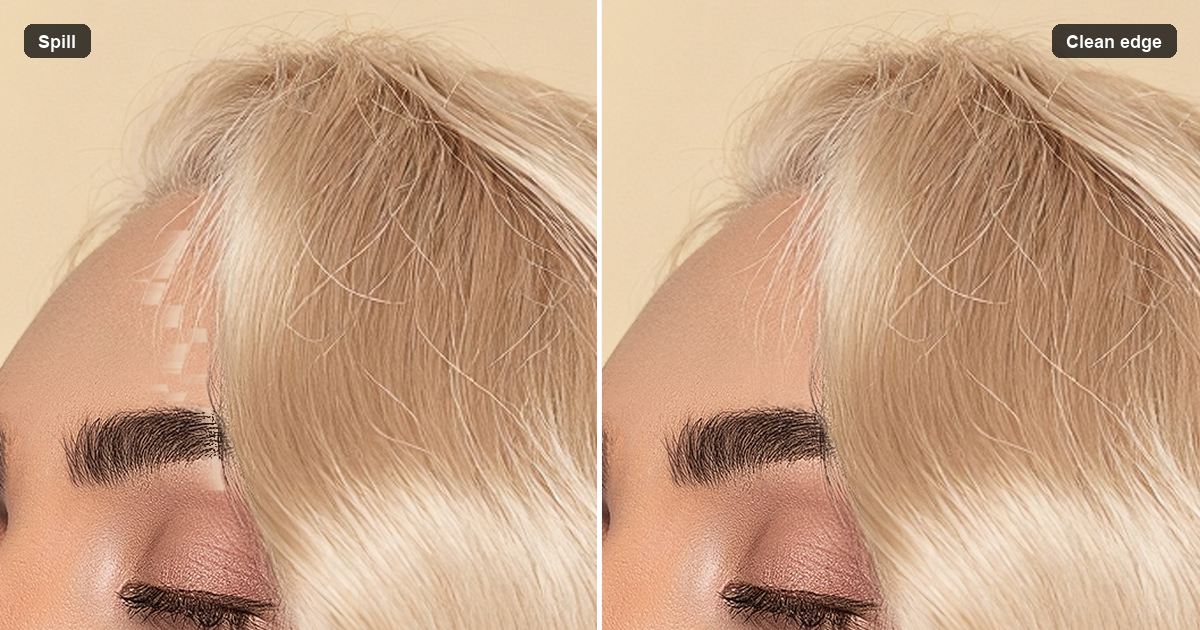
Proofing tip: zoom to 100% on the hairline, then zoom out to fit and ask whether the portrait still feels like the same sitting. Both distances matter. Full size catches spill. Fit view catches plastic shine and depth mistakes that only show when the whole head reads at once. If you deliver albums, also proof on a second display or a phone only after the desktop pass is clean. Phones can confirm a fail. They should not be the first place you decide a shade.
When the method is already a warm gold preview, open Blonde Hair Filter for the same face and cut. You can also download Evoto for Desktop finishing, or keep working in Evoto as an AI Photo Editor after the hair pass.


Powerful AI Photo Editor
Dark Hair, Curls, Groups, and a Mismatched Set
Four forks. Group frames ask who changes in one still. Sets ask whether gold matches across many stills.
Black Hair Does Not Tint, It Has to Lift
People search how to edit black hair to blonde and then paint yellow. Phlearn’s lift point applies. A yellow slab is a helmet.
Evoto: run “Golden Blonde Hair” so dark hair lightens with gloss, then “Hair Color” if you still need honey, platinum, ash, or a light fashion tint. Pastel on raw dark hair often looks dirty.
Honest line: still a preview, not a bleach guarantee. Dark bases make golden blonde vs honey blonde harder because both shades need lift before depth talk is fair.
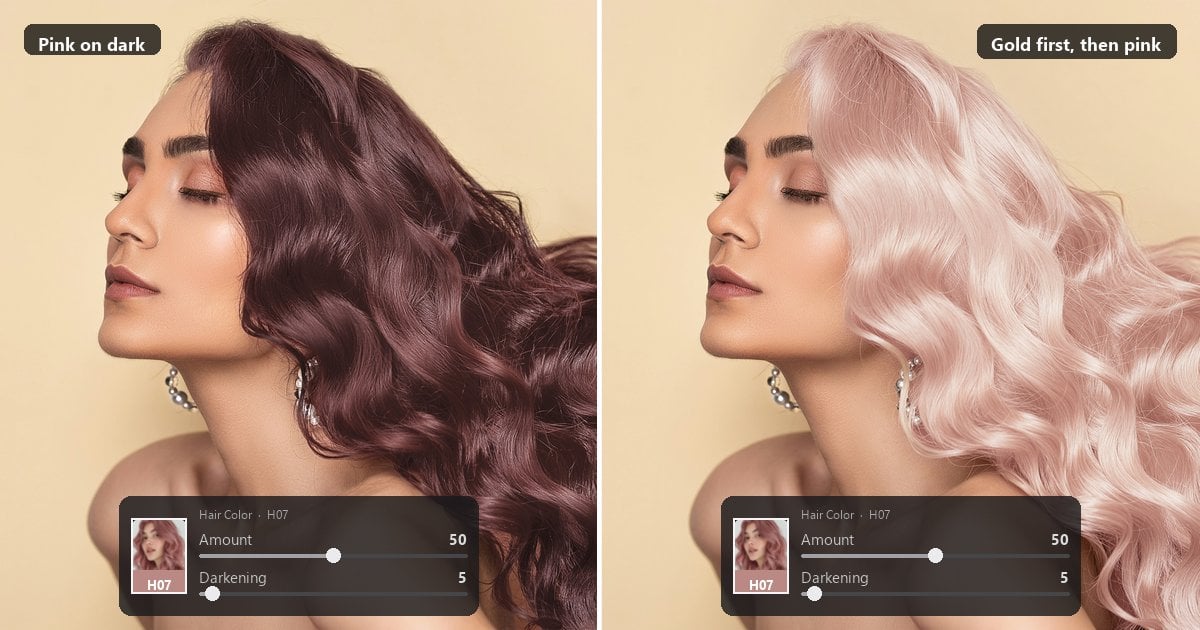
Same fashion tint tells the story. Pink dropped straight onto dark hair reads heavy and muddy. Pink after a golden blonde lift sits lighter and keeps more shine in the waves. Gold first is not a style opinion. It is a file order.
Curls Keep Their Shine, or They Look Like a Wig
Gold has to stop on the barrel highlights. Honey fills shadows faster and can glue curls into one mass. Maternity and fashion curl sets are the usual examples. If barrels die, viewers call the hair a wig even when the shade name was “correct” on paper.
One Person Gold, Everyone Else as Shot
In a group, only the chosen sitter goes gold. Everyone else keeps the hair you shot. That is why person selection exists. Without it, the frame reads like a cheap composite. Menu steps live on Blonde Hair Filter and the blonde hair try on tools guide. Shade nuance dies if three guests shift together.
Same Guest, Same Gold, Whole Set
Wedding and fashion delivery is often a set, not a single hero. Mixed light (hallway tungsten, window daylight) makes one guest look brassy in one frame, grey in another, and honey-deep in a third. Clients say the hair is not the same person. That complaint is a matching problem wearing a shade-name costume.
Pair the warm-gold tool with “Hair Color”:
- “Golden Blonde Hair” first: park the sitter on the same warm gold base so highlights still follow real strands. Do not brush a different yellow on every frame “until it feels close.”
- “Hair Color” second: one shade name, one intensity, across the set. Pull brass back. Warm up a grey cast. Hold honey, platinum, dirty blonde, strawberry, or ash as the set standard.
- Still run Look A, Look B, and Look C on each keeper. One spill frame or one moved jaw breaks the set.
- Do not use whole-frame white balance as a fake hair tool. Mixed light can lie about hair color. A global temperature swing is not a hair mask.
For where to click, use the blonde hair try on tools guide. This fork only explains why the two tools run as a pair when blonde hair photography spans a whole gallery. Once the set holds, you can finally reopen golden blonde vs honey blonde as a taste call instead of a rescue mission.
Plain workflow: gather the keepers for one guest, note which frames were tungsten hallways and which were window light, run gold on each keeper so the base matches, then apply the same “Hair Color” intensity so honey or ash reads as one decision.
If you sync settings across frames, make sure hair color adjustments are turned on, or the sync will not apply. Save a preset if the same couple will return for day-after edits.
Wedding and headshot batches both benefit from that repeatability.
Fashion sets benefit when a mood board demands one platinum depth across a lookbook. After the gold base is shared, the intensity and darkening controls on one preset are usually enough to settle a late shade taste call without rebuilding every mask.
If one frame still looks brassy after the matching pass, check Look B before you invent a new shade name. Spill and mixed light create false brass. Another white-balance swing will not fix a yellow forehead. When the set finally holds, reopen golden blonde vs honey blonde only as a client taste choice on one hero frame, then push that choice through “Hair Color” so the gallery does not fork into two warm stories again.
Busy portrait weeks usually break on mismatched sets more often than on a single hero shade call. Use both tools when the brief is a gallery, not a single social crop.
Powerful AI Photo Editor
Closing
Golden blonde vs honey blonde on a portrait is about warmth in existing highlights, not a box name. Name the method, read the shade, then Look A, Look B, and Look C. For a mismatched set, unify on a warm gold base, then dial “Hair Color”. Open Blonde Hair Filter. Need other gold depths, gloss, light fashion color, or set matching? Gold first, then Hair Color Changer.
FAQ
How do I judge golden blonde vs honey blonde on a portrait file?
Compare depth and shadow fill on the same file and display. Golden keeps brighter strand highlights and open shadows. Honey sits deeper and more amber. If skin took the tint, fix spill before you pick a name. Phone screens flatten that depth fight, so park both exports side by side before you rename either look. If you need a label for the ticket, write “open golden highlights” or “deeper honey shadows” instead of a dye aisle nickname.
Why does gold look brassy on my monitor but fine in the studio?
White balance and display bias. Tungsten and warm rooms push yellow. Cold panels pull platinum toward grey. Match lights and screens before you call the shade wrong. Bring a neutral gray card or a known white wardrobe into the proofing view when the argument gets loud.
Painted color, AI rewrite, or a warm gold preview: which should I run?
Paint when you own a mask and need print control. Rewrite when the brief allows a new picture. Warm gold preview when you need the same cut and face with one delivery gold, optionally followed by “Hair Color”.
Can I get honey, ash, platinum, or a light fashion color from the same warm-gold tool?
No. “Golden Blonde Hair” is one warm gold. Lift with gold, then “Hair Color” for honey, ash, platinum, or a light fashion tint so the second pass sits on already lightened hair.
How do I keep blonde from spilling onto skin?
Judge the hairline at 100%. Keep skin out of painted selections. If a preview floods the forehead, do not deliver. Edge quality beats another saturation push.
Does a photo preview tell me if bleach is safe?
No. File previews are not dye safety advice. Use FDA materials and a licensed professional for real hair decisions.
Are uploads secure, and does Evoto train generative models on my photos?
Uploads are processed on encrypted servers, then deleted. Evoto does not use your content to train generative AI models without explicit opt-in. Review the Privacy Policy for live terms.
Is it ethical to deliver blonde hair the guest never wore?
Treat it as retouching. Disclose when the job requires honesty about the edit. Confirm rights for wedding guests and commercial faces. The result is not proof of real hair.
What if the guest is in a group and only they should go gold?
Use person-by-person gold so other guests keep their shot color. Whole-frame filters make the group look composited.
How do I match gold across a whole photo set?
Run “Golden Blonde Hair” for a shared warm gold base, then “Hair Color” with one shade and one intensity across keepers to correct brass or grey drift. That second pass is how you match hair color across a portrait set. Do not fake the match with global white balance.
Methodology
Shade reads checked against Cambridge in Colour white balance notes, Adobe’s hair-color workflow, and Phlearn’s lift-versus-tint distinction. Evoto warm gold and `”Hair Color”` follow the live product labels for other golds, light fashion colors, and matching a mismatched set on wedding, fashion, and headshot work. No invented salon formulas or average retouch times.