

In the digital age, professional photographers rely heavily on reliable cloud solutions to secure and manage their creative work. With AI-driven innovations, online backup services comparison has become crucial for those seeking automation and efficiency.
Among today’s top contenders, Evoto AI and Imagen AI stand out as leading platforms for photo backup, collaboration, and workflow optimization. This article provides a detailed online backup services comparison, analyzing their functions, performance, and pricing to help photographers make informed decisions.

Overview of the Cloud Backup Service
Before diving into direct comparisons, it’s important to understand how both Evoto AI and Imagen AI approach cloud backup. While both aim to protect and organize your images, their core philosophies differ — Evoto AI emphasizes collaboration and structure, whereas Imagen AI focuses on automation and simplicity.
What Evoto AI Backup Brings to You
Evoto AI is designed to help photographers and creative teams stay connected across devices. It keeps your projects automatically synchronized, ensuring that every version of your work remains accessible and up-to-date. Meanwhile, the system maintains full version histories for each project, allowing you to track progress and restore older edits when necessary.
Evoto AI features two workspace modes:
- My Space – a private workspace for personal projects.
- Team Space – a shared environment for collaborative editing and review.
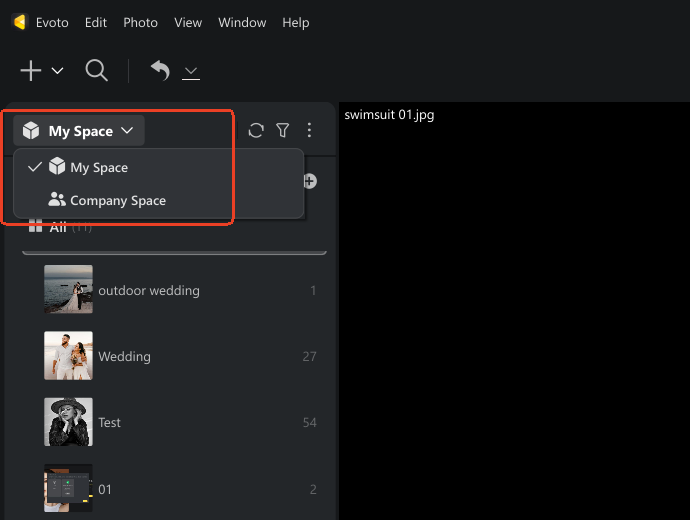
All projects uploaded to the Evoto Cloud Space can be accessed anytime from other authorized devices, making remote collaboration effortless. Currently compatible with Windows and macOS, Evoto AI’s upcoming iPad support will soon give users even greater flexibility in managing projects on the go.
Top Features of Imagen AI Backup
Imagen AI takes a different approach — one that focuses on automation and hands-free operation. Once connected to Lightroom, the software automatically uploads photos, catalogs, and edits to Imagen Cloud, keeping every change synced in real time. You don’t need to trigger backups or worry about missing files manually.

This makes Imagen AI especially appealing for solo photographers who prefer to spend more time creating and less time managing. By providing real-time synchronization, instant recovery, and encrypted protection for each file, Imagen AI ensures that your workflow remains uninterrupted and fully protected.
In essence, the online backup services comparison between these two platforms begins with a simple distinction: Evoto AI offers control and collaboration, while Imagen AI delivers automation and simplicity.
Online Backup Services Comparison of Features
Now that we understand how each service operates, it’s time to see how their backup performance and user experiences stack up. The online backup services comparison between Evoto AI and Imagen AI reveals two distinct approaches — one built around structured teamwork and another centered on effortless automation.
Evoto AI Online Backup Highlight & Evaluation
Evoto AI is designed to help photographers and creative teams stay connected across devices. It keeps your projects automatically synchronized, ensuring that every version of your work remains accessible and up-to-date. The system maintains full version histories for each project, allowing you to track progress and restore older edits when necessary.
Evoto AI features two workspace modes — My Space, a private area for personal projects, and Team Space, built for shared projects and collaborative editing. This clear distinction helps photographers maintain organization between solo and group work. All projects uploaded to the Evoto Cloud can be accessed anytime from other authorized devices, making remote collaboration effortless.
Currently compatible with Windows and macOS, giving users flexibility in managing projects on the go.
Steps to sync a project:
Step 1. Download Evoto and install the AI Photo Editor on your Mac OS or Windows device. Create a project in “My Space” or “Team Space”. Then, import your photos that need to be edited or backed up.


Powerful AI Photo Editor
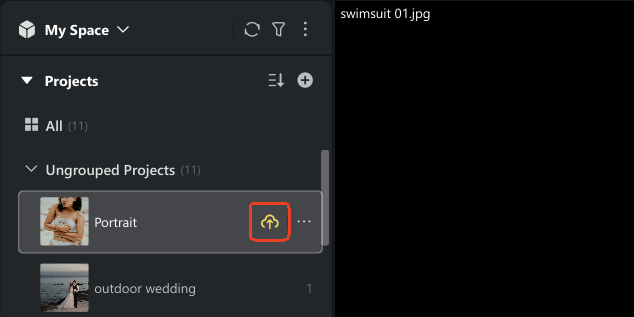
Step 2. After editing the photos, click the “Upload to Cloud” icon beside the project name for manual syncing, or right-click the project and select “Sync with Multiple Devices”.
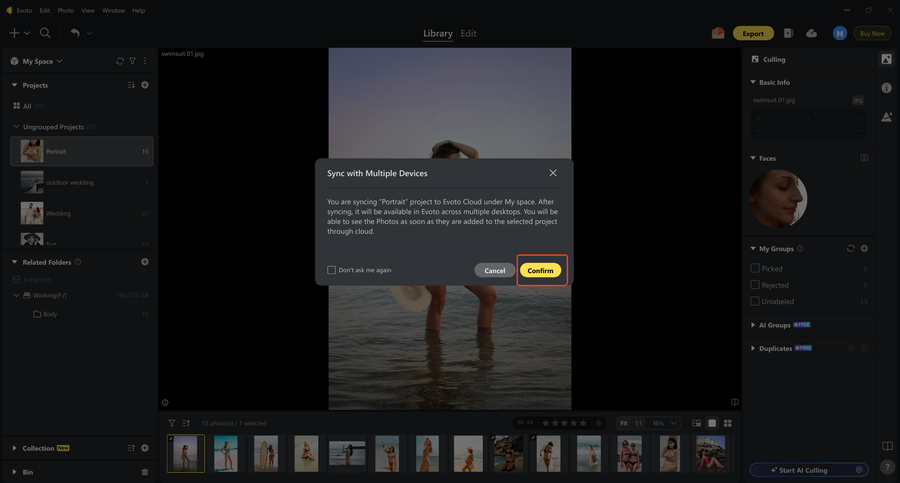
Step 3. Click “Confirm” and start backing up the photos to Evoto Cloud.
Step 4. Turn on your other desktop/ laptop device. Launch Evoto and go to “My Space” or “Team Space”. Click the “Download from Cloud” icon beside the project (or right-click the project) to download the edited/ backed up photos from Evoto Cloud to your current device.
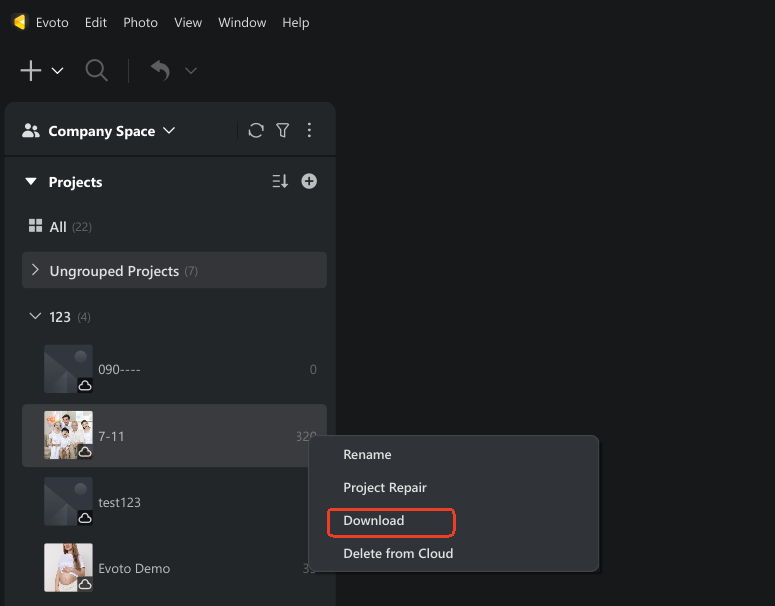
Now, you can make another edit to the same photos and then sync the changes to the cloud. Your team members can check or continue the edits on their devices once they sync the photos from Evoto Cloud.
Effectiveness:
- Promotes cross-device accessibility and data consistency.
- Maintains all project versions, ensuring no conflicts occur between team members.
- Enhances team efficiency and workflow transparency.
Ideal Users:
Team-based photographers, studios, and production houses require organized project management and detailed version tracking.
Evoto’s approach in this online backup services comparison focuses on team control, reliability, and transparent collaboration — making it a perfect choice for photographers who prioritize structure.
Imagen AI Online Backup Review & Insights
Imagen AI simplifies cloud syncing by connecting directly to Lightroom, allowing photographers to focus on editing instead of managing backups manually. To start, you simply link your Lightroom catalog to the Imagen Cloud. From there, all edits, metadata, and photo versions are uploaded automatically in real time. The synced files can be accessed anytime through the Imagen Cloud dashboard, giving you a centralized and reliable location for your entire photo library.
This approach makes Imagen AI particularly effective for photographers who prioritize efficiency and automation. By removing manual upload steps, the platform ensures instant backup for every edit and file, reducing the risk of data loss. While Imagen AI does not include advanced collaboration tools like Evoto AI, it excels in optimizing individual productivity, making it ideal for freelancers or solo photographers who want a smooth, hands-off cloud backup experience.
Steps to use:
Step 1. Link your Lightroom catalog directly to Imagen Cloud.
Step 2. The system uploads all edits and metadata automatically.
Step 3. Access synced files anytime through the Imagen Cloud dashboard.
Effectiveness:
- Ideal for photographers prioritizing efficiency and automation.
- Ensures instant backup without manual actions.
- Lacks advanced collaboration but excels in individual productivity.
Combined Evaluation:
In this online backup services comparison, Evoto AI stands out for teams that need controlled, shared environments, while Imagen AI caters best to individuals who prefer hands-free backup systems.
Read More: 10 Best Cloud Storage for Photographers in 2025 (Free & Paid)
Comparison of Cloud Backup-Related Additional Features
Beyond backup performance, both platforms offer distinct workflows and security features that influence the overall experience. This section explores how they differ in workflow integration, security, compatibility, and pricing — key factors in any online backup services comparison.
Online Backup Services Comparison Table
| Product | Free Tier | Max Storage | RAW Support | Sync | Auto Backup | File Versioning | Ext. Drive | Sharing | Integration | Security | Entry Price |
|---|---|---|---|---|---|---|---|---|---|---|---|
| Evoto AI | Yes | Custom scalable | Yes | Manual & Auto | Yes | Yes | Yes | Team-based | Evoto Library, Instant | End-to-End Encryption | Free trial available |
| Imagen AI | Yes | Scalable tiers | Yes | Auto | Yes | Yes | Yes | Limited | Lightroom Integration | End-to-End Encryption | From $9/mo |
Workflow Features
- Evoto AI supports the complete photography process, from image capture and culling to editing, reviewing, and delivery. Its Team Space enables multiple users to collaborate, share feedback, and manage approvals efficiently.
- Imagen AI, meanwhile, enhances solo workflows through AI-assisted catalog management that speeds up culling and photo delivery.
Ultimately, Evoto AI offers a team-oriented environment that benefits larger studios, while Imagen AI streamlines individual workflows with automation.
Security and Privacy Protection in Cloud Backup
Both Evoto AI and Imagen AI prioritize safeguarding user data with end-to-end encryption, ensuring all photos and project files remain secure during transfer and storage.
Evoto AI enhances security with role-based permissions and team-level access controls, allowing studios to manage who can view or edit each project while preventing unauthorized modifications.
Imagen AI focuses on individual users, offering automatic, encrypted backups that require minimal setup, giving solo photographers reliable protection with zero hassle.
Device Compatibility and Storage Capacity
Evoto AI supports Windows and macOS platforms and works with all major image formats, including RAW, JPEG, and TIFF. Its cloud storage is scalable, making it suitable for both individual photographers and collaborative teams managing multiple projects.
Imagen AI integrates directly with Lightroom across multiple devices, supporting RAW files and other common formats. Its personal storage tiers are flexible, allowing users to expand space as their photo libraries grow, ensuring that both small and large collections can be safely stored and easily accessed.
Cloud Backup Pricing Comparison
Evoto AI offers cloud storage as part of subscription plans or billed according to project usage, giving teams the flexibility to manage costs based on their workflow. Imagen AI uses a subscription-based pricing model with adjustable tiers, enabling individual photographers to increase storage capacity as their collection expands while benefiting from automated backup and seamless Lightroom integration.
Both platforms provide secure, high-performance storage, and the choice between them depends on whether you value collaborative control or automated convenience.
This online backup services comparison helps photographers compare cloud storage costs and assess which platform best aligns with their workflow. When cloud storage services compared, both show exceptional reliability and adaptability across creative environments.
Read More: Best Ways to Backup Photos: Ultimate Guide for Secure Photo Storage
Conclude Online Backup Services Comparison
Every photographer’s workflow is unique, which is why this online backup services comparison focuses on highlighting the strengths of each platform rather than ranking one definitively above the other. The ideal choice depends on whether you prioritize team collaboration, workflow control, or automation, and speed.
Evoto AI Pros and Cons
Pros
- Excels in structured, collaborative environments.
- Supports multi-user workflows, version control, and organized project management.
- Ideal for studios and teams managing multiple shoots simultaneously.
Cons
- Lacks iPad support, which may limit on-the-go accessibility for some users.
- Manual upload steps are required, which could be a minor inconvenience for photographers seeking a fully hands-off workflow.
When combined with the Evoto Library and Evoto Instant — an AI-powered Real-Time Photo Gallery — the platform streamlines your entire imaging process. Tasks such as AI-assisted culling, rapid image processing, and custom delivery can be completed in seconds, reducing manual work while maintaining professional quality. This efficiency allows photographers to focus more on creativity rather than repetitive tasks.
Powerful AI Photo Editor
Imagen AI Pros and Cons
Pros
- Provides fully automated backups and seamless Lightroom integration, ensuring all edits and metadata are synchronized in real time.
- Perfect for solo photographers or freelancers who want minimal setup and a reliable backup system without spending time on manual file management.
Cons
- Less flexibility in manual control and limited team collaboration features.
- Not offer the advanced multi-user project management, which may be a consideration for studios or teams.
Recommendation
Choose Evoto AI if your workflow involves teams, complex project pipelines, or multi-stage client projects that benefit from structured collaboration and version management. Its organized workspaces and team-oriented tools make it particularly suitable for studios and professional photographers handling multiple shoots simultaneously.
Choose Imagen AI if you prefer a fully automated, hands-off approach. Its real-time syncing and Lightroom integration save time, reduce manual intervention, and simplify the backup process, making it an excellent choice for individual photographers or small teams who prioritize efficiency over collaborative features.
Summary
That’s all about the online backup services comparison of the two professional AI photo editor tools. Evoto AI excels in structured, collaborative workflows with powerful project versioning and team management. Imagen AI delivers hands-free automation and seamless integration with Lightroom, making it perfect for individual photographers.
Both Evoto AI and Imagen AI represent the next generation of intelligent, AI-powered cloud storage — transforming how photographers protect, manage, and share their creative work.



