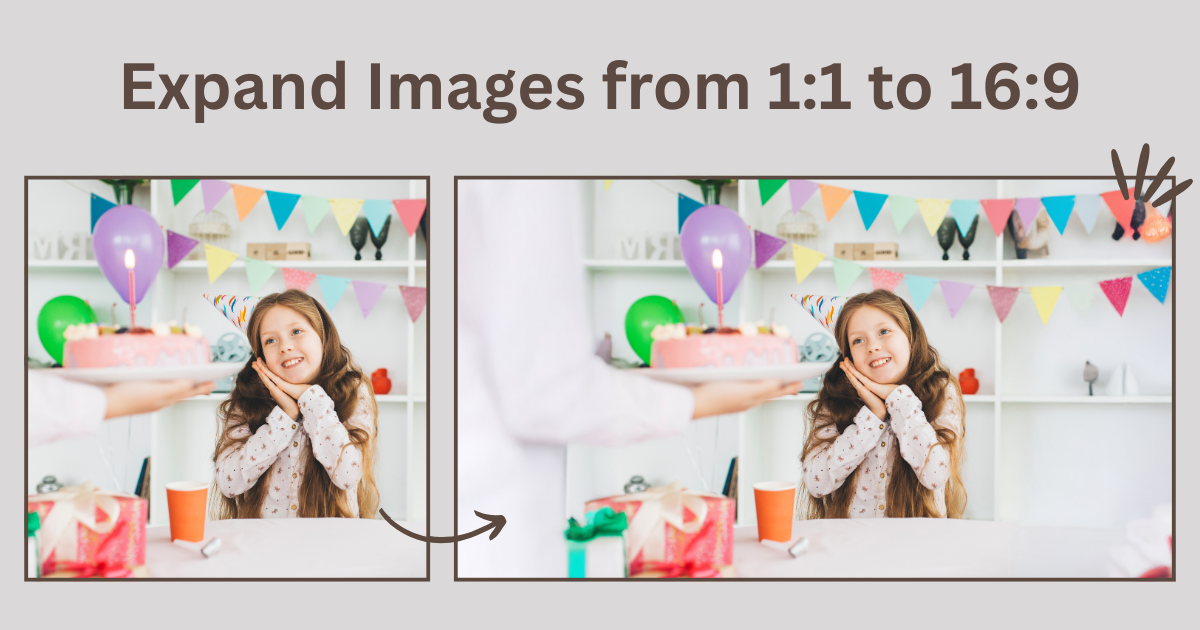
Converting square images(1:1) to 16:9 widescreen is one of the most common challenges in modern content production. What works perfectly on Instagram doesn’t fit website banners, YouTube thumbnails, or presentation slides.
The core issue is mathematical: a 1080×1080 square image needs to become 1920×1080 widescreen. That requires generating 840 pixels of additional width—a 78% horizontal expansion.
This guide examines seven approaches to this conversion, from destructive cropping to AI-powered expansion, with objective analysis of speed, quality, and cost-effectiveness.
Why This Conversion Is Unavoidable
Platform requirements create constant format conflicts:
16:9 is the dominant aspect ratio:
- YouTube thumbnails: 1280×720 (16:9)
- Website banners: typically 1920×1080 or wider
- LinkedIn covers: 1584×396 (~16:9)
- PowerPoint/Google Slides: default 16:9
- Video content: standard widescreen
1:1 remains popular for: Instagram feed posts, Facebook profile images, initial product photography
Content creators regularly need to adapt 1:1 assets to 16:9 contexts without losing compositional integrity.
Method 1: Center Crop
Process: Apply a 16:9 crop to the center of the square image, discarding 44% of the original content.
Time required: 30 seconds
Quality: Perfect for the retained portion
Major limitation: Destructive by nature. If the subject fills the square frame, critical elements get eliminated. Centered products become off-balance. Full-body shots lose heads or feet.
Appropriate use case: Images with horizontal subjects and significant empty space top and bottom.

Method 2: Letterboxing (Pillarboxing)
Process: Place the square image centered on a 16:9 canvas, filling empty sides with solid color or black bars.
Time required: 1 minute
Technical drawbacks:
- Wastes 39% of available screen space
- Social media algorithms penalize non-optimized dimensions
- Immediately signals format mismatch
- Reduces effective image size on all platforms
Verdict: Technically achieves 16:9 ratio but defeats the purpose visually.
Method 3: Photoshop Content-Aware Fill
Process:
- Expand canvas to 16:9 dimensions
- Select empty areas
- Apply Content-Aware Fill
- Manual cleanup of artifacts
Time required: 20-45 minutes per image
Quality potential: High with skilled execution
Realistic challenges: Pattern repetition, visible seams, texture inconsistencies. Every image requires hands-on correction.
Appropriate use case: Single hero images where time investment is justified.
Verdict: Capable of excellent results but scales poorly. Processing 50 images would consume multiple days.

Method 4: Photoshop Generative Fill
Process:
- Expand canvas dimensions
- Select empty areas
- Apply Generative Fill
- Optional text prompts for guidance
- Review 3 AI-generated variations
- Select best result
Time required: 10-15 minutes per image
Quality: Consistently good for most backgrounds
Cost: $55-60/month Photoshop subscription
Key advantage: Text prompts provide directional control over AI generation.
Limitation: Time requirement still significant for volume work. 100 images requires 16-25 hours of processing.
Method 5: Online AI Image Expansion
Process:
- Upload square image to web-based tool
- Select 16:9 aspect ratio
- Generate
- Download result
Time required: 2-3 minutes total
Cost: $0-30/month
Quality: Comparable to Photoshop for straightforward backgrounds
Performance comparison:
- 10 images: 25 minutes vs 2+ hours in Photoshop
- 50 images: 100 minutes vs 10+ hours in Photoshop
Common Technical Issues and Solutions
Issue: Visible Seam at Expansion Boundary
Root cause: Lighting, color temperature, or texture mismatch.
Solutions:
- Enable edge blending mode → Regenerate (60% success rate)
- Expand in stages (1:1 → 4:3 → 16:9) for smoother transitions
- Apply color grading to entire final image to unify appearance
Issue: Softness in Generated Areas
Solutions:
- Start with higher resolution source files (3000px vs 1080px)
- Select “detailed” or “sharp” quality mode
- Apply selective sharpening to generated areas only
Issue: Pattern Repetition
Solution: Regenerate 2-3 times (70% resolution rate). Each generation introduces randomness.
Issue: Color Temperature Inconsistency
Solution: Apply color correction to entire final image. Adjusting white balance globally unifies original and generated portions.
Cost-Benefit Analysis
Software Costs
Photoshop: $660/year
AI tools: $120-360/year
Direct savings: $300-540 annually
Time Value (More Significant)
Processing 20 images monthly at $50/hour billing rate:
Manual approach: 4-6 hours = $200-300 monthly = $2,400-3,600 annually
AI approach: 40 minutes = $30-35 monthly = $360-420 annually
Time value savings: $2,000-3,200 annually
The time efficiency gain significantly outweighs software cost differences for most use cases.
AI Image Extender Online Tool Evaluation: Evoto
Objective assessment of Evoto’s AI Image Extender:
Functional strengths:
- Single-click aspect ratio selection
- Directional control (horizontal-only expansion)
- Batch processing capability
- Unlimited regenerations
- Results prioritize natural appearance
Realistic limitations:
- Complex backgrounds may require 2-3 generation attempts
- Extreme aspect ratio changes work better in stages
- Not a replacement for pixel-perfect compositing work
Test Evoto’s AI Image Extender with your specific image types to evaluate fit for your workflow.
Decision Framework
Choose Photoshop when:
- Processing fewer than 10 images monthly
- Pixel-perfect accuracy is non-negotiable
- Already proficient with Photoshop
- Part of larger composite project
Choose online AI tools when:
- Processing 10+ images regularly
- Time efficiency is priority
- Team members need accessible solution
- Budget is constrained
Optimal approach: Hybrid strategy. AI tools for 90-95% of routine conversions, Photoshop for 5-10% of critical hero images.
Best Practices
- Maintain source quality: Start with highest resolution files available
- Test before batch: Always process one sample from each image category
- Accept “good enough”: 95% quality in 3 minutes often outperforms 100% quality in 30 minutes
- Build rejection threshold: Decide in advance which assets justify additional time investment
- Document successful settings: Record parameters that work for recurring image types


Powerful AI Photo Editor
Conclusion
Converting square images to 16:9 widescreen is a solved problem with multiple viable approaches. The optimal method depends on volume, quality requirements, time constraints, and existing tool expertise.
For most modern workflows processing 10+ images regularly, AI-powered expansion tools offer the best balance of quality, speed, and cost-effectiveness. Traditional methods retain value for edge cases requiring maximum control.
The key is matching method to context rather than seeking a universal solution.