Every photographer eventually faces the same problem: the shoot is done, the editing is done, and you need to share hundreds or thousands of images with clients who expect the same polish in the handoff that they got in the studio. An online photo gallery is the modern answer, a private shareable link that puts your finished work directly in front of your client without USB drives, WeTransfer expirations, or email attachments. The question is which platform gets out of your way and into your clients’ hands fastest. Evoto Instant was built specifically to answer that question for working photographers.
Clients do not just receive your work, they experience it. The first time they see your images at full resolution is on their phone, on the train home, sharing the link with a parent two time zones away. If that experience is slow or confusing, it pulls down the entire memory of working with you, even when the photos themselves are perfect.
Professional gallery delivery is increasingly the expectation, not the exception. Couples who saw a polished, branded gallery from a friend’s wedding photographer last summer notice when yours falls short. The gallery is not just a delivery mechanism. It is the final presentation layer of the work.
Why the Gallery Experience Shapes How Clients Remember Your Work
Broken gallery delivery costs you in three specific ways. Clients write back asking for help opening the link, downloading specific frames, or sharing with relatives, and each ticket lands on you in week two when you should be shooting your next job. Word of mouth shifts: “beautiful photos, but the delivery was a hassle” kills the same referral that “beautiful photos and they showed up the next morning” would have generated. And the second-purchase moment quietly evaporates: a guest who never finds their photos never buys a print download, never tips, never books a follow-up session.
What a Strong Online Photo Gallery Has to Get Right
Fast upload and fast loading. Large RAW exports should not bottleneck the upload pipe, and once images are in the gallery, each frame should appear well under a second on a normal phone connection.
Mobile-native viewing. Most clients open the link on a phone. A gallery that was clearly designed for desktop and shrunk down to mobile shows it immediately and undermines everything else.
One-link sharing. No mandatory account on the client side, no app download just to view. The link itself is the product.
Privacy controls. Event galleries, school photos, and wedding deliveries often contain images of minors or private moments that should not sit on a public link. Galleries should be gated by Access Code, face scan, or watermarked previews until paid downloads are released.
Client feedback inside the gallery. Many clients want to favorite frames, leave notes, and reply in a thread. A gallery that supports this saves rounds of email.
Built-in monetization. For event and commercial photographers, the gallery should also support pay-per-photo, free downloads with paid overage, full-gallery unlock, and Tips, so the same link doubles as the checkout.
The Two Workflow Paths Behind Every Online Photo Gallery
Depending on the job, photographers take one of two routes to gallery delivery.
The fast-delivery path. For high-volume jobs where clients need access right away, such as school photo days, corporate events, and sports tournaments, the workflow is short: import, upload to the gallery, share the link. No retouching, no culling bottleneck. The gallery goes live, clients get access in minutes, and the job is done.
The retouched-delivery path. For portrait sessions, weddings, and editorial work, every frame needs to be perfect before it leaves your hands. The workflow extends: import, AI Culling, AI Editing, export, upload, share. The gallery is still the delivery endpoint, but the path to it has more production steps.
Most working photographers run both paths, sometimes inside the same week. The gallery platform you pick has to handle both without forcing you to maintain two separate tools or rebuild a gallery when a client asks for retouched versions of frames you already published.
How Evoto Instant Builds the Online Photo Gallery Around Your Workflow
Inside Evoto Instant, capture, optional AI Culling and AI Editing, and client gallery delivery all live inside one project. The photographer never exports to a second tool to publish a gallery, and the gallery never has to be rebuilt when a client asks for retouched versions of frames already in there.

That single project splits into three independently configured galleries: Full Gallery (the whole event, one link for everyone), FaceKey Gallery (each guest scans their face at the door and sees only their own photos), and Personal Gallery (the photographer hand-curates a slice for VIPs and emails or QR-shares it as its own link). All three share the same project state, the same branding, and the same pricing setup. The photographer sets them up once.
Branded gallery, no client account required
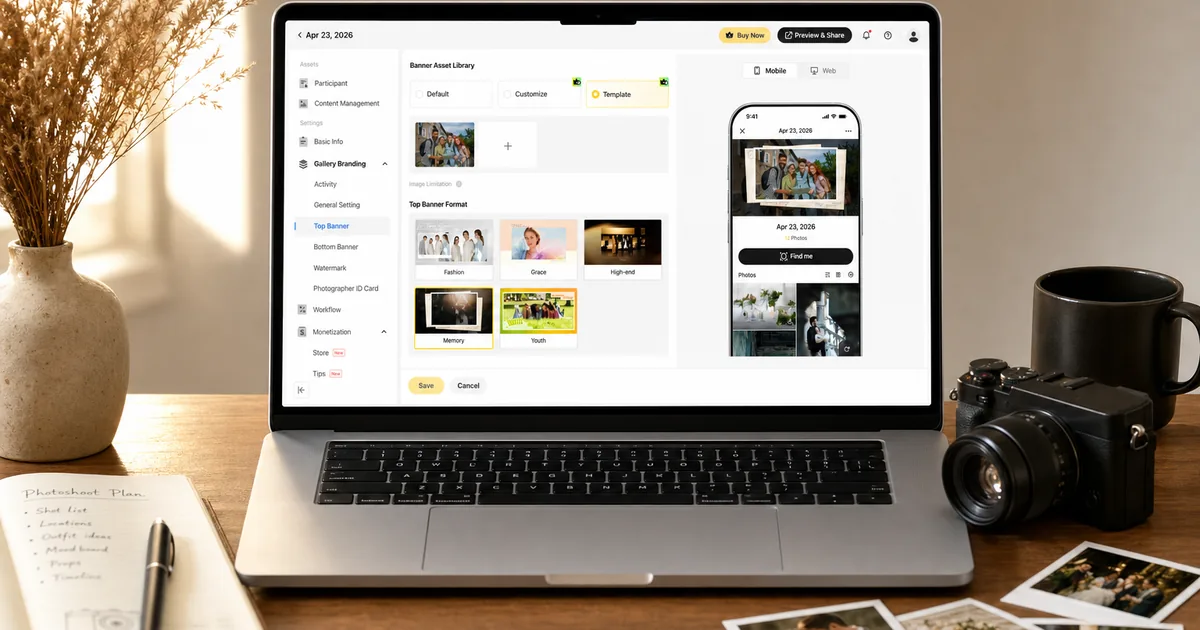
Every gallery goes out as a clean web link, optionally with a printable QR poster for on-site events. Clients open the link in any mobile or desktop browser and start browsing. There is no app to install and no Evoto Instant account to create on the viewer side. The branding sits at the top through a Top Banner, on the bottom through a Bottom Banner, and across each frame as up to five layers of customizable watermark, with Protective Overlays available on hover or for download-locked previews.
FaceKey for events with hundreds of subjects
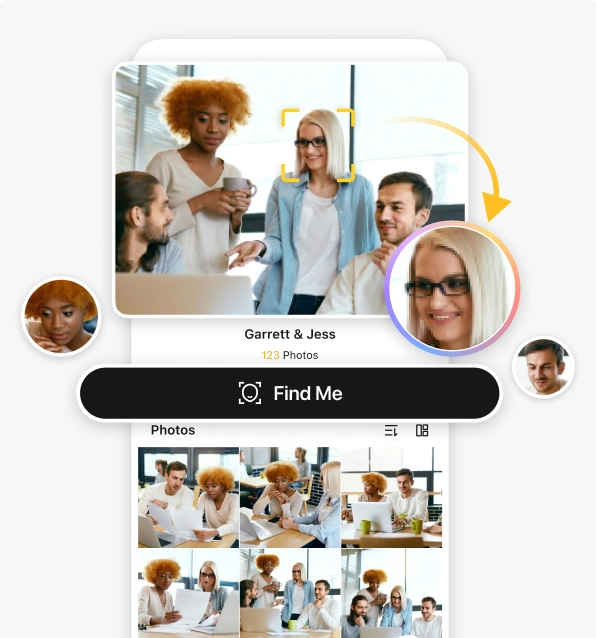
For school photo days, sports tournaments, corporate events, and large weddings, FaceKey Gallery removes the “scroll through 800 photos to find me” problem entirely. The photographer shares one link. Each guest is prompted to take a quick selfie and submit an email before the gallery loads at all. Once inside, they see only photos that contain their face. Other guests’ photos never appear in their view.
Find Me as an optional filter inside Full Gallery
Find Me serves a different role inside Full Gallery. Anyone who opens the gallery can browse the whole event, then optionally tap Find Me to scan their face once and switch to a personal “My Photos” view. No selfie is required to enter, and Find Me does not lock the gallery, it just filters what the viewer sees. This is the right setup for events where some guests want the whole experience and others want to skip straight to their own slice.
Built-in sales and Tips inside the gallery
For photographers who want to monetize delivery, three pricing modes live inside every gallery: pay-per-photo, free downloads with paid overage, and full-gallery unlock. Tips with preset or custom amounts can be turned on alongside any pricing mode. Secure checkout runs inside the gallery, and a Revenue dashboard surfaces sales, orders, ARPU, and free-to-paid conversion in the same workspace as gallery visits.
Online Photo Gallery Comparison: What Is Genuinely Different About Instant
The differences worth comparing show up across six dimensions.
- AI Culling integrated into the same project.
Evoto Instant: yes.
General gallery platforms: no, requires a separate culling tool. - AI Editing integrated into the same project.
Evoto Instant: yes.
General gallery platforms: no, requires Lightroom or a separate retoucher. - Face-locked gallery entry (FaceKey).
Evoto Instant: yes.
General gallery platforms: rare. Most platforms expose a face filter inside the gallery, not at the door. - Three independently configured galleries per project.
Evoto Instant: yes (Full, FaceKey, Personal).
General gallery platforms: one gallery per project. - Real-time arrival via tethered camera, mobile capture, or SD pull.
Evoto Instant: yes.
General gallery platforms: most require post-event upload. - In-gallery checkout for pay-per-photo, paid downloads, and Tips.
Evoto Instant: yes.
General gallery platforms: some, often with platform fees.
Who Evoto Instant Is Built For
Wedding photographers. Deliver a Full Gallery within hours of the reception, send a FaceKey link to every guest the next morning, and curate a Personal Gallery for the maid of honor and immediate family before the couple is back from honeymoon. Real-time arrival turns the wedding itself into a marketing event.
School photographers. Use FaceKey so every parent receives only their child’s photos without navigating a school-wide gallery. Multi-select Download lets parents pull a few hundred frames into one ZIP without help.
Event photographers. Conference, corporate, and sports clients expect attendees to walk away with a link by the end of the event, not a week later. The fast-delivery path turns this around in minutes.
Portrait and commercial photographers. Run the retouched-delivery path inside the same project. AI Editing handles batch retouching, the gallery hosts the proofing round through favorites and notes, and Personal Galleries deliver the final selects per client.
Setting Up Your First Gallery in Evoto Instant
- Create the project and import. Drag and drop on the web portal, pull from a connected camera or SD card on mobile, or import from cloud storage. Background deduplication keeps the project clean as photos arrive.
- Run AI Culling (optional). For jobs where selection quality matters, AI Culling removes blurry, duplicate, underexposed, and closed-eye frames before publishing. For fast-delivery jobs, skip this step and ship the gallery raw.
- Configure the three galleries. Decide which of Full Gallery, FaceKey Gallery, and Personal Gallery should be active for this job. Set Access Code, watermarks, Top Banner, Bottom Banner, and Activity Settings (Allow Favorites, Allow Notes, Allow Download).
- Configure pricing if monetizing. Pick pay-per-photo, free downloads with paid overage, or full-gallery unlock, and decide whether Tips should appear alongside checkout.
- Preview before sending. Preview Gallery opens any of the three galleries from a guest’s perspective so the photographer can confirm the Top Banner crops correctly, watermarks do not overlap critical faces, and FaceKey prompts the right entry flow.
- Share. Send the link, the printable QR poster, an SMS, or an email through the Share panel, and watch the Project Dashboard for visits, Find Me usage, downloads, and revenue in real time.
Final note
An online photo gallery is the last mile of every job, and it shapes how clients remember the experience. Slow delivery, confusing interfaces, and tools that cannot follow a photographer from import through monetization undercut the quality of the work that comes before them. Open a project in Evoto Instant before your next shoot, drop in your existing edited JPEGs through web drag-and-drop, and run a Full Gallery side by side with whatever platform you currently use. The first event you ship through Instant is usually the test that decides where future galleries live.