

TL;DR
- A sports team photo workflow is capture discipline + batch composite + named delivery—not sideline action coverage. Deliverable = consistent sports team photos, not per-frame beauty work.
- Run a Picture Day Run Sheet: roster CSV → 3-2-1 backup → tether naming → backdrop log → post-handoff with SLA written down.
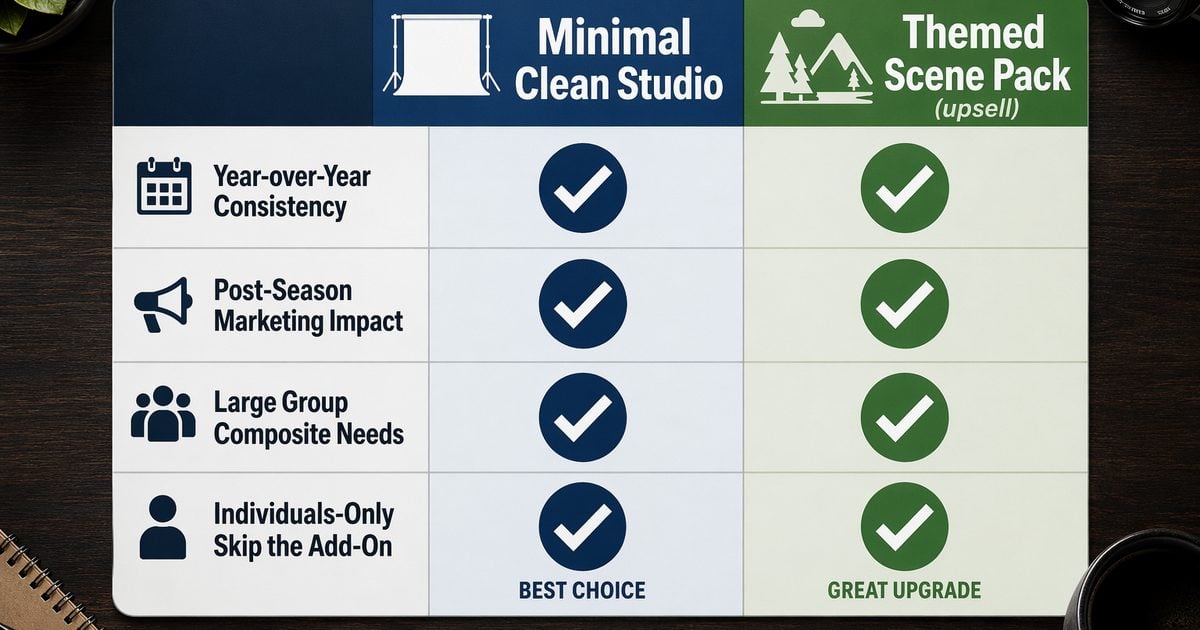
- Plain or themed composite? Minimal Clean Studio for league spec and speed; optional themed scene pack only when the contract sells a post-season or travel-team marketing upsell—decide in the order form.
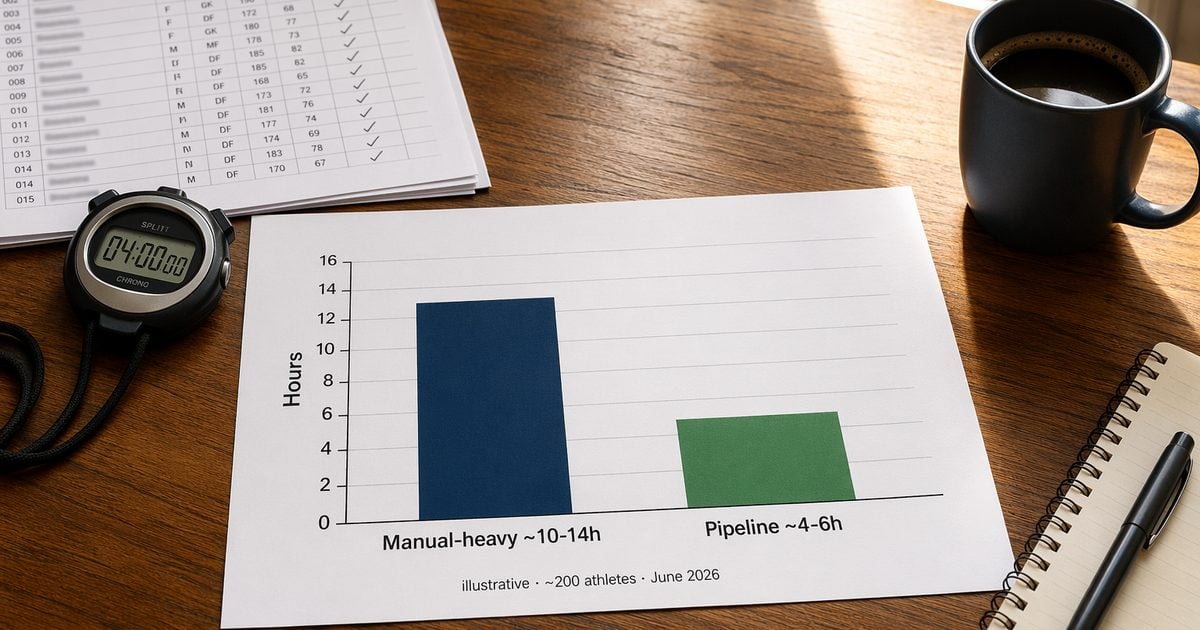
- Illustrative (~200 athletes · June 2026): ~600–1,000 raws → 200–400 deliverables · ~4–6 h pipeline vs ~10–14 h manual—not industry average.
- Color-lock before composite. Reference still → folder match → AI Background Fusion batch (≤1,000). Skip the lock, pay in Halo QA.
“We have 200 athletes, two coaches who want different poses, and one backdrop swap window before the next league arrives.”
If you shoot volume sports team photos, that sentence is not drama—it is Tuesday in the major summer sports season, when little league wrap-ups and July league deliveries land in the same week. The sports team photo workflow we mean here is capture discipline, batch composite, and manifest delivery—not match-day sideline coverage.
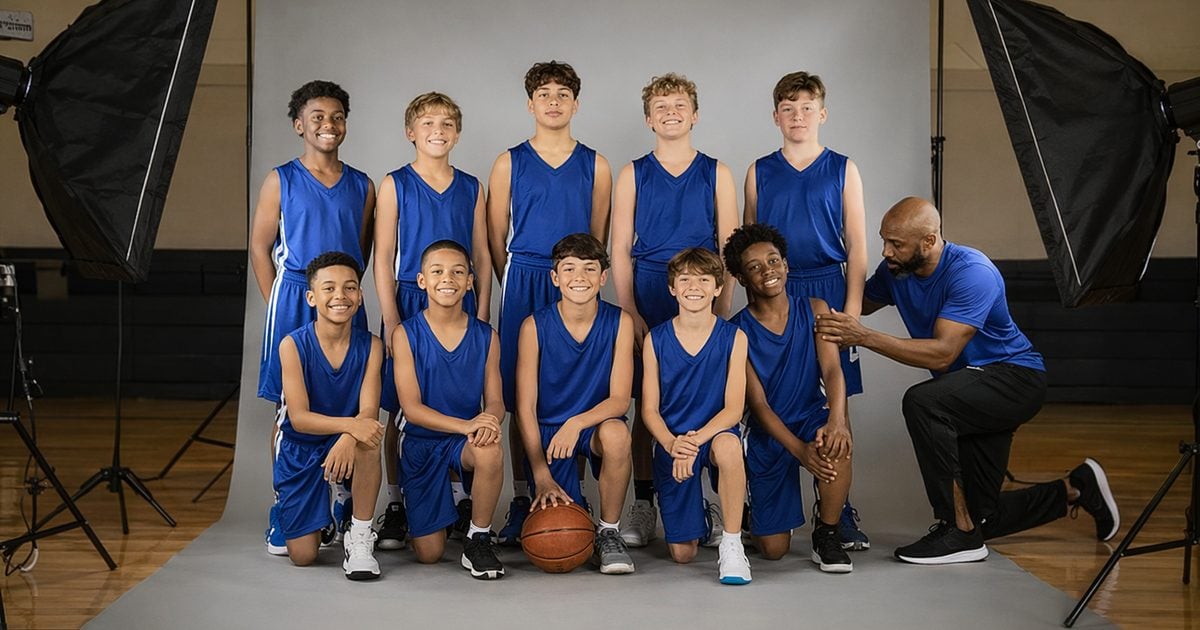
You need a Run Sheet the wrangler can read and a composite path chosen before anyone asks for “the themed team hero shot we saw on Instagram.”
Scope: Deliverable = standardized team + individual selects with consistent exposure/color and themed composite backgrounds—not per-frame beauty work on every athlete.
We run volume folders on Evoto when the job is roster-wide consistency and composite delivery—not because another app replaces your eye, but because cull → color lock → composite QA punishes slow folders during peak season. If you batch sports team photos every July, a repeatable Desktop project beats re-solving the same gates in three different apps.
Photographing Sports Teams — Capture Day Run Sheet
Photographing sports teams at volume means the same pass standards in a gym or on a pop-up grey. American Color Imaging’s school and sports photography workflow guide frames capture stations, barcode-to-roster discipline, and post handoff at league scale—and that spine covers little league team photos and travel-league packages alike.
The table below is what our lead prints—not inspiration, pass/fail gates.
| # | Node | Pass standard | Owner |
|---|---|---|---|
| 1 | Roster CSV loaded | Every athlete ID searchable | Lead |
| 2 | 3-2-1 backup before cull | Two media + offsite | Ingest |
| 3 | Tether + naming | Filename includes team + athlete ID | Capture |
| 4 | Team pose locked | Coach-signed reference photo | Capture |
| 5 | Individual loop | 3–5 selects per athlete | Capture |
| 6 | Backdrop log | Grey / solid / swap timestamp | Lead |
| 7 | Same-day spot check | Exposure + focus 10% sample | Lead |
| 8 | Handoff to post | Raw count + delivery SLA in sheet | Lead |
Planning range, not a quota: Tov Studio’s 2026 school and sports league guide cites 60–90 students per hour per station—an industry planning range, not an Evoto claim. The ACI guide adds what we care about most on picture day: athlete IDs must match the roster CSV from tether through export—no renaming marathons at delivery.
Volume planning context: The Professional Photographers of America (PPA) reminds studios that high-volume days still need cost-of-sales discipline; when post-hours slip, margin disappears before the next league arrives.
Gate 2: No cull until the 3-2-1 backup rule passes—three copies, two media, one offsite.
Build Your Picture Day Run Sheet (5 Minutes)
Copy these headers into Google Sheets or Notion—most studios have a live tracker before the next team lines up.
| Column | Purpose |
|---|---|
| Team ID | League/school |
| Athlete ID | Matches roster |
| Raw count | Frames shot |
| Backdrop type | grey/seamless/outdoor |
| Capture pass (Y/N) | |
| Backup pass (Y/N) | Cross-check 3-2-1 backup pass |
| Composite scene | Minimal / Themed / none |
| Delivery due | Contract date |
| Sign-off | Lead |
Formulas: Athletes_per_hour = athlete_count / capture_hours (sanity-check against Tov’s 60–90/h) · Delivery due = CAPTURE_DATE + contract_days. Dropdown Yes/No on pass columns; one row per team.
For post-capture editing after handoff, see our school and sports team photo editing guide.
Composite Team Photo Pipeline — Plain Backdrop vs Themed Scene
The composite team photo decision belongs in the contract, not in a Slack thread after cull. Most sports team photos in our studio ship on Minimal Clean Studio—high-key grey or white seamless that matches last year’s league folder. Themed composites are an optional upsell, not the default volume path.
| Client / contract need | Preferred path | Scene | Why |
|---|---|---|---|
| League requires year-over-year solid | Minimal Clean Studio · grey/white | Minimal | Fastest batch · aligns with school volume specs · lowest alignment risk |
| Post-season / travel-team marketing pack | AI Background Fusion composite | Themed scene pack | Hero backdrop without a stadium shoot or location permit |
| 200-athlete group team shot | Studio grey → composite | Minimal (default) | Matches team group photo delivery · spec-first |
| Individual selects only, no team frame | Skip team composite | — | Lowers alignment risk |
Minimal Clean Studio — high-key white or grey seamless for sports team picture packages that must match last year’s league folder. This is where ~80% of our July league deliveries land.
Themed scene pack (upsell only) — when a travel team or fundraiser sells a “team hero” marketing set, AI Background Fusion replaces the grey capture with a styled atmosphere—cutout, scene pack, foreground layer, character lighting fusion—without reshooting on location. Batch limit: ≤1,000 images per project on Desktop. Spot-check three athletes for character lighting after composite.
Scene naming note: Summer scene libraries may include looks built for fan portraits (e.g. Neon City Night). For roster team composites, we default to Minimal and only pull a nightlife-style scene when the contract explicitly sells that look—not because every sports folder needs a city backdrop. Fan-style neon minis belong on a separate SKU; see our football fan portrait guide in the sideline section below.
If your July league brief includes a themed upsell, new scene assets land with the Jul 9 peak-season update—worth locking the Run Sheet’s Composite scene column before capture day.
Folder-Wide Color Lock Before Composite — Reference Still Workflow
Western volume clients complain that “the team doesn’t look like the same light”—this section is lighting and color consistency, not per-frame finishing. These steps run in a single Evoto Desktop Project after the cull and 3-2-1 backup pass.
Capture-side: Grey card at session start. Three-light setup: do not change power mid-team. Same backdrop block per squad. Note when uniforms are not officially licensed—you deliver consistent light; you do not invent logos in post.


Powerful AI Photo Editor
Post: reference still workflow in Evoto Desktop
Quick steps — folder color lock
- Open the roster folder as a single Project on Evoto Desktop.
- After cull, flag one hero reference still—middle exposure, sharp eyes, representative kit color.
- Select all keepers → run AI Color Transfer (AI Color Match) to align exposure and white balance to that still.
- Preview a repeatable look with AI Color Looks on three athletes (light/medium/shadow side)—commit one look before you batch the roster folder.
- Park outliers in an exception queue. If more than 5% land there, fix capture notes for the next league.
Quick steps — themed composite (only if contract requires)
- With the folder color-locked, open AI Background Fusion.
- Choose Minimal Clean Studio for spec-matched league delivery—or your contracted themed scene pack for post-season marketing upsells.
- Batch apply to the keeper set (≤1,000 images per project); split by team if you exceed the cap.
- Spot-check cutout edges and character lighting on three athletes before export.
Failure mode: Composite before the reference lock and team-row color drifts. The extra 10 minutes of color lock beats an hour of halo QA. The same reference still carries into Minimal or themed scene work without a second grade pass.
Batch Numbers + Time — Sports Team Photo Workflow Delivery Math
This sports team photo workflow table is our studio illustrative log—not a national industry average. Scope before you quote:
- ~200 athletes ≈ 600–1,000 raws → 200–400 deliverables (team + individual selects)
- Exposure/color consistency only—not per-frame beauty work on every athlete
- 1 lead retoucher + Desktop · June 2026 single timer test
| Stage | Manual-heavy | Pipeline-optimized | Notes |
|---|---|---|---|
| Ingest + backup | 45–60 min | 30–45 min | 3-2-1 complete before cull |
| Cull | 90–120 min | 45–60 min | AI Culling + human confirm |
| Reference color lock | 90–150 min | 35–55 min | Reference still + folder match + look preview |
| Cutout spot-check | 60–90 min | 25–40 min | Cutout QA via bulk background remover |
| Composite (Minimal/Themed) | 180–240 min | 60–90 min | AI Background Fusion batch ≤1,000 |
| Alignment QA | 45–60 min | 20–30 min | Feet / perspective / halo |
| Export + manifest | 30–45 min | 30–45 min | Team folder naming |
| Total · ~200 athletes | ~10–14 h | ~4–6 h | Illustrative studio test |
June 2026 walkthrough: 200 athletes · ~820 raws · 5.5 post-hours · reference lock → Minimal composite · Desktop.
Photography Life notes cull often eats more sitting time than polish—we shift that time toward color lock and composite QA.
If you batch composites across multiple league weeks this summer, run your own stopwatch first—then compare Desktop batch tiers on Evoto pricing when you are sizing July volume.
Group Alignment Checklist — Composite Team Photo QA
Composite QA is alignment and lighting—not a per-face finishing pass. Five checks before export:
| Check | Pass standard |
|---|---|
| Foot contact line | No floating feet · front/back row consistent |
| Shoulder perspective | Back row not enlarged or pinched |
| Team color temperature | Matches reference still · spot-check 3 athletes |
| Edge halo | Hair/netting within acceptable fringe |
| Name/number boards | No unauthorized league logos in frame |
Before you batch the next league folder, run a 50-frame slice test on Evoto Desktop: pick one squad’s keepers, walk them through color lock → Minimal (or your contracted themed scene) → this alignment checklist. If feet, halos, or color drift fail on the slice, fix the Run Sheet and reference still—not on export night.
When the July league wrap-up leaves calendar gaps, some studios add studio fan portrait minis as an upsell—a separate SKU from team composite delivery.
Sideline vs Studio Composite — What Blog Football Photography Skips
Our Football Photography guide covers match-day sideline capture; this article covers composite delivery SOP for roster sports team photos on grey or seamless. For thousand-frame cutout habits before composite, see our batch portrait editing workflow companion post.
Export Manifest and Same-Week Handoff
Naming is the last gate—if the manifest misses the roster CSV, the client renames 400 files and you lose the referral.
File pattern: TeamID_AthleteID_Composite_v1.jpg · team composites: TeamID_TeamComposite_v1.jpg. Deliver team JPEGs, individual selects, and a manifest CSV aligned to the roster.
Client email: count · download window · optional fan-mini quote for league wrap-up weeks.
Sign the Run Sheet when export passes—not when the coach texts “any update?”
The value of a sports team photo workflow is turning sports team photos from “we’ll fix it tonight” into Run Sheet + Batch Numbers you can hand to the next league unchanged.
Build the sheet, lock the reference still, batch the scene, export the manifest. Build For Your Peak Season scene packs and bundle details go live Jul 9—if your July league contracts include a themed upsell, block capture day after you know which Minimal Clean Studio or themed scene path you are delivering. Until then, tighten the Run Sheet and edit caps—not discount messaging.
(Note: summer scene assets and subscription terms publish Jul 9 on Evoto pricing.)
Powerful AI Photo Editor
FAQ
Plain backdrop or themed composite for sports team photos?
Minimal Clean Studio when the league wants year-over-year solid backgrounds—fastest batch, lowest alignment risk. Themed scene pack only when the contract sells a post-season or travel-team marketing upsell without a stadium shoot. Write the path in the order form so post is not negotiating composites after cull.
How many post-hours for ~200 athletes?
Our illustrative June 2026 studio test logged ~5.5 post-hours on ~820 raws pipeline-optimized; the table range is ~4–6 h vs ~10–14 h manual-heavy. That is one lead + Desktop, not a national average—run your own stopwatch before you promise same-week delivery.
Can AI Background Fusion batch a full league folder in one project?
Up to 1,000 images per batch on Desktop for AI Background Fusion. A ~200-athlete folder usually fits one project after cull; split by team if your keeper count exceeds the cap. Composite is cutout + scene fusion—not generative athletes.
Should you color-lock before or after composite?
Before. Pick one hero reference still after cull, match the folder’s exposure and white balance, preview the look, then composite. Skipping the lock causes team-row color drift against Minimal or themed scenes and costs more in QA than the extra color-lock minutes.
Does Evoto use league photos for AI training—and is batch compositing ethical?
Evoto’s Privacy Policy states that your content is not used to train generative AI models without explicit opt-in. AI Background Fusion performs cutout and composite on your captures—it does not invent athletes. Obtain parent/guardian consent for minors and disclose composite backgrounds where your jurisdiction requires it.
Themed composite or Minimal for a July league package?
Minimal for spec-matched league folders—the default for most sports team photos. Themed only when the client bought a marketing upsell; choose in the Run Sheet’s Composite scene column before capture day, not in export. Summer scene details publish Jul 9.
Methodology & Author
Author: Evoto Editorial Team — volume sports workflow editors
Experience basis: illustrative team-volume model · June 2026 timer test · ~200-athlete composite walkthrough
Market context: American Color Imaging volume workflow; Tov Studio 60–90/h planning range (industry guide); PPA cost-of-sales discipline on high-volume days; Photography Life culling time share
Limitations: production composite and folder batch require Evoto Desktop; hours table is studio illustrative—not industry median; scope is color consistency + composite, not per-frame beauty work
Last reviewed: 2026-07-01



