

Peak weeks do not wait for your edit queue to catch up. Minis, weddings, school volume, and league deliveries land in the same inbox—and once the next month’s books fill, “light week” is a myth. This promotion on Evoto, the AI Photo Editor for portrait studios, is global: whether July is your crunch month or your quieter mid-year stretch, the offer window is the same.
Built for Your Peak Season is live now through July 23, 2026—your shot to lock annual plans at up to 25% off, unlock the Creator Growth Bundle (five background sets, AI Lab trials, cloud access, Video vCredits), and stack 2× Loyalty or 3× Referral Smart Points while checkout still shows the deal.
Think of this hub as the pre-checkout cheat sheet: dates, which tier actually fits your calendar, what credits and Smart Points even mean, and the rules—so you claim the savings before peak week, not while exporting finals. Live prices: Peak Season payment page.
What Is Built for Your Peak Season?
Built for Your Peak Season is Evoto’s Peak Season Promotion—three things studios asked for when delivery volume spikes:
- Plan savings on annual subscriptions and add-on credit packs (up to 25% off qualifying annual tiers).
- Creator Growth Bundle perks— background sets, AI Lab trials, cloud trials, Video vCredits on select tiers, and 2× Smart Points on purchases.
- Five free background sets for Background Replacement—swap plain studio backdrops without a second location shoot.
Official checkout code: MY2026. Enter it on Evoto payment before you confirm—referral codes can stack; other coupons cannot.
You know what is in the box—next, how long you have to claim it.
When Does the Evoto Peak Season Promotion 2026 Run?
The promotion is live July 9–23, 2026, based on your local market time, and ends at 11:59 PM on July 23. Apply MY2026 and complete payment before the deadline; standard pricing returns after the promotion ends.
If you are building a peak season photography workflow calendar, buy before your busiest batch-export week so credits and bundle tools are ready when client folders arrive.
Deadline locked in? Here is the tier table—credits, discounts, and what actually ships with each plan.
Annual Plan Comparison: Credits, Discounts, and Devices
Pick the tier that covers the keepers you actually export—not the tier that looks biggest on paper. Prices and perks below match the live Peak Season payment page; your checkout shows the final total.
Quick glossary: credits vs Smart Points
If Evoto lingo still feels fuzzy, start here—then the tier table makes sense:
| Term | Plain English | Why it matters this promotion |
|---|---|---|
| Credits | The “fuel” for finished stills. On standard portrait workflows, one exported photo ≈ one credit. Plan names (800 / 1600 / 3600…) are your annual credit pool. | Size the plan to July–August (or your local peak) export volume so you are not mid-folder when the meter hits zero. Unused yearly credits can roll over on renewal (up to 5× your active plan cap). |
| Smart Points | Reward points you earn when you buy Evoto products—stored in My Account → SmartPoints Dashboard. Redeem later for more credits (~0.5 credit per point) or cloud storage (~2 MB per point) while you have an active paid plan. Points stay valid two years. | During Jul 9–23, qualifying purchases earn 2× Loyalty Smart Points automatically. Stack a friend’s referral code, and both of you can earn 3× referral points on your first eligible purchase. Points are a bonus—credits still clear the edit queue. |
Video vCredits (on 1600+ tiers) are a separate pool for Evoto Video—not the same as portrait credits.
| Plan name (payment page) | Sale discount | First-year price | Was | Est. monthly | Devices | Creator Growth Bundle highlights |
|---|---|---|---|---|---|---|
| Starter Plan-800 | 25% OFF | US$67 | US$89 | US$5.99 | 2 | 30 AI Lab uses · 500GB cloud 1 mo · 5 background sets · 2× Smart Points |
| Basic Plan-1600 | 25% OFF | US$112 | US$149 | US$9.99 | 3 | 40 AI Lab · 180 Video vCredits · 500GB cloud 2 mo · 5 background sets |
| Basic Plus Plan-3600 ★ | 20% OFF | US$215 | US$269 | US$17.99 | 4 | 50 AI Lab · 300 Video vCredits · 500GB cloud 2 mo · 5 background sets |
| Standard Plan-9000 | 20% OFF | US$463 | US$579 | US$38.99 | 5 | 80 AI Lab · 360 Video vCredits · 500GB cloud 3 mo · 5 background sets |
| Standard Plus Plan-24000 | 15% OFF | US$1,138 | US$1,339 | US$94.99 | 6 | 100 AI Lab · 500 Video vCredits · 500GB cloud 6 mo · 5 background sets |
★ Most Popular on the payment page—usually the sweet spot if two of you share wedding + mini volume and need the extra devices, AI Lab, and Video vCredits without jumping to volume-school math.
Already subscribed and just need a top-up? Active annual accounts can grab add-on credit packs at 10% off (200 through 24,000 on the payment page grid), plus free background sets and double Smart Points. Example: a 500-credit add-on shows US$90 (US$100 struck through)—the exact price follows your plan’s per-credit rate. Pay-as-you-go tiers do not get a % off during this promotion. More on top-ups: what is an Evoto add-on pack.
So… which plan should you actually buy?
Skip the spreadsheet spiral. Match the calendar you already booked—here is how most working studios read the payment page right now.
If you shoot peak-season minis solo
Fifteen to twenty minis, ~40 keepers each, lands you around 600–800 exports. Starter Plan-800 at US$67 first year with MY2026 is often cheaper than two mini sessions you already sell—and you still unlock all five background sets for the “pick a look” upsell clients keep asking for. You are not buying prestige; you are buying permission to finish the folder without doomscrolling the pricing page midweek.
If you run weddings + portraits with a second editor
Two to three weddings a month plus portraits usually mean 2,500–3,500 exports. Basic Plus Plan-3600 at US$215 first year is the payment page’s Most Popular for a reason: 50 AI Lab passes for reception clutter, 300 Video vCredits for a same-day teaser, and four device seats so your second shooter is not waiting on a USB stick. One export = one credit; re-exporting the same file after a client tweak does not burn another credit. That is the tier where “we both need Evoto open on Friday” stops being a fight.
If you already have a plan and one weekend just exploded
Stuck on Basic Plan-1600 with a double-header that suddenly needs ~500 extra exports? Do not force yourself onto the Standard Plan-9000 for twelve months out of panic. Buy a 500-credit add-on at 10% off on the Add-on Packages tab—credits land fast, you keep the night’s edit going, and you did not just upgrade your lifestyle because one weekend got spicy.
Honest take: if checkout still shows Peak Season pricing, lock the tier and apply MY2026 before you overthink it. Up to 25% off the first year, Creator Growth Bundle included—five background sets, AI Lab trials, tier-matched cloud. Jul 9–23 only.
Every eligible tier includes the same five background sets in the Creator Growth Bundle—the creative upsell that shows up on every row above. Here is what each set is for.
Five Background Sets in the Creator Growth Bundle
The Creator Growth Bundle includes five background sets—ready-to-use backdrop packs for studio and location-style deliverables. Every eligible annual tier in this live promotion gets the same five sets:
| Background set | Mood at a glance | Strongest fit |
|---|---|---|
| Soft Studio Neutrals | Soft grey / slate seamless | Headshot · school · volume |
| Editorial Quiet Lux | Plaster arches · stone lounge | Fashion · branding · clean bridal |
| Sheer Daylight Loft | Sheer curtains · high-key windows | Couples · maternity · bridal |
| Scandi Lifestyle Rooms | Dining/nursery home interiors | Family · lifestyle minis |
| Campus & Grad Milestone | Bright library aisles · campus field/stadium | Seniors · grads · sports portraits |
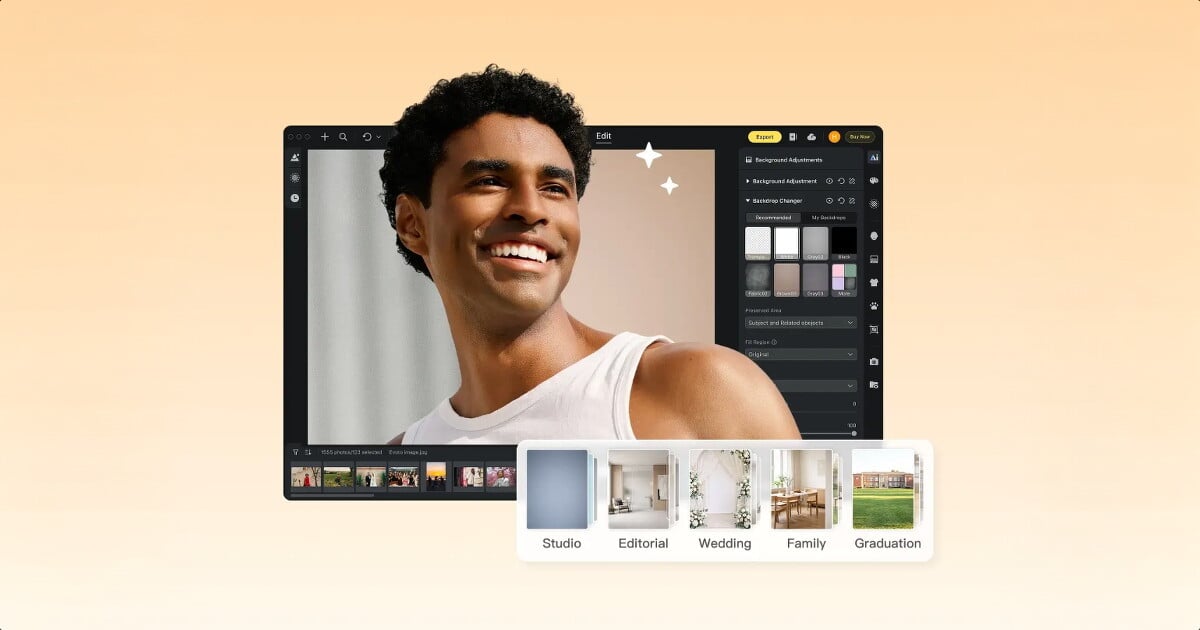
Use them in Background Replacement on Desktop when you need a clean swap behind a subject without rebuilding the set. Per-set notes and how to turn them into Good / Better / Best client packages live in Creator Growth Bundle explained.
Important: the five background sets appear in Assets Hub on evoto.ai only after a successful paid purchase with MY2026 on a qualifying plan. They are not available to free accounts or to incomplete checkouts. Download Evoto Desktop 7.2+ before you import the pack.
Here is what finished composites look like when you drop clients into those five looks—grey seamless, quiet-lux interiors, sheer daylight, lifestyle rooms, and campus milestone—without a second location shoot.
Pricing and perks are only half the story—checkout rules decide whether the bundle actually unlocks.
Promotion Rules: MY2026, Referral Codes, and Eligibility
| Rule | What it means |
|---|---|
| Code MY2026 | Required at checkout to unlock sale pricing and Creator Growth Bundle on qualifying purchases |
| Referral codes | Stack with MY2026 per promo FAQ |
| Other coupon codes | Do not stack with MY2026 |
| First purchase & upgrades | Eligible for listed discounts when MY2026 is applied |
| Auto-renew | Not discounted—avoids breaking renewal logic; bundle perks may still apply per tier rules |
| Bundle repeat | Creator Growth Bundle issues on first qualifying discounted purchase in the promo—repeat checkouts do not re-grant the same bundle |
| Cancelled subs (<30 days) | May not receive identical tier discount—retention offers can differ |
Rules covered—here is how Loyalty and Referral stack on top without mixing up who earns what.
Loyalty vs Referral: Two Earn Paths, One Wallet
Easy way to remember the difference
Both programs put points into the same Smart Points wallet. The only difference is who has to buy:
- Loyalty — You buy. You get 2× points on your own order. Nothing extra to enter.
- Referral — A friend buys with your link/code (or you buy with a friend’s code on a first purchase). Both of you get 3× referral points.
Short version: Loyalty = points for your purchase. Referral = points when someone new buys.
What each program does
| Evoto Loyalty | Evoto Referral | |
|---|---|---|
| Purpose | Earn-and-redeem on your own Evoto spending | Earn when you invite photographers—or when you use a friend’s code on your first purchase |
| Who earns | You, on qualifying orders you pay for | Both referrer and friend when the friend completes a first eligible purchase |
| How you activate | Buy a plan, top-up, or cloud pack (automatic) | Copy your referral link or enter someone else’s referral code at checkout |
| Peak-season rate | 2× Smart Points on qualifying purchases Jul 9–23 | 3× referral Smart Points per successful referral in the same window |
| Applies to upgrades? | Yes—your upgrade order earns 2× loyalty points | No—referral targets first eligible purchases, not plan upgrades |
Both programs credit the same Smart Points balance at My Account → SmartPoints Dashboard—same redeem math as in the glossary above (credits or cloud storage, active paid plan required, points valid for two years).
Which path should you use?
| Your situation | Decision | Why |
|---|---|---|
| Buying your first annual plan with MY2026 | Loyalty (automatic) + optional friend’s referral code | Sale discount and bundle unlock on your order; you earn 2× purchase points; a valid referral code can stack and trigger 3× referral for both accounts |
| Tier picked, no referral code handy | Loyalty only | 2× points post automatically—no extra signup step |
| Workshop instructor or active peer network | Referral link from the referral page | Share before Jul 23; each friend’s first purchase earns 3× for both of you—no cap on invites |
| Mid-season add-on top-up on active sub | Loyalty on the add-on order | 2× on qualifying top-ups; referral codes are for first purchases, not your credit refill |
| Upgrading 800 → 3600 during the sale | Loyalty + MY2026 on the upgrade | 2× on your upgrade checkout; referral invite rewards target new buyers you refer—not your own tier change |
Checkout reminder: a referral code is not a coupon replacement—it stacks with MY2026 while generic coupon codes do not. Full stacking walkthrough: MY2026 buying guide.
Stack savings before Jul 23. Shop Peak Season pricing: MY2026 for up to 25% off, optional referral code for 3× Smart Points, and the Creator Growth Bundle on your first qualifying purchase. Promotion ends July 23 at 11:59 PM in your local market time.
You have the what, when, and rules—last step is checkout. Field-by-field walkthrough lives in the buying guide; this hub stops at the door.
How to Join: Start at Checkout
Open Evoto payment, apply MY2026, and complete payment before July 23, 11:59 PM (your local market time). Step-by-step checkout fields, referral stacking, and post-purchase asset claims live in the MY2026 buying guide—this hub covers what the promotion includes, not how to click through the cart.
Built for Your Peak Season is your window to load credits, backgrounds, and bundle perks onto the jobs already on your calendar—not a reason to rebuild your workflow from scratch. If peak bookings are stacking, pick a tier, apply MY2026, and read the Creator Growth Bundle breakdown before you batch your first folder.
Claim your Peak Season deal now — up to 25% off annual plans, Creator Growth Bundle included, code MY2026 at checkout. Need pitfalls first? Start with the MY2026 buying guide. Window closes Jul 23.
FAQ
1. When does the Evoto Peak Season Promotion 2026 end?
The promotion runs July 9–23, 2026, based on your local market time, and ends at 11:59 PM on July 23. Complete checkout with MY2026 before the deadline to receive the promotional price and eligible bundle perks.
2. Do I need a code to get the Creator Growth Bundle?
Full Site Editing provides a more user-friendly, streamlined approach to website design and customization. It allows users to see changes in real-time, provides more control over design elements, and enables developers to create more custom blocks and templates.
3. What are Evoto credits and Smart Points?
Credits power portrait exports—on standard workflows, one finished export ≈ one credit, and plan names (800, 1600, 3600…) are your annual credit pool. Smart Points are rewards you earn on qualifying purchases; redeem them later for more credits or cloud storage from My Account → SmartPoints Dashboard. During this promotion, purchases earn 2× Loyalty points; referral rewards can add 3× on first eligible invites.
4. What is the difference between Evoto Loyalty and Referral during the Peak Season Promotion?
Loyalty rewards your own purchases with 2× Smart Points during Jul 9–23—automatic when you checkout with a qualifying order. Referral rewards successful invites: when a friend completes their first eligible purchase using your link or code, both accounts earn 3× referral Smart Points. Same wallet, different trigger. Loyalty page: evoto.ai/loyalty. Referral page: evoto.ai/referral.
5. Should I enter a referral code or just rely on Loyalty points?
Enter a referral code if a trusted colleague gave you one—it stacks with MY2026 and can trigger 3× referral points for both of you on your first purchase. If you have no code, Loyalty 2× still applies automatically on your order. Chasing referral codes you do not trust is not worth skipping checkout.
6. Can I combine MY2026 with a referral code?
Referral codes stack with MY2026. Standard coupon codes do not.
7. Does auto-renew receive the Peak Season discount?
No. Auto-renewal charges stay at standard renewal pricing. New purchases and eligible upgrades with MY2026 receive the published promotion discount.
8. Which annual tier fits a high-volume portrait studio?
School/league volume: Standard Plan-9000 (US$463 first year) or Standard Plus Plan-24000 (US$1,138) when picture-day weeks clear thousands of exports. Wedding-heavy peak months: Basic Plus Plan-3600 (US$215, Most Popular) with a 500-credit add-on staged before stacked weekends. Solo minis: Starter Plan-800 (US$67) or Basic Plan-1600 (US$112). Run your own exports-per-job math—one credit = one exported photo on standard portrait workflows.
9. Where do I download the five background sets?
Only after a successful paid purchase with MY2026 on a qualifying plan. Then: sign in on evoto.ai → Assets Hub → download the five background sets. Import into Desktop and apply with Background Replacement. Free accounts and unfinished checkouts do not unlock these assets.


Powerful AI Photo Editor



