
An Amazon hero is due tonight. The client only has a group-chat JPEG. Type on the pack is already tiled. Search results for remove JPEG artifacts split in two. Half teach Clarity. Half sell a magic enhancer. You need a 2026 shortlist that can still ship.
People also type image depixelizer and unpixelator for the same mess. This review treats that as a deblock job. It is not a hunt for a magic restore button. For button-level teaching, read how to unpixelate an image. If you cannot tell tiles from blur yet, start with how to make a pixelated image clear.
TL;DR
- Score tools on edge rebuild, identity, output size, batch, and privacy.
- Photoshop first if the file is already open. Evoto when delivery texture matters.
- Canva Upscale is the anti-example. Enlarge is not the same as a JPEG artifact remover.
The rest of this page is a Best Tools to Unpixelate Image 2026 scorecard. Read the rubric, then the table, then the seven short reviews.
How We Score Tools That Remove JPEG Artifacts
A tool that can remove JPEG artifacts has to rebuild 8×8 block edges. Sharpening compression trash is a fail. JPEG stores color in those blocks. Chat apps and extra saves stack more of them. Photo Stack Exchange covers that format fact. Adobe’s JPEG Artifacts Removal help is the Photoshop reference.
We score five things. Each one is a photographer question, not a lab claim.
- Edge rebuild versus sharpen. Do tiles actually open, or did Clarity paint a brighter grid?
- Identity and texture. Does the sitter still look like the sitter? Reddit threads flag plastic skin and redrawn eyes for a reason.
- Output size. Can you still crop or print? Think 2K, 4K, or 6K as a delivery question, not as a contest for the largest badge.
- Batch and workflow. One browser still versus a Desktop folder. A batch photo enhancer mindset only helps if faces survive the stack.
- Privacy and honesty. Does the product explain uploads? Does it pretend to restore camera pixels? Does it hint you can unlock a censored mosaic? We will not teach that. A honest JPEG artifact remover refuses that job.
Use those five rows as a sticky note while you read the table. Ads with glowing before and after still have to pass a 100% crop.
We scored the way a studio would on deadline. Open a chat JPEG with type. Open a portrait with tiles on a cheek. Zoom to 100%. If identity slips, the tool fails even when marketing looks sharp. No stopwatch claims. No invented user counts. Just those two crops and the five questions.
Quick Shortlist: Seven Ways to Clean Blocky JPEGs
Best tools to unpixelate images in 2026 still start from the same job. You are here to rebuild tiled edges, not to collect every enhancer badge. The table is the scan. The reviews below are the proof.
Price language stays qualitative. Seats, credits, and Creative Cloud you already pay are enough. We do not invent promo percentages.
| # | Tool | Best fit | Weak spot | Price logic |
|---|---|---|---|---|
| 1 | Photoshop Neural Filter | Single file already in PS | Heavy compression; easy global sharpen | Seat you may already have |
| 2 | Evoto | Delivery portraits and later retouch | Web is one frame | 3 free web generations, then credits |
| 3 | Picsart | Social stills | Weak brand-hero control | App plus credits |
| 4 | Pixelbin | Browser trial with stated limits | Thin portrait finishing | Credit packs |
| 5 | Topaz Photo AI | Studio rebuild budget | Cost and invented texture | Desktop license |
| 6 | LetsEnhance | Catalog folders | Faces need spot checks | Subscription |
| 7 | Canva Upscale | Layout inside a design file | Weak deblock story | Design seat |
General photo enhancer sites can lift overall look. That is a different job. See Evoto’s photo enhancer sites guide if you need that broader list. Stay here when the crop is tiled.
Best Tools to Remove JPEG Artifacts in 2026
This section is the list, numbered 1 to 7. Each heading is a tool name plus a short hook. Steps tell you what to watch, not a second tutorial. If a product cannot rebuild the grid without redrawing a face, it fails the shortlist even if the ad looks sharp.
1. Photoshop: Neural Filter You Already Own
You are already in Photoshop. The first honest pass is to remove JPEG artifacts Photoshop works with JPEG Artifacts Removal. Adobe documents that Neural Filter. It is a layer-friendly rescue, not a portrait suite.
Compared with Evoto, Photoshop wins on masks you already know. It loses when you need a delivery-sized set and later skin work in one place. A retoucher who already lives in layers should not bounce a single invite file into a new app first. Save that jump for folders and print size.
Strengths include layer control and a filter built for JPEG Artifacts Removal rather than crank Clarity. Limits include heavily compressed chat files that have no structure left. There is no photography delivery kit hiding in that one filter.
The three checks below are review notes. They are not a second Photoshop tutorial.
Step 1: Open the JPEG and Zoom to 100%
Look at type, sky, and skin. Count tiles. If the frame is only a smear, leave this filter. Diagnosis belongs in the companion triage post.
Step 2: Run JPEG Artifacts Removal as a Neural Filter
Start low. Watch block edges open. Stop when skin goes porcelain. The goal is to open tiles, not to glaze the face.
Step 3: Check Hair, Type, and a Tight Crop Before You Save
If letters stay mosaic, the file is spent. Save a copy. Do not stack a new JPEG generation. Longer layer teaching lives in the how-to companion.
Photoshop Creative Cloud is a seat many studios already pay. Support sits in Adobe Help. Use this path for one file on a layer stack.
2. Evoto: Delivery Repair, Same Face
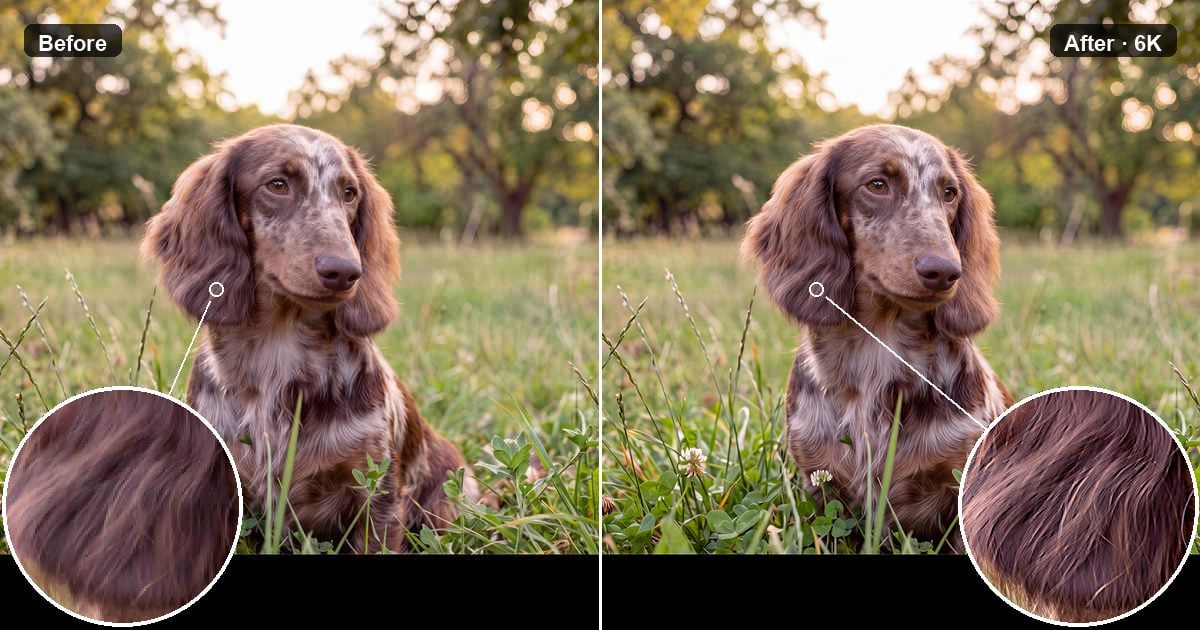
Evoto is for a delivery file that still looks like the sitter. There is also an online Unpixelate Image tool in the browser. New users get 3 free generations to try that web path, then credits apply. Exports have no watermark.
- Web handles one still: Upload, 2K / 4K / 6K, Generate, free download.
- Desktop uses “AI Lab”, “Enhance & Restore”, and “Detail Enhance”. Resolution Upscale includes “No Upscale”. Batch Edit covers a folder.
That is an AI Photo Editor workflow, not a cheap clone of Topaz. If you want a Topaz photo AI alternative for portraits, you are choosing a retouch suite with repair inside it. You are not buying the same standalone reconstruction box.


Powerful AI Photo Editor
People hunting an image depixelizer often want the same deblock. The product job here is still to remove JPEG artifacts on a client JPEG.
Strengths: texture that can survive delivery, a path into portrait finishing, and a clear privacy stance. Limits: Web has no batch. A wrecked file still has a ceiling.
Use the online remove JPEG artifacts tool when you want that delivery path. The steps below are review checks.
Step 1: Upload the Blocky JPEG, Not a Screenshot of the JPEG
A screenshot adds another tile layer. Web is the single-frame trial. New-user credits cover those first three generations. Confirm the file still shows 8×8 structure before you spend a generate.
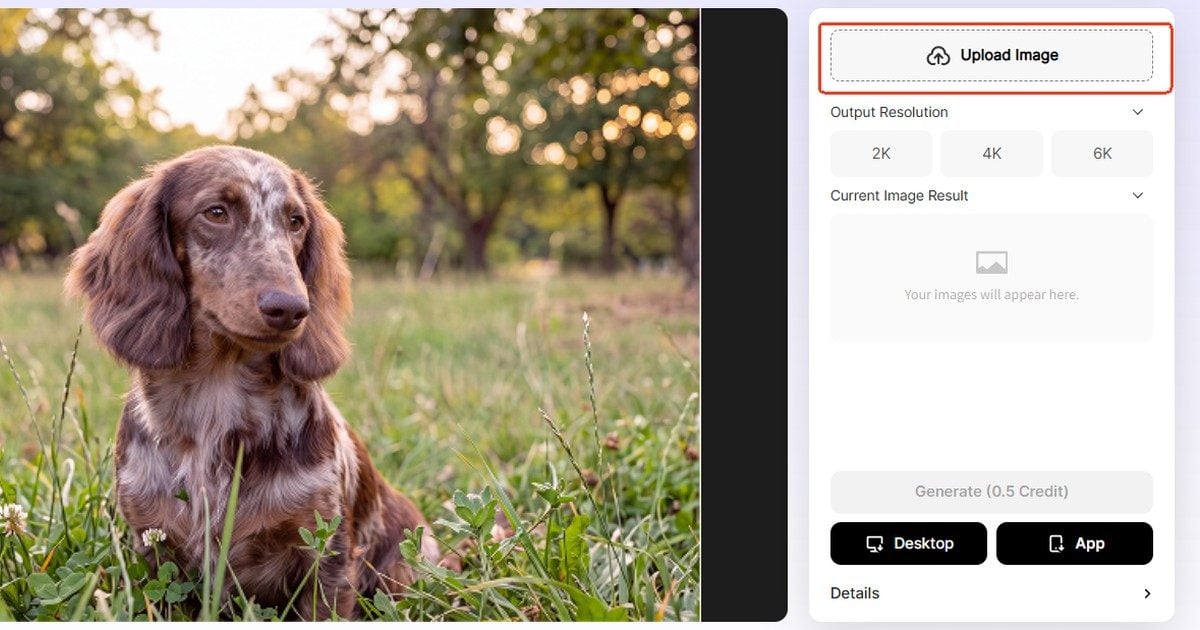
Step 2: Pick 2K, 4K, or 6K, Then Generate
Catalog heroes often ship at 2K. Keep 4K or 6K for crop or print. After generating, ask one question. Is this still the same person?
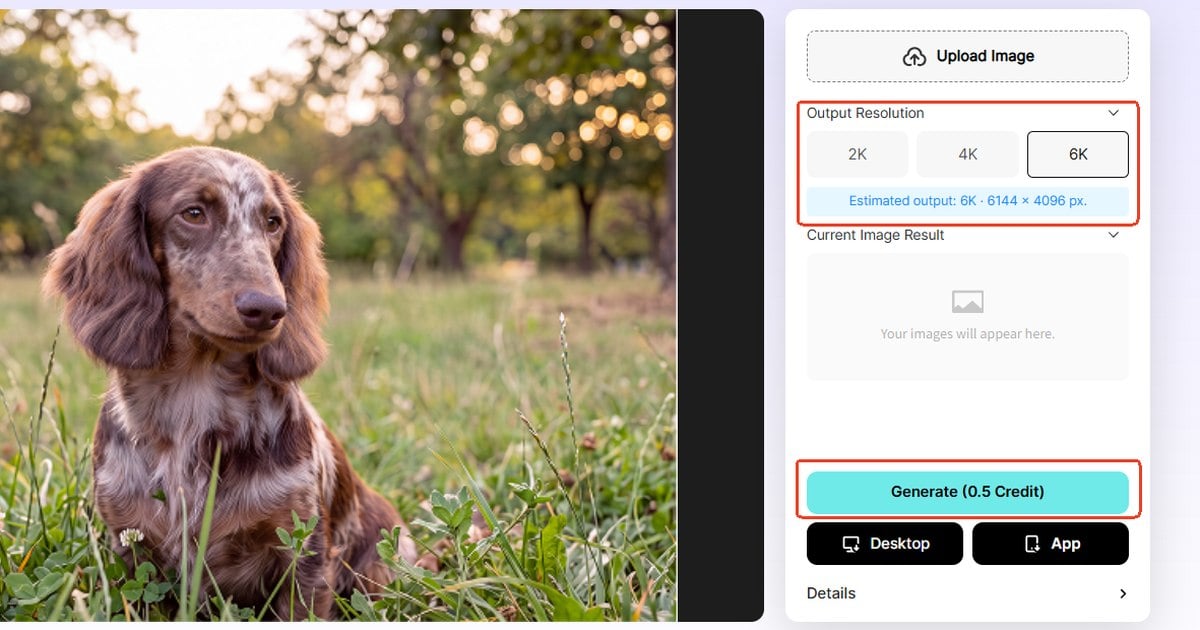
Step 3: Download the Free Result and Crop at 100%
Check hair, pores, and fabric. If eyes redraw, drop a size or stop. Do not sharpen on top. That would undo the deblock.
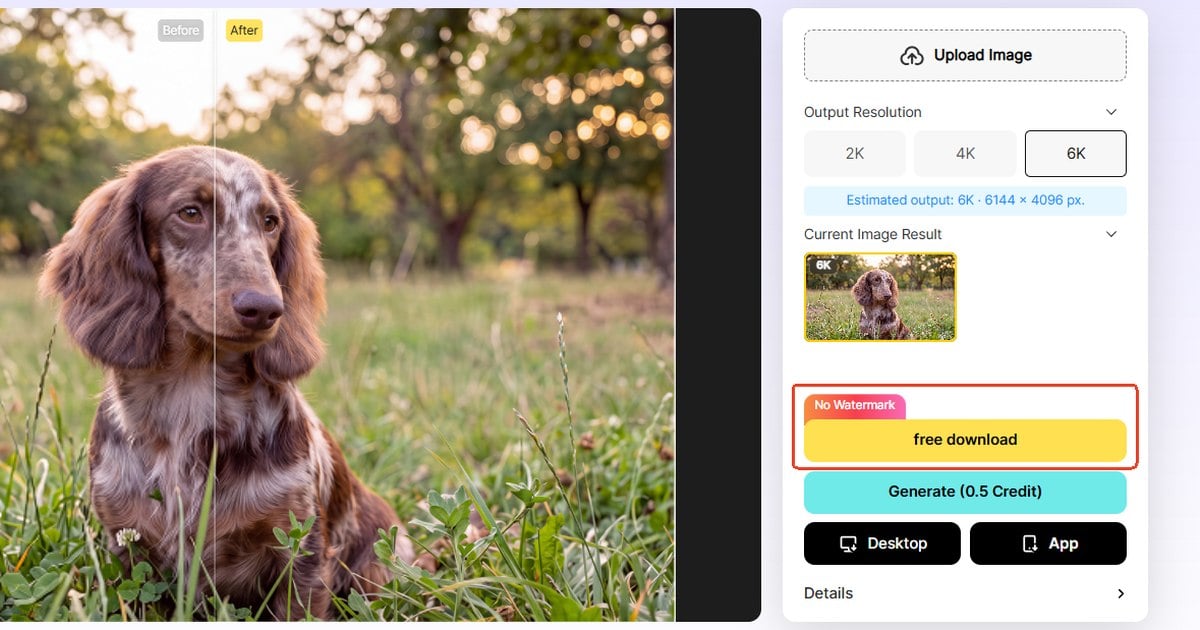
Step 4: Move a Folder to Desktop Detail Enhance If One File Is Not the Job
Download Evoto for Desktop Batch. Use “No Upscale” when you only need to remove JPEG artifacts and the files are already large. The web tool is for one still. Desktop is for the folder.
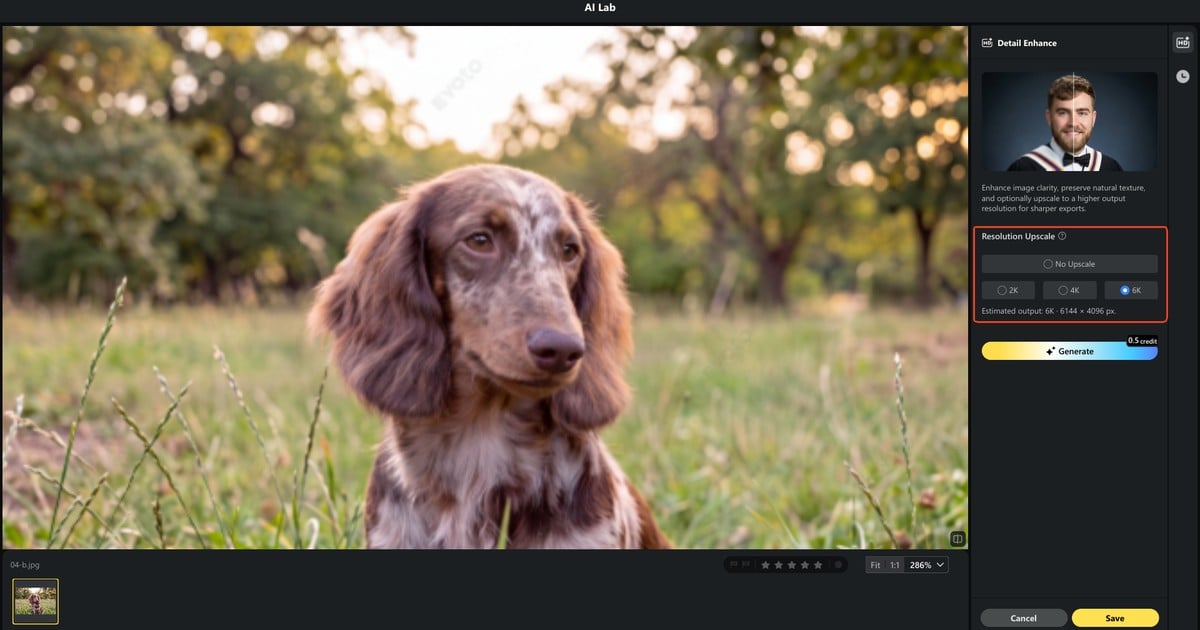
Try one tiled client JPEG. Open Evoto’s online Unpixelate Image tool, use a free generation at 2K, 4K, or 6K, then proof hair at 100 percent before you touch the rest of the set.
3. Picsart: Fast Social Unpixelate
Picsart sells a one-tap unpixelator mindset. That is useful for a story frame. It is not a brand-hero workstation.
Against Evoto, Picsart is faster to open and lighter to learn. It is weaker when you must keep a catalog face stable across a set. Treat it like a phone crop tool. Do not build a wedding pipeline around it. If the same face must match twenty angles, leave Picsart after the test still.
Step 1: Drop in a Social JPEG, Not a Client Master
Keep the master out of a social app if you still have it.
Step 2: Run the Unpixelate or Enhance Pass Once
One pass. Stacking enhancers is how AI unpixelate image demos go plastic.
Step 3: Reject It If the Face or Logo Redraws
If type melts, this is not a paid-delivery deblock. Keep the frame on social, or move it to Evoto.
Picsart pricing is app plus credits. Use it for a single social still.
4. Pixelbin: Browser Trial, Clear Limits
Pixelbin is a browser trial that usually writes upload limits in the open. That honesty is the hook. Official site: Pixelbin.
It is a fair first look when you want side-by-side crops. It is not a deep portrait workstation. Read the quota before you drag a wedding dump into the browser. A cap that surprises you mid-batch is a workflow fail, even if the sample crop looked clean.
Step 1: Read the Upload Cap Before You Drag a Huge File
A large wedding file may not belong in a capped browser slot.
Step 2: Compare the 100% Crop, Not the Marketing Hero
Hero slides hide tiles. Your crop should not.
Step 3: Stop If Type or Jewelry Turns to Mush
Mushy metal means the trial already failed the crop.
Credit packs pay for extra runs. Support is typical SaaS chat. Use Pixelbin to test, then graduate if the face must hold.
5. Topaz Photo AI: Desktop Rebuild, Studio Budget
Topaz Photo AI is the desktop rebuild many studios already pay for to denoise and enlarge. Official product: Topaz Photo AI. It can remove JPEG artifacts on a tough file when you already live in that app.
It is not the same product as Evoto. A Topaz photo AI alternative for portrait delivery is a workflow choice. Evoto is a retouching suite with repair. Topaz is a reconstruction box. Do not treat them as one-for-one clones.
Strengths: strong rebuild and a name photographers already mention. Limits: price, learning curve, and hallucinated texture.
Step 1: Open the File in the Desktop App, Not a Random Web Clone
Stay in the app you licensed.
Step 2: Prefer Recover Over Maximum Enlarge If the Job Is JPEG Blocks
Enlarging on a tiled file can invent weave. Recover the grid first if blocks are the only disease.
Step 3: Proof Faces and Fabric at 100% Before You Bill the Client
If pores turn to paint, you cannot ship it.
Topaz is a desktop license. Use it when the studio already paid for that seat.
6. LetsEnhance: Catalog Batch, Not One Hero Face
LetsEnhance thinks in folders. That helps product photo retouching when a whole SKU set came back tiled.
It is stronger than Picsart on volume. It is weaker than a portrait suite when a face is the hero. Run a five-SKU test before you commit a whole catalog. Check type on dark packs and foil labels. Those surfaces show mush first.
Step 1: Group SKUs That Share the Same Compression Mess
Do not mix a chat JPEG with a camera original in one blind batch.
Step 2: Run a Small Batch and Spot Check Labels
Readable type is the test for removing JPEG artifacts on pack shots.
Step 3: Hold Back Any Face-Forward Pack Shot That Looks Plastic
Pull those frames into a portrait path instead.
LetsEnhance is a subscription. Use it for catalog volume, then spot-check every face.
7. Canva: Layout First, Weak Depixelate
Canva is in this list as the anti-example. Canva is excellent when the JPEG already lives in a layout. Upscale inside a poster is not a true way to remove jpeg artifacts.
If you truly need more pixels, that is a different job. Send enlarge work to Evoto’s Image Upscaler. This page is about cleaning tiles. Enlarging is a separate job.
Step 1: Use Canva When the JPEG Already Lives in a Layout
Design first. Repair second.
Step 2: Do Not Treat Upscale as a JPEG Artifact Remover
Bigger mush is still mush.
Step 3: If Blocks Remain, Leave the Layout and Pick a Repair Tool Above
Come back to Photoshop, Evoto, or Topaz when tiles remain.
Canva is a design seat. Use it to place a file, not to claim you cleaned the grid.
Photo Restoration Software Is a Different Job
Photo restoration software fixes fade, scratches, mold, and tears. It does not remove JPEG artifacts on a chat still. Evoto’s old-photo tool is for yellowed scans, not 8×8 tiles. Keep those jobs apart.
Searchers mash image depixelizer, unpixelator, and restoration into one button. That mix creates bad shortlists. A tiled iMessage portrait wants the tools above. A cracked album print wants restoration. A tiny blurry file wants the triage companion, not this list.
Do not pitch restoration as a way to unlock a censored mosaic. That job is off the table.
If a client brings a yellow scan that is also tiled, split the work. Restore fade first or deblock first, but name both jobs. Do not promise one slider will do both. Old Photo Restoration in Evoto AI Lab can Batch Edit faded sets. It still will not replace a JPEG artifact remover on a chat still.
Wedding Files, Catalog Work, and One Client JPEG
Match the repair to the delivery instead of collecting every enhancer badge.
Wedding and event galleries live or die on identity. If the face must still be that person, start with Evoto or the Photoshop Neural Filter you already have open. Ask for the master first when the chat JPEG is a copy. A second shooter JPEG from the after-party is the usual late request. Treat it as a single rescue, not a new look for the whole gallery.
Catalog and Amazon type need readable labels across a folder. LetsEnhance or Evoto Desktop Batch is the better fit. Spot-check every SKU with type.
Landscape and large print can stay in Topaz if that seat is already paid. A new portrait studio does not need a full super-resolution license just to remove JPEG artifacts on one tiled JPEG.
Phone-only self-repair can use Evoto Web for a single still. Do not run experiments on a privacy-blurred or censored frame.
When two tools could work, pick the app you already pay for. A Photoshop seat plus a light Evoto trial covers most portrait weeks. Buying Topaz only to clean one tiled JPEG is a poor fit. Keep licenses aligned with the files you actually bill.
Powerful AI Photo Editor
Bottom Line: Rebuild the Grid, Then Proof the Face
Best Tools to Unpixelate Image 2026 is not a sharpness contest. The job is to remove JPEG artifacts by rebuilding block edges. Photoshop is the layer you already own. Evoto is the delivery path. One-click apps are for social. Restoration software is another craft. Proof hair and type at 100%. Label the export as a repaired file.
Need a delivery-sized repair that still looks like the sitter? Start with one tiled JPEG in Evoto, pick 2K, 4K, or 6K, then check the crop before you batch.
When you want the button path, return to the how-to. When the crop is not tiles, return to the diagnosis guide.
FAQ
1. What Is the Best Way to Remove JPEG Artifacts for a Client Portrait Versus a Product Shot?
Portraits need identity first. Use Evoto or Photoshop and proof the face. Product shots need readable type. Use batch tools and spot-check labels.
2. Should I Start in Photoshop Neural Filter or Jump to an AI Unpixelate Tool?
Start in Photoshop if the file is already open. Jump to Evoto when you need delivery size and later retouch. Both can clean tiles. They are not the same workflow.
3. Free Trial Versus Paid Seat: When Is One Generate Enough?
Evoto Web gives new users 3 free generations on the online Unpixelate Image tool, then credits apply. One generation is enough for a social still. A paid seat or Desktop batch is for a folder you will bill.
4. Evoto Web or Desktop If I Have a Folder of Blocky JPEGs?
The web tool is for one still. Desktop “Detail Enhance” with Batch is for the folder. Use “No Upscale” when the size is already fine.
5. Is Evoto a Good Topaz Photo AI Alternative for Portrait Delivery?
It can be, as a workflow. Evoto is a retouching suite with repair. Topaz is a reconstruction app. Pick by face, batch, and the seat you already own. This is not a 1:1 swap.
6. Do I Need Photo Restoration Software If the File Is Just a Chat JPEG?
No. Restoration is for fading and scratches. A chat JPEG needs a tool that can remove jpeg artifacts.
7. Are My Uploads Handled Securely, and Does Evoto Train AI on My Photos?
Uploads are processed on encrypted servers. Evoto does not use your photos to train AI models. Running a repair is not the same as training.
8. How Should a Studio Disclose AI JPEG Repair to a Client Without Overclaiming?
Call it a repaired delivery file. Do not call it the original capture. Show a 100% crop before you invoice.
9. Can These Tools Undo Censored Mosaics or Privacy Blur?
No. They repair compression tiles on files you have the right to edit. They do not unlock mosaics, faces, or plates.
10. Is It Ethical to Run a Guest’s Face Through an Image Depixelizer Without Saying So?
No. Ask, disclose, and keep the result labeled. Guests did not agree to a rebuilt face by accident.
11. Is Sharpening Enough to Remove JPEG Artifacts?
Usually no. Sharpening a grid often adds halos. A dedicated pass to remove JPEG artifacts should rebuild edges first.
Methodology & Author
Author: Evoto Editorial Team, catalog and portrait workflow editors
Experience basis: Scoring seven tools against edge rebuild, identity, output size, batch, and privacy. Evoto Web and Desktop Detail Enhance checked against live controls. Photoshop JPEG Artifacts Removal checked against Adobe Help. No invented prices or user counts.
Sources: Adobe JPEG Artifacts Removal Help, Photo Stack Exchange JPEG artifacts thread (19270), Evoto How-to for Unpixelate Image and Detail Enhance
Limitations: Third-party UIs and plans change. This page does not teach mosaic reversal.
Last reviewed: 2026-10-29