

The best AI photo editing software for beginners in 2026 depends on your goal: Evoto AI is ideal for portrait editing with automated retouching, Luminar Neo suits creative photography with guided AI tools, and Canva remains the most accessible option for free social media editing.
Quick Comparison: Best AI Photo Editing Software for Beginners
Software | Ease of Use | Best AI Feature | Learning Curve | Price | Platform |
|---|---|---|---|---|---|
Evoto AI | ⭐⭐⭐⭐⭐ | One-Click Portrait Retouching | Minimal | From $0.13/credit | Win / Mac / iPad / Mobile |
Luminar Neo | ⭐⭐⭐⭐⭐ | Sky Replacement & AI Enhance | Minimal | $119/year | Win / Mac |
Canva | ⭐⭐⭐⭐⭐ | Magic Edit & Background Remove | None | Free / $12.99/month | Web / Mobile |
Adobe Lightroom | ⭐⭐⭐⭐ | AI Masking & Presets | Moderate | $11.99/month | All platforms |
Fotor | ⭐⭐⭐⭐⭐ | AI Photo Enhancer | Minimal | Free / $8.99/month | Web / Mobile |
Pixlr | ⭐⭐⭐⭐ | AI Background Removal | Minimal | Free / $4.90/month | Web |
Snapseed | ⭐⭐⭐⭐⭐ | Portrait & Selective Tools | Minimal | Free | Mobile |
PhotoDirector | ⭐⭐⭐⭐ | AI Sky & Object Removal | Moderate | Free / $54.99/year | All platforms |
What Beginners Need in AI Photo Editing Software
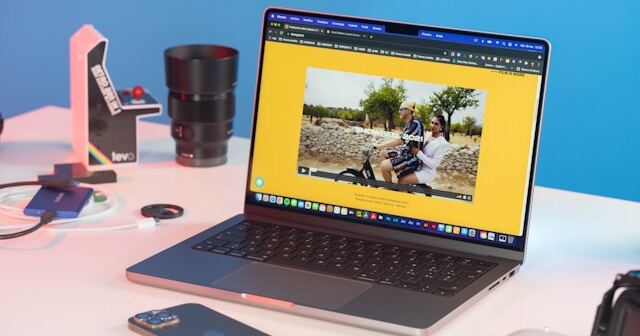
Starting with photo editing can feel overwhelming. Traditional software often requires understanding layers, masks, curves, and manual adjustments just to brighten photos or fix overexposed photos. That complexity discourages many beginners before they even see results.
AI photo editors remove that barrier entirely.
Why AI Photo Editors Are Perfect for Beginners
AI photo editors remove much of the technical barrier that traditionally discouraged new users. Instead of learning complex tools from day one, beginners can achieve professional-looking results almost instantly.
Here’s why they work so well:
- No need to master complex techniques: Rather than manually adjusting sliders to tweak exposure, soften skin, or correct colours, AI analyses your image and applies intelligent improvements automatically.
- One-click tools replace manual workflows: Portrait features powered by AI skin retouching can smooth imperfections while preserving natural texture, without needing to learn traditional skin smoothing techniques.
- Instant results build confidence: When beginners see visible improvements within seconds, they are more motivated to continue editing and experimenting.
- Automation with room to grow: Most beginner-friendly AI editors allow users to start with automatic enhancements and gradually explore manual controls as their skills develop.
In short, AI photo editing tools let beginners focus on creativity rather than technical complexity.
Key Features to Look for as a Beginner
When choosing your first AI photo editor, focus on simplicity, guidance, and flexibility.
Feature | Why It Matters for Beginners |
|---|---|
Intuitive Interface | Helps you find tools quickly without confusion or technical jargon |
One-Click AI Tools | Produces strong results without understanding the “how” behind the adjustment |
Preset Library | Allows experimentation with professional styles while learning |
Undo History | Encourages risk-free experimentation |
Tutorials & Guides | Acts as a built-in learning system |
Free Trial or Free Version | Lets you test before committing financially |
The best beginner software should allow you to fix overexposed photos, brighten photos, remove blemishes, and adjust exposure without forcing you into advanced editing workflows.
Desktop vs. Mobile vs. Web-Based Editors
Choosing the right platform also matters.
- Desktop editors are typically more powerful and ideal for serious hobbyists who want greater control. Tools such as Evoto AI, Luminar Neo, and Adobe Lightroom offer deeper editing capabilities while still being beginner-friendly.
- Mobile editors are convenient for quick edits and social media sharing. Snapseed and Lightroom Mobile allow beginners to edit directly from their phones. Evoto AI also offers mobile support, making portrait retouching accessible even on the go.
- Web-based editors require no installation and work from any device. Canva, Pixlr, and Fotor are excellent choices for beginners who want simplicity and accessibility.
The best option depends on how and where you prefer to edit.
Detailed Reviews: Top 8 AI Photo Editing Software for Beginners
1. Evoto AI – Best for Portrait Editing Beginners
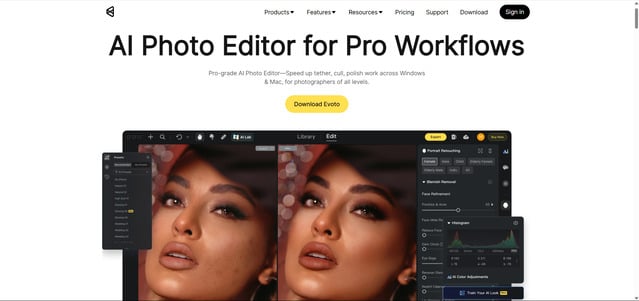
If your primary goal is to improve selfies, family photos, or headshots, Evoto AI is the most beginner-friendly option available in 2026.
Unlike traditional editors that require understanding layers, masks, and complex manual adjustments, Evoto AI automates professional portrait editing using intelligent algorithms. You do not need to study a beginner’s guide to beauty retouching or learn advanced skin smoothing techniques, the AI handles it for you.
Why Beginners Love Evoto AI
Evoto AI makes professional portrait retouching accessible to everyone, even complete beginners. Import your photo, apply intelligent adjustments, and see results instantly.
What Makes Evoto AI Beginner-Friendly
Evoto AI is designed to remove the intimidation many first-time editors feel. Rather than overwhelming users with layers and technical controls, it simplifies professional retouching into guided, intelligent tools.
- One-click AI retouching: Import a photo, and the AI automatically smooths skin, removes blemishes, enhances facial balance, and refines lighting, all without manual masking or brushing.
- No technical knowledge required: You do not need to understand exposure curves, dodge and burn, or traditional skin smoothing techniques. The AI analyses facial structure and applies natural corrections automatically.
- Clean, intuitive interface: The layout is uncluttered and logically organised, allowing beginners to find tools quickly without navigating complex menus.
- Hover tooltips that explain each tool: When you hover over a feature, brief explanations appear, helping you understand what each adjustment does while you edit.
- Instant results in seconds: Adjustments are applied in real time, enabling beginners to see before-and-after improvements immediately, building confidence and encouraging experimentation.
Best AI Features for Beginners
Feature | What It Does | Beginner Benefit |
|---|---|---|
AI Skin Smoothing | Refines skin while preserving texture | Natural results without an artificial look |
Auto Blemish Removal | Detects and removes spots automatically | No manual selection required |
Instantly isolates the subject | Perfect for portraits and product shots | |
Applies professional colour styles | Learn colour aesthetics through presets | |
Apply edits to multiple photos | Saves hours on similar images |
Evoto AI also helps beginners brighten photos, adjust exposure, and fix overexposed photos without manually tweaking multiple sliders.
Real users consistently describe the interface as intuitive and straightforward, allowing beginners to bypass lengthy tutorials.
“Evoto AI is incredibly easy to use. It is so intuitive that most first-time users will be able to bypass all the initial pop-up instructions.” — Fstoppers Review
Pricing for Beginners
- Free trial available
- Pay-as-you-go: From $0.13 per credit
- Starter Plan: $89/year (800 credits)
- Basic Plus Plan: $269/year (3,600 credits)
Full details are available under Evoto pricing plans, allowing you to choose the structure that fits your needs.
You can also Download Evoto AI free to test the software before committing.


Powerful AI Photo Editor
Best for: Beginners focused on portrait photography who want professional results with minimal learning curve.
Verdict: ⭐⭐⭐⭐⭐ The easiest AI photo editor for portrait retouching.
2. Luminar Neo – Best for Creative Editing Beginners
Luminar Neo strikes a balance between powerful AI tools and guided learning. It is ideal for beginners interested in landscapes, travel, and creative photography.
Standout Beginner Features
- AI Enhance with a single slider
- One-click sky replacement
- Built-in tool explanations
- One-time purchase option
Luminar allows beginners to experiment creatively while still providing helpful guidance.
Best for: Creative beginners exploring landscape and artistic photography.
Pricing: Desktop License: $119 (one-time), Cross-Device: $159 (one-time)
Verdict: ⭐⭐⭐⭐⭐ Excellent guided AI editing.
3. Canva – Best Free AI Photo Editor for Beginners
Canva is the most accessible entry point into photo editing. Its drag-and-drop interface requires almost no learning curve.
Standout Beginner Features
- Magic Edit (AI-powered editing)
- Background remover
- Thousands of templates
- Works entirely in browser
It is ideal for social media content and quick visual edits.
Best for: Complete beginners and content creators.
Pricing: Free tier available
Verdict: ⭐⭐⭐⭐⭐ Best free and browser-based option.
4. Adobe Lightroom – Best for Aspiring Photographers
Adobe Lightroom (cloud version) offers strong beginner features while building transferable professional skills.
Standout Beginner Features
- Massive preset library
- AI-powered masking
- Cross-device syncing
- Excellent tutorials
Beginners can learn how to adjust exposure and refine colours while gradually moving towards more advanced editing.
Best for: Beginners serious about long-term photography development.
Pricing: $11.99/month (Photography Plan)
Verdict: ⭐⭐⭐⭐ Slightly steeper learning curve but valuable skills.
5. Fotor – Best for Quick AI Enhancements
Fotor simplifies editing through AI-based improvements that require minimal input.
Standout Beginner Features
- AI Photo Enhancer
- Portrait beautify tools
- Collage maker
- Browser-based access
It allows beginners to brighten photos and enhance clarity in seconds.
Best for: Quick improvements without complexity.
Pricing: $8.99/month
Verdict: ⭐⭐⭐⭐ Easy and fast AI enhancements.
6. Pixlr – Best Browser-Based AI Editor
Pixlr offers more advanced features than most free web editors while remaining accessible.
Standout Beginner Features
- AI background removal
- AI cutout tool
- Layer support
- Templates and overlays
It provides room to grow without overwhelming beginners.
Best for: Users who want more control without installing software.
Pricing: Free tier available, Plus: $4.90/month
Verdict: ⭐⭐⭐⭐ Strong free browser option.
7. Snapseed – Best Free Mobile AI Photo Editor
Developed by Google, Snapseed is a powerful mobile editor with professional-level tools.
Standout Beginner Features
- Portrait mode with face detection
- Selective adjustments
- Healing brush
- Completely free
It allows beginners to fix overexposed photos and enhance portraits directly from mobile devices.
Best for: Mobile-first beginners.
Pricing: 100% Free
Verdict: ⭐⭐⭐⭐⭐ Best free mobile editor.
8. CyberLink PhotoDirector – Best All-in-One for Beginners
PhotoDirector combines organisation, editing and AI tools in one package.
Standout Beginner Features
- AI sky replacement
- Object removal
- Guided editing modes
- Built-in stock library
It offers gentle guidance while still providing advanced tools as skills improve.
Best for: Beginners who want everything in one application.
Pricing: Free tier available, Subscription: $54.99/year
Verdict: ⭐⭐⭐⭐ Comprehensive beginner option.
Powerful AI Photo Editor
How to Choose the Best AI Photo Editor as a Beginner
Choose Based on Your Primary Goal
Your Goal | Best Choice | Why |
|---|---|---|
Edit portrait photos/selfies | Evoto AI | Best AI portrait retouching with minimal learning curve |
Creative landscape/travel editing | Luminar Neo | Powerful AI tools with built-in guidance |
Social media content | Canva | Templates plus AI editing in one place |
Learn professional photography | Adobe Lightroom | Industry standard with transferable skills |
Quick mobile edits | Snapseed | Powerful free mobile option |
Browser-based editing | Pixlr or Fotor | No downloads required |
Budget Considerations for Beginners
Budget | Recommendation |
|---|---|
(Free only) | Canva, Snapseed or Fotor free tier |
Under $100/year | Evoto AI Starter ($89 equivalent) |
Under $150/year | Adobe Lightroom or Luminar Neo |
Pay-as-you-go | Evoto AI (from $0.13/credit) |
Beginner Mistakes to Avoid
When starting out with AI photo editing software, it’s easy to overcomplicate the process. Avoiding a few common mistakes can save time, money, and frustration.
- Starting with Photoshop: While Photoshop is powerful, it is often too complex for beginners. Its layer-based workflow, masking tools, and technical controls can feel overwhelming. Starting with AI-driven software allows you to build confidence before moving into advanced manual editing.
- Ignoring AI tools: Some beginners try to edit everything manually, assuming it will produce better results. In reality, AI tools are specifically designed to simplify complex tasks such as portrait retouching, exposure correction, and colour balancing. Using them does not mean sacrificing quality.
- Over-editing: It is tempting to push sliders too far, especially with skin smoothing or colour adjustments. However, excessive editing can make photos look unnatural. AI-powered tools help maintain realistic texture and balanced tones when used moderately.
- Avoiding presets: Presets are not “shortcuts” in a negative sense. They are learning tools. By applying and analysing presets, beginners can understand how exposure, contrast, and colour grading work together in a cohesive edit.
- Paying for advanced features too early: Many beginners invest in premium plans or advanced tools before understanding their own workflow needs. It is usually better to start with a free tier, explore the features you genuinely use, and upgrade only when necessary.
Conclusion
AI has made professional photo editing accessible to everyone.
If your goal is portrait editing, Evoto AI offers the easiest path to professional-quality results. For creative photography, Luminar Neo provides guided AI tools. For free social media editing, Canva remains the most accessible choice. For mobile editing, Snapseed is unmatched. If you aim to build long-term professional skills, Adobe Lightroom is the logical foundation.
Start with your primary goal in mind rather than the most powerful software.
Download Evoto AI free today to experience effortless portrait retouching and see how AI skin retouching, one-click background removal, and intelligent batch processing simplify editing for beginners.
Powerful AI Photo Editor
Frequently Asked Questions
What is the best AI photo editing software for beginners?
For portrait editing, Evoto AI is the best choice due to its one-click AI retouching and intuitive interface. For creative editing, Luminar Neo offers strong guided AI tools. For free options, Canva and Snapseed are excellent starting points.
What is the easiest photo editing app for beginners?
Canva is the easiest overall, requiring almost no learning curve. For portraits specifically, Evoto AI is incredibly simple and produces professional results instantly.
Is there a free AI photo editor for beginners?
Yes, several excellent free AI photo editors exist for beginners. Canva offers free AI tools including background removal and Magic Edit. Snapseed is 100% free with no premium tier. Fotor and Pixlr both offer generous free tiers with AI features.
Do I need experience to use AI photo editing software?
No. AI tools analyse your image and apply improvements automatically. Beginners can achieve professional results without understanding complex editing theory.
What is the difference between AI photo editing and regular photo editing?
Traditional editing requires manual adjustments such as exposure and colour corrections. AI editing automatically detects areas that need improvement and applies intelligent corrections.
Can beginners edit portrait photos professionally?
Yes. Tools such as Evoto AI use AI skin retouching and intelligent enhancements to produce professional-quality portraits without requiring advanced knowledge.
Which AI photo editor has the shortest learning curve?
Evoto AI and Canva both have extremely short learning curves. Evoto focuses on portrait automation, while Canva simplifies general editing.
Is Evoto AI good for beginners?
Yes. Evoto AI is consistently praised for being intuitive and beginner-friendly. The AI handles complex retouching tasks automatically, making it ideal for new users.



