

TL;DR
- Double exposure examples for studios must bind use case + print spec + social crop—not a mood board.
- Good / Better / Best controls scope: 1 / 2 / 3 looks—illustrative 24–96 hr SLA · July 2026.
- Proof with Standard export; albums and labs with high-resolution (1 Credit/image).
“We love the sample. Can you do that for every image in the gallery?”
The couple saw one Instagram double exposure examples frame—city through the groom’s profile—and assumed the whole wedding would look that way. Your contract said standard retouching. Nobody scoped art composites as a separate line item.
That gap is where studios lose margin or eat unpaid revisions. A double-exposure client delivery workflow is not a slider technique—it is a discipline of tiers, specs, approval, and export before the editor opens. Hybrid creators shipping client work need the same gates, even at smaller volumes.
Delivery gate: One double exposure hero in the album ≠ double exposure on every frame. Scope it at booking, not at export.
Start with how you sell it—then we name four reusable samples clients can point to on a look book.
Good / Better / Best Add-On Ladder — Sell Double Exposure Without Scope Creep
Double exposure examples sell when clients choose from three named packages—not an open-texture library.
Prices below are your studio math, not Evoto subscription tiers. Anchor minutes to the double exposure Photoshop sheet—illustrative 8–15 min per clean two-layer export.
| Tier | What ships | Price logic (studio) | Turnaround (illustrative) |
|---|---|---|---|
| Good | 1 double exposure hero · 1 print file + 1 social crop | Base add-on | 24–48 hr after cull |
| Better | 2 looks · album spread + social set | ~1.6–2× Good | 48–72 hr |
| Best | 3 looks + gift print · 1 revision round | ~2.5–3× Good | 72–96 hr |
Booking script (adapt):
“Double exposure art is a separate creative add-on—finished examples are in our look book. Standard gallery retouching does not include silhouette composites unless you select Good, Better, or Best at contract sign.”
Pair tiers with the 12 subject–texture pairings matrix so sales name a look, not “something dreamy.”
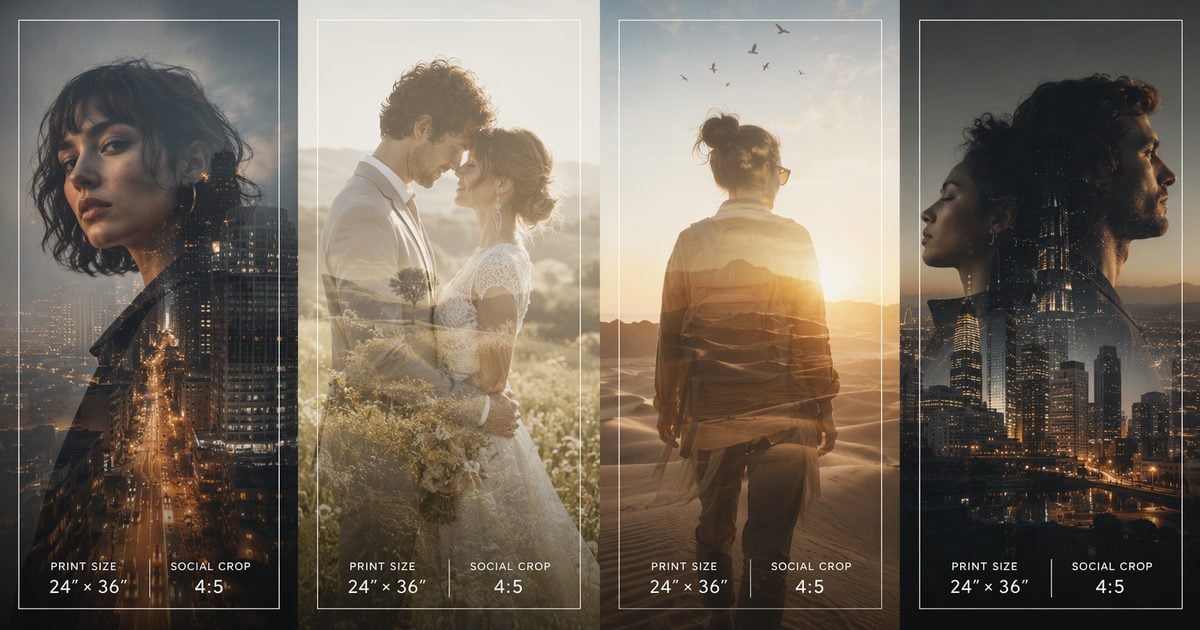
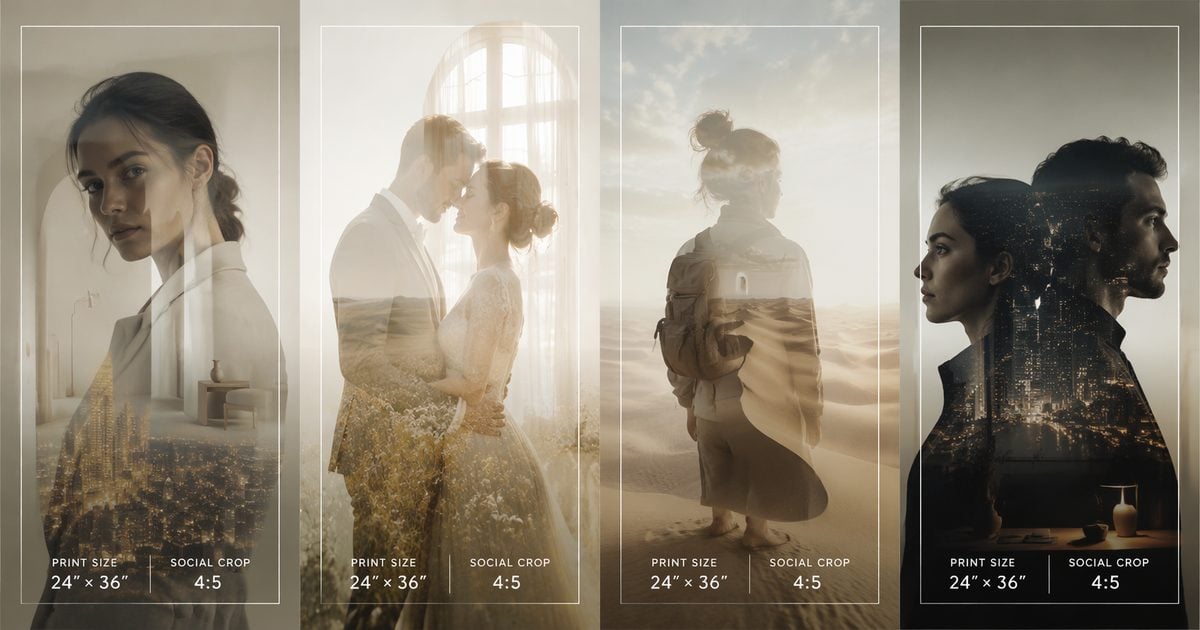
Tiers need named samples clients can point to—four double exposure examples below ship with print and social specs already filled in.
Double Exposure Examples — Four Reusable Studio Samples (Use Case + Spec)
This section is not a Pinterest listicle. Each finish binds delivery metadata—copy into proposals.
| Example name | Subject–texture look | Client use case | Print spec | Social spec |
|---|---|---|---|---|
| City Night Fashion | Front/city portrait + neon or night city fill | Album hero · wall art | 8×10 @ 300 DPI | 1080×1080 |
| Meadow Embrace | Couple embrace + wildflower / soft sky (or sheer daylight mood) | Album spread center | 10×10 @ 300 DPI | 1080×1350 |
| Dunes Adventure | Cyclist or travel silhouette + golden dunes / sunset | Parent gift · travel | 11×14 @ 300 DPI | 1080×1080 |
| Dual Profile Poster | Dual profiles + dark smoke city | Wall / album art panel | 16×20 @ 300 DPI | 1080×1920 |
Keep example names stable in contracts; refresh overlay files seasonally. These four cover fashion/city, wedding, travel, and poster styles studios reuse every peak season.
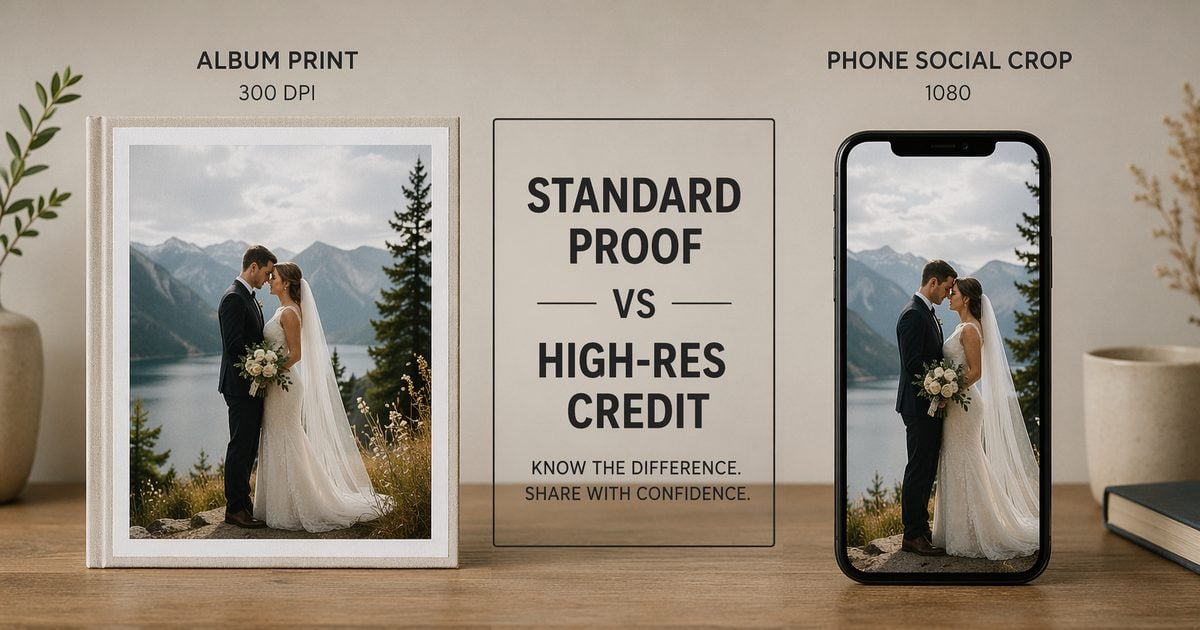
Named samples still fail if the wrong export tier ships to the lab—lock Standard vs high-res before you attach files to the invoice.
Export Spec Table — Print vs Album vs Social
| Destination | Long edge | DPI | Format | Notes |
|---|---|---|---|---|
| Album spread | Per lab template | 300 | JPG 90+ · PNG | High-res · 1 Credit/image |
| Wall art print | 8×10 / 11×14 / 16×20 | 300 | JPG · PNG · WEBP | High-res credit |
| Instagram feed | 1080 px | 72 | JPG · WEBP | Center-weight crop from master |
| Stories | 1080×1920 | 72 | JPG · WEBP | Face clear of UI zone |
| Mood board / proof | ~2048 px | 72 | JPG · WEBP | Standard-quality · softer OK |
Handoff rule: Composite at full subject resolution first; derive social crops after client approval.
Preview blends in the two-layer silhouette compositing editor, then upgrade export when approved—Shoot today. Deliver today only works when the tier matches the destination.
Export tiers assume the Lightroom handoff was clean. Here is the double exposure client delivery workflow from develop to proof.
Handoff from Lightroom — Double Exposure Client Delivery Workflow
Lightroom double exposure searchers often expect a blend inside LR. This workflow uses LR for develop + export stills, then the Double Exposure editor for the two-layer merge—state that in booking emails.
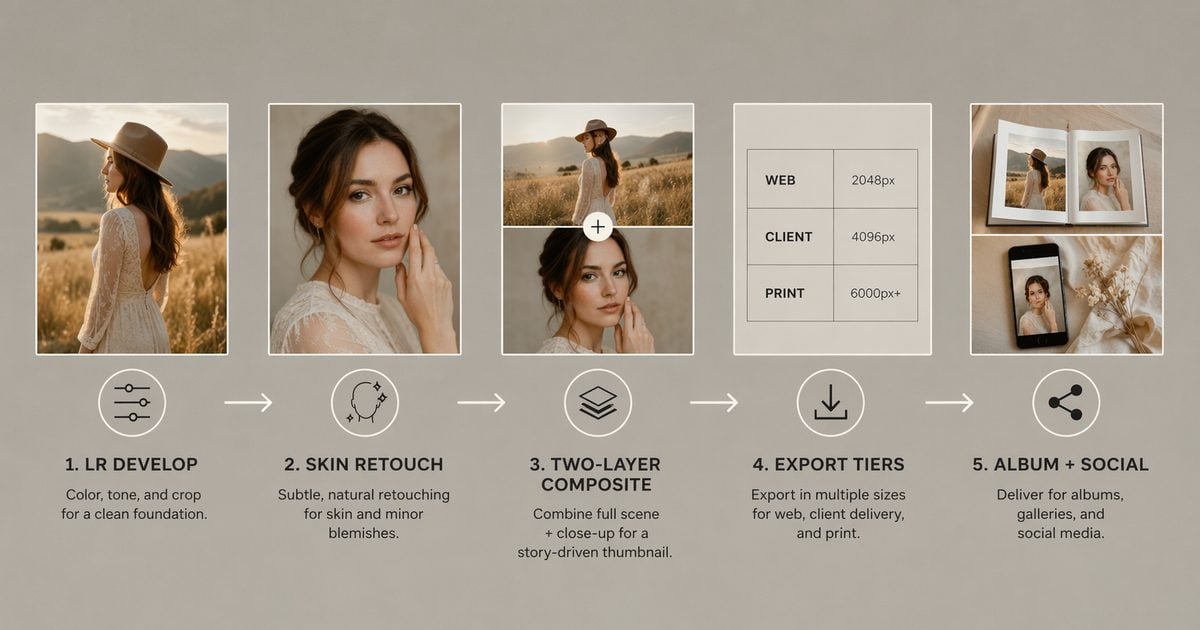
Step 1 — Cull to double exposure candidates only
Flag 3–5 heroes per session max—poses with clean edges. Do not run double exposure on the entire gallery.
Step 2 — Sync develop across flagged frames
Match exposure, white balance, and contrast so overlay color does not fight per-frame. Export JPG, PNG, or WebP at max quality.
Step 3 — Skin pass on flagged heroes
Run blemish and basic portrait retouching before Soft Light meadow merges—same skin-before-scene discipline as how to edit beach photos.
Step 4 — Composite + tier pick
Upload subject + overlay. Export Standard for proof; high-resolution (1 Credit/image) after approval for print rows.
Step 5 — Archive the decision log
Save blend mode, Opacity, and overlay filename in your delivery sheet—not in the client ZIP.
Clean files still die in client email threads. Keep these four scripts next to your CRM—same tone you use when a crop comes back “too dark.”


Powerful AI Photo Editor
Expectation Scripts — When Clients Say “Too Fake” or “Not Enough”
Double exposure examples on social are edited for drama. Clients compare your proof to phone brightness.
| Client says | Studio response (adapt) |
|---|---|
| “It looks too fake.” | “Double exposure art is intentional surrealism—the overlay shows through the silhouette by design. We can soften Opacity toward a Standard Portrait finish, or keep Art Print strength for the album. Which direction?” |
| “Can you put our venue in every photo?” | “Venue-wide replacement is scene compositing, scoped separately. Double exposure packages include 1–3 art heroes from the look book—not full-gallery transformation.” → AI Background Fusion when that is truly the ask |
| “Stars-and-city on the family formals.” | “That pairing needs a profile silhouette—not straight-on groups. We can add a Better-tier couple frame or a 10-minute profile mini.” |
| “Why is the print softer than the screen?” | “Phone proofs use preview resolution. Approved print files export at 300 DPI high-resolution tier—that is what your lab receives.” |
Document the chosen script in the CRM when the client picks a tier. Scripts set expectation—your loupe still closes the invoice.
Pre-Delivery QA Checklist — 100% Zoom Before Invoice
| Check | Pass criteria | Fail action |
|---|---|---|
| Hair / veil edge | No hard halo at 100% | Edit Mask · Subject Only |
| Skin texture | Pores visible on cheek | Lower Opacity |
| Overlay alignment | Fits contract crop | Transform · re-export |
| Color vs gallery | WB consistent | Revisit develop sync |
| Print dimensions | Lab template + bleed | High-res re-export |
| Social safe zone | Face clear of UI zones | Re-crop from master |
| Rights | Licensed / self overlay | Replace before ship |
Before/after standard: Client-facing double exposure should read artful at album size, not broken at 16×20. If you would not hand it to a lab tech, hold the invoice.
One more scope line sales often blurs: single-image double exposure is not the same as folder-scale finishing.
Scope Note — Single-Image Double Exposure vs Folder-Scale Finishing
| Task | Double Exposure editor | Evoto Desktop |
|---|---|---|
| 1–3 wedding heroes | Yes | Skin prep + gallery queue |
| 40-frame mini all double exposure | No · rescope the menu | Cut looks or use scene tools |
| Batch skin before double exposure | No | Yes |
| Same-day proof meeting | Yes · Standard tier | Optional |
State single-image double exposure vs folder-scale skin in the contract footer. Sales promising silhouette art on every mini-session frame is how studios drown in July.
Powerful AI Photo Editor
Double exposure examples belong in proposals and look books—paired with export specs, tier names, and QA gates.
How to build a delivery QA log without a downloadable PDF: add columns to your existing export sheet:
Client | Package (Good/Better/Best) | Example name | Blend + Opacity | Print file | Social crop | QC pass | Approved date | Invoice line.
Check hair edge, pores, crop, and overlay rights at 100% before you attach the ZIP. Track double exposure orders / total weddings for your own upsell rate—not an industry claim.
Package three tiers, run the checklist, export the right DPI. The two-layer silhouette compositing workflow handles the blend; you handle the client boundary.
(Peak-season note: Built for Your Peak Season is live. Creator Growth Bundle includes five background sets for Desktop Background Replacement—Soft Studio Neutrals, Editorial Quiet Lux, Sheer Daylight Loft, Scandi Lifestyle Rooms, Campus & Grad Milestone. Bundle Soft Studio Neutrals or Editorial Quiet Lux subject plates into Better/Best look books alongside your double exposure art. Volume math: Evoto pricing.)
FAQ
1. How do double exposure examples differ from a Pinterest ideas board?
Each studio sample here binds use case + print spec + social crop. Pairing capture lives in the 12 pairings guide; this article covers the ship.
2. What is a realistic double exposure client delivery workflow SLA?
Good: 24–48 hr after cull. Better: 48–72 hr. Best: 72–96 hr with one revision round. Illustrative · July 2026.
3. Lightroom double exposure vs this workflow—what should clients expect?
LR develop → export stills → Double Exposure editor. Set that at booking to avoid “why doesn’t Lightroom stack?” emails.
4. Standard vs high-resolution export for album delivery?
Standard for proofs and mood boards. High-resolution (1 Credit/image) for album spreads and lab print.
5. How many double exposure examples should a look book show?
Three client-facing tiers plus one seasonal refresh quarterly. More choices slow booking.
6. Can I batch double exposure for an entire wedding gallery?
No. Scope 1–3 heroes per event. Batch skin and color on Desktop; run double exposure per approved frame.
7. Does Evoto use client delivery files to train AI—and is upload data private?
Privacy Policy: session processing; content not used to train public AI models without appropriate consent. Trial does not require face-ID gating. You still own the overlay licensing and contract disclosure.
8. Is AI double exposure ethical for client albums—and what if they reject after approval?
Artistic silhouette composite is not face swap or identity alteration—you keep 100% QC. Better/Best include one revision round (blend/Opacity)—not unlimited re-pairs. Full re-shoot is a new session line item. Use the expectation scripts above for “too fake.”
Methodology & Author
Author: Evoto Editorial Team — studio delivery and IPS workflow editors
Experience basis: Double Exposure export tiers · Good/Better/Best add-on templates · illustrative July 2026 delivery QC log
Market context: Album lab 300 DPI practice · Feature export FAQ (Standard vs 1 Credit)
Trust / privacy: Evoto Privacy Policy — session processing · not used to train public AI models without opt-in
Limitations: Single-image double exposure workflow; pricing examples are studio math, not Evoto plan costs; overlay licensing remains studio responsibility
Last reviewed: 2026-07-16
Powerful AI Photo Editor



