

TL;DR
- Double exposure portrait success is a pairing decision—not a slider memorization contest.
- Lock three client-facing packages first; keep all twelve for associate training.
- Double exposure portrait workflow: capture → Lightroom → skin → two-layer composite → export—illustrative 8–18 min/look · July 2026.
“Can you do that skyline-through-the-face look from your Instagram?”
The client points at a portrait double exposure sample. Your associate nods. Nobody wrote down which overlay file, which blend mode, or whether the session needed a profile re-shoot because the first pass was straight-on.
Double exposure portrait delivery fails in pairing—not in blend sliders. Search results show finished art; studios need a repeatable SOP for Saturday wedding week. Hybrid creators can use the same matrix—just ship fewer rows.
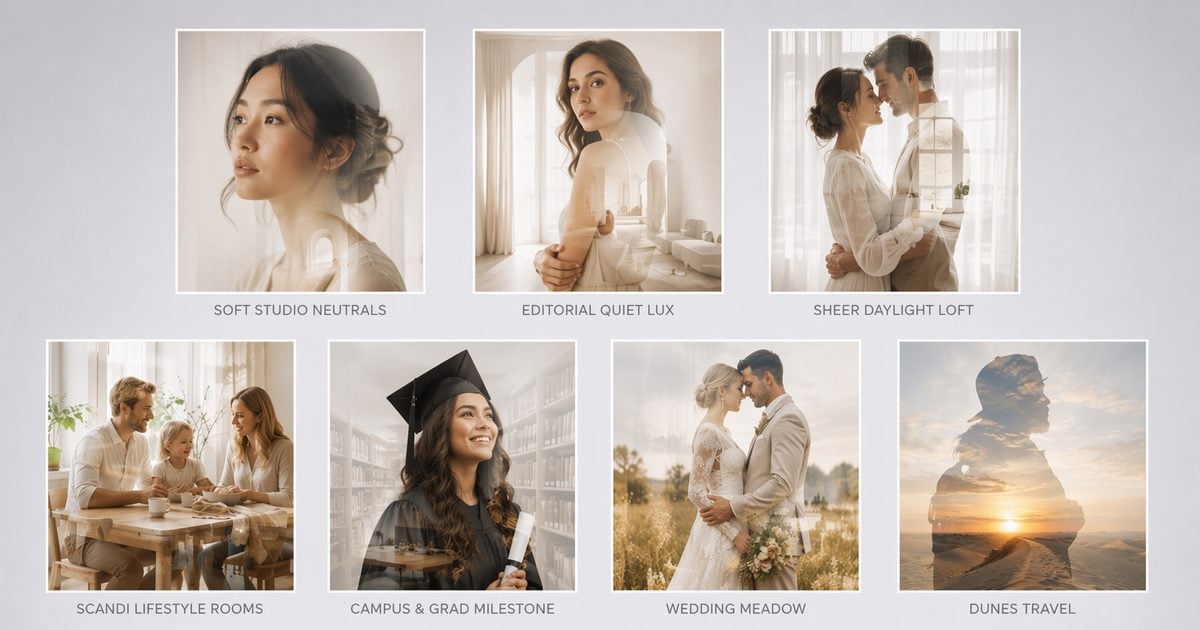
We standardize pairings when the brief is silhouette-through-subject—two layers, same look book every week. Full background swaps are not a row here.
Pairing gate: If the client wants the background replaced but the body unchanged, that is full scene replacement vs silhouette overlay—not this matrix.
Start with the matrix—then we narrow it to three packages clients can actually buy.
Subject–Texture Pairing Matrix — 12 Rows That Ship
Use this table in look menus and associate training. Blend = starting mode; adjust Opacity and tone on every row.
| # | Subject | Texture overlay | Start blend | Session type | Failure flag |
|---|---|---|---|---|---|
| 1 | Front/city fashion portrait | Neon city night | Multiply / Screen | Editorial · evening | Flat if no facial depth |
| 2 | Groom profile | Blue-hour skyline | Screen | Wedding · city | Halo on busy reception BG |
| 3 | Couple embrace · veil motion | Wildflower + sky | Soft Light | Wedding · garden | Muddy skin if overlay dark |
| 4 | Cheek-to-cheek profiles | Pastel sky / soft clouds | Soft Light | Engagement | Over-soft if Opacity >85% |
| 5 | Bride veil profile | Cherry blossom/spring trees | Overlay | Bridal | Busy branches mid-face |
| 6 | Child profile | Watercolor wash | Soft Light | Family · school | Parent approval · ethical scope |
| 7 | Dancer full-body leap | Star field / Milky Way | Screen | Performance | Motion-blur edge fight |
| 8 | Athlete profile | Stadium lights bokeh | Screen | Sports portrait | No unlicensed team logos |
| 9 | Pet / wildlife-style profile | Forest canopy + sunbeams | Overlay | Pet · editorial | Fur edge → Edit Mask |
| 10 | Cyclist silhouette | Golden dunes + sunset | Overlay | Adventure · travel | Underexpose subject for density |
| 11 | Musician + instrument | Stage smoke + spots | Multiply | Editorial | Screen blows metal highlights |
| 12 | Dual profiles back-to-back | Dark smoke city | Multiply | Poster · album art | Needs offset transform |
Scope note: Pairings assume licensed or self-captured overlays. Train associates on rows 1, 3, and 10 first—they align with Evoto Feature hero looks (city, wedding meadow, dunes) and convert well in US/EU wedding and travel menus.
For minutes-per-look vs a Photoshop stack, see the double exposure Photoshop comparison—pairing choice often moves SLA more than software brand.
Twelve rows train associates. Clients only need three packages—the same honesty you use when you stop offering twelve preset packs on a mini menu.
Wedding & Couple Pairings — Sell Three Packages, Not Twelve Textures
Double exposure portrait wedding sales stall when the menu shows twelve options and the client picks six. Offer Good / Better / Best—structure only; your studio sets the dollars.
| Tier | Pairing | Blend | Ships | Minutes (illustrative) |
|---|---|---|---|---|
| Good | Row #5 or soft solo #3 | Soft Light ~65% | 1 art file + 1 social crop | 8–12 |
| Better | Row #3 couple | Soft Light | Album spread + social set | 12–18 |
| Best | Row #1 or #12 drama | Multiply / Screen | Trio + gift print size | 15–22 + one revision note |
Client script (adapt):
“Our portrait double exposure add-on includes one art finish from three curated pairings—garden softness, sky pastels, or city night. Extra pairings are [rate] each because each blend is QC’d at print size.”
Run batch skin finishing before blend before Soft Light meadow merges—blemish and tan-line passes compete with overlay color at 100%.
Open the two-layer silhouette compositing editor on a row #3 proof before booking forms go live this peak season.

Packages fail when the capture never earned the mask. The next notes are what we tell associates before they promise a city-through-face look from a busy reception candid.
Profile Silhouette Capture Notes — Where Pairings Win or Die
Double exposure portrait workflow starts on set.
- Angle. Profile or 3/4 with edge separation—or a front city look (row #1) with enough facial depth for neon to read through cheek and forehead. Straight-on beauty with flat flash rarely carries texture.
- Backdrop. Grey, white, or soft seamless. Location shoots need subject-to-background distance or cutout time eats the SLA.
- Key light. Soft key from the overlay-bright side often reads best. Avoid on-axis flash that kills silhouette density.
- Wardrobe. Veils and flyaways need Edit Mask budget—sell “art edge softness,” not strand-perfect composite, unless priced.
- Overlay direction. Pre-pick licensed files at booking so sales never promises a skyline you cannot ship.
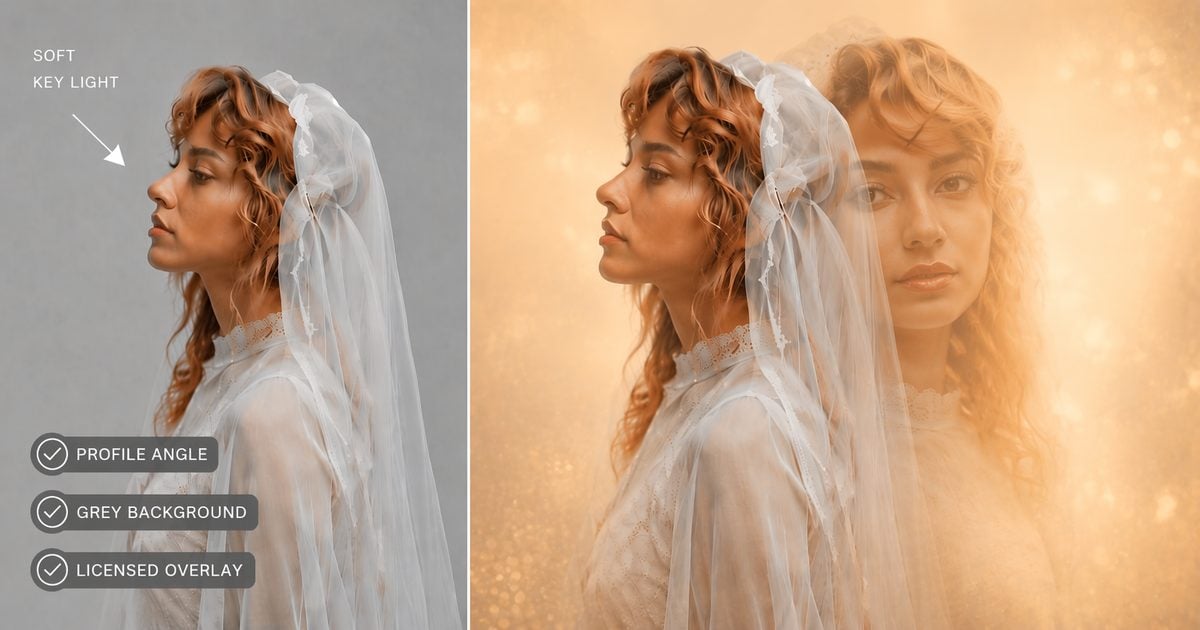
Capture earns the row. Order keeps the minutes—here is the double exposure portrait workflow we run from session day to export night.
Retouch vs Composite Order — Double Exposure Portrait Workflow
| Step | Action | Tool row |
|---|---|---|
| 1 | Cull + flag double exposure candidates | Lightroom |
| 2 | Sync develop across candidates | Lightroom |
| 3 | Skin + blemish on heroes only | Desktop portrait retouching |
| 4 | Optional depth separation | Bokeh effect |
| 5 | Two-layer double exposure composite | Double Exposure editor |
| 6 | Crop + export tier | Standard proof vs high-res credit |
Rule: Composite before gallery-wide creative grade on double exposure heroes—LUT first fights both overlay and skin.
Exception: Heavy Multiply neon may need micro dodge on the cheek after composite—note on the QC sheet, not a full reskin.
When summer galleries mix beach and formal frames, even skin before scene work—same discipline as our how to edit beach photos notes. Input quality still decides whether that workflow finishes in ten minutes or forty.
Studio vs Outdoor Input — Decision Table
| Input source | Pairing success | Extra minutes | Recommendation |
|---|---|---|---|
| Grey seamless studio | High | Baseline | Default for add-on menus |
| White cyclorama | High | +0–3 | Watch gown blowout |
| Outdoor open shade profile | Medium | +5–10 | Pre-sell art-edge softness |
| Busy city street | Low | +15–25 or reshoot | Reshoot on seamless |
| Indoor reception | Low | Often fail | Do not promise double exposure from candids |
Outdoor engagements can feed overlay plates (sky, meadow) while the studio holds subject silhouettes—a valid double exposure portrait workflow when the weather cooperates. Soft Studio Neutrals from the Peak Season pack are a strong subject-capture plate before you overlay a licensed texture.
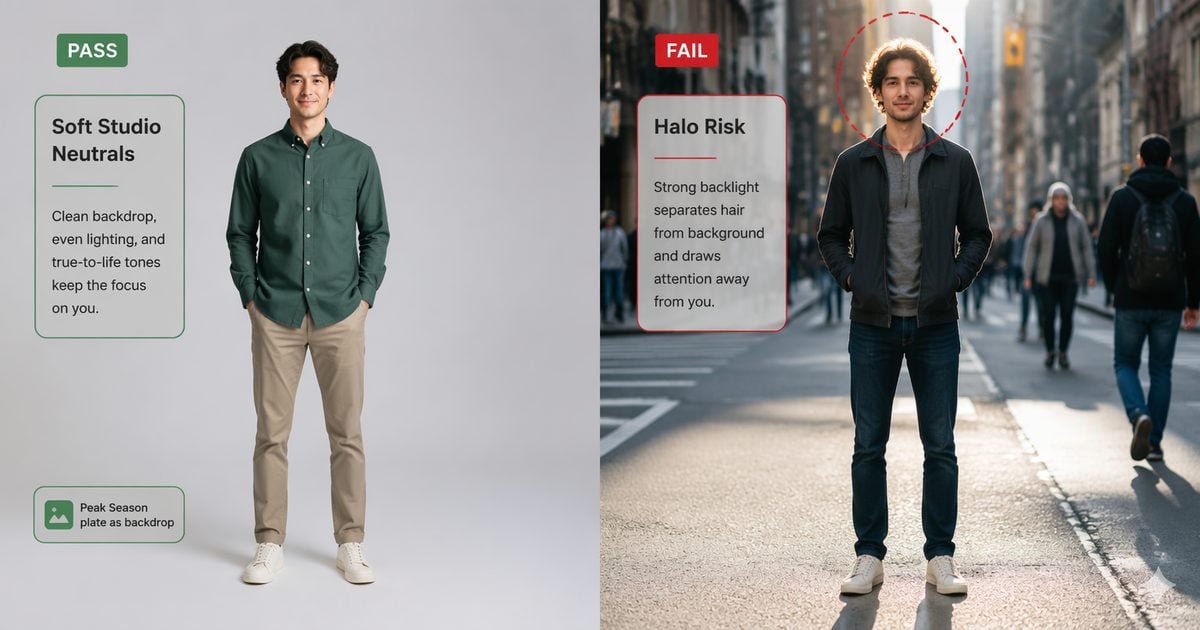
Wrong input looks like a bad blend mode. When something still reads amateur at 100%, use the failure table—then decide whether to re-pair or reshoot.
Failure Modes — When Portrait Double Exposure Looks Wrong
| Symptom | Likely cause | Recovery |
|---|---|---|
| Texture on nose tip only | Straight-on / flat light | Reshoot profile or side key |
| Muddy mid-face | Soft Light + dark meadow | Lift Brightness · lower Opacity |
| Veil halo | Busy background | Edit Mask · Subject Only |
| Client “too fantasy” | Wrong row | Re-pair · scripts in client delivery |
| Print soft | Social-tier export | High-res credit export |
Track failure type on the pairing sheet—if stadium bokeh fails twice on rights, drop it until licensing is clean.
Double exposure portrait work is menu design, not slider memorization. Cut the twelve rows to three client options; train associates on capture.
How to keep a pairing log without a fancy download: in Sheets or Notion, add columns
Look name | Subject pose | Overlay file (licensed/self) | Blend | Opacity | Client package (Good/Better/Best) | QC pass.
Train new associates on city night, meadow couple, and dunes travel first—those three cover most wedding and travel asks.
(Peak-season note: Built for Your Peak Season is live. Creator Growth Bundle unlocks five background sets for Desktop Background Replacement—Soft Studio Neutrals, Editorial Quiet Lux, Sheer Daylight Loft, Scandi Lifestyle Rooms, Campus & Grad Milestone. Capture subjects on Soft Studio Neutrals or Editorial Quiet Lux, then run your double exposure overlay pass. Evoto pricing.)
Try two-layer silhouette compositing on a meadow or city proof before your next look-book refresh.
FAQ
1. What is the best double exposure portrait workflow for a wedding studio?
Capture on grey seamless, develop in Lightroom, skin-pass heroes, composite with Soft Light meadow or Screen/Multiply city overlays, export tier matched to album vs social. Illustrative 8–18 min per look.
2. Which pairing sells best as a session add-on?
Rows #3 couple meadow and #1 city portrait—offer as packaged Good/Better, not unlimited picks.
3. Portrait double exposure vs multiple exposure portrait—same thing?
Clients use terms interchangeably. Evoto supports two layers only—one subject, one overlay. Three-layer scenes belong in scene fusion.
4. Should retouching happen before or after the composite?
Before for Soft Light wedding pairs. After only for micro dodge on heavy Multiply neon rows.
5. Can outdoor engagement photos be both subject and overlay?
Yes with planning—profile subject plate plus separate sky/meadow overlay. Do not use the same file twice.
6. How do I avoid unlicensed logos in sports row #8?
Use generic stadium bokeh without readable marks. Never promise team-branded double exposure without rights.
7. Does Evoto use my client portrait files to train AI—and is overlay data private?
Privacy Policy: session processing; content not used to train public AI models without appropriate consent. You still supply licensed overlays. Trial does not require face-ID gating to explore the tool.
8. Is AI mask cutout ethical for wedding or child portraits?
Mask work is silhouette control, not face swap. Child row #6 needs parent approval and contract scope. Manage “too fantasy” with delivery scripts—not another slider pass.
Methodology & Author
Author: Evoto Editorial Team — wedding and fashion portrait workflow editors
Experience basis: Feature Hero pairing alignment (city / wedding / dunes) · illustrative 8–18 min/export · July 2026 associate training log
Market context: Feature blend-mode and delivery-style guidance
Trust / privacy: Evoto Privacy Policy — session processing · not used to train public AI models without opt-in
Limitations: Two-layer composite; pairing minutes assume clean input; overlay licensing remains studio responsibility
Last reviewed: 2026-07-16


Powerful AI Photo Editor



