

A photo organizer is software that keeps a growing image library findable. It imports, tags, rates, and filters thousands of files so you don’t dig through folders by hand. The best photo organizer for you depends on how much you shoot: culling 2,000 wedding frames is a different job from sorting ten years of phone pictures.
We compared 15 desktop, mobile, and online options below, including AI tools that pick your best shots and free, open-source programs like digiKam.
The Best 15 Photo Organization Software at a Glance
Start here if you want the short version. Each row matches a full review further down.
| Tool | Best for | Pricing |
|---|---|---|
| Evoto | High-volume AI culling and editing | Free AI culling; credits only for edited exports |
| Adobe Lightroom Classic | All-in-one catalog and RAW editing | Subscription |
| Adobe Bridge | Free file browsing for Adobe users | Free |
| Excire Foto 2027 | AI keywording and archive search | One-time license |
| Capture One | Pro RAW workflow and tethering | Subscription or perpetual |
| Google Photos | Phone libraries and cloud backup | Free 15GB, Google One plans |
| Apple Photos | iPhone and Mac users | Free (iCloud storage paid) |
| Adobe Lightroom Mobile | Organizing and editing on the go | Free app, premium features with an Adobe plan |
| Mylio Photos | One library across devices | Free tier, Photos+ subscription |
| Photo Manager Pro | Folder-based organizing on iOS | One-time purchase |
| Flickr | Photo community sharing | Free (1,000 items), Pro |
| SmugMug | Pro portfolios and client galleries | Subscription |
| Adobe Lightroom Web | Browser-based cloud library access | Adobe plan |
| Piwigo | Self-hosted team galleries | Free open source, hosted plans |
| digiKam | Free, open-source photo management | Free |
15 Best Photo Organizers Compared
The list is split into three groups: professional and AI tools, mobile apps, and online/free options. Professionals with tens of thousands of files will lean toward the first group; casual shooters will find most of what they need in the second and third.
5 Professional and AI Photo Organizers
1. Evoto AI Photo Organizer
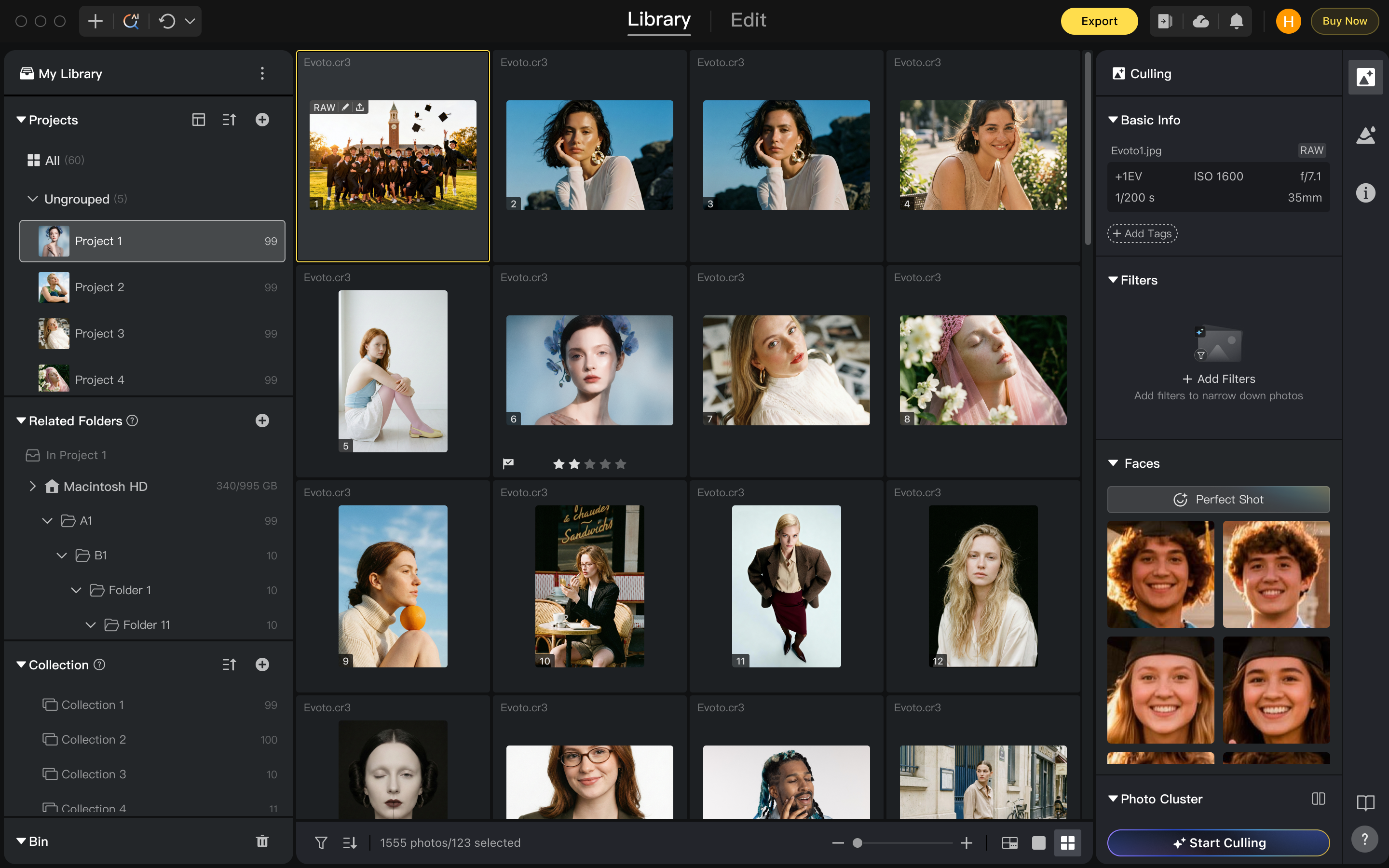
Evoto is an AI photo editor for Windows and macOS with a full photo organizing workspace built in. Each shoot gets its own project, AI culling sets aside the rejects, and text search, tags, and ratings help you find any frame later, so you can sort and retouch a session without switching apps.
Best for: wedding, event, school, and headshot photographers who bring home hundreds or thousands of frames per session and need them sorted before they edit and deliver.
Key organizing features:
- Projects and hot-folder import: bring whole folders, Lightroom Classic catalogs (.lrcat), or tethered captures into a project. Hot folders watch up to 10 folders, subfolders included, and pull new files in automatically.
- Project groups and Collections: sort projects into custom groups, search them by name, and order them by name or last opened date. Collections gather photos from several projects without duplicating the original files, which is handy for portfolio picks or album drafts.
- AI Culling Dashboard: AI photo culling flags blurry, overexposed, underexposed, and closed-eye frames and keeps the strongest shot from each duplicate group. Best Picks, candidates, quality issues, faces, and similar-photo clusters all appear on one screen.
- Story-based Culling & Segments: groups a wedding or event by People or Scene. You can review a finished segment while culling keeps running on the rest.
- Search by Text & Custom Tags: type a phrase like “red dress” or “beach” to find matching frames inside the project, then save the results under a reusable tag.
- Ratings, labels, and filters: rate, label, flag, and keyword photos one at a time or in bulk. The filter panel combines quality issues, flags, text, and faces with AND/OR logic, and you can edit EXIF and IPTC metadata right in the Library.
- Lightroom Classic and Cloud Space: Back to LR sends crop, rotation, and flip changes to your Lightroom catalog, and Cloud Space shares projects with your team across devices.
Pricing: Importing, rating, tagging, searching, and culling by hand don’t use credits. Evoto deducts a credit only when you export an edited image, and unedited originals export for free. A free trial includes the full photo organizer. AI culling access depends on your plan.
Good to know: AI culling and Search by Text work inside one project at a time. That makes Evoto strongest for shoots you’re actively delivering.


Professional Photo Organizer
2. Adobe Lightroom Classic
Lightroom Classic is built around a catalog: you organize photos into folders, collections, and Smart Collections using keywords, metadata, flags, and star ratings.
Its Library Filter bar offers Text, Attribute, and Metadata modes for filtering by filename, EXIF/IPTC fields, capture date, and custom tags. The Library module is where you view, sort, compare, and rate images before editing. Recent versions add Assisted Culling, which helps you filter shots by subject focus and open eyes.
3. Adobe Bridge
If you already pay for Creative Cloud, Adobe Bridge is a free digital asset manager that works alongside those apps. It acts as a file browser with thumbnail previews, batch renaming, colored labels, and star ratings. You can edit XMP and IPTC metadata, sort images in various thumbnail sizes, and script custom workflows with JavaScript.
4. Excire Foto 2027
Excire Foto 2027 is a dedicated AI photo manager for Windows and Mac. Its AI runs locally, so your files aren’t uploaded to the cloud. It keywords images automatically on import and supports natural-language search, face recognition, duplicate search, and search for text inside photos.
Map and timeline views help you browse large archives by place and date. It doesn’t edit photos, but it works alongside your editor, and it’s sold as a one-time license with a 14-day free trial.
5. Capture One
Capture One’s Cull view speeds up photo culling with star ratings, color tags, and 100% zoom previews, and its importer lets you browse and pick images before importing them. It suits photographers sorting thousands of RAW files at once.
You can also set a Base Characteristics curve such as “Film Standard,” “Extra Shadow,” or “Linear” at import.
Read More: The Best AI Photo Editor
5 Picture Organizer Apps
1. Google Photos
Google Photos backs up photos from your phone and computer, with 15GB of free storage shared across Google Photos, Gmail, and Drive. Paid Google One plans add more space. Photo Stacks group similar shots and pick a “best” image, and auto-organized albums collect screenshots, receipts, and documents.
It auto-tags content into People, Places, and Things, and Ask Photos lets you search in plain language without entering any metadata yourself.
2. Apple Photos
Built into iOS and macOS, Apple Photos splits your library into Library and Collections views. Collections group People & Pets, Memories, Trips, and pinned albums, so you can browse by date, face, or location. Memories builds slideshows set to music automatically, and iCloud sync keeps everything current across devices.
3. Adobe Lightroom Mobile
Lightroom Mobile lets you create albums, nest them into folders, and flag or rate images, with full keyword and metadata search. Everything syncs through Creative Cloud, so albums, flags, and ratings you set on your phone show up on desktop and web.
4. Mylio Photos
Mylio Photos combines your phone, computer, external drives, and NAS (network-attached storage) into one library and syncs them device to device, so a cloud account is optional. Face recognition and AI search run offline on your own devices, and it finds and removes duplicates. A free tier and a paid Photos+ plan cover iOS, Android, Mac, and Windows.
5. Photo Manager Pro
Photo Manager Pro is an iOS-focused picture organizer app with folder-based organization, drag-and-drop thumbnail reordering, and sorting by date, name, or type. You can assign keywords, ratings, and captions, then sync or transfer between cloud services like Google Drive and Dropbox.
5 Online and Free Photo Organizers
Flickr, Piwigo, and digiKam have free options, and digiKam is the most capable free desktop organizer on this list. SmugMug and Lightroom Web need a paid plan but handle online sharing well.
1. Flickr
Flickr works as a photo community and an online organizer at once, with albums, tagging, geotagging, and group-based sharing. Free accounts hold up to 1,000 photos and videos, while Flickr Pro removes that cap and lets viewers download full-resolution files. Photostream tracks uploads by date, and Albums and nested Collections group photos by topic.
2. SmugMug
SmugMug is aimed at professional photographers. Every plan includes unlimited full-resolution photo storage (RAW file storage is a paid add-on), plus auto-upload backup, privacy settings, customizable galleries, and e-commerce tools. Its search-optimized galleries let you tag and caption images so clients and audiences can find them.
3. Adobe Lightroom Web
The web version of Lightroom keeps your library in the cloud, with AI search, sync, shared-album collaboration, and editing tools. It also offers presets, basic keywording, and shareable links.
4. Piwigo
For self-hosted team galleries, Piwigo is an open-source photo gallery program with unlimited album depth, multi-album assignments, tag clouds, and calendar-based browsing. Plugins add batch management, user permissions, and geolocation maps.
5. digiKam
digiKam is free, open source, and runs on Windows, macOS, and Linux. It catalogs large libraries with hierarchical tags, star ratings, and color labels, and adds face recognition, geotagging, and similarity search for duplicates. Metadata goes into XMP sidecars, so your tags come with you if you switch software. Expect a steeper learning curve than the paid options.
What to Look for in Photo Management Software
Photo organizers are also called DAM (digital asset management) software. Whatever the label, a good one should handle these jobs well:
- User interface and ease of use: clear menus, drag-and-drop, and views you can customize.
- Import and indexing speed: fast batch import, background folder scanning, and quick thumbnail generation.
- Metadata support: solid EXIF (camera data) and IPTC (caption and copyright) editing, hierarchical keywords, and AI auto-tagging.
- Search and filtering: keyword, date, location, and face search, plus natural-language search where you type what’s in the picture.
- Culling and AI features: AI culling that flags blurry, closed-eye, and duplicate shots, plus basic edits such as crop, denoise, and content-aware fill.
- Integration and export: cloud sync, sharing, plugin support, XMP sidecar compatibility (small files that carry your ratings and keywords between apps), and a clean handoff to your editor.
- Security and backup: version history, offline access, automated backups, and reliable syncing across devices.
Tip for photographers: If you shoot large volumes, prioritize AI culling or AI keywording. Hobbyists can usually get by with a simpler free organizer that imports reliably and offers basic edits.
Photo Organizer vs. Photo Culling Software vs. Cloud Storage
These three get mixed up a lot, and many photographers end up needing all of them. Photo organizing software helps you find images over the years. Culling software helps you choose the keepers from one large-volume shoot. Cloud storage keeps copies safe.
| Type | What it does | Examples in this list | When you need it |
|---|---|---|---|
| Photo organizer | Catalogs, tags, rates, searches, and filters a library over time | Lightroom Classic, Excire Foto, digiKam, Mylio Photos, Adobe Bridge | You need to find and reuse photos months or years later |
| Photo culling software | Picks the keepers from a shoot and flags blurry, closed-eye, and duplicate frames | Evoto, Lightroom Classic (Assisted Culling), Capture One | Every shoot produces hundreds or thousands of similar frames |
| Cloud storage and backup | Keeps safe, synced copies you can access anywhere | Google Photos, iCloud, SmugMug, Flickr | You want protection against drive failure and access across devices |
Scenario-Based Recommendations
The right tool depends on what you shoot and who you deliver to. Use this table to narrow the list of all these photo cullers/organizers/managers.
| Scenario | Key needs | Recommended tools |
|---|---|---|
| Wedding photographers | Fast culling, face grouping, batch editing, client proofing and sharing | Evoto, Adobe Lightroom Classic, Capture One |
| Travel bloggers | Cataloging, geotagging, auto-locations, creative editing | Excire Foto 2027, Mylio Photos, Google Photos, Adobe Lightroom Classic |
| E-commerce shooters | Consistent metadata, background removal, product tags, platform integration | Evoto, Adobe Bridge, Adobe Lightroom Web |
| Campus photographers | Sharing with students and organizations, cataloging, archiving | Evoto, Flickr, SmugMug, Adobe Bridge |
| Event planners | Collaborative albums, permission control, client sharing | SmugMug, Piwigo, Google Photos, Evoto |
| Families and hobbyists | Sorting decades of photos, finding duplicates, backing up across devices | Google Photos, Apple Photos, Mylio Photos, digiKam |
Evoto shows up in most professional rows because, as an AI photo organizer, it handles the step that slows high-volume work down: choosing from thousands of frames. Here’s how that plays out on a real job:
- Story Segmentation & Best Picks groups a wedding, event, or school shoot by People or Scene, so you can cull and deliver one segment at a time.
- Batch editing and backdrop tools take over after selection, and tethered shooting lets you review and cull frames during the shoot.
- Lightroom Classic catalog import and cloud collaboration fit Evoto into a team’s existing workflow instead of replacing it.
Conclusion
The best photo management software for you depends on how much you shoot and what you deliver. digiKam is the strongest free pick, and Lightroom Classic is the most complete catalog.
If culling is your bottleneck, Evoto brings AI photo culling, text search, project organization, and retouching into a single app. Try the Evoto AI photo organizer on your next shoot.
The Best Photo Culler & Organizer