

Wrinkles tell a story — but sometimes that story distracts from the one you’re trying to tell on camera. Whether you’re filming interviews, vlogs, corporate presentations, or beauty content, fine lines and creases become amplified in video. Camera sensors pick up every fold that your eyes would naturally overlook in person.
The obvious fix — a one-tap beauty filter — trades one problem for another. It blurs the entire face into a waxy, lifeless texture that screams “edited.” And the professional alternative? Frame-by-frame masking in After Effects that takes hours per clip.
There’s a middle ground. A dedicated wrinkle remover for video like Evoto Video lets you target each wrinkle zone with its own slider — forehead, eyes, smile lines, neck — while AI handles the frame-by-frame tracking automatically. You remove wrinkles from face in minutes, not hours, and the result still looks like a real person.
What Makes Wrinkle Removal in Video Harder Than Photos
In a photo, a face wrinkle remover only needs to process one static frame. Video is a different challenge. Your subject moves, expressions shift, and lighting changes from frame to frame. A forehead wrinkle deepens when someone raises their eyebrows, then softens when they relax. Smile lines appear and disappear mid-sentence. Any wrinkle removal tool that can’t track these dynamic changes will produce flickering, inconsistent results — or simply fail.
That’s why purpose-built AI is essential. Evoto Video’s algorithms map facial landmarks and track them across every frame, adjusting wrinkle removal intensity in real time as expressions change. The result: consistent, natural corrections that hold up in motion.
Every Wrinkle Zone, One Slider — Target Exactly What You Need
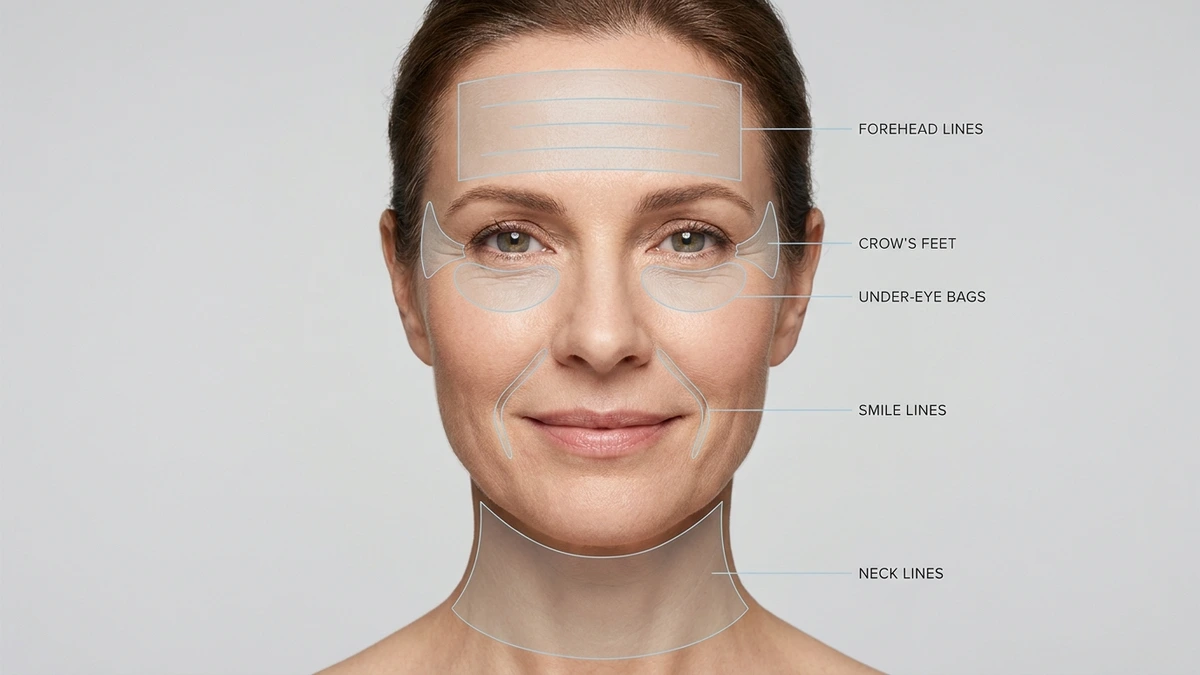
Most beauty filters apply the same blur to the entire face. Evoto Video takes the opposite approach: each wrinkle zone gets its own dedicated slider inside the Blemish Removal module. You only fix what needs fixing — and leave everything else untouched.
Forehead Wrinkles
Horizontal forehead lines and vertical frown lines are the first thing viewers notice in close-up interview or presentation footage. The Face Forehead Wrinkle slider softens these creases without affecting the hairline or eyebrow area. Ideal for talking-head videos where the forehead is constantly in frame.
Eye Wrinkles & Crow’s Feet
Crow’s feet radiate from the outer corners of the eyes — and they deepen every time your subject smiles or squints. The Eye Wrinkle slider targets this zone specifically. For vloggers, wedding videographers, and anyone filming expressive faces, this is often the single most impactful adjustment.
Dark Circles & Eye Bags
Puffy under-eyes and dark circles are lighting-dependent — they can look subtle in person but dramatic on camera. Evoto Video provides separate Eye Bags and Dark Circle sliders, letting you reduce puffiness and lighten discoloration independently. Essential for early-morning shoots or multi-day productions where fatigue shows.
Evoto Video – Be the First to Edit Smarter
Professional-grade AI color grading and retouching for video creators.
Smile Lines
Nasolabial folds — the lines running from the nose to the corners of the mouth — are among the deepest and most visible facial wrinkles. Evoto Video’s Smile Line control is unique: left and right sides are adjustable independently, handling the natural asymmetry of real faces. This face smoother precision is something no basic filter can replicate.
Neck Wrinkles & Body Blemishes
Low-cut or off-shoulder framing exposes neck lines and body imperfections that are easy to overlook during shooting. The Neck Wrinkle and Body Blemishes sliders extend cleanup beyond the face — covering shoulders, arms, and neckline in a single pass.
Take It Further — Smooth Skin, Even Tone, Reshape Features
After removing wrinkles, you can keep going without leaving Evoto Video. The same Portrait Retouching panel offers additional modules that complement wrinkle removal and help you deliver a polished final product:
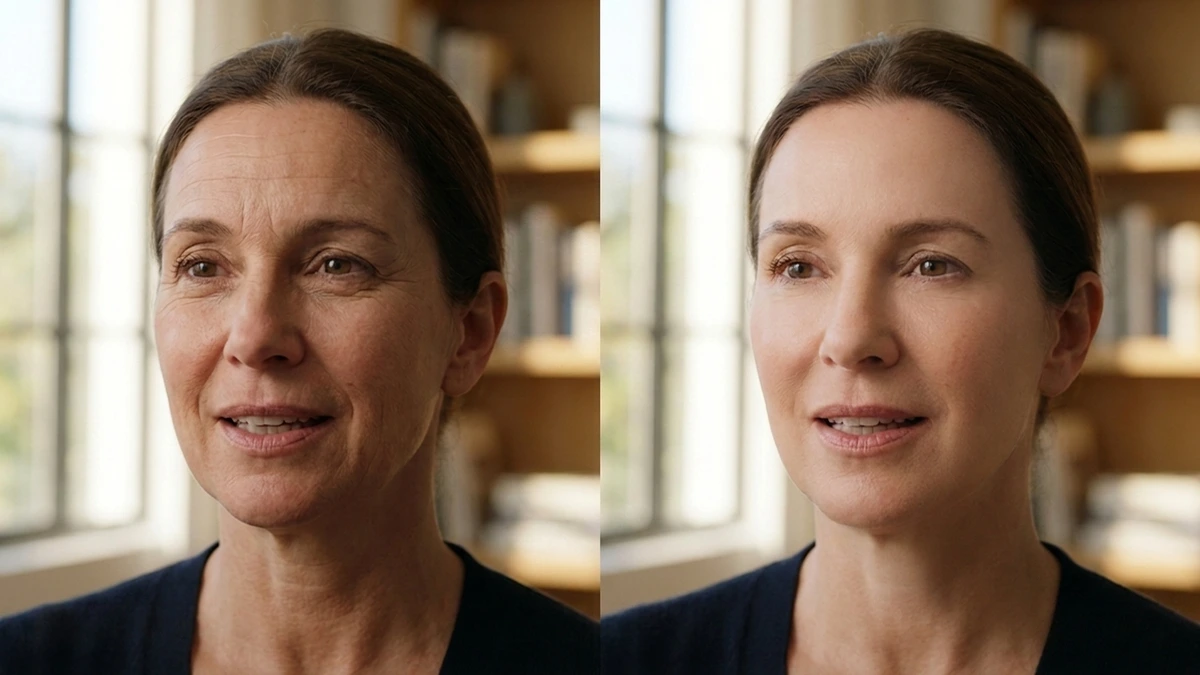
- Skin Retouching — Textured Smoothing evens out skin texture while preserving natural pores; AI Unify Face Complexion corrects uneven tone caused by lighting or makeup. This skin smoother for video works alongside wrinkle removal for a comprehensive result.
- Facial Reshape — Subtly refine jawline, cheekbones, nose, and other features with 16+ individual sliders. Left and right sides adjustable independently.
- Teeth & Eyes — Whiten teeth, brighten eyes, remove red veins — small touches that elevate the overall look.
- Makeup — Apply highlights, contour, and preset looks with one tap. Useful for maintaining consistent appearance across clips.
Everything is slider-based and AI-tracked. No masking, no compositing — just adjust, Apply, and export. That’s what makes Evoto Video a complete video beauty editor, not just a wrinkle remover app.
Import to Export in 5 Minutes — Quick Walkthrough
- Import your video — Drag and drop your MP4, MOV, or M4V file (up to 4K resolution) into Evoto Video.
- Open Portrait Retouching — Click the panel on the right and select the correct gender/age preset (Male, Female, Child, Senior) so the AI optimizes face detection.
- Adjust wrinkle sliders — Expand Blemish Removal and drag each wrinkle slider to your desired level. The before/after split view lets you compare results in real time.
- Layer additional retouching — Optionally add Skin Retouching for overall complexion, Facial Reshape, or other modules.
- Apply & Export — Click Apply to render the AI effects across every frame, then Export at full resolution. Your 4K footage stays 4K.
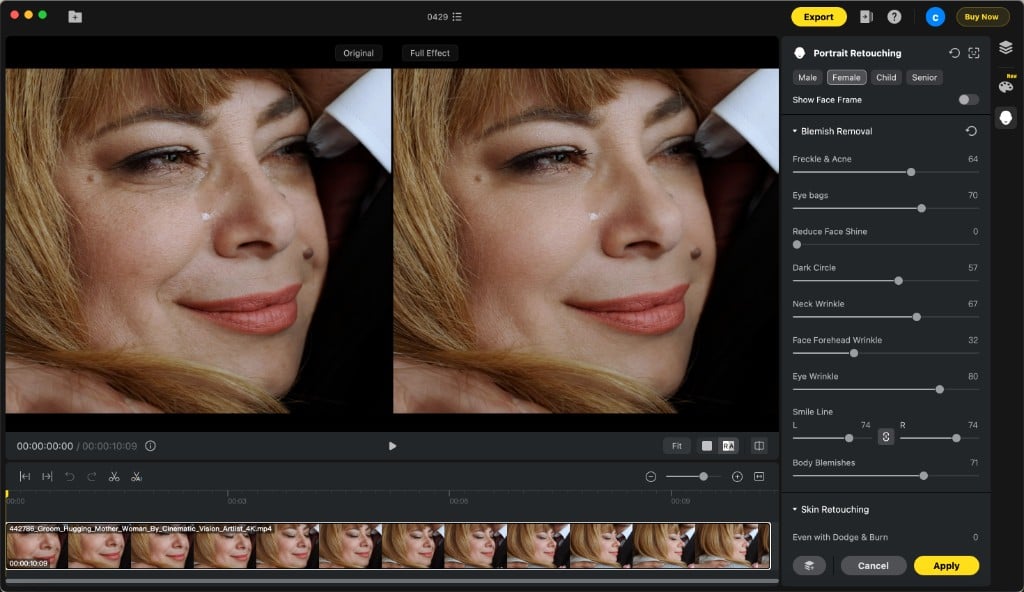
That’s it. Five steps, a few minutes, and your video has professional-grade wrinkle removal that looks natural in motion.
FAQs
Can I remove wrinkles from video without making it look fake?
Yes — that’s the core advantage of Evoto Video’s per-zone approach. Instead of blurring the entire face, each wrinkle remover for face slider targets a specific area while preserving surrounding skin texture and pores. The result is a wrinkle free face that still looks like a real person, not a wax figure.
What types of wrinkles can Evoto Video remove?
Evoto Video’s Blemish Removal module includes dedicated sliders for forehead wrinkles, eye wrinkles (crow’s feet), dark circles, eye bags, smile lines (left and right independently), neck wrinkles, and body blemishes. Each is a separate AI wrinkle remover control, giving you full precision over every zone.
How is this different from a beauty filter?
A beauty filter applies uniform smoothing across the entire face — fast but destructive, erasing natural texture along with wrinkles. Evoto Video’s face wrinkle remover targets only the wrinkle zones you choose, at the intensity you set, while leaving the rest of your skin detail intact. Combined with AI frame-by-frame tracking, it delivers results that hold up in motion.
Evoto Video – Be the First to Edit Smarter
Professional-grade AI color grading and retouching for video creators.
Conclusion
Wrinkles don’t have to define your video footage. With a dedicated wrinkle remover for video like Evoto Video, you can target forehead lines, crow’s feet, smile lines, and neck wrinkles individually — each with its own slider, each tracked by AI across every frame. No masking, no keyframing, no hours lost in After Effects. Just import, adjust, and export. Your subject still looks like themselves, your footage stays at full 4K quality, and your editing workflow drops from hours to minutes.



