

As millions of online shoppers scroll through endless deals during Black Friday 2025, your clothing photos must grab attention instantly. Blurry, poorly lit, or unedited product images can cause buyers to scroll past, resulting in lost conversions. This guide teaches you how to take photos of clothes to sell and how to edit them like a pro for perfect Black Friday visuals.
Why Visual Quality Matters in Black Friday Clothing Sales
Before we delve into how to take photos of clothes to sell, let’s explore why visual quality is crucial for clothing sales. In the fast-paced world of e-commerce clothing photography, visuals are everything. And the quality of your images directly impacts whether shoppers stop to explore or keep scrolling.
The Common Problems:
- A wrinkled shirt or dress gives the impression of poor craftsmanship
- A dull or cluttered background can distract from the clothing’s design details
- Inconsistent lighting creates color inaccuracies, making fabrics appear different from their real shade
- Poor model posing or unflattering angles can make even premium garments seem ill-fitting or outdated.
These flaws lead to mistrust, fewer clicks, and abandoned carts. High-quality ecommerce photography for clothing captures textures, colors, and styles accurately—building customer confidence, driving engagement, and ultimately boosting your Black Friday sales.

How to Take Photos of Clothes to Sell Professionally
Keep reading to check a complete step-by-step guide on how to take photos of clothes to sell professionally, covering planning, setup, shooting techniques, and tips to create high-quality visuals that attract buyers during Black Friday 2025.
Step 1: Plan Your Clothing Photoshoot
Before you start shooting, clearly define your goal. Are you producing catalog-style ecommerce clothing photography, creative lifestyle images, or eye-catching social media visuals? Each direction determines your lighting setup, props, and composition style.
- Think about your audience, whether professional buyers, everyday shoppers, or trend-conscious teens, and plan your visual tone accordingly.
- Choose your photography style carefully: flat lay clothing photography is ideal for showcasing details and textures, clothes on models emphasize fit and style, while hanging or mannequin displays maintain garment structure.
- Use a tripod for sharp, stable shots, softbox lights for even exposure, and white balance cards for accurate color.
- For Black Friday, schedule efficient batch sessions, including photographing multiple outfits in consistent lighting and angles ensure fast edits, cohesive branding, and quick online updates.
That is all for the good start on how to take photos of clothes to sell.
Step 2: Prepare the Clothes Before Shooting
The preparation stage sets the foundation for professional-looking results.
- Start by ironing or steaming every garment carefully to remove wrinkles and folds that can appear exaggerated under studio lights.
- Check for loose threads, stains, or lint, and make sure buttons, zippers, and seams are properly aligned.
- Arrange the clothing neatly, like smoothing out fabric edges and adjusting collars, cuffs, or hems to show their natural shape.
- Adding subtle accessories such as belts, scarves, or jewelry can enhance visual appeal and storytelling.
For finishing touches, AI clothing wrinkle remover tool helps refine any remaining imperfections. With just one click, you can digitally smooth fabrics without altering their texture. An AI clothes lint remover also works for spotless visuals.
These careful preparations elevate your clothing photoshoot, helping your products look premium and trustworthy for Black Friday shoppers.
Step 3: Choose the Right Background and Lighting
When figuring out how to take photos of clothes to sell, a clean and consistent background is a must because it ensures the focus stays on your clothing.
For minimal setups, use a flat lay background for clothes in white, gray, or pastel. Lifestyle settings, such as soft fabric surfaces or natural textures, work for editorial looks.
The best backdrop for clothing photography is one that enhances the product’s color and fabric without distractions. Neutral tones are ideal for clothing studio photography, while bright backgrounds add energy to youth-focused brands.
Also, lighting is crucial. It’s better to use softboxes or ring lights to reduce shadows. Natural light is also excellent for achieving accurate color tones and a genuine look.
Step 4: Photograph Clothes on Models or Mannequins
Featuring clothed models brings your products to life. Models help customers visualize fit, drape, and movement, making your images more relatable. However, mannequins or hangers can also be effective for a minimalist brand aesthetic.
When working with a model for clothing brands, keep lighting, poses, and backgrounds consistent to ensure a cohesive catalog. Encourage natural expressions and relaxed poses that match your brand’s tone, that is, casual for lifestyle, poised for luxury. Pay attention to details such as fabric folds, sleeve drape, and styling accessories.
Always remember that effective modeling clothes photography captures confidence and emotion, turning simple images into persuasive selling tools.
Step 5: Shoot for Online Platforms
Each online marketplace has specific photography requirements, so tailoring your images is essential.
For example, Amazon requires a white background, centered framing, and a 1:1 ratio for uniformity, while Shopify favors larger banner-style hero shots that highlight brand personality. When selling clothes on Poshmark, vertical formats and lifestyle-inspired compositions perform best.
- To master how to take photos of clothes to sell online, capture multiple angles, including front, back, side, and detailed close-ups of fabrics, stitching, and accessories.
- Ensure even lighting, consistent alignment, and clear focus across all shots.
- Keeping your images cohesive across listings builds a professional storefront, enhances your e-commerce clothing photography, and boosts trust and conversions during your Black Friday 2025 campaign.
That’s all the steps on how to take photos of clothes to sell. Follow them to shoot perfect clothing photos for sales
How to Edit Clothing Photos for Professional Visuals
Besides the shoot attention, ready-to-sell assets, and photo editing are an important part of the process of how to take photos of clothes to sell. It refines your visuals into polished. Evoto AI Photo Editor is exactly what you need to simplify the editing process, which delivers professional results in minutes.
Remove Wrinkles and Imperfections from Clothes
Wrinkled fabrics can make products look secondhand. Explore the guide on how Evoto’s AI fabric retouching tool removes wrinkles and lint while keeping fabric textures realistic.
Step 1. Download Evoto AI to your Windows, macOS, or iPad devices.


Powerful AI Photo Editor
Step 2. Upload the clothing photos to the workspace in formats JPG, PNG, RAW, and TIFF.
Step 3. Navigate the feature sections > Clothes & Accessories Adjustment. Move the slider of De-wrinkle Clothing, also fine-tune the strength of “Fine Wrinkles Removal” and “Deep Wrinkles Removal”. Evoto’s AI wrinkle remover smooths fabrics instantly.
Notice: Avoid over-removal to preserve the authentic texture.
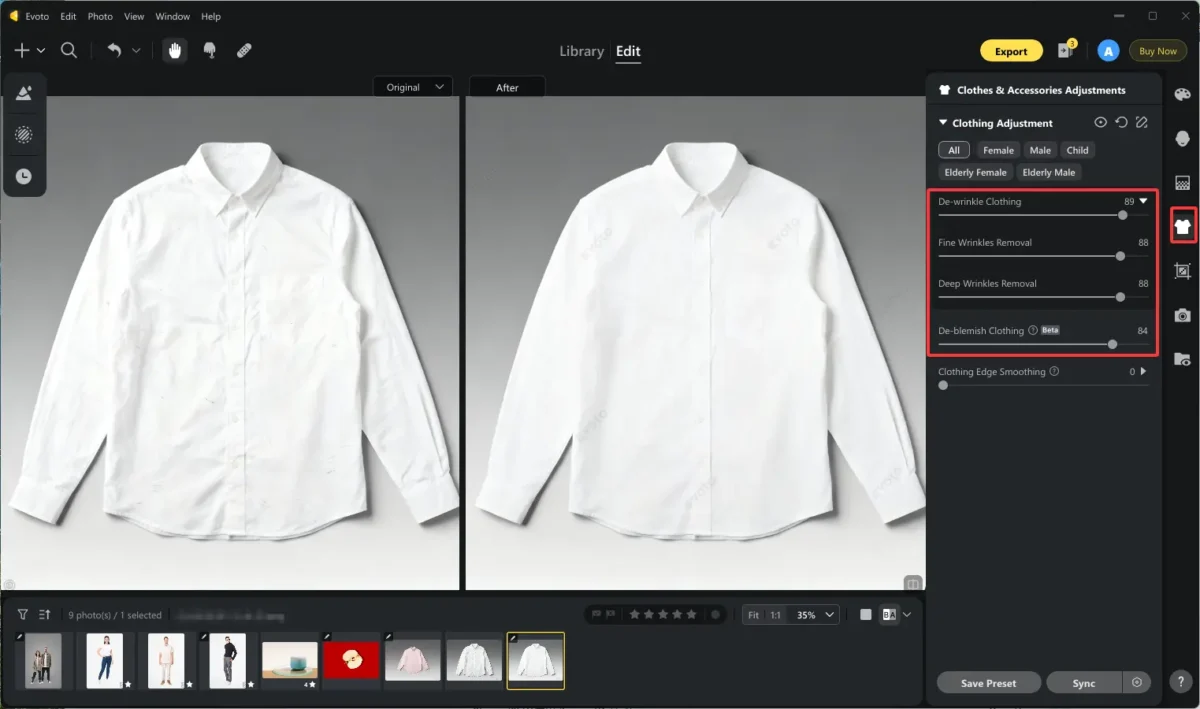
Step 4. (Optional) If there are blemishes on the clothing, you can increase the value of De-blemish Removal’s slider.
Generally, traditional retouching can take hours, but Evoto automates the process while maintaining detail accuracy. With Evoto, e-commerce clothing photography becomes effortless, allowing you to focus on scaling your listings instead of manual editing.
Perfect Backgrounds for Clothing Photos
Distracting backgrounds can ruin even the best outfit. Evoto’s AI background remover lets you cleanly isolate garments or replace messy environments.
Step 1. Import your clothing photos with clutter backgrounds.
Step 2. Locate the “Background Adjustments” section. Here, you can clean the distractions from the background by enabling the “Distraction Removal” button. It will automatically detect the distractions and eliminate them naturally.
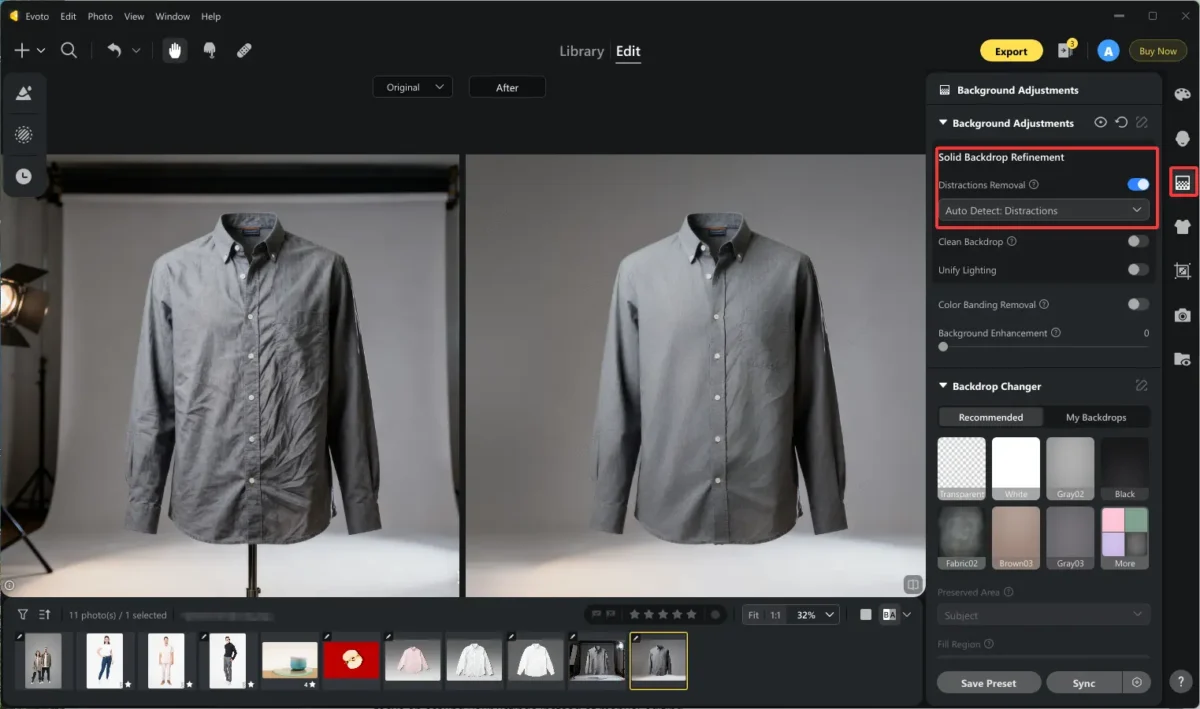
Also, you can replace the backdrop entirely with the Backdrop Changer. Select a solid color background in the recommended choices or import a backdrop as you wish, e.g., brand-themed or holiday-inspired backgrounds.
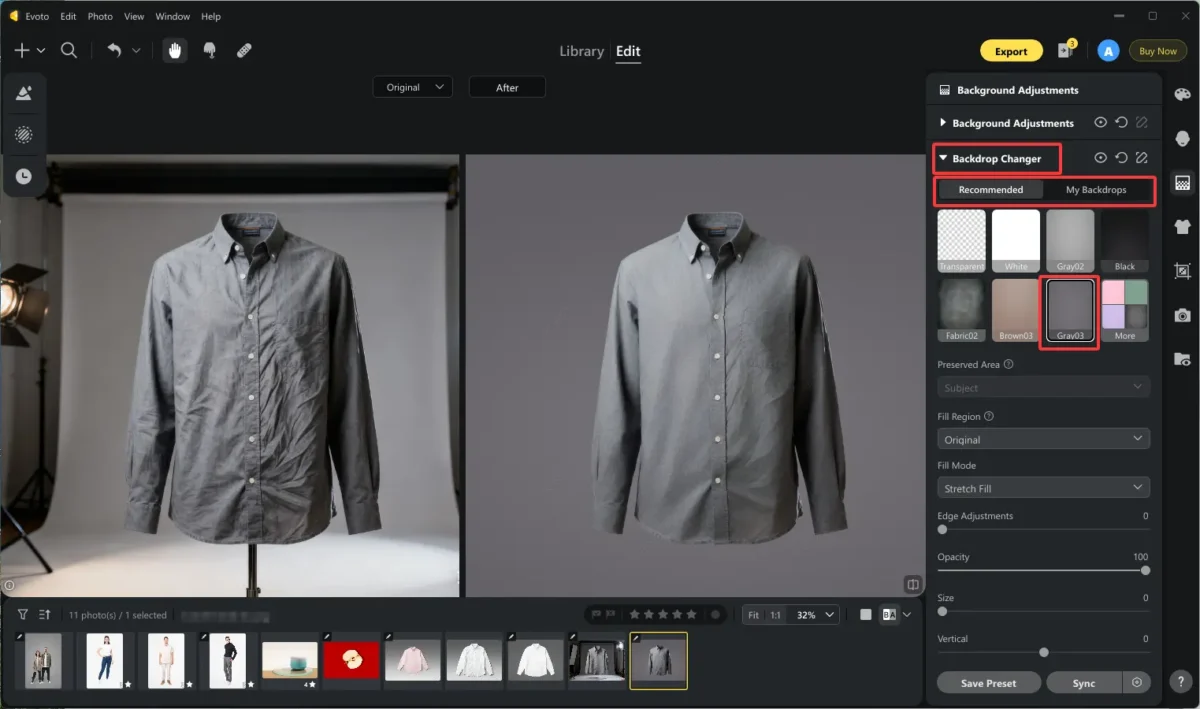
Step 3. Save the edits, and you can implement them to multiple images with one click. This ensures all your visuals have a consistent style, perfect for fashion photoshoot ideas or festive Black Friday campaigns.
Note that maintaining visual consistency across all products reinforces your brand’s identity and professionalism.
Powerful AI Photo Editor
Crop and Resize for E-commerce Platforms
Evoto’s smart crop feature helps you adjust photo dimensions automatically for various platforms. Learn about the common sizes for platform rules like Amazon, Shopify, and Poshmark as below.
- Amazon: 2000×2000 px (square ratio)
- Shopify: 2048×2048 px
- Poshmark: 1600×1600 px
Quick Steps:
Step 1: Import the photos that need to be resized. Go to the “Crop & Rotate” feature section.
Step 2. Unfold the ratio list and choose W*H*Resolution. Input the values for the width and height. And remember to change the unit into “px”.
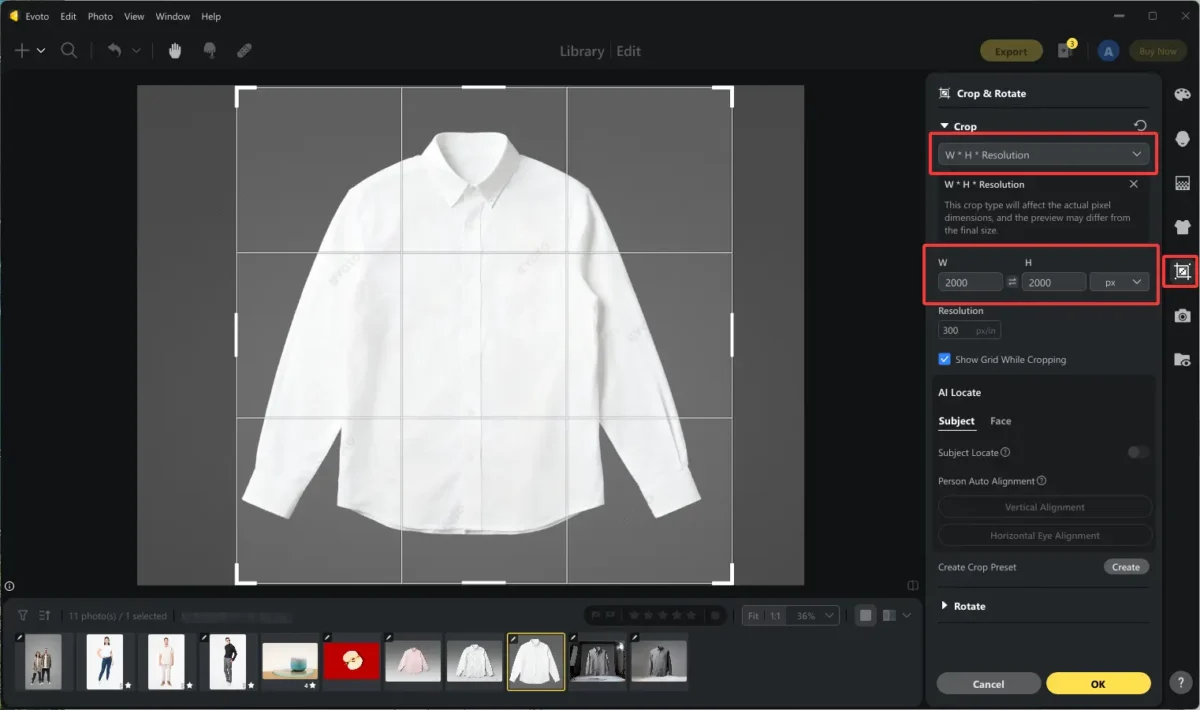
Step 3. You can sync cropping edits to photos in batches that are prepared for the same platform.
Accurate cropping enhances framing and ensures your clothing product shots look sharp on every platform. This is a crucial part of mastering how to take clothing product shots that meet online standards.
Read More: How to Edit Multiple Photos at Once | E-commerce Guide
(Optional) Portrait Retouching for Product Model Photos
For brands that use clothed models, Evoto refines skin tones, adjusts lighting, and evens out shadows while preserving natural beauty. Check how it works.
Step 1. Upload your clothing photos with models.
Step 2. Head to the Portrait Retouching section. Here, you can
- Remove blemishes from the model’s face and body.
- Smooth the full body’s skin and unify skin tone, and keep natural skin texture.
- Reshape facial features and body parts, making the clothing stand out.
- Adjust gummy smile, correct eye catchlight, add hair volume, and even re-makeup to match the clothing style.
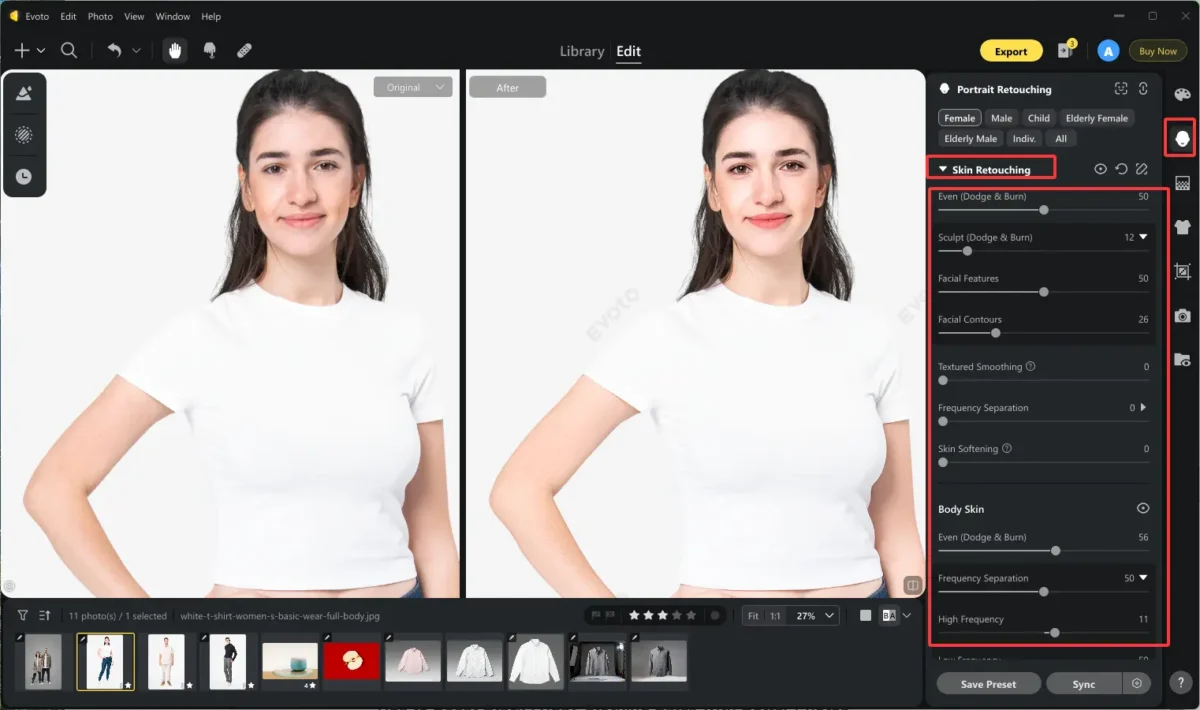
Step 3. Save the changes as a preset to apply to a series of clothing photographs in batches for a consistent visual effect.
This level of photography for clothing editing ensures a luxurious yet realistic look. It is ideal for clothing brand photoshoots. But keep in mind that balanced retouching enhances appeal without appearing artificial, and it makes your Black Friday visuals more persuasive and premium.
Tips to Boost Black Friday Clothing Sales with Better Photos
In spite of the guide on how to take photos of clothes to sell, the practical tips are also valuable for sales.
- Consistency is the secret to conversions.
- Stick to uniform lighting, true-to-color representation, and clean compositions.
- Use Evoto AI’s batch editing to keep your store cohesive and efficient during Black Friday rush hour.
Better photos mean better sales; that is to say, every pixel matters. Surge your clothing sales on Black Friday by memorizing the tips above.
Powerful AI Photo Editor
Conclusion
Professional, high-quality visuals define success in fashion ecommerce. By mastering how to take photos of clothes to sell and refining them with Evoto AI Photo Editor, you’ll stand out this Black Friday 2025. Combine creativity, clarity, and technology to turn every image into a sale.



