

In the world of fashion e-commerce, product photos play a crucial role in driving sales. However, wrinkled garments in photos can create a negative impression, making products look unprofessional and poorly presented. For photographers and e-commerce brands, manually smoothing out hundreds of clothing photos is a time-consuming challenge that impacts productivity. This is where learning how to edit out wrinkles in clothes becomes essential for efficiency and maintaining professional standards.
Why Editing Wrinkles Matters for Apparel Photography
Wrinkles distract customers from a garment’s true texture, style, and fit. Smooth, polished clothing images not only improve visual appeal but also enhance brand trust. Using a clothing editor or AI clothes wrinkle remover ensures consistent presentation across multiple product shots, helping online shoppers focus on the product rather than flaws.
Traditional Methods vs AI-Powered Editing
Manual retouching in software like Photoshop can be effective, but it is slow and repetitive. Photographers must smooth fabrics, adjust lighting, and remove folds one by one—a daunting task for bulk product listings. Modern AI solutions, such as an AI clothes editor, automate wrinkle removal, streamline workflow, and allow batch editing, saving hours of manual work.


Powerful AI Photo Editor
How to Edit Out Wrinkles in Clothes with Evoto AI
Editing wrinkles doesn’t have to be difficult or time-consuming. With Evoto AI, you can remove wrinkles and smooth clothing in just a few clicks. The process is fast, easy, and perfect for e-commerce photographers who need consistent results. Follow these simple steps to edit out wrinkles in clothes efficiently and keep your product images looking clean and professional.
Step 1: Upload Photos
Import JPG, PNG, TIFF, or RAW files into Evoto AI. Organize by clothing type, collection, or color.
Step 2: Apply Initial Adjustments
Adjust brightness, contrast, or color balance on one image. Save settings as a preset for bulk editing.
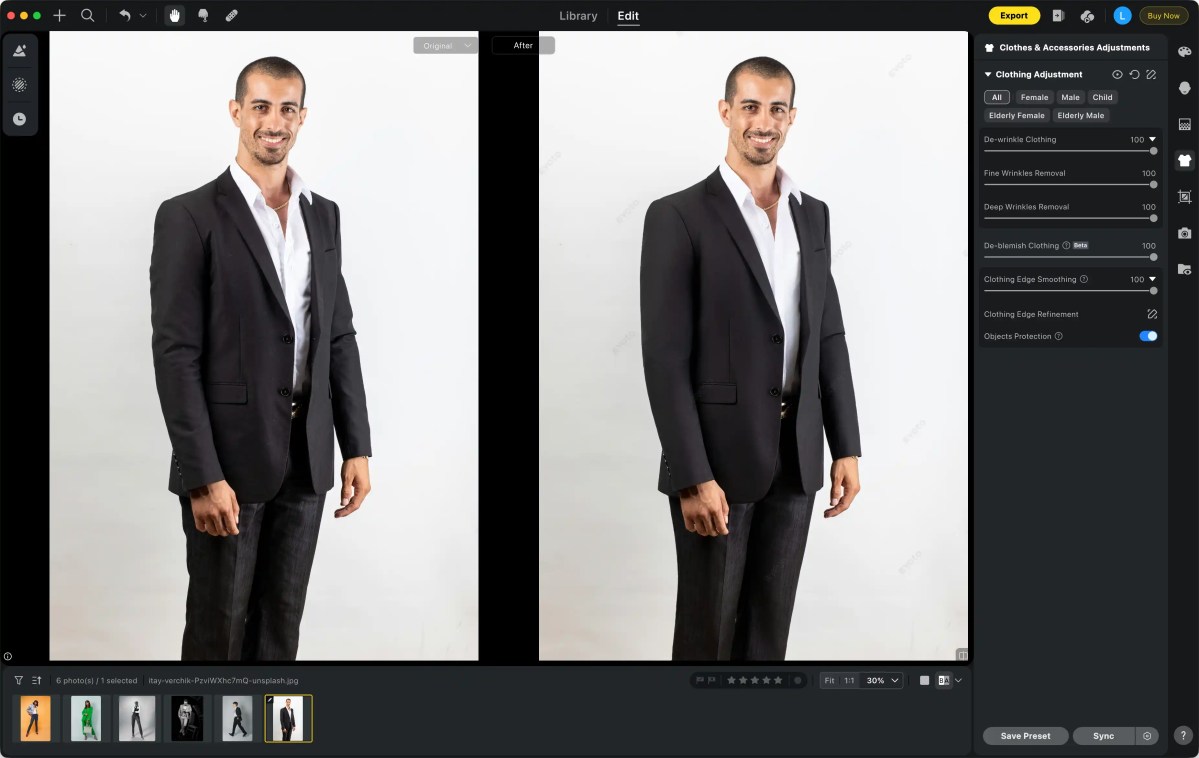
Step 3: Remove or Smooth Wrinkles
Use AI-powered tools to smooth out wrinkles across all selected photos. Ensure a clean background and polished product appearance.
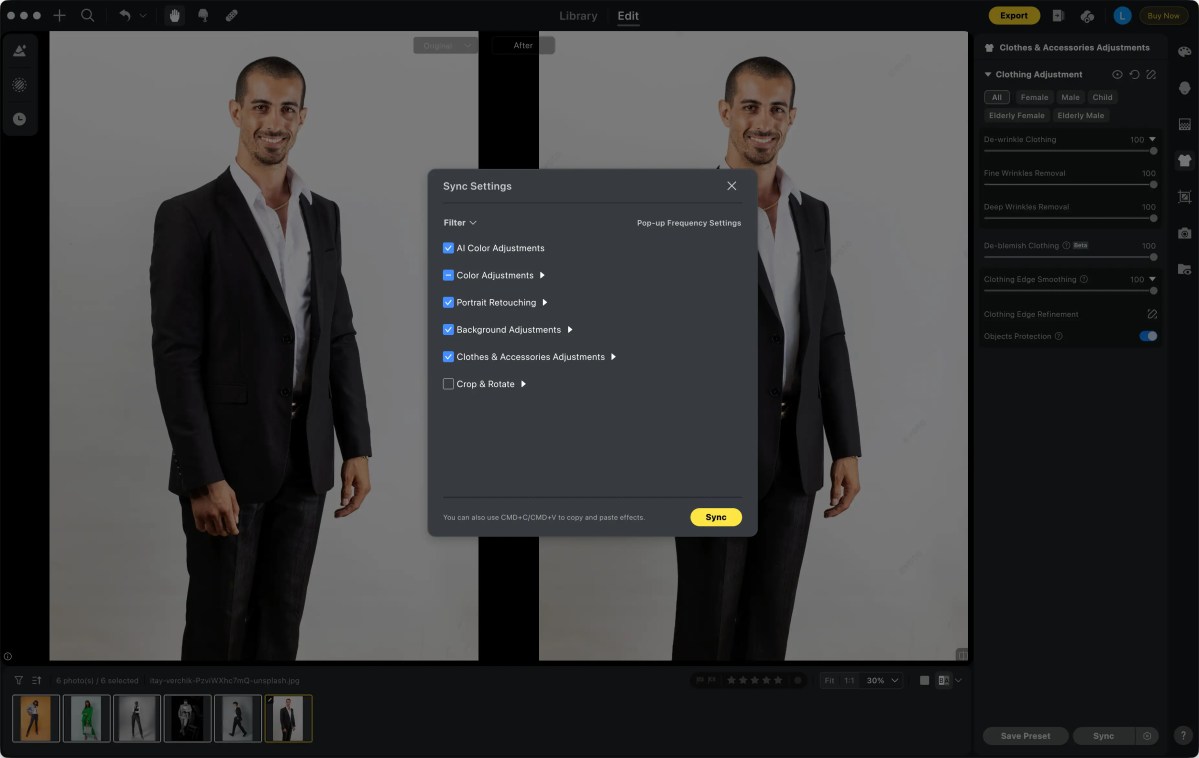
Step 4: Batch Edit Images
Select multiple images and apply the preset simultaneously. Tools include bulk edit images, batch edit, and wrinkle removal.

Step 5: Export Edited Photos
Export high-quality JPG or PNG files ready for online stores. Maintain consistency for product catalogs and social media.
Read More:
- How to Take Photos of Clothes to Sell Online for Black Friday 2025
- How to Edit Multiple Photos at Once | E-commerce Guide
- Mastering Model Portrait Photography for Black Friday Success: A Complete Workflow Guide
Key Features for Fashion E-commerce Success
- AI Subject Detection: Isolates garments precisely for consistent wrinkle removal.
- Preset Synchronization: Apply edits to hundreds of images at once.
- Quick Bulk Adjustments: Brightness, contrast, cropping, and watermarking in one click.
- High-Volume Workflow: Ideal for apparel photography, social media, and catalogs.
Use Cases of Evoto AI for Fashion Retailers
- Product Photography: Smooth fabrics, remove wrinkles, and maintain color consistency.
- Social Media & Content Creation: Keep a consistent, professional look across posts.
- Bulk Online Catalog Management: Edit hundreds of product shots in a single workflow.
Advantages of AI-Powered Wrinkle Removal
- Time-Saving: Hundreds of images edited in minutes.
- Consistency: Uniform tone, brightness, and smoothness.
- Professional Quality: Retains fabric texture while removing wrinkles effectively.
- User-Friendly: Intuitive for beginners, powerful for pros.
- Free Trial Available: Explore features before committing.
Tips for Faster Fashion E-commerce Editing
- Create reusable presets for product categories.
- Use folders, tags, and batch organization for faster selection.
- Preview edits before exporting to ensure consistency.
- Combine studio photography workflow with batch editing for maximum efficiency.
Powerful AI Photo Editor
Conclusion
Mastering how to edit out wrinkles in clothes is important for fashion e-commerce. Wrinkle-free photos make your products look professional. They help build trust with customers and improve your brand image. AI tools like Evoto AI save time by automating the editing process. You can edit many photos at once and keep them consistent. These tools also maintain the fabric’s texture and quality. Using AI makes your workflow faster and more efficient. It helps you create polished catalogs and attractive product listings.



