

TL;DR
- Mini sessions for photography stay profitable with three themed looks from one 30-minute shoot on a single backdrop—not three physical sets.
- Price at 2.5–3× true post cost; cap edits at 45–60 minutes; structure mini photo session packages as Good/Better/Best.
- Batch scene work belongs in a fixed post budget—not open-ended retouching promises.
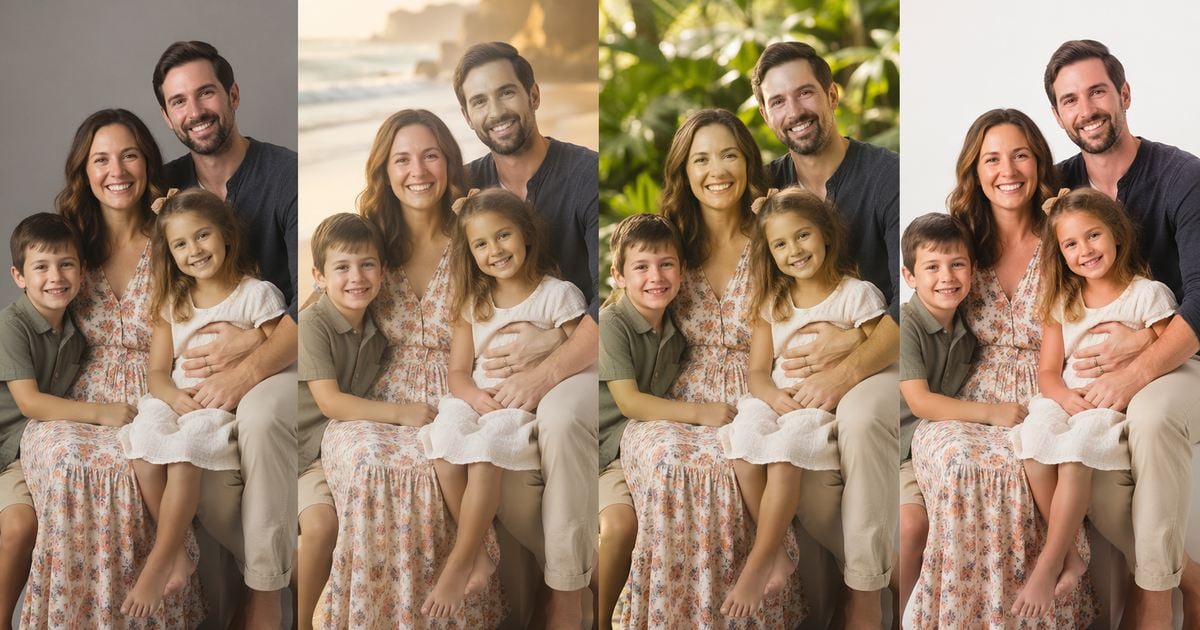
Clients want summer color, sand, and garden greens. They also book mini photo sessions in 20–40 minute blocks and expect gallery-ready files within days. If you run mini sessions for photography as a studio owner—not as a client hiring a photographer—this guide is about margin, not posing inspiration.
For pose and wardrobe ideas, see a summer photoshoot ideas roundup on the Evoto blog—this article covers pricing, packages, and delivery math.
Who This Guide Is For (and Not For)
This workflow fits solo and small portrait studios that already shoot family and children minis on a controlled backdrop. You need repeatable capture, an honest mini session pricing sheet, and a post pipeline that survives July and August booking density.
It is not aimed at on-location-only photographers with no composite path. High-volume school vendors follow different SLAs—see school delivery timelines elsewhere on the blog rather than this mini-profit model. If you are still deciding whether mini sessions for photography fit your studio model, start with the table below—not competitor Instagram prices.
| Studio type | Runs profitable minis? | Why |
|---|---|---|
| Solo portrait studio | Yes | One backdrop + repeatable post workflow scales |
| High-volume school vendor | Partial | Different SLA and pricing; not the focus here |
| Outdoor-only, no studio | No | Hard to standardize capture for scene swaps |
If you already use Evoto for portrait batches, the numbers below map cleanly to AI Background Fusion on Desktop. You do not need every feature on day one—you need a priced edit cap per booking.


Powerful AI Photo Editor
How Many Looks Fit in 30 Minutes (Without Rushing)
The fan-out question is simple: how many looks should a mini session include? The honest answer depends on edit minutes, not wishful posing.
Keep one lighting setup. Rotate poses—not sets. Aim for 15–20 keeper frames you would actually deliver. Each additional delivered scene adds composite, QA, and client-review time.
| Delivered looks | Session time | Edit budget | Client fatigue | Suggested tier |
|---|---|---|---|---|
| 2 | 20–25 min | 30–40 min | Low | Good (base) |
| 3 | 25–30 min | 45–55 min | Medium | Better (recommended) |
| 4–5 | 35–40 min | 70–90 min | High | Best / add-on only |
Price looks, not hope. If you sell five themed scenes, budget 90+ edit minutes or your mini session photography pricing lies to you.
Mini Session Photography Pricing That Survives July
Many studios peak on fall mini sessions and Christmas mini sessions with higher list prices. Summer is when smart owners finalize mini session pricing and packages before Q4. Treat fall mini session prices and Christmas mini session prices as market context—not your primary offer window.
Trade groups such as the Professional Photographers of America (PPA) emphasize that session fees must cover the cost of sales and overhead—not competitor list prices alone. That discipline matters more when minis stack in July.
Cost-plus baseline
A practical floor:
(session minutes + edit minutes + overhead) × 2.5–3×
This is studio shorthand aligned with cost-plus pricing: cover labor and overhead, then add margin. PPA’s benchmark work often cites ~25% cost of sales as a healthy ceiling for product-heavy studios—minis with heavy post time can run higher on labor, which is why minute tracking beats guesswork.
Track post-production minutes per booking the same way you track session time. When edit time creeps past your cap, margin dies quietly.
Sample tiers (illustrative USD)
| Tier | Session fee | Looks included | Edit cap | Target margin |
|---|---|---|---|---|
| Good | $175–$225 | 1 themed scene + neutrals | 35 min | 40%+ |
| Better | $225–$295 | 3 themed scenes | 50 min | 45%+ |
| Best | $295–$350 | 5 themed scenes + prints | 65 min | 50%+ |
Mini vs full session (illustrative)
| Format | Booked hours | Edit hours | Example revenue | Notes |
|---|---|---|---|---|
| Mini (3 looks) | 0.5 | 0.75 | $265 | High turns, tight edit cap |
| Full session | 2.0 | 4.0 | $850 | Lower volume, higher absolute fee |
Numbers vary by market. The pattern should not: mini photo session prices must cover minutes, not just feel competitive on Instagram.
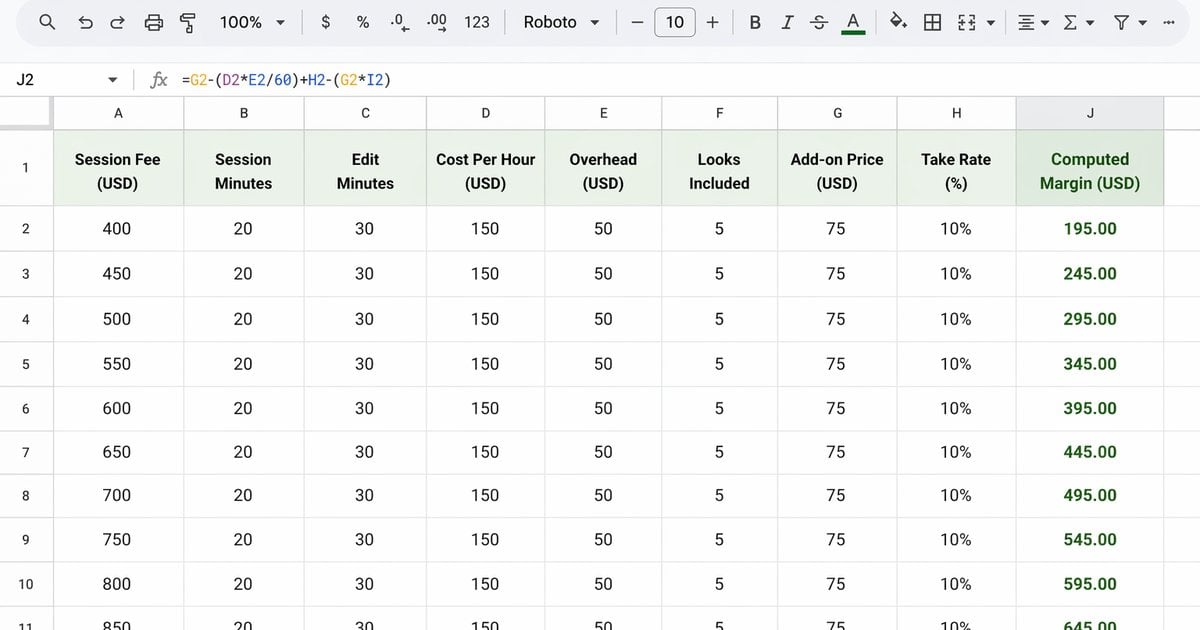
Build a simple margin sheet (Google Sheets or Excel)
There is no public download link for this article—build a one-tab sheet yourself and copy one row per tier (Good / Better / Best).
| Column | What to enter | Example |
|---|---|---|
| Session fee | List price | $265 |
| Session minutes | Shoot time on clock | 28 |
| Edit minutes | Post cap (honest) | 45 |
| Cost per hour | Loaded labor rate | $45 |
| Overhead per session | Studio, admin, software slice | $25 |
| Looks included | Sanity check vs package | 3 |
| Add-on price | Extra scene or print credit | $75 |
| Add-on take rate | Share of bookings that buy (0–1) | 0.30 |
Formulas (same row):
- Labor cost = (Session minutes + Edit minutes) ÷ 60 × Cost per hour
- Total cost = Labor cost + Overhead per session
- Expected revenue = Session fee + (Add-on price × Add-on take rate)
- Margin ($) = Expected revenue − Total cost
- Margin (%) = Margin ($) ÷ Expected revenue
- Weekly break-even (sessions) = Weekly fixed costs ÷ Margin ($) — only when margin is positive
Run a timer on three real minis after peak week. If average edit minutes beat your Edit minutes column, update the sheet before you reprice—not after you burn out.
Delivery timeline (Day 0–3)
| Day | Milestone |
|---|---|
| 0 | Shoot + same-day backup |
| 1 | Composite + portrait finish |
| 2 | Client gallery + optional upgrade window |
| 3 | Final delivery |
Operational booking-to-export detail belongs in a dedicated summer mini session workflow article—this section only sets client-facing SLA expectations tied to your mini session pricing sheet.
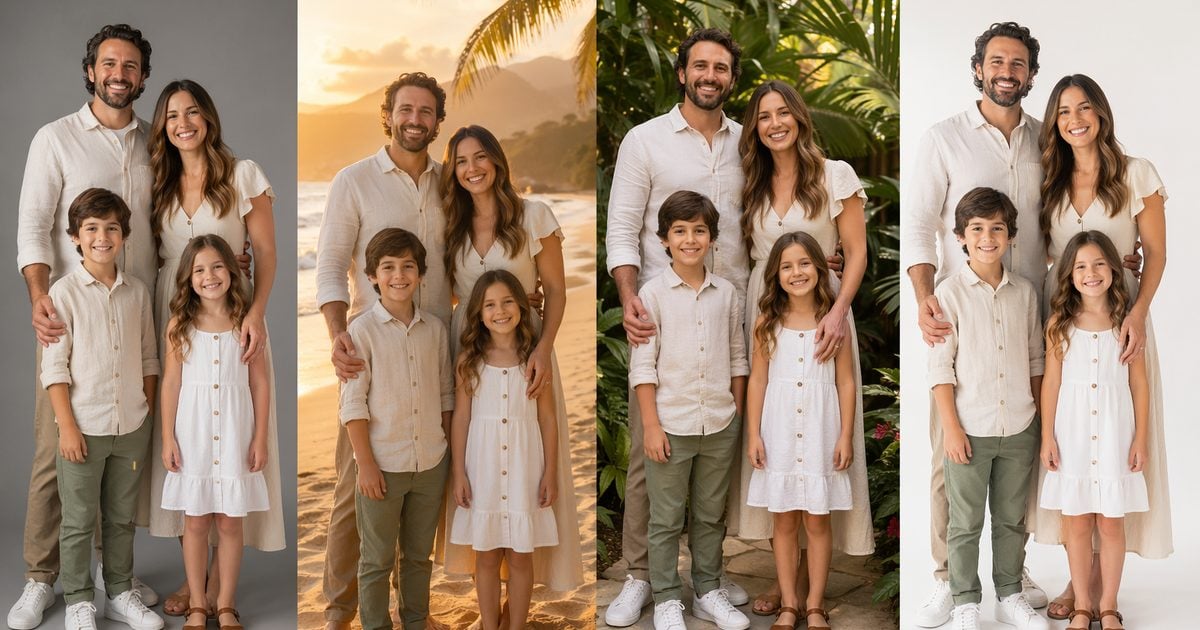
One Backdrop, Three Summer Deliverables
You do not need a physical beach set to sell a beach look. You need one fusion-ready capture and a Look Menu clients understand at booking.
Example scene names aligned with summer portrait packs (adjust to your studio library):
| Look | Example scene | Client-facing note |
|---|---|---|
| 1 | Golden Beach Haze | Warm backlit beach mood without travel day |
| 2 | Tropical Garden | Family-friendly green backdrop |
| 3 | Minimal Clean Studio | Bright, print-ready clean look |
| Add-on | Rooftop Golden Glow | Optional upgrade in Better/Best tiers |
Shoot grey or white seamless with a consistent key light. That neutral capture is your anchor for every swap. Grey seamless is a common chroma key capture choice when you plan edge-friendly compositing (chroma key—neutral backdrop terminology from broadcast and portrait practice).
After capture, beach looks are a delivery and consistency problem—scene swaps, matting QA, and light match—not develop sliders alone. On-location sand-and-sky files still need solid color work; see how to edit beach photos for that path. Mini session packages with themed studio scenes need a portrait-first composite pipeline before export.
Walkthrough (one Better-tier booking · tested June 2026)
Method: single operator · Evoto Desktop 7.3.0 · Better package · grey seamless + one key light
Inputs: 28-minute session · 22 keepers · three scenes on Look Menu
Output: three themed exports · 38 minutes post-production (timer-stopped; illustrative, not a guarantee for every studio)
Powerful AI Photo Editor
- Cull and rate (Batch Editing / Survey View)—keep only true keepers.
- AI Background Fusion—subject cutout, apply scene pack or custom background, optional foreground layer. (Early docs may label this AI Scene; the current product name is AI Background Fusion.)
- Character Lighting—quick pass on three hero frames so subject and scene share believable light direction.
- Batch apply scenes across the keeper set on Desktop (see limitations below).
- Portrait sync—skin and finish settings copied across the set, then export tiers.
A neutral capture backdrop workflow helps when you standardize grey/white seamless before fusion. Keep capture boring; keep delivery flexible.
Good / Better / Best Mini Photo Session Packages
Clear mini photo session packages reduce awkward upsell conversations. Clients choose a tier; you choose how many scenes fit your edit cap.
| Package | Scenes | Prints | Typical uplift | Sample order-form line |
|---|---|---|---|---|
| Good | 1 themed | Digital only | Base | “One summer look, delivered in three business days.” |
| Better | 3 themed | Small print set | +$60–$90 | “Three looks, one session—pick your scenes from the menu.” |
| Best | 5 themed | Album credit | +$120–$160 | “Full summer menu plus print credit.” |
Upgrade = extra scenes, not a reshoot. Say that on the booking page and in confirmation email.
Pose and outfit inspiration helps clients prepare—but studio margin planning still lives in your tier table and edit timer.
The 45-Minute Post-Production Budget
For a Better mini with three looks, treat 45 minutes as a ceiling—not a suggestion. Overflow is a margin leak.
| Step | Minutes | Notes |
|---|---|---|
| Cull & rate | 8 | Batch Editing |
| Batch scene apply | 18 | AI Background Fusion on Desktop |
| Portrait finish sync | 12 | Batch portrait finishing |
| Export & upload | 7 | Gallery prep |
| Total | 45 | Stop when the timer hits cap; reprice before next season |
Some studios still cull in Lightroom before finishing elsewhere—compare Capture One vs Lightroom for batch portrait delivery if you are weighing handoffs. The point here is not which brand wins—it is that handoffs add minutes you must price.
Failure Modes Most Studios Hit in Year One
- Selling five looks, delivering in 90+ minutes. Cap Better at three scenes unless mini session photography pricing includes a real edit premium.
- Light mismatch on scene swaps. Use Character Lighting; pick scenes with similar sun angle; keep one key light on seamless.
- No QA before upload. Spot-check three frames: edge halos, shadow direction, skin tone.
- Underpriced add-ons. Price scene upgrades at ≥40% of base session fee—or reshoots eat you alive.
- Client surprise on digital scenes. Show the Look Menu at booking; pose ideas alone do not set delivery expectations.
Where Batch Scene Work Fits in Your Workflow
Batch scene work earns its place when you repeat the same lighting and deliver multiple themed exports from one session—typical mini sessions for photography in peak summer.
On Evoto Desktop 7.3.0+, AI Background Fusion supports batch scene application across a keeper set. That is how a solo operator keeps a 45-minute cap realistic. See the studio-to-scene compositing workflow for feature context—without turning this section into a spec sheet.
Limitations worth stating to clients and staff:
- Online trial does not support batch AI Background Fusion. Batch-themed delivery requires Evoto Desktop.
- Some AI Lab actions consume credits; budget them inside your mini session pricing, not as surprise overhead.
- Fusion cannot rescue badly exposed captures—fix exposure on seamless first.
- Foreground layers have compositing constraints; QA still matters.
If batch scene work is not part of your season, price mini photo session packages accordingly. Fewer looks, shorter edit cap, same honest timeline.
Peak Season Planning
Before July bookings stack, confirm your Desktop batch workflow and scene library match what you sold on your mini session pricing page. Mini sessions for photography peak in July and August—lock your margin sheet before those weeks fill. Compare subscription tiers on Evoto pricing before you lock scene credits into packages. Scene assets change seasonally—check Evoto release notes when you update your Look Menu. If you have not batch-tested a Better folder yet, download Evoto Desktop and run one session end-to-end before peak week.
Mini sessions for photography only feel “cheap” when you treat them as discount full sessions. Price the minutes, package the looks, and cap the post. That is how small studios survive July without burning out in September.
For broader batch portrait tools outside this pricing frame, see the AI Photo Editor hub on Evoto.ai.
Powerful AI Photo Editor
FAQ
1. How many mini sessions for photography can I shoot in one summer weekend without burning out?
Most two-person studios cap at 8–12 mini bookings across a weekend only if edit caps hold and batch scene work stays on Desktop. If every session runs 70+ edit minutes, cut bookings—not sleep.
2. Should I include all themed looks in my mini session pricing or charge per look?
Include one scene in Good; bundle three in Better. Charge per additional scene in Best or à la carte add-ons so mini session photography pricing tracks edit time.
3. Do I need a physical beach set for profitable summer mini sessions?
No. A fusion-ready seamless capture plus a clear Look Menu covers beach mood without travel days or set rental.
4. How long should clients wait for delivery during peak season?
A three-business-day SLA is realistic if your 45-minute post-production budget is enforced. Miss the cap twice in a week—raise prices or cut looks.
5. What backdrop color works best when planning mini photo session packages with scene swaps?
Medium grey or clean white seamless with edge-friendly lighting. Avoid busy patterns that fight matting.
6. Can I run mini sessions for photography profitably with only two staff?
Yes—one shooter, one editor/editor-shooter hybrid works if batch scene and portrait sync are standardized. Chaos returns when packages outrun edit caps.
7. How do I handle client expectations when using digital summer scenes?
Show the Look Menu during booking. Separate pose inspiration from delivered scenes so clients know what they are buying.
8. Can I run batch AI Background Fusion on the online trial?
No. Batch AI Background Fusion requires Evoto Desktop. The online trial suits single-image exploration—not multi-scene mini delivery at volume.



