

TL;DR
- A good cutout app removes a background in one tap and keeps clean edges around hair, fur, and fine detail.
- Phone apps (Evoto, PhotoRoom, Picsart, Apple Photos, Background Eraser) are great for quick one-off cutouts; online tools (remove.bg, Adobe Express) are handy on any device.
- For high-volume, professional work — consistent white backgrounds across hundreds of images — Evoto pairs AI background removal with batch editing and full manual control.
- Most picks below are free to start, so you can test the edge quality on your own photos before committing.
Cutting a subject out of a photo used to mean slow manual masking in Photoshop. Today the right cutout app does it in a tap — lifting a person, product, or pet off its background and dropping it onto white, transparent, or a brand-new scene. Whether you shoot on an iPhone, an Android phone, or edit in a browser, there is an app to cut out images that fits how you work. Below are eight of the best, each broken down the same way — what its cutout does, who it suits, quality, bulk support, pricing, and the honest pros and cons — so you can match the tool to the job instead of fighting the wrong one.
What Makes a Great Cutout App
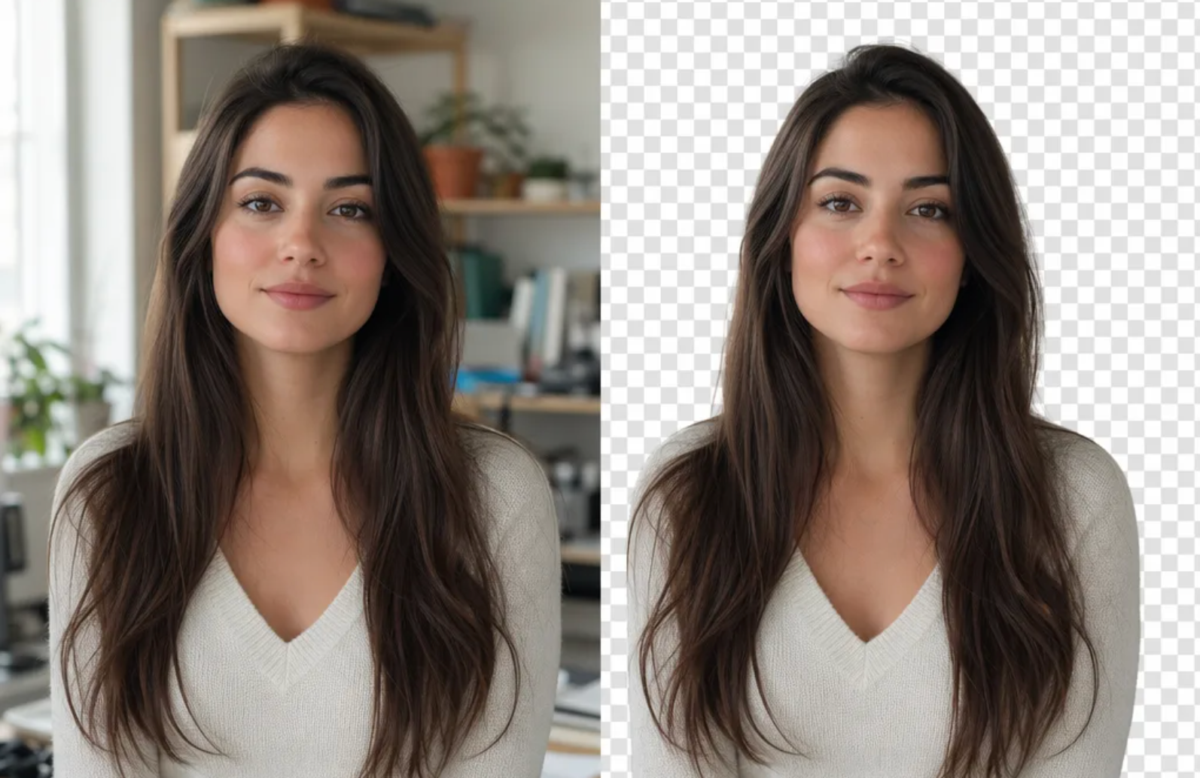
Background removal looks simple until you zoom in on the edges. The difference between a quick app and a great one shows up in a few specific places, and it is worth knowing what to look for before you download anything.
- Edge quality. Hair, fur, fabric, and motion blur are where cheap cutouts fail. Look for clean, natural edges — not a hard, cut-with-scissors halo.
- Speed and automation. One-tap subject detection beats manual brushing for most photos, but the best tools still let you refine by hand.
- Output options. You want a transparent PNG, a clean white background, or a custom color depending on the use case.
- Batch support. If you process more than a handful of images, removing backgrounds one by one is a real bottleneck.
- Control. AI gets you 90% there; you want to nudge the last 10% rather than accept whatever the model decides.
Each app below is described against these same points, so you can compare them like for like.
The 8 Best Apps to Cut Out Pictures
Here are the eight tools worth your time, ordered from professional workflow software to quick mobile and online helpers. Every entry follows the same structure — a brief intro, then the cutout feature, who it is good for, quality, bulk support, pricing, where it runs, and the trade-offs.
1. Evoto — Free & High Quality Cutouts
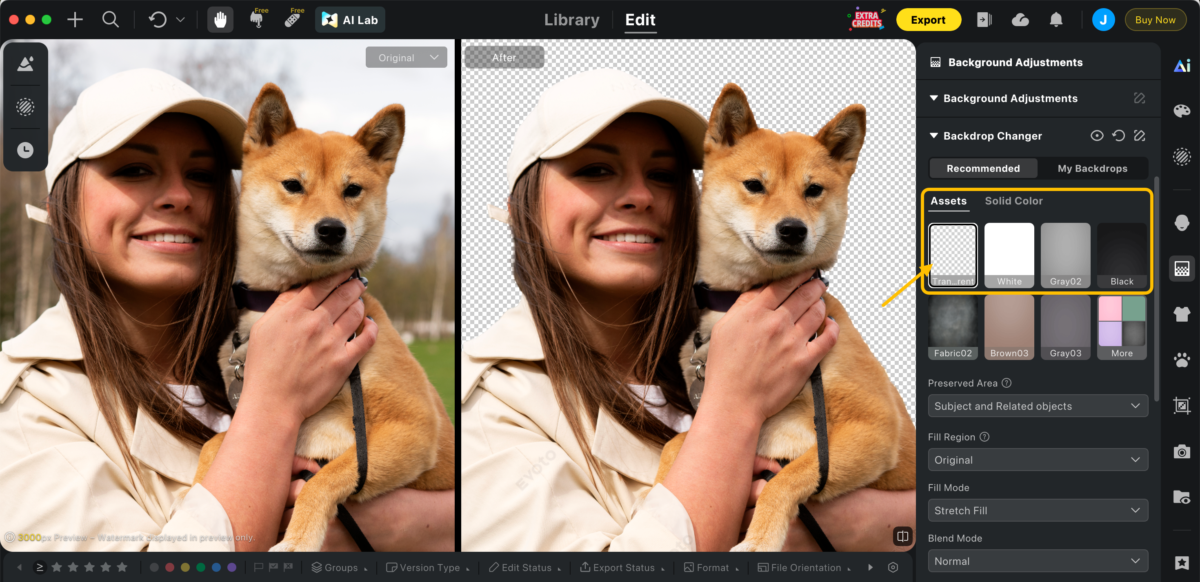
Evoto AI photo editor is built for photographers and studios that need clean cutouts and a finished edit, not just a quick mask. Its AI background remover detects the subject automatically, holds crisp edges around hair and clothing, and lets you drop in a white, transparent, or replacement background.
Because it is a full editor, you can also retouch skin, match color, and crop in the same pass — and with bulk background replacement you can apply one clean background across an entire shoot for natural, consistent results. It is free to download, so you can test edge quality on your own files first.
- Cutout feature: AI background remover with manual mask refinement; export to white, transparent (PNG), or a replacement background.
- Good for: High-volume portrait studios, headshots, e-commerce catalogs, weddings.
- Cutout quality: Excellent — holds natural edges on hair and clothing.
- Bulk support: Yes — batch and bulk background replacement across a full shoot.
- Pricing: Evoto’s background editing features are free with no watermark. You can also try all other editing tools for free before choosing a credit-based package or subscription plan.
- Available on: Mac, Windows, iOS, Android ,and iPad.
- Pros: Studio-grade edges; full editor (retouch, color, crop) in one pass; consistent batch results; full manual control.
- Cons: Desktop-class software is more than you need for a single phone snapshot.


Powerful AI Photo Editor
2. PhotoRoom — Quick Mobile Cutout for Products
PhotoRoom is a favorite for sellers and creators who shoot on their phones. Point it at a product or person, and it isolates the subject and offers instant white or templated backgrounds — fast, and genuinely good on clean-shaped objects.
- Cutout feature: One-tap subject isolation with instant white and templated backgrounds.
- Good for: Marketplace and social product photos created on mobile.
- Cutout quality: Very good on clean shapes; softer on flyaway hair.
- Bulk support: Batch export on paid tiers.
- Pricing: Free with limits; PhotoRoom Pro subscription.
- Available on: iOS and Android.
- Pros: Fast; strong selling-focused templates; built for marketplaces.
- Cons: Best templates and batch sit behind a subscription; hair edges can soften.
3. Canva — Cutouts Inside a Design
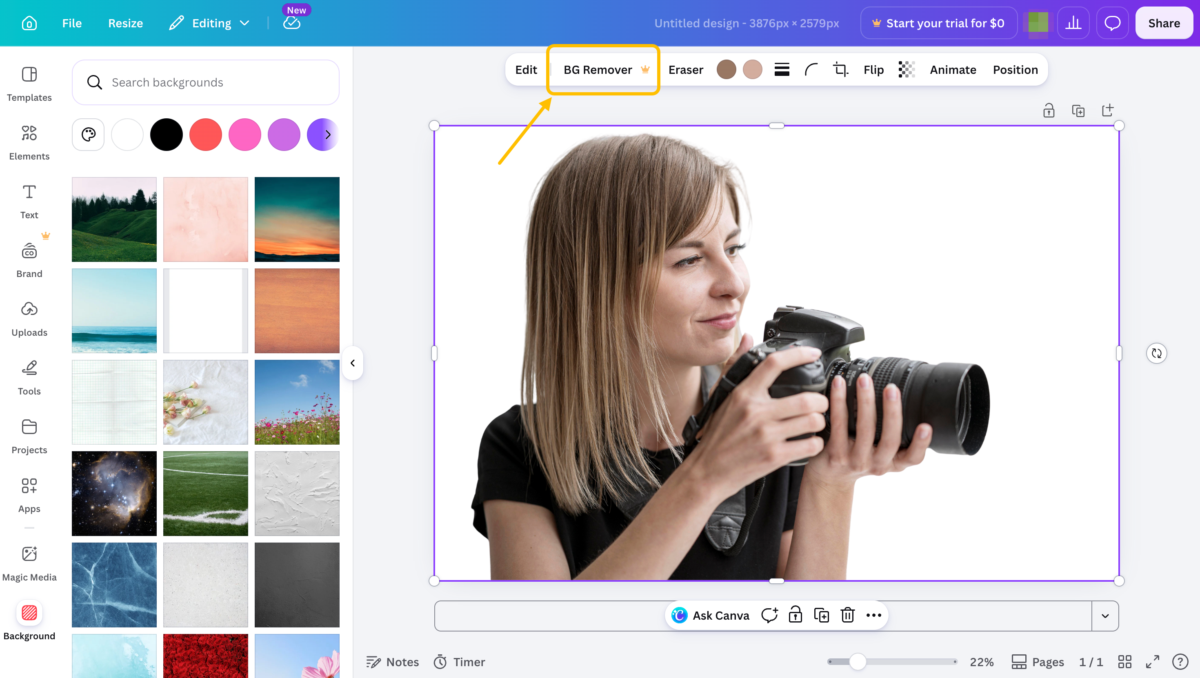
If your cutout is headed straight into a social post, thumbnail, or flyer, Canva’s Background Remover is convenient because the edit and the layout live in one place. One click lifts the subject, and you keep designing around it.
- Cutout feature: One-click Background Remover inside the Canva design editor.
- Good for: Designers building social posts, thumbnails, and flyers.
- Cutout quality: Good — fine for graphics, less so for high-end product shots.
- Bulk support: No.
- Pricing: Background Remover is a Canva Pro (paid) feature.
- Available on: Online, iOS, and Android.
- Pros: Cutout and layout in one place; very easy to use.
- Cons: Paid feature; edge precision is good rather than studio-grade.
4. Adobe Express — Online Cutout from Adobe
Adobe Express runs in a browser and as an app, and its background removal is reliable for everyday subjects with no install required — a sensible photo cut out app free option for quick transparency that also ties into Adobe’s wider design tools.
- Cutout feature: Browser and app background removal, no install required.
- Good for: Quick, free transparency for everyday subjects on any device.
- Cutout quality: Good; decent but not flawless on complex hair.
- Bulk support: No.
- Pricing: Free tier; paid plan for heavy or repeated use.
- Available on: Online, iOS, and Android.
- Pros: Free and reliable; integrates with Adobe design tools.
- Cons: Heavy use nudges you to a paid plan; complex edges not flawless.
Powerful AI Photo Editor
5. Picsart — Mobile Editor with Cutout
Picsart pairs a one-tap cutout with a deep mobile editing toolkit — stickers, effects, text, and collage — so you can cut out a subject and then build something around it without leaving your phone.
- Cutout feature: One-tap cutout plus a full creative editing suite.
- Good for: Creators who want to cut out a subject and design around it on mobile.
- Cutout quality: Very good; cleanest exports favor Picsart Gold.
- Bulk support: No.
- Pricing: Free with ads; Picsart Gold subscription.
- Available on: iOS, Android, and Online.
- Pros: Versatile all-in-one mobile editor.
- Cons: Toolset can feel busy; ads on the free tier.
6. remove.bg — One-Click Online Cutout
remove.bg does one thing and does it fast: upload an image in any browser and get a transparent PNG back in seconds, with no account needed for a quick try. It is the simplest app to cut out images when you just need a clean PNG.
- Cutout feature: Upload to automatic transparent PNG in seconds.
- Good for: A fast single transparent PNG with nothing to install.
- Cutout quality: Very good for a one-click tool.
- Bulk support: Via API and paid plans only.
- Pricing: Free low-resolution downloads; paid for full resolution and credits.
- Available on: Online (plus API).
- Pros: Fastest path to a clean PNG; dead simple.
- Cons: Free downloads limited to low resolution; no real editor.
7. Apple Photos — Built-In iPhone Cutout
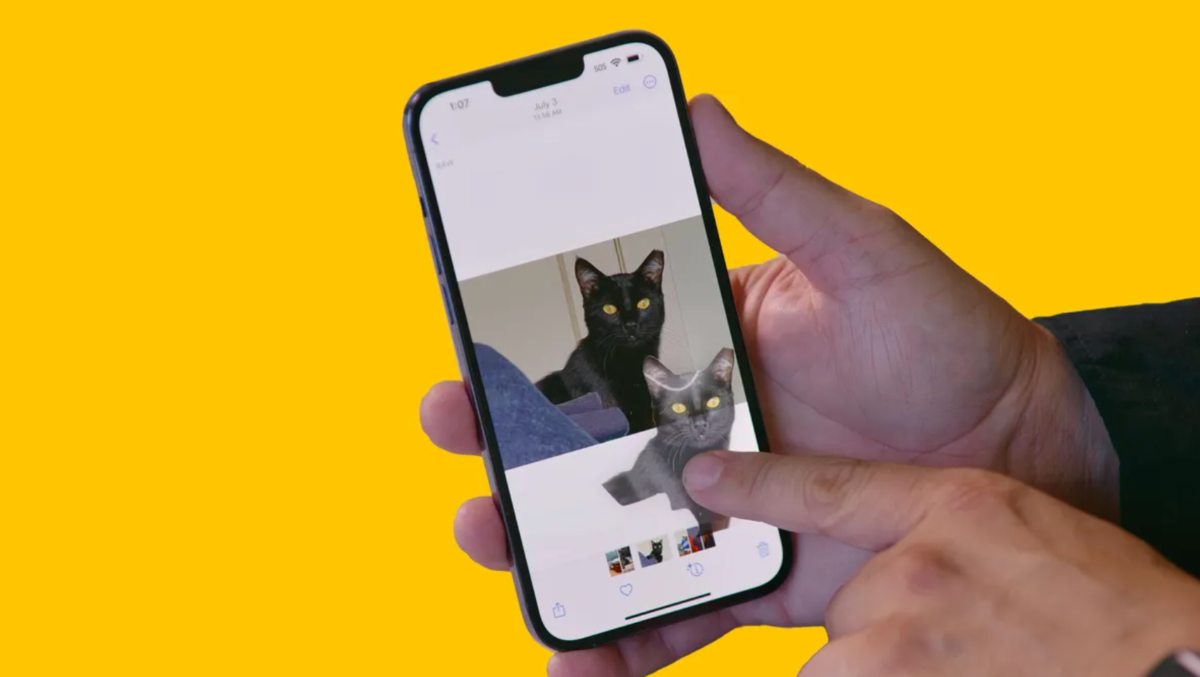
On any recent iPhone, you can press and hold a subject in Photos to lift it out and paste or save it — no download at all. For a fast, free cutout to drop into Messages or Notes, it is genuinely useful.
- Cutout feature: Press-and-hold subject lift-out; copy, share, or save.
- Good for: Instant free cutouts to drop into Messages, Notes, or a quick collage.
- Cutout quality: Good for a built-in utility.
- Bulk support: No.
- Pricing: Free — built into iOS.
- Available on: iPhone and iPad.
- Pros: No download; instant; completely free.
- Cons: No background replacement, batch, or fine edge control.
8. Background Eraser — Best Manual-Control Cutout on Android
Background Eraser apps on Android give you auto removal plus manual erase and restore brushes, which helps on tricky photos where AI alone misjudges the edge.
- Cutout feature: Automatic removal plus manual erase and restore brushes.
- Good for: Tricky photos where one-tap tools get the edge wrong.
- Cutout quality: Good with patience; depends on your manual work.
- Bulk support: No.
- Pricing: Free with ads; paid upgrade to remove ads.
- Available on: Android.
- Pros: Hands-on manual control for difficult edges.
- Cons: Ad-supported; detailed work is slow.
Quick Pick: Which Cutout App Should You Use
If you want the short answer, match your situation to the best photo cutout app for it.
| Your situation | Best pick |
|---|---|
| One quick cutout on an iPhone, free | Apple Photos |
| Fast product photo for a listing | PhotoRoom |
| One-click transparent PNG in a browser | remove.bg |
| Cutout that goes straight into a design | Canva |
| Free online cutout, no install | Adobe Express |
| Cutout plus creative editing on a phone | Picsart |
| Tricky edges needing manual control (Android) | Background Eraser |
| High-volume, consistent, professional cutouts | Evoto |
If you only cut out the occasional photo, a built-in or free online tool is plenty. The moment you are removing backgrounds across a full shoot or a product catalog, a consistent white-background workflow with batch support saves hours.
Powerful AI Photo Editor
Free vs. Paid Cutout Apps: What You Actually Pay For
Nearly every tool here offers a free path, so the honest question is what the paid tiers unlock. Usually it is one of three things: higher-resolution exports, removal of watermarks or ads, and batch processing. For a single social image, the free tier of a photo cut out app free like remove.bg or Adobe Express is genuinely enough.
The math changes with volume. If cutouts are part of how you earn — product listings, headshots, real-estate galleries — paying for clean, full-resolution, consistent results across a whole shoot is the cheaper choice once you count your time. That is the gap a professional, batch-capable editor is built to close.
The Bottom Line
The best photo cutout app is the one that matches your device, your volume, and how clean the edges need to be. For a one-off, reach for a built-in or free online tool and move on. For repeatable, professional results — clean edges, consistent backgrounds, and batch speed across a whole shoot — a dedicated AI editor pays for itself in saved time.
If that sounds like your workflow, try Evoto free and run a few of your own photos through it. Cut out one image to check the edges, then batch a folder to feel the difference — fast, accurate, and natural, with full control over the final result.



