

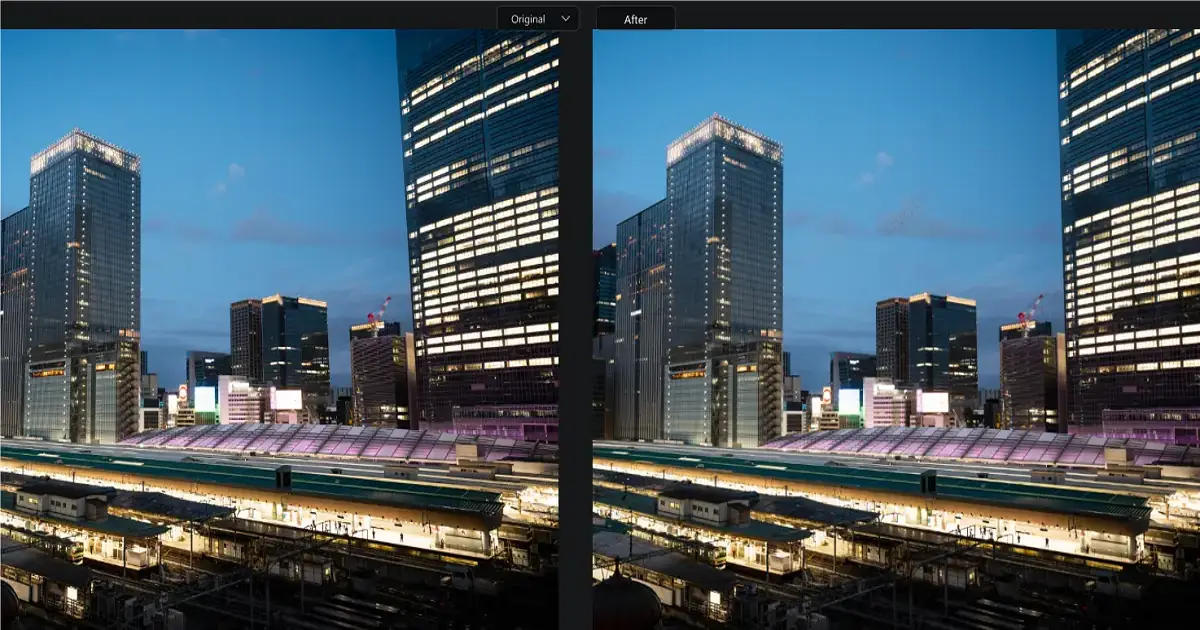
When photographing iconic landmarks while traveling, you’ve likely faced the frustrating issue of perspective distortion—a leaning church spire, a tower that looks like it’s about to collapse, or crooked interior walls. This distortion occurs because of shooting angles, lens limitations, and camera positioning. Wide-angle lenses and tilted viewpoints exaggerate converging verticals, making buildings appear warped.
The Evoto AI Perspective Tool offers a simple solution. With just one upload, the automatic perspective correction AI feature straightens lines and restores natural balance. In seconds, tilted architecture photos look realistic, aligned, and professional—without requiring advanced editing skills.
Tips for Taking Architectural Photos
Getting great architecture photos starts with shooting carefully, but even then, distortion can creep in. Here are some tips:
- Mind your angles. Keeping the camera level reduces the need for a heavy AI image perspective fix later.
- Avoid extreme tilts. Upward or downward shots make buildings lean unnaturally.
- Use wide-angle lenses cautiously. They capture more, but cause edge warping. Keep your subject centered.
- Stabilize your camera. Tripods prevent uneven shots, which makes AI straighten perspective lines easier afterward.
Despite best practices, distortions still happen—especially in tight spaces or crowded cities. That’s where a reliable AI photo perspective editor becomes invaluable.
Advantages of Evoto AI Perspective Tool
The Evoto AI Perspective Tool makes perspective correction simple, fast, and reliable. Instead of struggling with complex manual adjustments, travelers and photographers can achieve professional-quality results in just a few clicks. Here’s why it stands out:
- Fast: Traditional editing in Photoshop often requires dragging grids, warping edges, and carefully aligning lines—a process that can take several minutes per photo. With Evoto, you get one-click perspective correction AI that straightens buildings and interiors instantly. Whether you’re fixing a single image or an entire travel album, the AI perspective tool works in seconds, saving hours of tedious work.
- Simple: Not everyone has the technical skills or patience for manual corrections. Evoto is designed as an AI perspective correction app that anyone can use. Beginners simply upload their tilted photo, click the perspective tool, and let AI handle the rest. There’s no steep learning curve, making it accessible to casual travelers, hobbyists, and professionals alike.
- Natural: One of the biggest challenges in perspective correction is avoiding results that look unnatural. The AI photo perspective adjustment in Evoto is carefully tuned to preserve realism. Instead of flattening details or stretching proportions, it ensures architecture looks the way it should—balanced, authentic, and true to life.
- Efficient: For bloggers, influencers, and content creators managing large photo libraries, the Evoto AI perspective tool offers batch processing. This means you can apply corrections to dozens of images at once. The efficiency of this workflow makes it perfect for professionals who need quick turnaround times without sacrificing quality.
Unlike manual tools, this perspective correction AI software handles both vertical and horizontal distortions. It’s also a geometric distortion correction software alternative, helping users correct geometric distortions in images quickly.
Compared to manual methods, the Evoto AI perspective tool saves hours while delivering consistent, professional results. That’s why it’s considered one of the best AI perspective correction solutions available.
Evoto AI Perspective Tool User Guide
Here’s how to get the most out of the AI perspective transformation tool:
- Upload Photos
Download Evoto AI photo editor. Import tilted buildings, crooked interiors, or distorted landmarks. - Automatic Correction
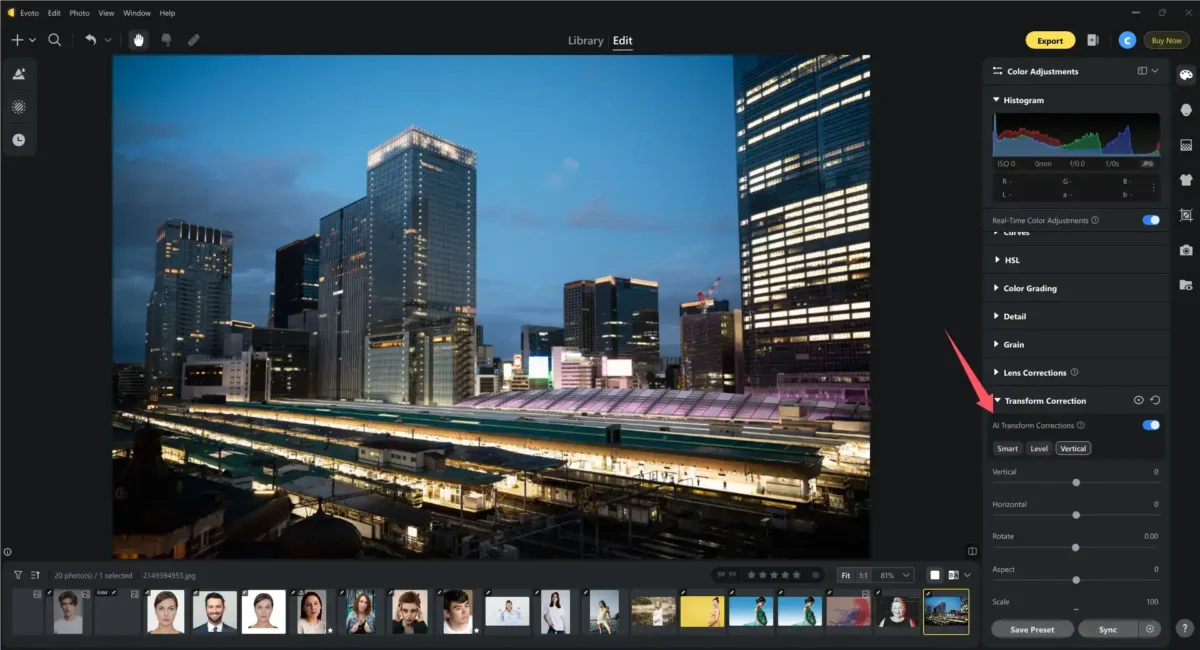
Go to Color Adjustment and scroll down. Find Transform Correction, and enable AI Transform Correction. The AI lens distortion correction feature straightens lines instantly.
- Manual Fine-Tuning
For precision, adjust rotation, scaling, or orientation manually. This makes it a flexible AI perspective retouching software choice.
- Preview and Compare
Use the B|A preview option to compare before-and-after results. The difference is immediately noticeable.
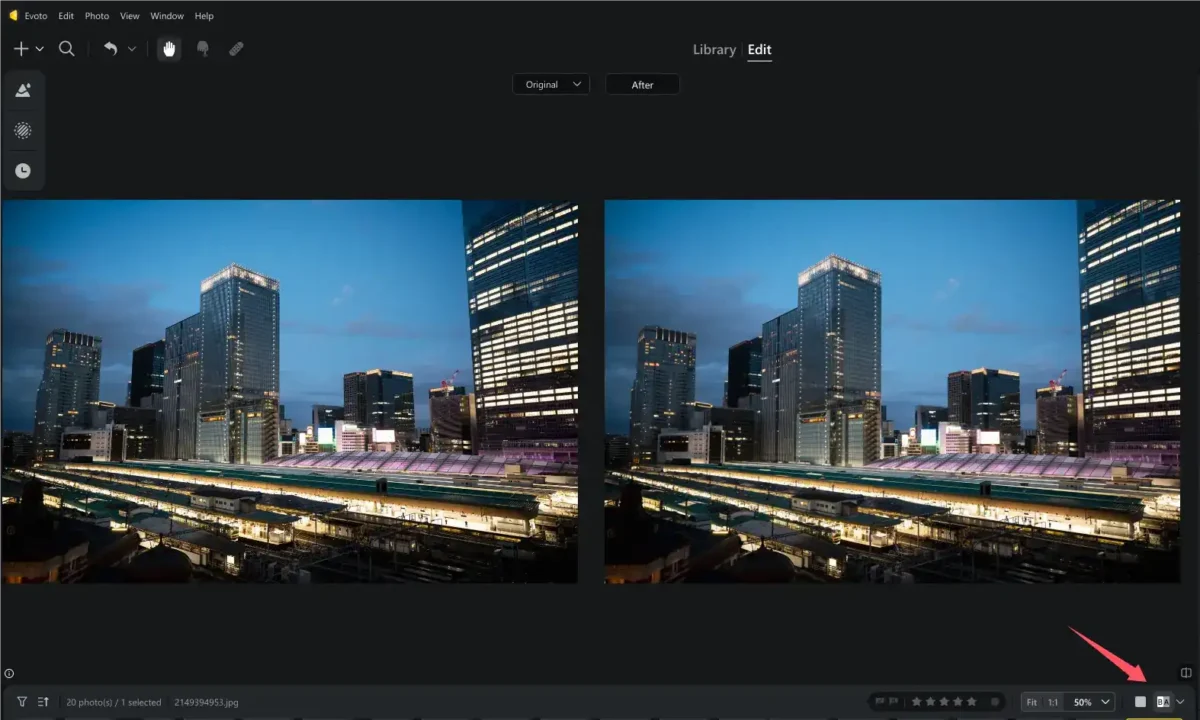
All changes are reversible. Undo, redo, and compare at any time—your original remains safe.
Evoto’s clean interface and AI perspective grid generator make it intuitive for both beginners and pros. Whether you want to AI correct converging verticals or use it as an AI perspective drawing tool, it covers every need.
Suitable Scenes for AI Perspective Tool
The AI camera perspective fix is versatile enough to handle a wide variety of travel photography challenges. Whether you’re shooting iconic landmarks, historic sites, or intricate interiors, this AI perspective tool ensures your photos maintain balance, stability, and visual appeal.
- City Travel: Urban photography is often plagued by leaning skyscrapers, tilted towers, and warped streetscapes. With straighten architecture photo AI, those crooked lines are automatically corrected. The AI building perspective tool makes it simple to restore proper alignment in high-rise skylines, bridges, or bustling city avenues.
- Cultural Heritage: When photographing monuments, castles, or cathedrals, you’re often forced to shoot from narrow alleys or close angles, which exaggerates distortions. The AI interior photo perspective fix corrects converging verticals, making historic architecture appear exactly as it does in real life. This is especially valuable for heritage documentation and professional portfolios.
- Indoor Shots: Museums, palaces, and galleries often suffer from uneven verticals when photographed with wide-angle lenses. The AI photo perspective enhancer aligns columns, walls, and ceilings, ensuring your images reflect accurate geometry. This AI tool to correct geometric distortions is particularly effective for architectural symmetry indoors.
The AI perspective tool doubles as an AI perspective transformation tool and a AI perspective drawing tool for professionals, while casual travelers can rely on its fix distorted perspective AI capabilities with minimal effort.
This makes it the best AI tool for perspective photos, ensuring consistent, polished travel albums. For content creators, influencers, and bloggers, Evoto is more than a photo editor—it’s an AI tool to correct geometric distortions that strengthens visual storytelling.


Powerful AI Photo Editor
Conclusion
Travel photography often results in leaning towers, tilted walls, and distorted interiors caused by lens and angle limitations. The Evoto AI Perspective Tool provides the perfect fix with one-click perspective correction AI that is fast, beginner-friendly, and professional.
By combining AI photo perspective adjustment with AI lens distortion correction, Evoto ensures your architecture photos look natural and aligned. Whether you’re a casual traveler or a professional photographer, this AI photo perspective editor guarantees stunning results.
With Evoto, you can finally enjoy perfectly straightened, realistic travel photos without the stress of manual editing.



