

The Christmas season is a time for family, joy, and creating lasting memories. One of the best ways to preserve these moments is through family photos that capture the magic of the holidays. Whether you’re planning a formal Christmas family portrait or looking for fun, candid shots, having creative Christmas family photo ideas can elevate your photos to the next level. To help you capture the perfect holiday memories, we’ve put together some great photo ideas.

5 creative Christmas Family Photo Ideas you need to know
1.Capture Candid Family Moments
Sometimes, the most memorable photos are the ones that happen naturally. Candid family moments—like laughing around the Christmas tree, exchanging gifts, or sharing a quiet moment—often capture the warmth and love of the season better than any posed shot. These photos radiate happiness and make great keepsakes.
2.Incorporate Holiday Props for Fun and Festivity
A simple way to bring some extra cheer to your Christmas family photoshoot is by using festive props. Santa hats, stockings, Christmas decorations, and gift boxes can make your photos more playful and visually interesting. Props help convey the spirit of the holidays and bring a sense of festivity to the photos.

3.Create a Cozy, Intimate Scene
The holidays are a time for cozy family moments. Whether you’re gathered around a fireplace, cuddling up with blankets, or sitting together at a festive dinner table, these intimate family scenes can create beautiful, heartfelt memories. A family Christmas photoshoot focused on warmth and togetherness is always a hit.
4.Tell a Christmas Story Through Your Photos
What better way to make your holiday photos more memorable than by telling a story? Consider capturing a series of shots that tell a tale, such as decorating the Christmas tree, baking cookies, or exchanging gifts. These photos allow you to showcase the different traditions your family enjoys during the holiday season.
5.Experiment with Outdoor Winter Photos
Don’t forget about the magic of the outdoors! Snow-covered landscapes, winter wonderlands, and outdoor Christmas decorations make for stunning backdrops. Whether you’re taking family portraits in the snow or capturing a candid moment in front of a frosty window, outdoor winter photos can add an enchanting touch to your Christmas photos.
How to edit Christmas Family Photo with Evoto AI
Editing Christmas family photos can be fun, but also tricky if you want perfect lighting, colors, and a clean background. With Evoto AI, you can enhance your holiday photos quickly and easily, making them look professional without spending hours in manual editing.


Powerful AI Photo Editor
1. Upload your photo
Upload your Christmas family photo to Evoto AI, which supports all common formats, including RAW. The AI automatically detects faces and main subjects, giving you a ready-to-edit photo in seconds.
2. Quickly Adjust Your Photo with AI Powerful Features
Once your photo is uploaded, you can use Evoto AI’s smart features to make fast improvements:
1. AI Facial Expression Changer
After you’ve captured those family Christmas pictures, use Evoto’s Facial Expression Change tool to enhance your family members’ expressions. This tool can help everyone to adjust their smile, ensure everyone looks their best.
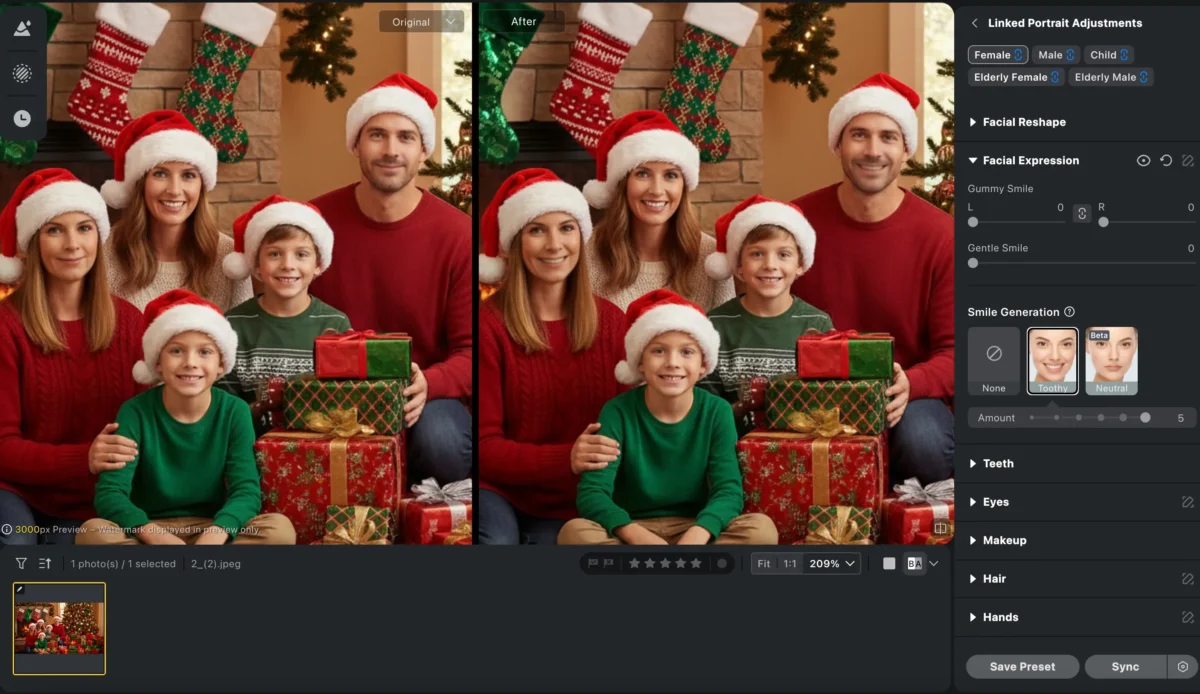
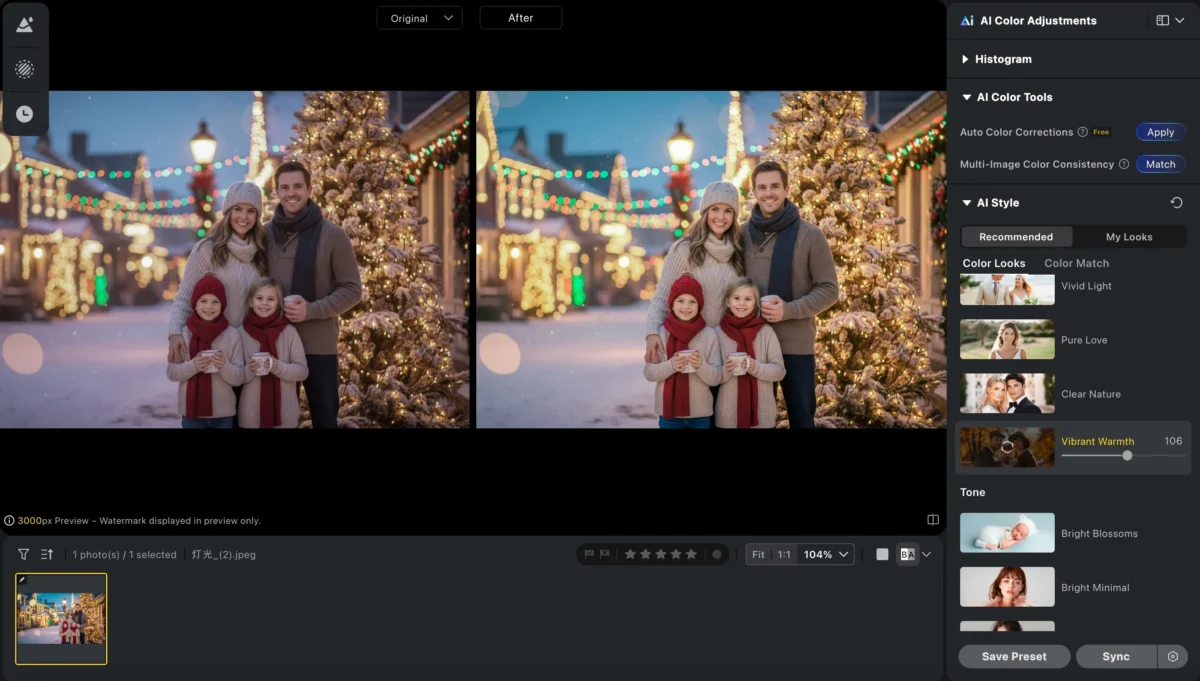
2. AI filters
Use Evoto’s exposure and tone adjustment tools to enhance the warmth of the photo. You can also achieve this effect using filters in Evoto. By adjusting the warmth and contrast, you can make the photo feel more inviting.
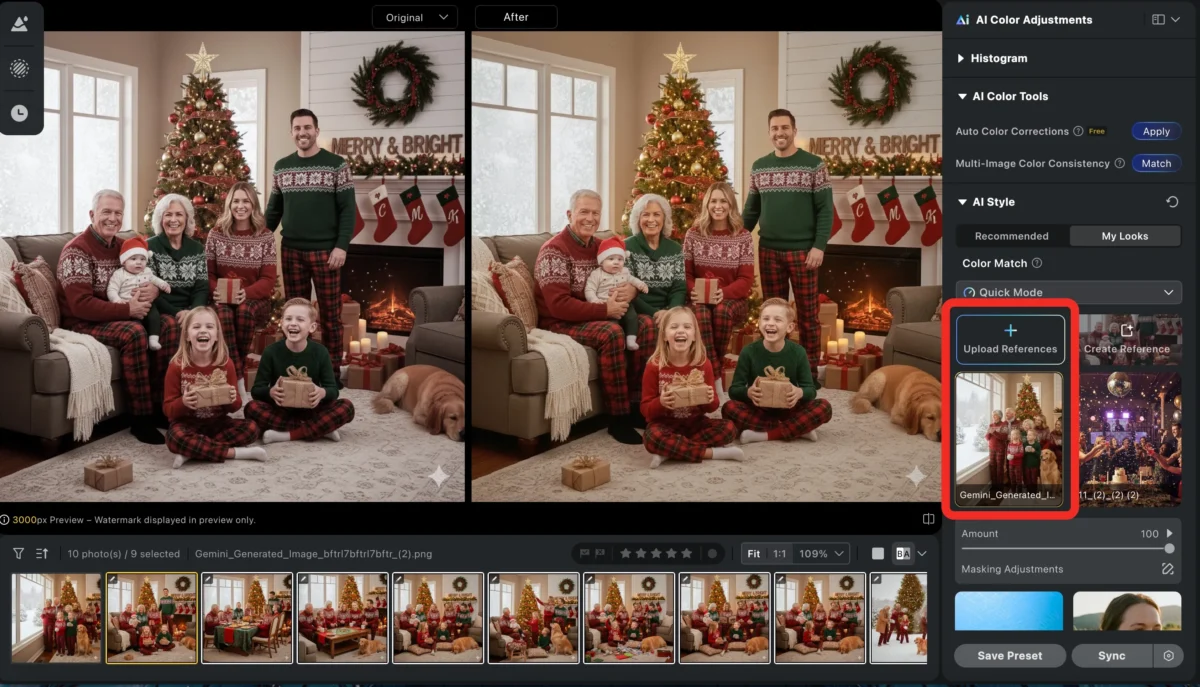
3.Color Match and Batch Edit
After taking your family Christmas photos, use Evoto’s color match and batch edit tools to ensure a consistent style across the entire set. First, adjust one photo and save it. Then, open Evoto’s Color AI color match function, select the edited photo, and with a single click, AI analyzes the photo’s tone, matching colors, hues, and lighting across the images to ensure every photo—whether it’s a Christmas tree, unwrapping presents, or baking cookies—has the same visual style. Next, select the images you want to batch edit, and Evoto quickly performs batch editing to help you create a cohesive, narrative, and professionally refined set of photos.

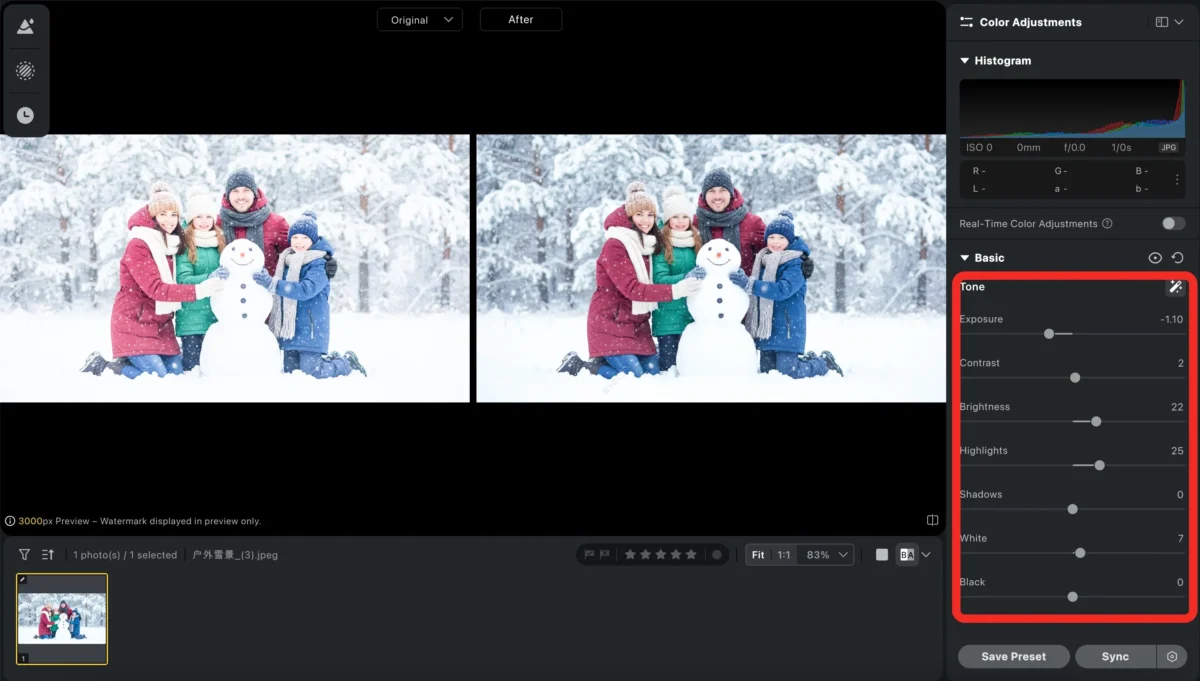
4.AI Exposure Adjustment
If the lighting is uneven or the snow scene is overexposed, Evoto’s editing tools can help you balance the exposure and showcase the natural beauty of the scene. You can manually adjust the exposure as needed, or use AI Exposure Adjustment tool. Using Evoto’s tone adjustment tools, you can add depth to the snow scene to create a more dramatic or softer winter atmosphere.
3. Fine-Tune
After the quick adjustments, you can fine-tune your photo for the perfect holiday look.
4. Export the Photo
Once you’re happy with the edits, simply export your photo in your preferred format.
Conclusion
No matter what your Christmas family photo ideas are, Evoto’s Christmas photo editing tools can help you enhance your photos to perfection. Whether you’re creating a classic family portrait or capturing candid, fun moments, Evoto allows you to adjust lighting, fine-tune facial expressions, sharpen props, and create the perfect holiday vibe.
If you’re looking to refine your family Christmas pictures or get creative with fun edits, Evoto has everything you need to transform your Christmas family photoshoot ideas into unforgettable memories. Ready to elevate your holiday photos? Let Evoto help you turn your family’s Christmas magic into a beautifully edited masterpiece!
Try Evoto AI Photo Editor
Retouch photos with Evoto AI and make your photos best! Available on Windows, MacOS and iPadOS.



