

Let’s Talk Halloween Vibes
Hey creators, it’s finally Halloween season! The pumpkins are glowing, the nights are longer, and the internet is full of orange lights and creative costume shoots.
If you’ve ever wondered what makes a photo feel like Halloween, it all comes down to color.
So, what are Halloween colors exactly?
Think deep blacks, burnt oranges, shadowy purples, and eerie greens. These colors instantly bring that haunted, mysterious feeling — even if your photo was taken on a sunny afternoon.
That’s why we’re giving you something special this year — 4 free Evoto Halloween Color Presets that capture everything we love about the season. From cozy pumpkin warmth to full-on gothic drama, these presets make every shot look like a scene from your favorite Halloween movie.
What Are Halloween Colors?
When we talk about Halloween colors, most people picture orange and black. But the real magic lies in the contrast — warmth against darkness.
- Orange — represents candlelight, pumpkins, and the harvest season.
- Black — mystery, shadows, and night.
- Purple — supernatural energy and mystical themes.
- Green — eerie, glowing contrast that feels otherworldly.
Evoto’s Halloween pack combines these tones using advanced color curves and highlight protection — so your photo looks cinematic, not cartoonish.
What’s Inside: 4 Free Halloween Presets
Each preset was designed with Evoto’s AI Color Engine to match classic Halloween palettes — no harsh filters, just beautifully balanced tones you can actually use.
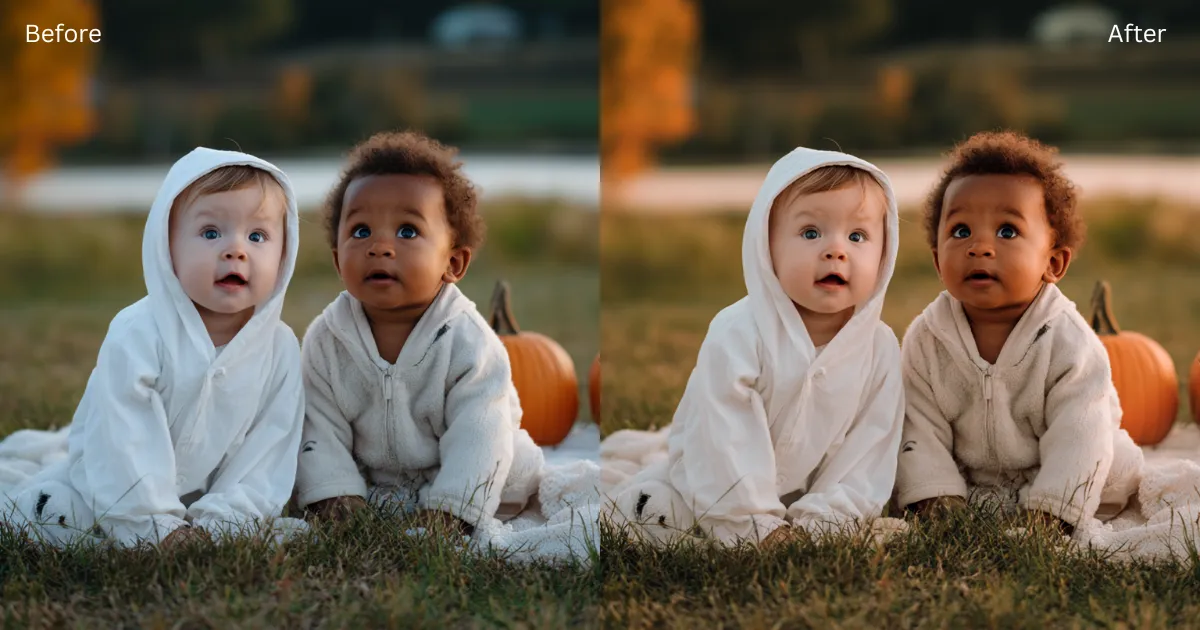
1. Pumpkin Glow
Warm orange and soft amber tones — perfect for cozy pumpkin patch portraits, candle-lit selfies, or autumn decor photos. Adds that gentle golden radiance without oversaturating skin.
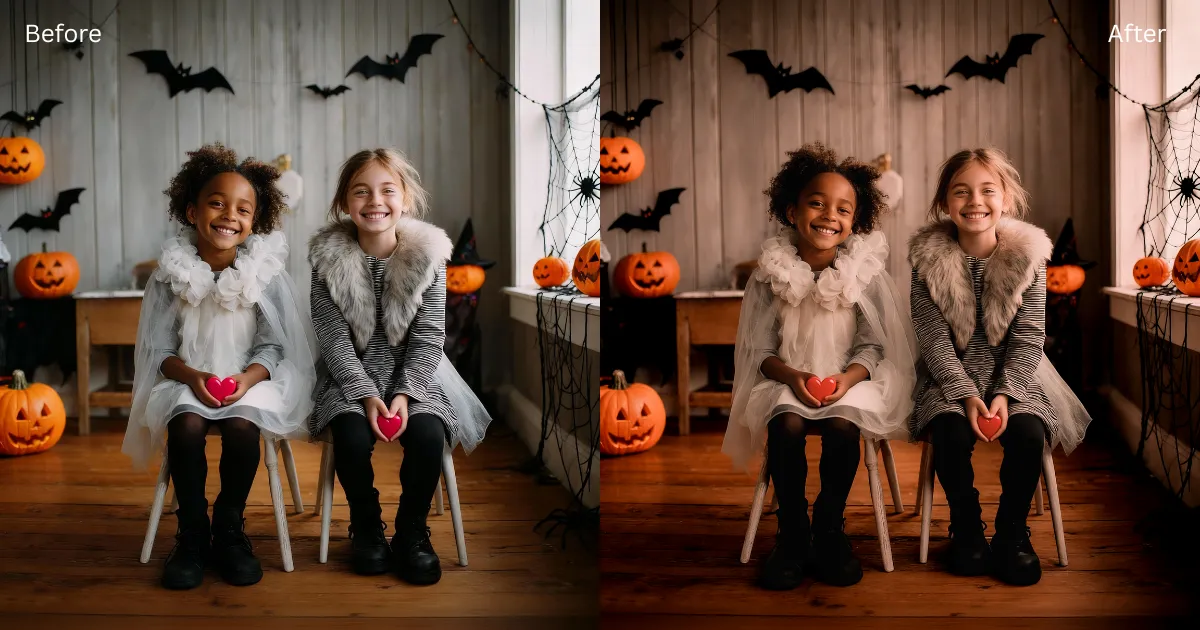
2. Burnt Noir
When the jack-o’-lanterns ignite and shadows come alive. Burnt Noir is all about dramatic contrast: vibrant, fiery oranges blazing against inky darkness. Bold, intense, and perfect for creating Halloween moments that feel straight out of a suspenseful scene.
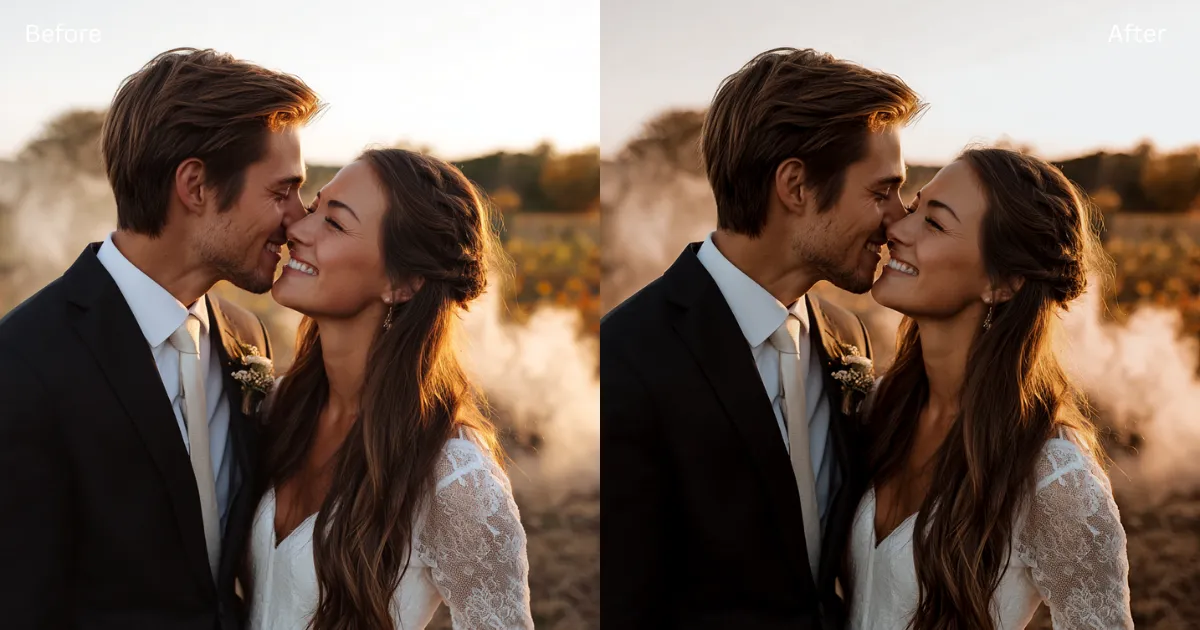
3. Twilight Ember
When the sun dips and Halloween lights start to glow, Twilight Ember captures that magical in-between moment — part golden hour, part spooky dusk. Warm oranges melt into deep purples and muted blues, giving your photos a dreamy, cinematic contrast that feels both nostalgic and mysterious. It’s the perfect preset for outdoor shots, costume strolls at sunset, or any moment that dances between day and night.
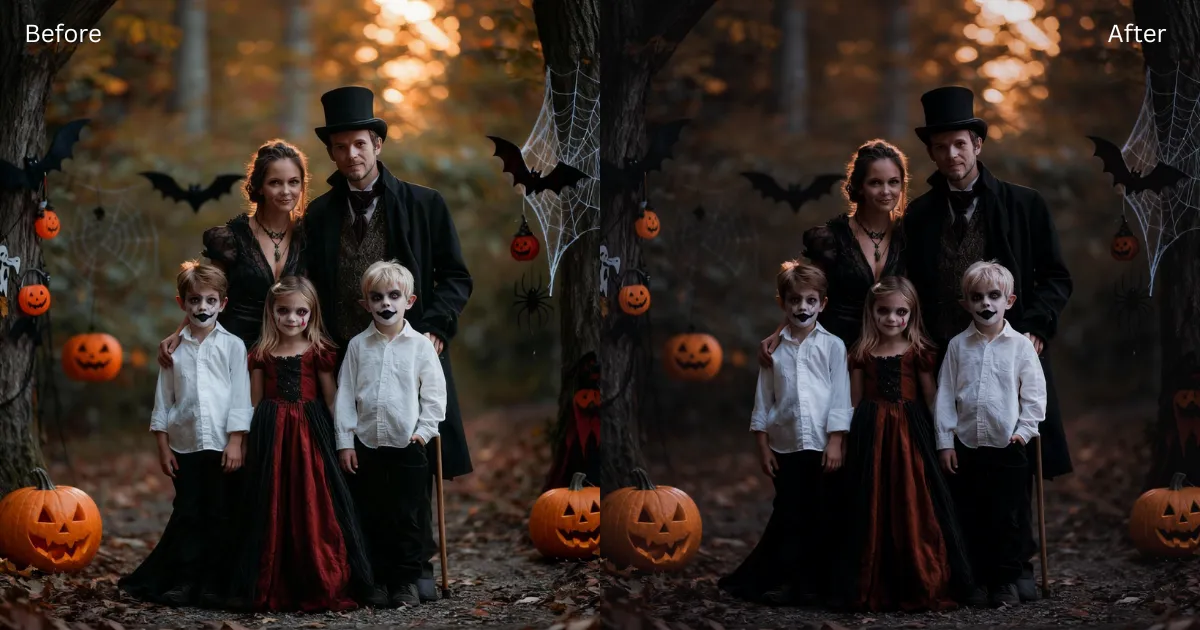
4. Midnight Curse
If Halloween had a soul, Midnight Curse would be it. Deep blacks, cool undertones, and a whisper of faded moonlight create that moody, cinematic tension you see in horror movie posters. Perfect for night portraits, haunted house shoots, or any photo where you want mystery to breathe through the shadows. It doesn’t just darken, it dramatizes!
Get the Free Halloween Preset Pack
Ready to give your photos that Halloween glow?
Click below to grab your free presets and start creating your spooky masterpiece.
Your friend shared 4 preset(s) with you: HALLOWEEN. To import the preset(s):
copy this 「EVOTO2fqzN7ZgYS」,
paste it to the textbox in Evoto, then click Import.
Then, download and open Evoto and start exploring!


Powerful AI Photo Editor
How to Use the Halloween Presets in Evoto
- Download and open Evoto on your desktop.
- Import your photos or project. And Copy the preset pack (Above).
- Go to Edit→ Presets → Import Presets, then paste your Preset token.
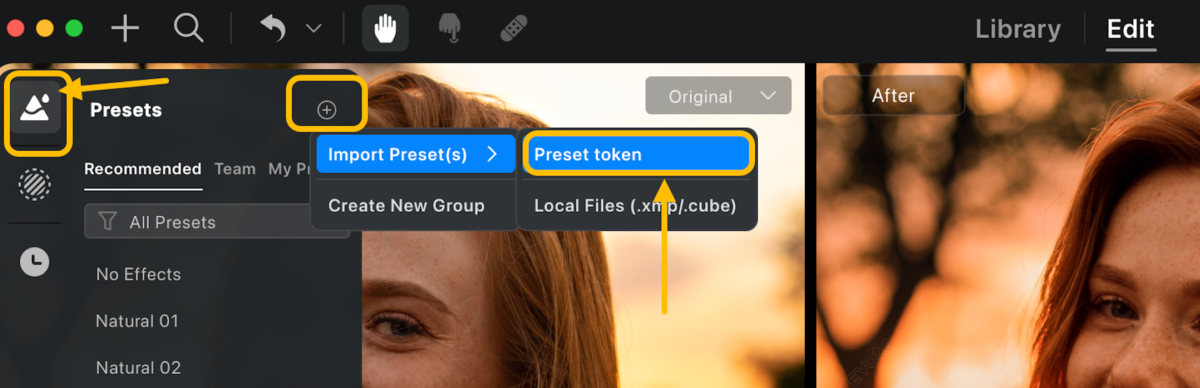
4. After importing, access the collection via Presets → My Presets → HALLOWEEN. Click on any preset to apply it. For further customization, adjust the intensity or utilize the full range of color sliders to achieve your desired effect.
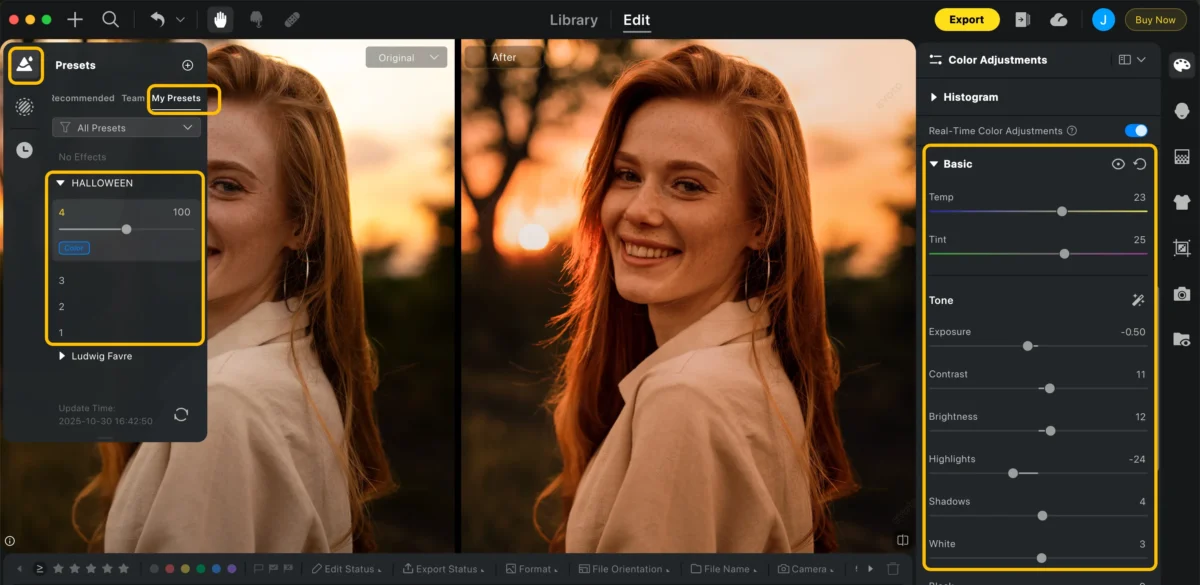
That’s it — one click, instant Halloween vibes.
Behind the Color Magic
We didn’t just pick random filters.
Our color team analyzed thousands of popular Halloween photos — from horror films to real-world costume shoots — and used Evoto’s AI to extract their core color signatures.
Each preset is built from that data, then fine-tuned manually to ensure perfect balance between cinematic color and real skin tone. That’s how these presets were born: part AI magic, part human creativity.
You can give it a try in Evoto, effortlessly color grade your photos to match the Halloween vibe with dynamic, cinematic tones. See how your shots transform in just one click!
Take Your Halloween Edits Even Further with Evoto
Loved the presets but want something even more you? Evoto’s got your back.
AI Color Match
Didn’t find a preset that fits your exact vibe? Just upload any photo with the color tone you love — a movie still, a fashion shot, even your favorite Halloween poster — and Evoto’s AI Color Match will automatically recreate that look on your photos. The best part? You still have full control to tweak highlights, shadows, and saturation until it’s perfect.
This is where Evoto really shines. Whether you’re smoothing wrinkles, reshaping faces, or adding subtle Halloween makeup, every adjustment feels natural — never overdone. You don’t need to mask or paint; just drag a few sliders and watch the magic happen. Simple, fast, and pro-level results that look effortlessly real.
Smart AI Fixes
Shooting in low light or with flash? No problem. Evoto’s got one-click tools for removing red eyes, glass glare, clothing wrinkles, and even unwanted distractions in your background. What used to take hours in Photoshop now takes seconds — and still looks clean and professional.
Batch Editing for Consistency
And if you’re editing a full shoot — maybe your whole Halloween album — you can batch apply your settings and effects across every image. That means your color tone stays consistent, your workflow stays fast, and your edits stay stress-free.
So whether you’re chasing a spooky cinematic look or fine-tuning portraits with professional precision, Evoto makes it easy to bring your Halloween photos to life — your way.
Ready to Create Your Halloween Magic?
Now it’s your turn to play. Try the Evoto’s free Halloween Preset Pack on your own photos, and see how easily you can bring out those cinematic tones and spooky vibes. Whether you’re chasing moody shadows or glowing pumpkin warmth, these presets are just the start.
And here’s the fun part — you can also create your own custom Halloween preset, match any color mood you love, and share it with others. Who knows? Your look might be the next one everyone’s talking about.
So go ahead — download Evoto, explore the presets, and start crafting your own Halloween masterpiece. 👻



