You nailed the lighting, the pose, and the expression — then you zoom in and the subject is looking just past the lens. It is one of the most common reasons a strong portrait gets cut, and learning how to fix eye contact in portraits (without a reshoot) is faster and cheaper than asking everyone back into the studio. With the right eye contact AI and a careful retouching pass, you can redirect a wandering gaze, balance uneven eyes, and clean up redness — all from the file you already have.
This guide walks through what is actually fixable, the exact eye tools we reach for in Evoto, and how to keep an entire gallery consistent when you are editing hundreds of frames at once.
Why Eye Contact Breaks (and What You Can Recover)
Eye contact reads as connection. When the eyes drift even a few degrees off-axis, viewers feel it before they can name it — the portrait looks distracted instead of present. The good news: a surprising amount of this is repairable on the desktop.
Before you reach for any eye editor, sort your problem into one of three buckets, because each maps to a different Evoto tool.
Problem
What you see
Evoto tool that fixes it
Off-camera gaze
Subject looks slightly left, right, or past the lens
AI Iris Correction (Direct Gaze)
Uneven or misaligned eyes
One eye higher, larger, or more open than the other
Eye Symmetry (Eye Level + Eye Balance)
Dull or bloodshot eyes
Red veins, color cast in the whites, low sparkle
Eye White Enhance, Eye White Cleanse, Catchlights, Brightness
Only a true blink with both eyes fully shut, or a head turned far from the camera, genuinely needs a reshoot. Almost everything short of that can be edited.
Fixing an Off-Camera Gaze with Eye Contact AI
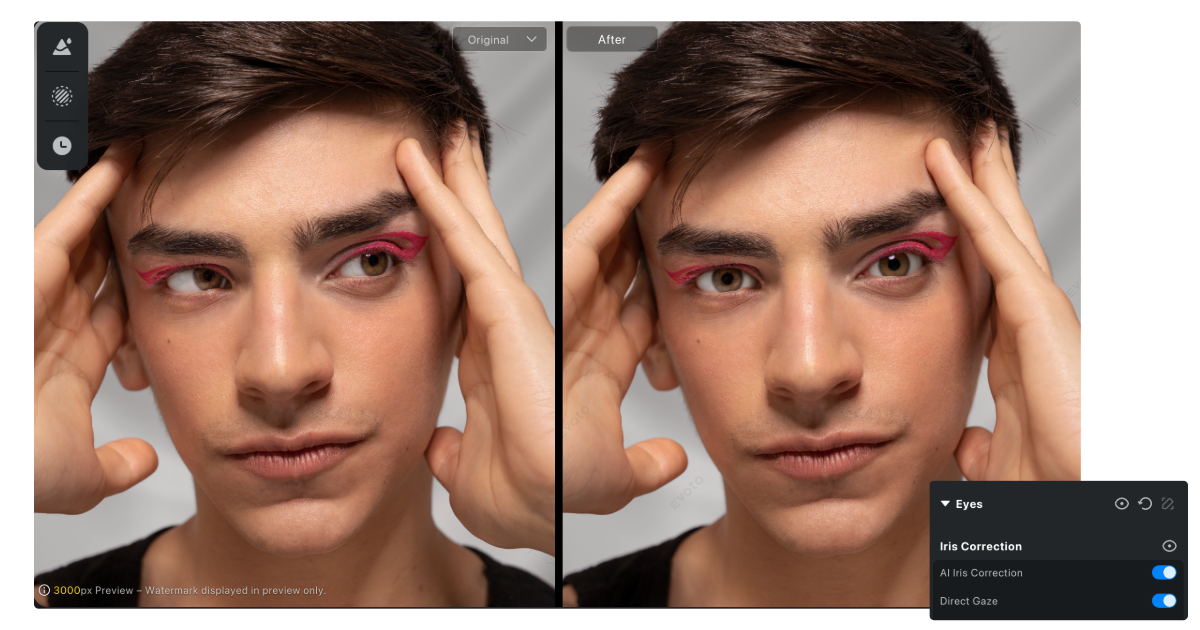
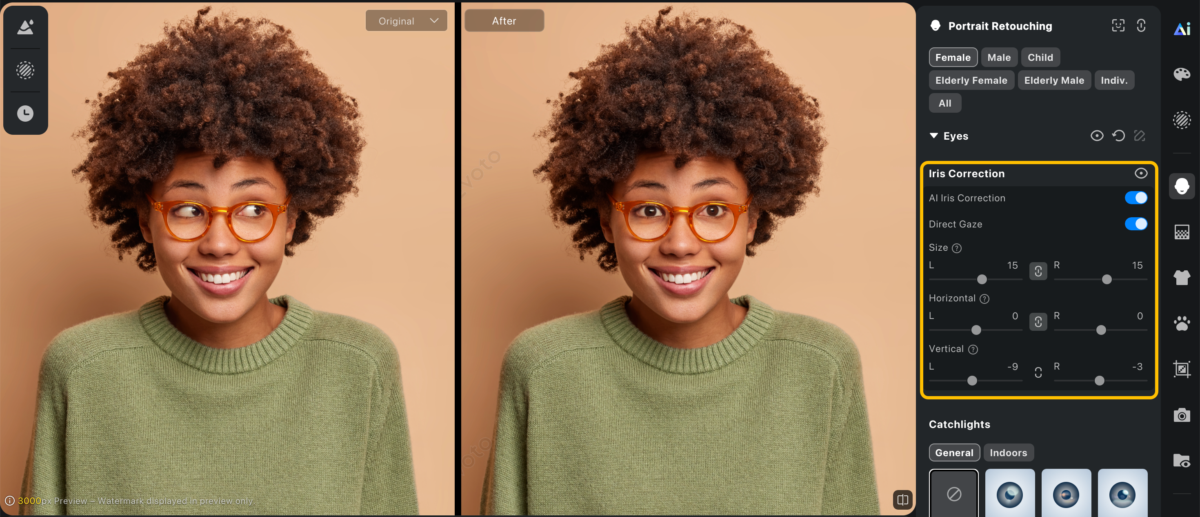
The hardest fix used to be redirecting where someone is looking. Older approaches in Photoshop meant manually selecting the iris and nudging it — slow, and easy to make uncanny. Evoto’s AI Iris Correction handles this far more naturally by intelligently refining iris position, and its Direct Gaze option guides the subject’s eyes toward the camera. It is purpose-built to rescue near-keeper portraits where eye direction is the only thing holding the frame back.
The Quick Workflow
Assess the angle.AI Iris Correction also tames mild strabismus and excessive upper or lower sclera exposure. Small redirections look flawless; a gaze pointed far to the side will look forced, so know the limit before you start.
Apply Direct Gaze. Let the AI guide both eyes toward the lens together so they track to the same point.
Refine manually if needed. Evoto lets you fine-tune horizontal position, vertical position, and size for each eye, so you can perfect one stubborn iris without touching the other.
Zoom to 100%. Confirm the iris edges are crisp and the catchlights in both eyes sit in matching positions — mismatched catchlights are the number-one giveaway of a bad edit.
If you only need a one-off correction, a browser eye fixer can be enough. But if eye contact is a recurring issue across your shoots, a desktop portrait editor with controllable AI gives you cleaner results and far more throughput. The Evoto AI photo editor is built for exactly this kind of precise, repeatable portrait work.
How to Fix Uneven, Misaligned, or Half-Closed Eyes
Sometimes the gaze is fine but the eyes themselves are the problem — one sits higher than the other, or one is more open. Evoto’s Eye Symmetry is the fastest way to fix eyes like these, and it gives you two layers of control.
Eye Level and Eye Balance
Turning on Eye Symmetry automatically enables two adjustments. Eye Level corrects the horizontal alignment of both eyes, so a slightly tilted pair lines up naturally. Eye Balance adjusts the size and proportion of the eyes; by default the system uses the larger eye as the reference, but you can manually choose the left or right eye instead. Because the tool works from a reference eye, the result reads as the subject’s real face — not an obviously “fixed” one.
When to Borrow from a Burst
If the subject got caught mid-blink and Eye Symmetry has nothing to work with, the cleanest eye editor move is to take the open eyes from a neighboring burst frame and composite them onto your hero shot. Because the head position barely changes between burst frames, this blends almost invisibly.
Brightening Dull and Bloodshot Eyes
Even with perfect contact, tired-looking eyes flatten a portrait. Evoto groups several targeted tools here, and a light touch on each makes the biggest difference:
Eye White Enhance removes redness and visible blood vessels while preserving the natural shadows and highlights, so eyes look rested instead of bleached.
Eye White Cleanse removes color bias in the sclera and brightens it slightly for a cleaner, more transparent look.
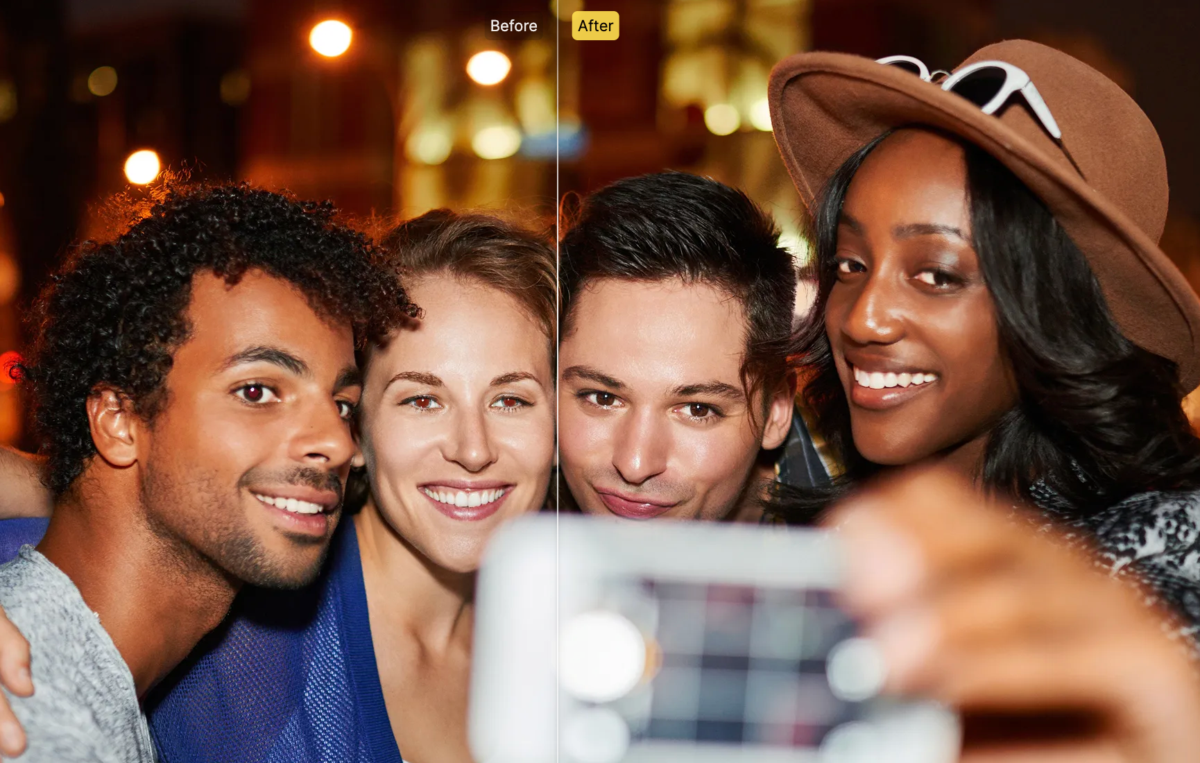
Red Eye Removal automatically detects and corrects the red-eye that flash photography leaves behind.
Brightness lifts the iris, the whites, and the eye reflection independently, with separate left/right control. Keep it natural.
Catchlights add controlled light reflections to bring back sparkle and expressiveness, and they can be repositioned to match the eye’s position and your key light.
If the subject wore glasses, the same Eyes group includes a one-slider Remove Glasses Glare tool to clear reflections off the lenses — a frequent culprit behind eyes that look dull or hidden. These adjustments are skin-tone aware and fully controllable, so the enhancement reads as natural and consistent rather than filtered.
Doing It at Scale: Consistent Eyes Across a Whole Gallery
Fixing one portrait is easy. Fixing eye contact and eye brightness across 300 school headshots or a full wedding gallery — while keeping every frame consistent — is the real challenge for working photographers.
This is where a batch-capable workflow pays off. Build your Eye White Enhance, Eye White Cleanse, and Catchlights settings once, then apply them across the set so eye color, brightness, and clarity match from frame to frame. AI Iris Correction still gets a per-image check — gaze redirection always should — but the surrounding cleanup runs consistently across the gallery with batch editing supported throughout.
For high-volume portrait and headshot work, that consistency is the difference between a polished set and one that looks edited frame-by-frame. Try Evoto free and run a test batch on a folder of your own portraits to see the time saved.
When You Genuinely Do Need a Reshoot
Editing has limits, and good judgment protects your reputation. Plan a reshoot when both eyes are fully closed in every available frame, when the head is turned so far that even AI Iris Correction would distort the face. In those cases no eye fixer will produce a believable result, and forcing it looks worse than an honest retake.
Frequently Asked Questions
Will redirecting the gaze look fake?
Not if you keep the correction small and check the catchlights. The reflections in both eyes must sit in matching positions, and the iris edges should stay crisp at 100% zoom. Evoto’s manual horizontal, vertical, and size controls let you nudge a single eye back to natural if the automatic result drifts.
How do I keep eyes consistent across a large gallery?
Build your Eye White Enhance, Eye White Cleanse, and Catchlights settings once, then apply them across the set with batch processing. Reserve per-image attention for AI Iris Correction, which always benefits from a quick manual check.
The Bottom Line
A near-miss on eye contact is one of the most recoverable problems in portrait photography. With AI Iris Correction and Direct Gaze for redirecting the eyes, Eye Symmetry for alignment, and Eye White Enhance, Cleanse, Brightness, and Catchlights for life and clarity, you can rescue images you would have deleted — and do it across an entire gallery without losing consistency. Learning how to fix eye contact in portraits without a reshoot saves studio time, protects client relationships, and keeps your turnaround fast.
When you are ready to handle eyes — and full portrait retouching — at professional speed, download Evoto and edit your next set with fast, accurate, natural-looking results.