

Some photos are technically fine but still feel unclear.
The exposure works. The location is good. The subject may even be beautiful. But the viewer does not know where to look first.
That is usually a focal point problem.
Focal points in photography give the image a clear purpose. They tell the viewer what matters and give every other part of the frame a job. Without one, composition starts to feel like decoration: nice light, nice background, nice color, but no real center of attention.
For working photographers, this matters on every shoot. A portrait needs the viewer to land on the face or gesture. An event photo needs the viewer to read the moment quickly. A landscape needs a strong point of interest so the scene does not become empty space. A product image needs the product to remain the main visual anchor.

What Are Focal Points in Photography?
A focal point in photography is the main point of interest in the image.
It is where the viewer’s eye should land first.
That focal point can be:
- a face
- a hand gesture
- a person in a landscape
- a product
- a bright patch of light
- a color accent
- a shape that breaks a pattern
- a tree, mountain, doorway, road, or architectural detail
The focal point does not have to be large. It just has to feel important.
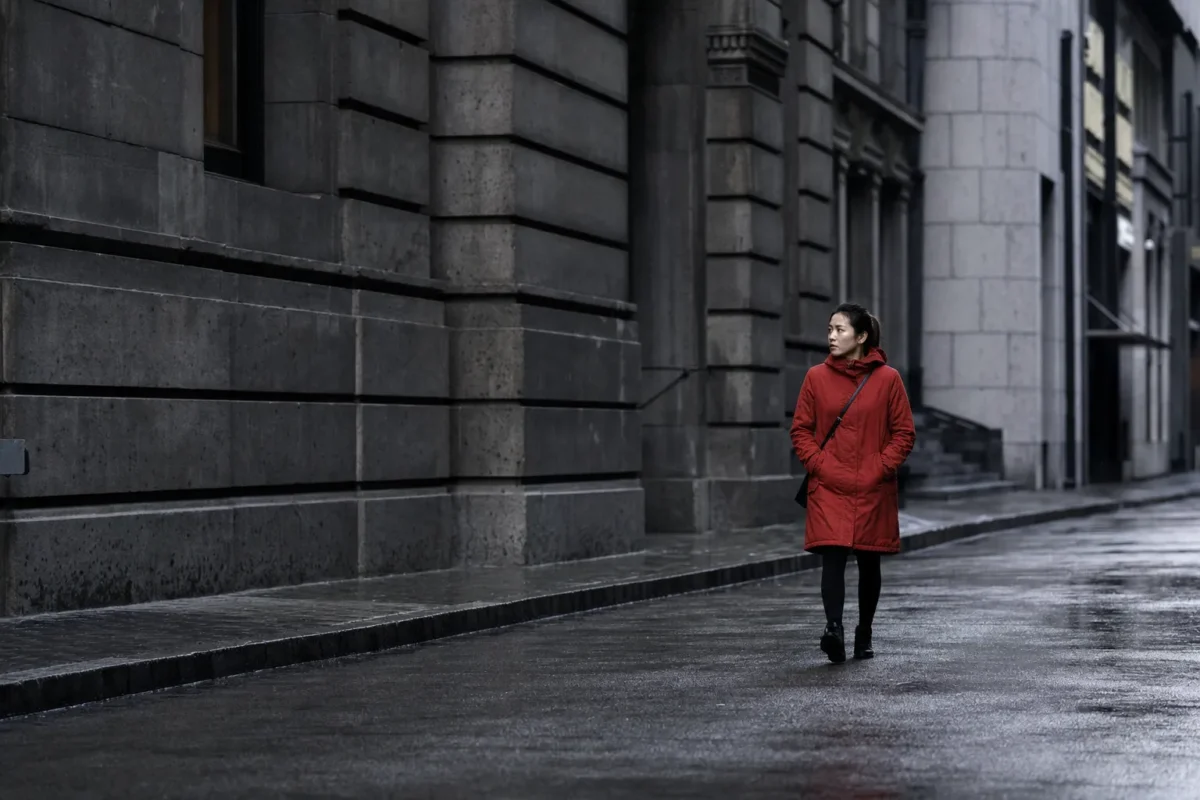
A small person in a wide landscape can be a strong focal point if the space supports them. A tiny red coat can become the strongest part of a muted winter scene. A face in clean window light can overpower a busy room because the light tells the viewer where to look.
The point is clarity.
The viewer should not have to search for the subject.
Focal Point vs Focus Point
Focal point and focus point sound similar, but they are not the same thing.
A focal point is a composition decision. It is the part of the image that feels most important.
A focus point is a camera decision. It is where the camera places sharp focus.
They often overlap. In a portrait, the eye may be both the focus point and the focal point. In a product image, the logo or front edge may be both sharp and visually important.
But they can also differ.
In a landscape, you may focus at a distance that gives the scene enough depth of field, while the focal point is actually a tree, cabin, or person in the frame. In a documentary image, the technical focus may fall on one face, but the emotional focal point may be a hand, expression, or interaction.
This distinction matters because a sharp image can still feel weak if the composition has no clear focal point.
Focus gives the file technical clarity. A focal point gives the image visual clarity.

Choose the Focal Point Before You Compose
Before you place the subject, choose what the photo is about.
Ask:
What should the viewer notice first?
That answer controls the rest of the frame.
If the focal point is a face, protect the expression and keep the background from competing. If the focal point is a product, keep labels, edges, and shape readable. If the focal point is a person in a landscape, give them enough contrast or space to stand out. If the focal point is a gesture, do not let the gesture disappear into clutter.
This is where many photos go wrong.
The photographer sees a good location and starts composing around the location instead of the subject. The background becomes stronger than the person. The window becomes more important than the face. The leading line pulls attention away from the moment instead of toward it.
Start with the focal point. Then build the frame around it.
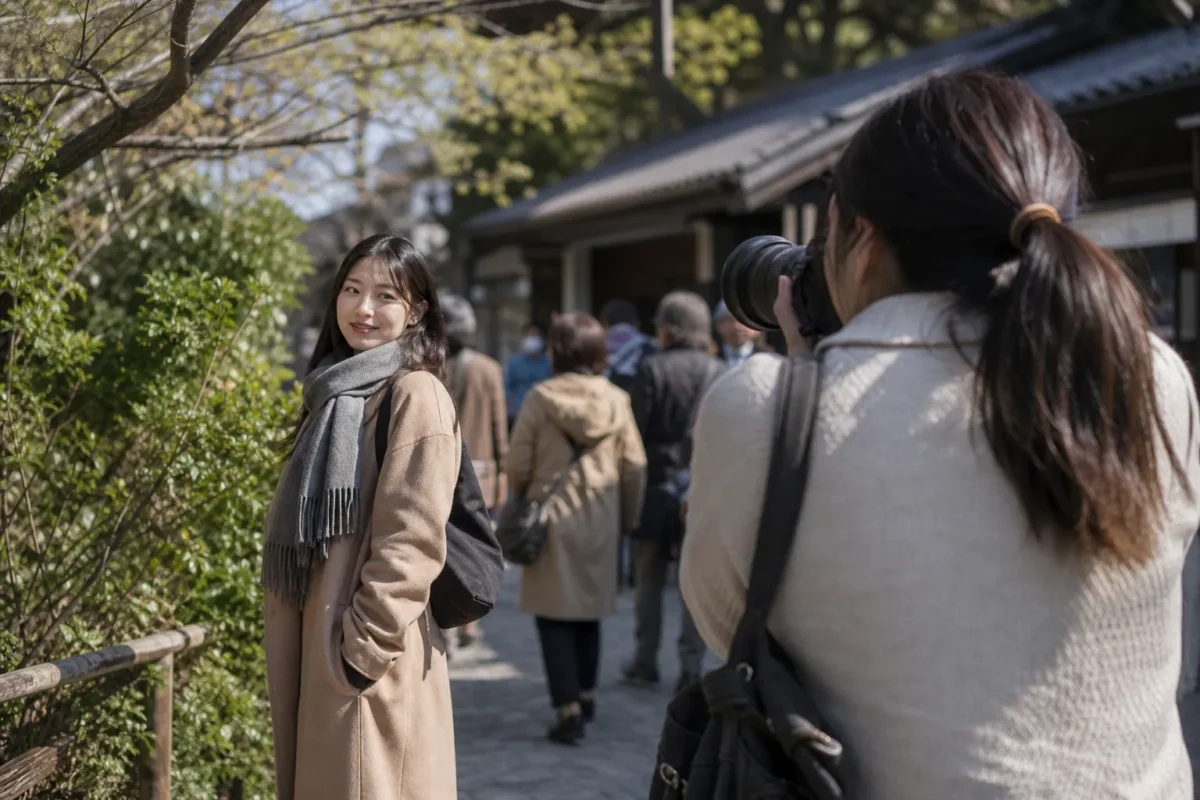
Use Contrast to Make the Focal Point Stand Out
Contrast is one of the fastest ways to create a focal point.
The eye naturally goes toward contrast:
- bright against dark
- sharp against soft
- warm color against cool color
- bold color against muted color
- smooth texture against rough texture
- small subject against large empty space
You can use contrast in camera by moving the subject, changing your angle, waiting for light, or simplifying the background.
A person in a red jacket against gray buildings will stand out. A face in window light against a darker room will stand out. A white product on a dark table will stand out. A single tree in fog will stand out because the rest of the scene is quiet.
Contrast should support the intended subject.
If the strongest contrast is in the corner, the viewer may look there first. If a bright sign sits behind a portrait, the sign may become the accidental focal point. If the background is sharper or more colorful than the subject, the photo may feel visually confused.
Before shooting, scan the whole frame. The strongest visual pull should either be the focal point or support the focal point.
Use Depth of Field Carefully
Depth of field is one of the most common ways to isolate a focal point.
A wide aperture can blur the foreground and background, making the subject easier to read. This works well for portraits, flowers, food, products, travel details, and busy locations.
But shallow depth of field is not a fix for every composition problem.
If the background is too bright, the blur may still pull attention. If the subject is posed awkwardly, blur will not solve it. If the eyes are soft, the focal point may fail even though the background looks beautiful.
Use shallow depth of field when you want separation.
Use deeper depth of field when the environment is part of the story. A travel portrait may need the market, street, or mountain to stay readable. A landscape may need foreground, middle ground, and background to work together. An event image may need multiple people sharp enough to read the moment.
Depth of field should match the job of the photo.

Use Light to Direct Attention
Light carries visual weight.
The viewer usually looks at the brightest readable area first. That makes light one of the strongest tools for controlling focal points.
Use light to guide attention:
- place the subject in cleaner light than the background
- let the background fall slightly darker
- use window light to shape the face
- wait for a subject to enter a patch of light
- use shadow to quiet the edges
- avoid bright distractions behind the subject
The goal is not always dramatic light. Often, the best focal point support is subtle. A slightly brighter face, a clean catchlight, or a gentle separation from the background can be enough.
If the viewer looks first at a bright wall, lamp, window, or sky instead of the subject, the light balance needs work.
Move the camera. Move the subject. Change the exposure. Or plan to reduce that distraction in post.
Place the Focal Point With Intention
Where you place the focal point changes how the image feels.
A centered focal point can feel calm, formal, stable, or direct. This works well for symmetrical portraits, architecture, product images, reflections, and quiet scenes.
An off-center focal point can feel more dynamic. It often works well with negative space, movement, gaze direction, leading lines, and environmental context.
The rule of thirds can be a useful starting point. Place the focal point near one of the intersections, then use the rest of the frame to support it.
But do not follow the grid blindly.
Ask whether the placement helps the subject.
If a person is looking right, space on the right gives the gaze somewhere to go. If a runner is moving left, space on the left makes the movement feel natural. If a product is placed near the edge without enough breathing room, it may feel cramped.
Good placement is not about rules. It is about the viewer’s path through the image.

Use Negative Space to Strengthen the Subject
Negative space can make a focal point stronger by reducing competition.
It can be sky, wall, water, fog, sand, snow, shadow, grass, or any quiet area around the subject.
A small subject can still feel powerful when the surrounding space is simple. A portrait can feel more intentional when the background has room to breathe. A product can feel more premium when it is not crowded by props.
Use negative space when:
- the subject is small but important
- the scene feels cluttered
- the image needs calm
- the subject’s gaze or movement needs room
- you want the viewer to land on one point quickly
Negative space should support the focal point, not swallow it.
If the subject becomes too small, too low contrast, or too close to the edge, the focal point may disappear. If the space is too empty without purpose, the image can feel unfinished.
Balance matters.

Use Leading Lines and Framing as Support
Leading lines and framing can make a focal point easier to read.
A road, path, fence, river, railing, shadow line, or row of lights can guide the eye toward the subject. A doorway, window, tree branch, mirror, arch, or foreground blur can frame the subject and keep attention inside the image.
But these tools should not overpower the focal point.
If the leading line is more interesting than the subject, the photo becomes about the line. If the frame is too heavy, the viewer notices the frame before the person. If foreground blur covers the face or product, it becomes a distraction.
Use composition tools as support layers.
They should answer one question:
Do they help the viewer find the subject faster?
If not, simplify.

Create a Focal Point With Pattern Breaks
Not every focal point is a person or object placed in clean light.
Sometimes a focal point appears because something breaks a pattern.
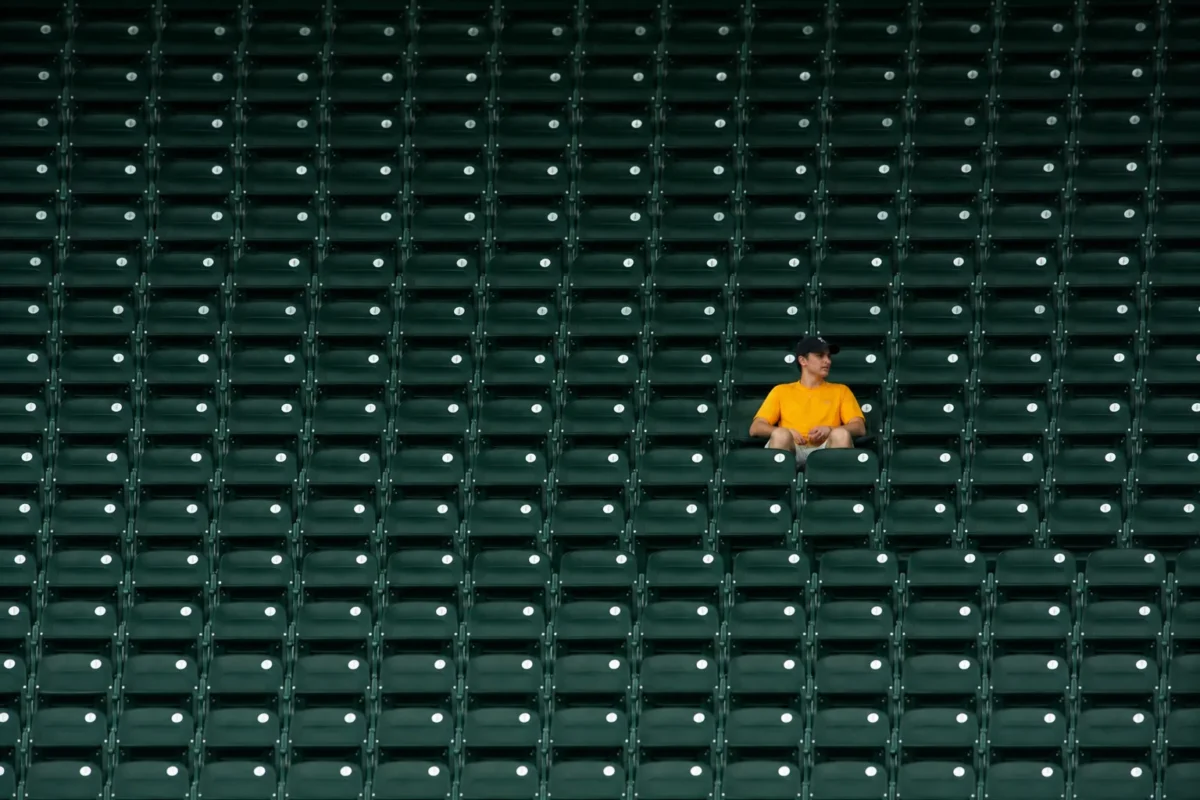
One open window in a row of closed windows. One person standing still while others move. One yellow flower in a field of purple. One empty chair in a full room. One different shape in a repeated texture.
Pattern breaks work because the eye notices difference.
Use them when you want a quieter or more graphic composition. They can be useful in street photography, architecture, landscapes, product details, and abstract work.
The key is simplicity. If too many things break the pattern, none of them becomes strong.
Multiple Focal Points Need Hierarchy
A photo can have more than one focal point, but one usually needs to be primary.
In a wedding photo, the couple may be the primary focal point while guests, flowers, and architecture support the story. In a product image, the product is primary while hands, props, and texture add context. In a landscape, a person may be primary while the mountain becomes secondary scale.
If every interesting element has equal visual weight, the photo feels busy.
Create hierarchy by controlling:
- brightness
- sharpness
- size
- placement
- color
- contrast
- distance from the camera
- surrounding negative space
The viewer should know where to start and where to go next.

Common Focal Point Mistakes
The biggest mistake is not having a clear focal point.
The scene may be beautiful, but if nothing clearly matters most, the viewer moves on quickly.
Another mistake is letting the wrong element become the focal point. Bright corners, signs, lamps, background faces, strong colors, and high-contrast objects can steal attention.
Too many focal points create the same problem. Several sharp, bright, colorful areas can make the frame feel cluttered.
Weak subject separation is another issue. If the subject blends into the background, the focal point may not read even when the subject is important.
Finally, some photographers confuse technical focus with visual emphasis. A subject can be sharp and still not be strong.
Ask where your eye goes first. If it is not the intended subject, the image needs adjustment.

How to Strengthen Focal Points in Post
The best focal point work starts in camera, but editing can protect it.
After the shoot, the pressure is usually practical. You have many good frames, but not all of them read clearly. One has the best expression but a bright background object. One has clean light but weak color separation. One has the right subject but too much visual noise around the edges.

Start by culling for clarity.
Choose the images where the intended focal point is strongest. Do not keep a frame only because the location is pretty. If the viewer cannot find the subject quickly, the image will need more work and may still fall short.
Then refine the crop.
Remove edge distractions. Give the subject breathing room. Strengthen the path of the eye without making the frame feel cramped.
Next, control light and color.
Reduce bright areas that pull attention away from the subject. Keep skin tone natural. Use contrast carefully. A little local brightness on the focal point can help, but heavy editing can make the image look forced.
For background cleanup, Evoto Object Remover can support the workflow when one object near the edge is stealing attention. The goal is not to rebuild the scene. It is to remove friction around the subject.
For portraits, the focal point is often the face, eyes, or expression. Evoto Portrait Retouching can help polish skin, small distractions, and facial details while keeping the person recognizable and natural. If the image was shot in RAW, Evoto Camera RAW Photo Editor gives more room to recover shadow detail, protect highlights, and refine the tonal path toward the subject.
For selective emphasis, Evoto’s guide to local adjustment is useful because many focal point problems are local: a dark face, bright corner, color cast, or distracting background patch. Evoto’s update notes on AI-powered color grading and background editing are also useful when the focal point depends on separating subject color from background color.
For sets that need a consistent read, Evoto AI Color Looks can help create a controlled color direction, while Evoto Batch Edits can apply that direction across similar images so the gallery does not jump from one focal emphasis to another.
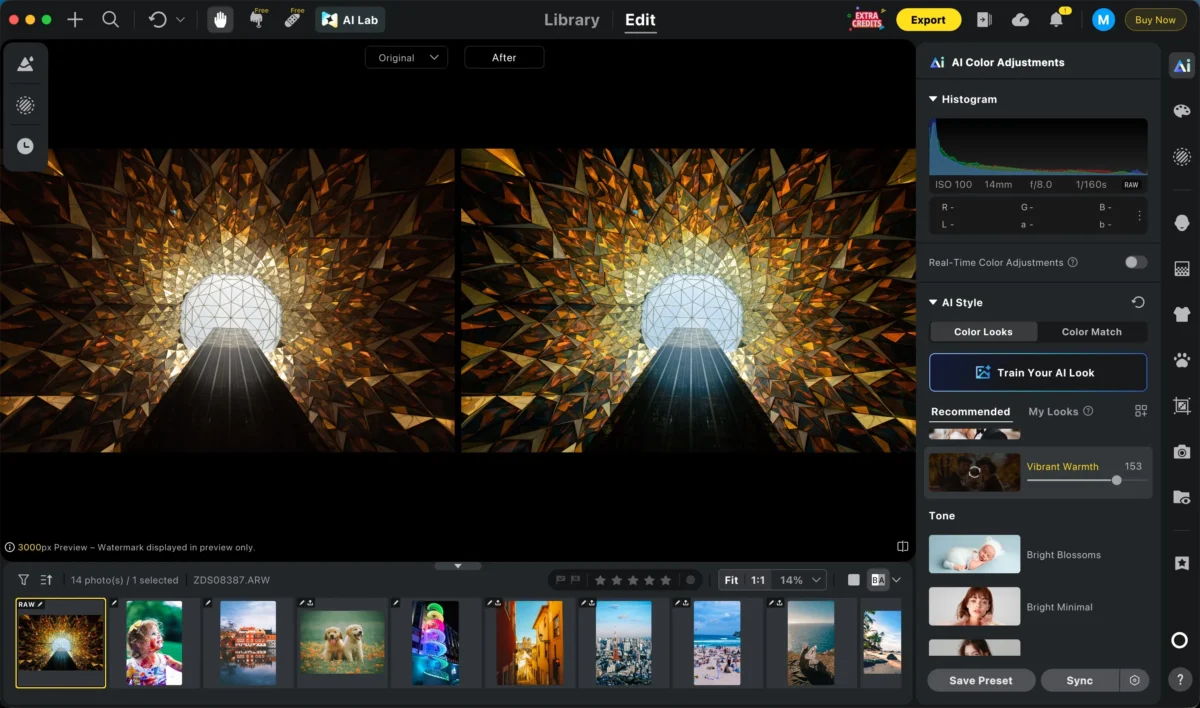
Good post-processing should make the focal point easier to see. It should not make the photo feel like a different scene.


Powerful AI Photo Editor
Focal Point Checklist
Before shooting, ask:
- What is this photo about?
- Where should the viewer look first?
- Is the focal point visually stronger than the surroundings?
- Does light support the subject?
- Does color support the subject?
- Is the background competing?
- Would a different angle create better separation?
- Does negative space help or weaken the subject?
- Do leading lines or framing guide attention to the right place?
After the shoot, ask:
- Where does my eye go first?
- Is that the intended focal point?
- Are there competing bright spots or color distractions?
- Does the crop help the subject read faster?
- Does the edit preserve a natural look?
- Does the image still feel clear when viewed quickly?
Final Thoughts
Focal points in photography are where composition begins.
Before you think about rules, grids, or styling, decide what the photo is about. Then use the rest of the frame to support that decision.
Light can emphasize it. Depth of field can isolate it. Negative space can give it room. Leading lines and framing can guide the viewer toward it. Editing can remove distractions that weaken it.
The viewer should not have to work hard to understand the image.
Give them a place to land, then make everything else serve that point.
Try Evoto AI Photo Editor
Retouch photos with Evoto AI and make your photos best! Available on Windows, MacOS and iPadOS.



