

A great portrait is more than a photo; it’s a statement, and at its center is a confident smile framed by the perfect lip color. The right shade can define your look, accentuate features, and instantly boost confidence. That’s why knowing how to choose the perfect lip color is essential in portrait photography.
Imagine testing an entire makeup bag of shades without touching a single tube. Evoto AI lets you digitally try 15 lipsticks, helping you find the perfect lip color for weddings, travel photos, or social media portraits—all before the camera ever flashes.
Understanding Your Skin Tone
Before selecting a lip color, it’s important to first understand your skin tone, as it greatly influences how shades appear in photos. Skin tones are generally categorized as warm, cool, or neutral:
- Warm Undertones – Pair well with pink lip color or peachy shades, enhancing warmth in portraits.
- Cool Undertones – Blue-based reds or purple color lips complement cooler skin, creating a polished look.
- Neutral Undertones – Can wear both warm and cool shades effectively, giving flexibility for different styles.
For natural or everyday portraits, natural lip colors like soft nudes work best. Bold shades are perfect for creative or editorial shoots. Knowing your undertone ensures your lip color complements your complexion and looks harmonious in every scenario, helping you how to choose the perfect lip color effortlessly.
Matching Lip Color to Your Portrait Style
Choosing the right lip color isn’t just about personal preference; it also depends on the style of your portrait. Different scenarios call for different shades, and knowing how to match them can make a big difference in your final photo:
Professional Profiles
Subtle tones create perfect lips without distraction, conveying professionalism and confidence.
Creative or Editorial Portraits
Bold and vibrant shades allow experimentation, adding personality and making your photos stand out.
Wedding and Engagement Portraits
Timeless reds or soft pinks photograph beautifully in natural light, ensuring elegance.
Travel or Lifestyle Photos
Light and natural shades complement casual outfits and outdoor environments, keeping lips fresh and harmonious.
Personal Portraits & Social Media
Any of the 15 lipsticks can match your mood, outfit, or theme, helping you how to find the perfect lip color for casual or fun portraits.
With Evoto AI, you can digitally test and compare shades for all these scenarios, ensuring the lip color enhances your look naturally and cohesively.
Considering Lighting and Photography Setting
Lighting has a huge impact on lip color, and the right choice can make your photos stand out. While you can’t control the light in every situation, knowing how it affects your look can help you prepare.
- Natural Light – Shows true shades; pink lip color appears softer and delicate.
- Studio Lighting – May alter colors; slightly deeper shades can prevent washing out.
- Flash Photography – Can brighten colors; bold reds or purple color lips stand out effectively.
- Evening or Indoor Portraits – Slightly richer tones ensure lips remain visible and flattering.
No matter the lighting, you can get the perfect look afterward. With Evoto AI, you can instantly adjust your lip color, giving you the power to find the ideal shade for any photo and make your lip photos look natural and flawless.
The Evoto AI Lip Color Tool: Your Digital Makeup Bag
With the freedom to edit after the fact, you can explore endless possibilities. Evoto AI’s Lip Color Tool makes it easy. It features a curated collection of 15 digital lipsticks, from soft nudes and delicate pinks to bold reds and rich purples.
- Quick Testing: Change your lip color in seconds with a single click. You can experiment freely without the mess of physical makeup.
- Natural Results: The tool subtly enhances your facial features, ensuring the new lip color blends harmoniously and looks completely real.
- Time-Saving: Whether you’re a model, a photographer, or just getting ready for a shoot, this tool saves you the hassle of reapplying makeup, letting you focus on getting the perfect shot.
With Evoto AI, you can easily determine the best lip color for any portrait, ensuring your look is always on point.
Step-by-Step Tutorial: How to Change Lip Color in Evoto AI
Using Evoto AI to change lips color is simple and highly effective. Steps include:
Step 1. Upload Your Photo:
Open your image to begin the lip color adjustment process.

Step 2. Select Portrait Retouching Tool:
From the toolbar, quickly access makeup and lip options.
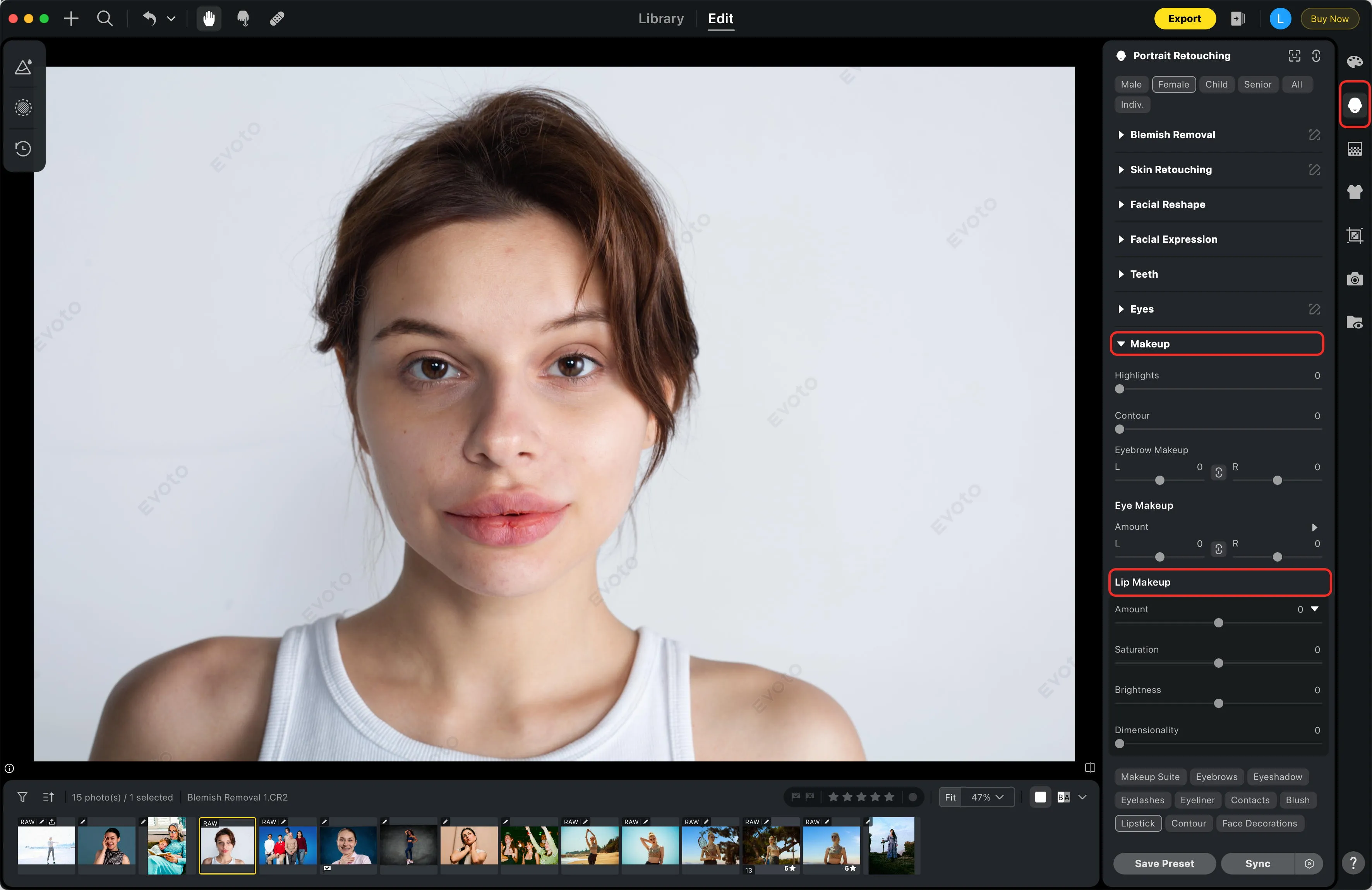
Step 3. Choose & Apply Lip Color:
In the Makeup panel, select the “Lipstick Makeup” filter, and adjust the Amount, Saturation, Brightness, and Dimensionality.
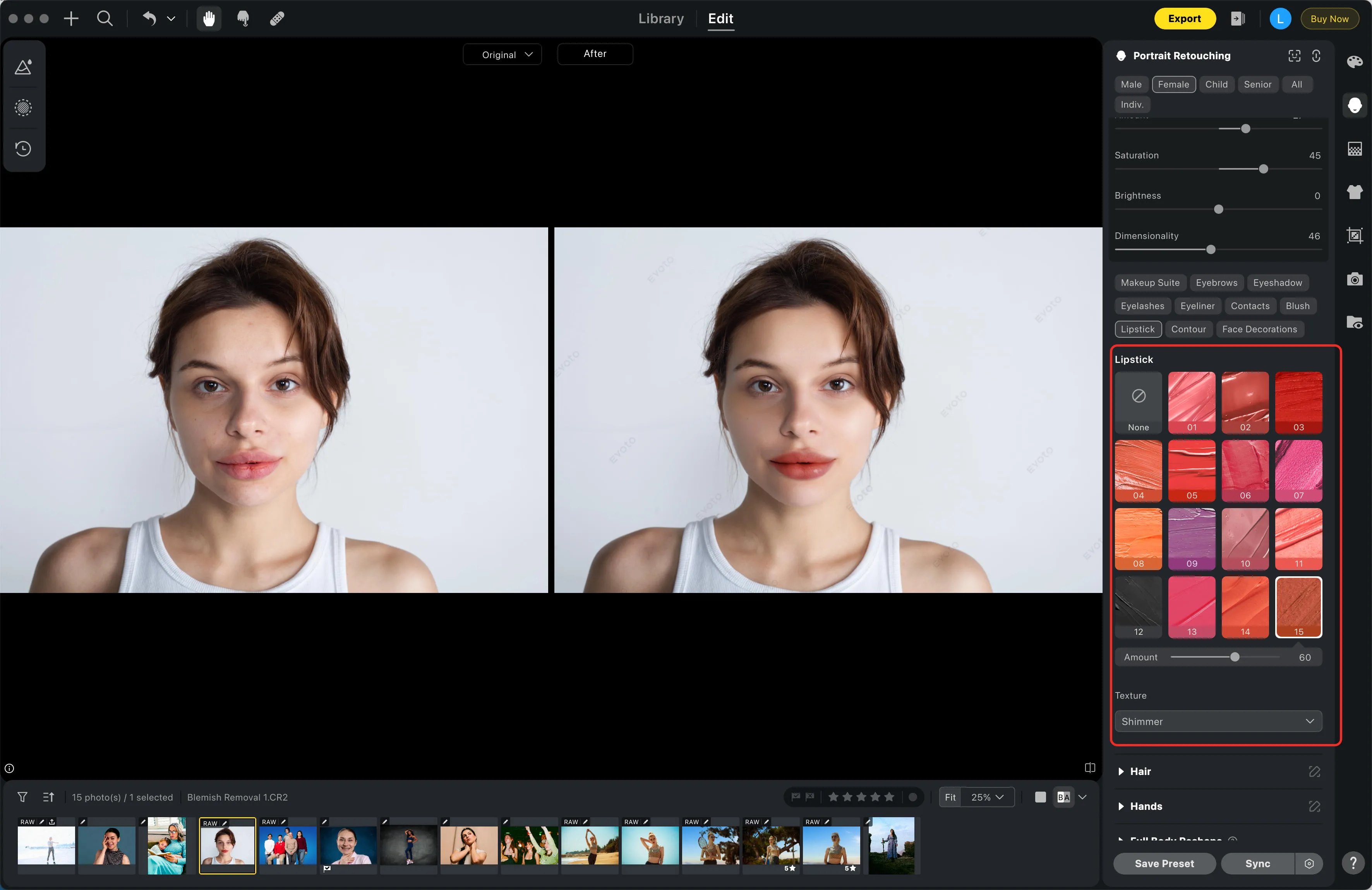
Step 4. Refine Lip Texture:
Pick the best lip texture and adjust its intensity for a natural look that matches your skin tone.
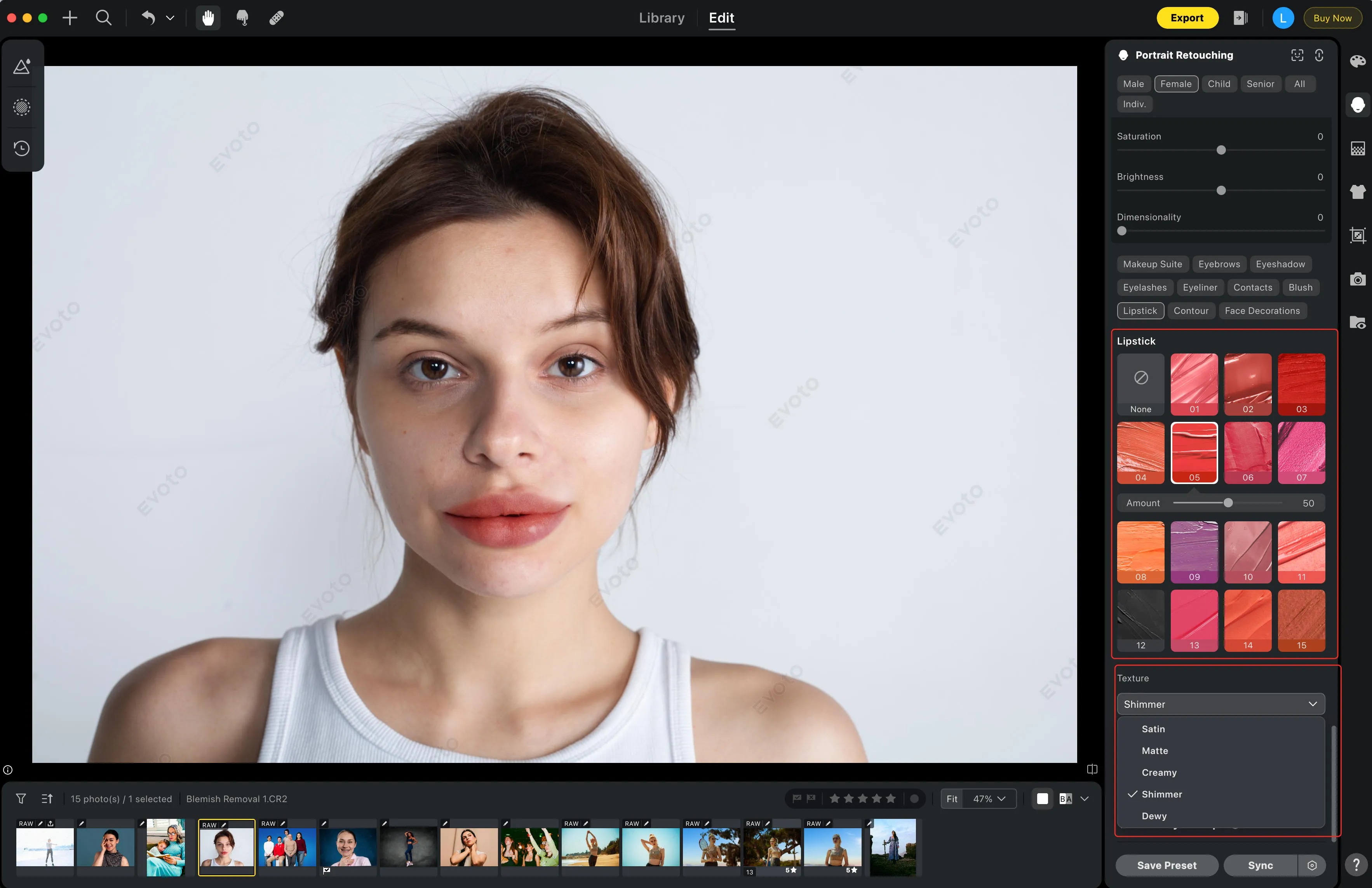
Step 5. Preview & Fine-Tune:
Make small tweaks until your lips appear vibrant and harmonious.
Step 6. Save Your Edited Photo:
Export your updated lip photo in high resolution.
Evoto AI’s AI-powered features let you test all 15 lipsticks, ensuring you find the best lip color for me and understand how to choose the perfect lip color digitally.
More Lip Enhancements with Evoto AI
After you’ve found the perfect shade, Evoto AI provides even more tools to refine your lips for a truly flawless look.
- Smooth Imperfections: Use the “Lip Wrinkles & Flakes“ tool to gently remove any fine lines or texture issues, giving your lips a smooth, polished finish.
- Enhance Lip Shape: Use the “Lip Reshape“ tool to subtly improve symmetry and contour, creating a beautifully balanced pout.
- Combine with Lipstick Filters: All these features work together. Apply one of the 15 lipsticks and then refine the shape and texture simultaneously for a cohesive and professional look.
Evoto AI lets you change lip color and perfect every detail at the same time, ensuring your lips are smooth, symmetrical, and perfectly matched to your skin tone. This helps you master your look for any occasion.
Why Evoto AI Is a Game-Changer for Your Photos
Evoto AI stands out as a powerful tool for effortless photo editing, all thanks to its smart, AI-driven features.
User-Friendly Interface – Easy for beginners to use, no advanced editing skills required.
Time Efficiency – Quickly try all 15 lipsticks and adjust lip tones digitally without redoing photoshoots.
Versatile Editing – Works for wedding portraits, travel photos, and social media posts.
Natural-Looking Results – Subtle adjustments ensure lips look real and polished, enhancing perfect lips without over-editing.
Experiment Safely – Test multiple shades and lighting conditions digitally, learning how to choose the perfect lip color before committing in real life.
Tips for Long-Lasting Impact in Portraits
Choosing the right lip color is about making a lasting impression:
- Professional Photos – Timeless reds or soft pinks convey elegance and confidence.
- Social Media or Personal Projects – Bold shades encourage creativity and fun.
- Special Occasions – Weddings, engagements, or parties benefit from shades that complement the lighting and outfit.
Using Evoto AI, you can preview all 15 lipsticks to decide what lip color is best for me in every scenario, ensuring your lip photo looks balanced and appealing.
Conclusion
How to choose the perfect lip color involves considering skin tone, portrait style, lighting, and overall harmony. Evoto AI simplifies this with 15 lipsticks, lip color adjustment tools, and additional lip enhancements. Whether for professional profiles, weddings, travel photos, or personal portraits, you can how to find your perfect lip color quickly.
By testing shades, refining details, and previewing digitally, you achieve perfect lips and polished results. Try Evoto AI today to discover the best lip color for me and achieve flawless lip edit results.



