

School portraits and yearbook photos are cherished memories for students. However, one common challenge photographers face is glasses reflection. Light often reflects off lenses, creating glare that distracts from the subject’s eyes. As a professional photographer, you want to maintain clear, natural eyes while keeping skin tones realistic. Fortunately, Evoto AI offers a simple and effective solution. Its Remove Reflection from Photo feature allows you to eliminate glare quickly and maintain professional quality.


Powerful AI Photo Editor
Why Glasses Reflection Is a Challenge for Photographers
Glasses reflection occurs due to light sources and lens angles. In school settings, overhead lights or camera flash often cause glare. This glare can obscure the eyes and make the portrait look less professional. Manual correction, such as using Photoshop brushes, is time-consuming and requires precision. Moreover, over-editing can make the eyes look unnatural or distort the surrounding skin. For photographers handling hundreds of school portraits, this challenge can slow down the workflow. This is why an app to remove glare from glasses or a photo editor to remove glasses glare can be a game-changer.
How Evoto AI Supports Photographers
Evoto AI helps photographers address glare efficiently. The tool automatically detects the subject’s glasses and identifies reflective areas. It removes glare while preserving the eyes’ natural appearance. Photographers can adjust the Glasses Glare slider in real-time, ensuring subtle and professional results. This feature works for school portraits, senior pictures, teacher photos, and even group shots. By using Evoto AI, you can remove glare from photo without affecting skin texture or eye details. It also functions as a reliable ai remove glass reflection solution for high-volume workflows. Additionally, Evoto AI can be combined with Skin Soften or Rosy Complexion features to enhance overall portrait aesthetics.
Step-by-Step Tutorial: Remove Reflection from Photo
Step 1: Upload a Photo
Start by uploading a high-resolution image with glasses reflection to Evoto AI Photo Glare Remover. For best results, use RAW or high-quality JPEG files. High-resolution images allow the AI to detect glare precisely and preserve fine details in the eyes and skin. This is the first step if you want to remove glasses reflection from photo efficiently.
Step 2: Find the Glasses Glare Slider
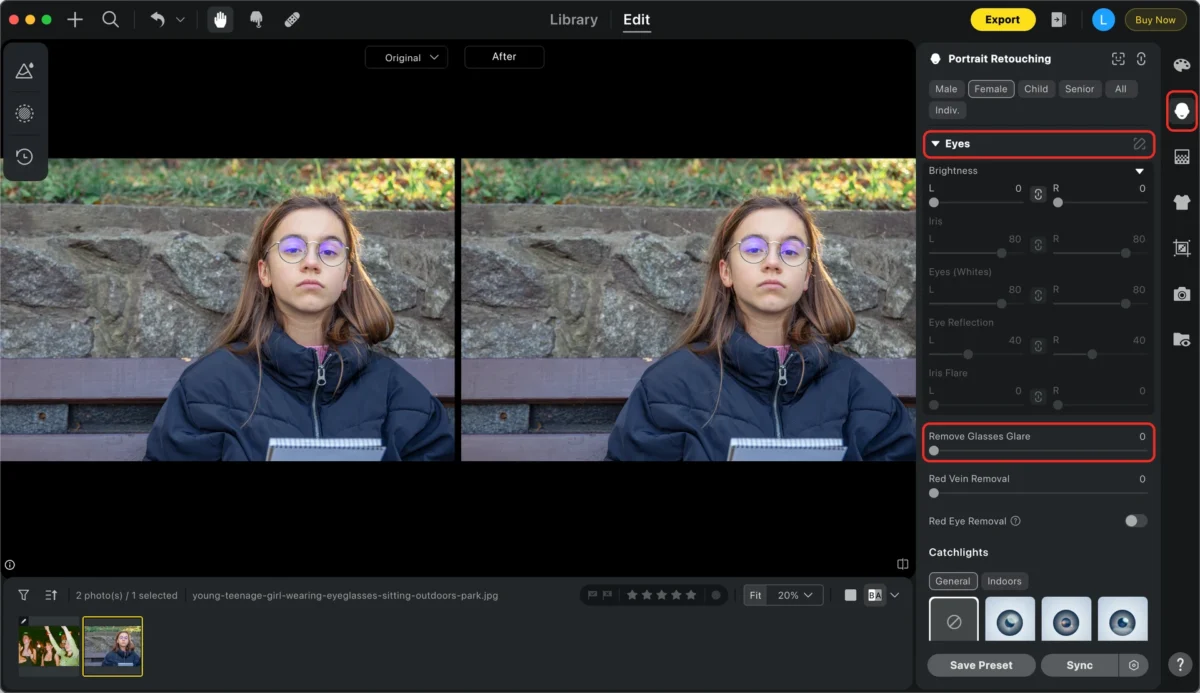
Next, open the Portrait Retouching panel and go to the Eyes section. Locate the Glasses Glare slider. This slider controls the strength of glare removal. Photographers should adjust it carefully depending on how strong the reflection is. This is where the glass reflection remover feature comes into play. Real-time preview ensures you can see the effect immediately.
Step 3: Remove Glare from Photo
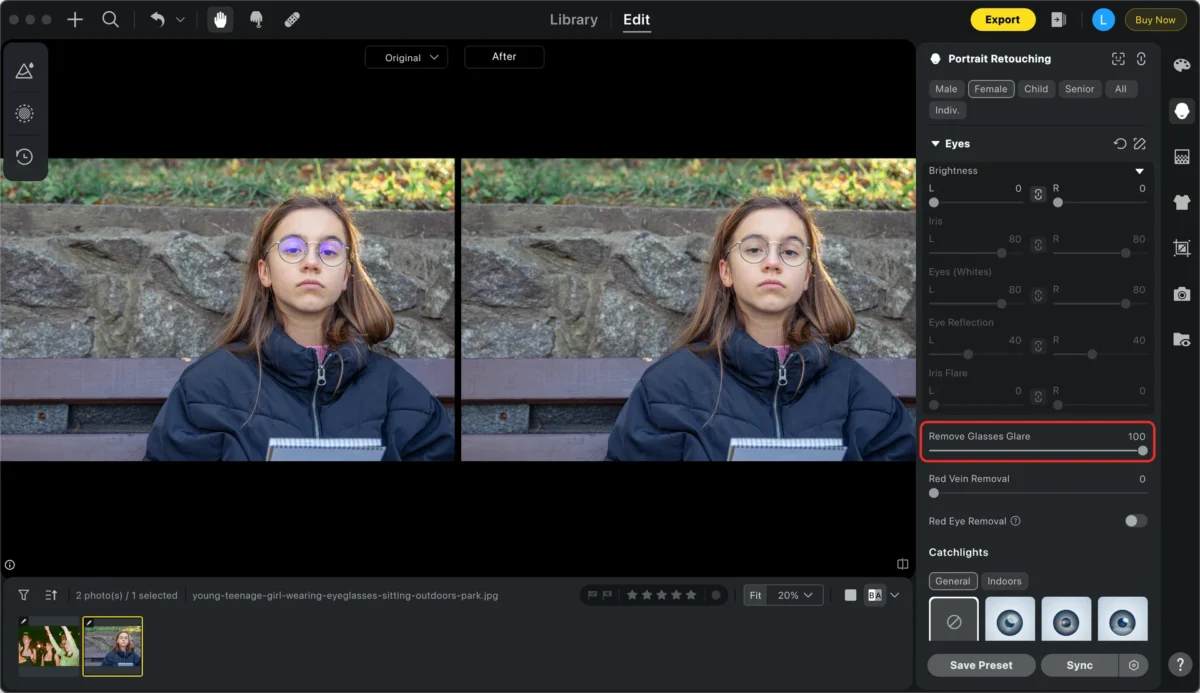
Move the slider left or right to reduce reflection. The AI analyzes the lenses and removes glare while keeping the eyes natural. You can zoom in to check subtle areas and ensure the eyes are not over-processed. Adjust gradually for a smooth, realistic finish. This tool is perfect if you are wondering how to remove reflection in glasses or how to remove glare from photos in a professional workflow. The feature also addresses common concerns like how to remove reflection from glasses in photo.
Step 4: Export the Photo
After removing the glare, click Export to save the enhanced photo. Evoto AI supports multiple formats such as JPEG, PNG, TIFF, and RAW. Now you can deliver polished, glare-free portraits to your clients. Using this method, photographers can remove reflection from photo for school yearbooks and senior portraits consistently.
Photographer Best Practices
For optimal results, always use high-resolution photos to ensure clear details. After removing glasses glare, combine the Face Enhancement feature to refine facial contours and enhance natural skin tones, making each student look vibrant in the photo.
Then, use the Background Adjustment feature to fix uneven colors or wrinkles in the backdrop, creating a clean, consistent environment suitable for yearbooks or class photos. You can also apply Clothing Flaw Removal to smooth out wrinkles, remove stains, or fix creases in shirts and uniforms, ensuring the entire portrait looks polished from head to toe.
For batch photos, applying these adjustments at once can greatly improve efficiency while maintaining a uniform style. Evoto AI offers real-time previews and smart suggestions, allowing photographers to quickly produce high-quality edits that enhance facial details, optimize the overall image, and present clean, natural, and professional portraits.
Benefits of Using Evoto AI from a Photographer’s Perspective
Evoto AI improves workflow efficiency by automating glare removal. This is especially useful when handling dozens or hundreds of school portraits. The tool preserves fine details in the eyes and natural skin textures. It prevents common mistakes that occur during manual editing, such as over-blurring or distorted features. By using Evoto AI, photographers can remove reflection from photo easily, saving time and ensuring consistency. This tool is beginner-friendly, allowing photography assistants or new team members to achieve professional results quickly. It also functions as a reliable photo editor to remove glasses glare, giving you full control over eye clarity.
Real-World Applications
In addition to school portraits, this tool is valuable for senior pictures, graduation photos, and teacher portraits. It works for individual and group shots alike. Removing reflections from glasses creates a cleaner, more engaging image. Clients will appreciate sharp eyes and balanced lighting. The overall effect contributes to a polished and professional school yearbook or digital portfolio. With Evoto AI, photographers can confidently remove reflection from glasses and provide flawless results for all clients.
Conclusion
Even small glasses reflections can significantly affect the quality of school portraits. Manual editing is time-consuming and requires advanced skills. With Evoto AI, photographers can efficiently remove glare while preserving natural eye and skin details. Integrating this tool into your workflow allows you to deliver clean, polished, and professional school and yearbook photos consistently, saving time and ensuring every image meets high-quality standards that students and schools will appreciate.
Powerful AI Photo Editor


