

Quick Answer
- canon metering modes on the R5 Mark II (stills): Evaluative, Partial, Spot, Center-weighted average—Canon names and field use start in the next major section.
- Pick weighting for what must survive—skin, sky, or wardrobe texture—then verify with histogram and highlight warnings, not LCD brightness alone.
- After capture, keep color cohesive with Evoto; shutter, ISO, and install links sit in the body where they match each idea.
Canon owners often search canon metering modes when their files look “correct” on camera but wrong in Lightroom—usually because the meter solved a different problem than the photographer intended. The EOS R5 Mark II gives you four stills metering tools with clear jobs, and Canon’s own language is the cleanest way to learn them.
This article follows Canon’s EOS R5 Mark II manual descriptions for naming and intent. For the primary source, see Canon’s online manual section on metering mode selection (Metering Mode Selection).
Working photographers rarely meter in a vacuum. You are also thinking about shutter speed, ISO, and how motion interacts with exposure. When faces look sharp but the frame still feels “wrong,” read Shutter Speed: How It Changes Motion and Exposure in Real Photos before you blame metering alone.

Start With Canon’s Names on the R5 Mark II
Forum threads mix nicknames. Canon’s manual names stills metering clearly—use them so menus, tutorials, and service match. If you want brand-neutral vocabulary first, What Is Metering Mode on a Camera? is a clean on-ramp; this article stays specific to canon metering modes on the R5 Mark II.
Later, when you match finals in software, AI Photo Editor works best when your RAW files arrive with intent—no slider replaces highlights you never captured.
Canon Metering Modes: Evaluative, Partial, Spot, and Center-Weighted Average
The four blocks below are reference points, not personalities. Real jobs mix them. Once you know what each mode votes for, Quick Control stops feeling random.
- Evaluative — whole-frame balance when contrast is moderate; your default for pace.
- Partial — centered subject versus a bright rim (sunset, tent, window behind them).
- Spot — a tiny tone you can keep under the sampling point; precision, not patience.
- Center-weighted average — classic “face in the middle” logic; edges matter less.
Evaluative Metering
Outdoor family groups, travel days, and moderate indoor ambient are the natural home for evaluative. Canon describes it as a general-purpose mode suited even for backlit subjects, with the camera adjusting exposure automatically to suit the scene. In practice that usually means many zones contribute to a “reasonable” whole-frame exposure—skin, background, and sky all get a say.
What can still bite: a huge sky strip or harsh rim can leave faces darker than you want because bright edges still pull the average. For gentler portrait light before you lean on compensation, bookmark Golden Hour Photography: Better Portraits Before the Light Disappears.
Tiny field anchor: noon park shade, 24–70mm, group filling roughly half the frame; histogram shows a gentle hill. You are rarely fighting the mode—you are choosing whether to nudge +0.3 EV for eyes or stay neutral for print headroom.

Partial Metering
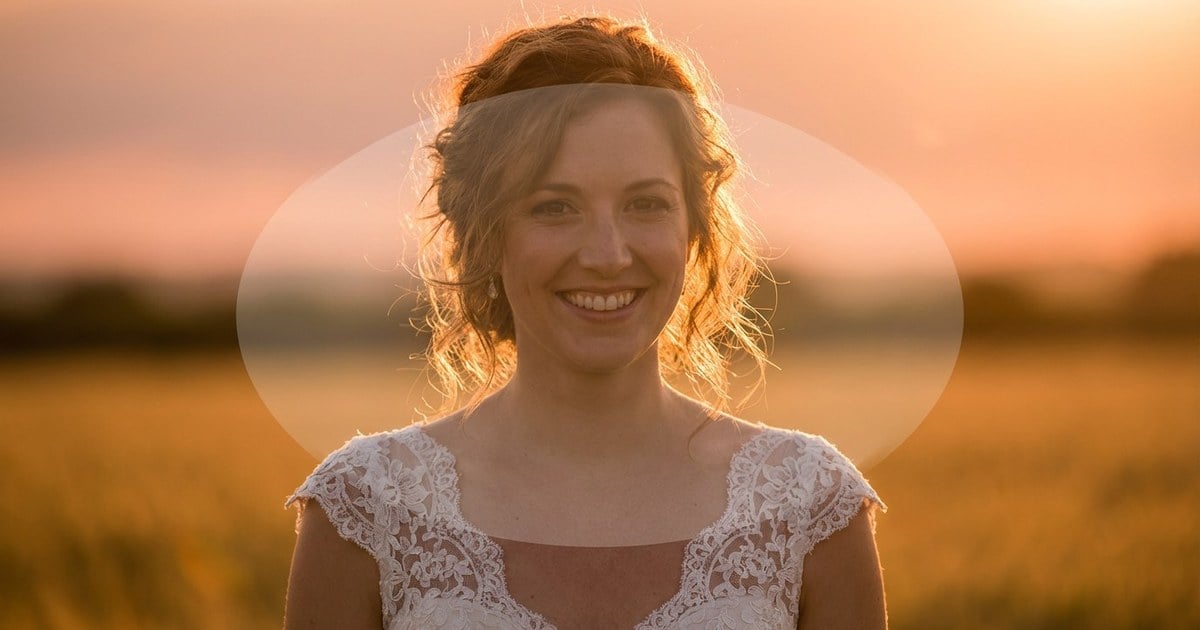
Sunset rim, white tent walls, or a tall window behind a centered subject: beginners blame glass, but the meter is doing what evaluative was asked to do—hold detail in a bright rim. Canon positions partial metering as effective where there are much brighter lights around the subject due to backlight. In photographer language, the frame still averages, yet the weighting listens harder to the central subject region than to the screaming edges.
When you are ready to connect that centered-backlight habit to skin-first delivery, canon metering modes in portrait lighting walks the same contrast ladder using portrait framing language you can map back to Partial here.
If the face still reads dark, pair partial with small positive compensation instead of stacking +2 EV in evaluative alone.
Spot Metering
Spot is the scalpel. Canon documents it as effective when metering a specific part of the subject, and notes that the spot metering area is indicated on the screen—treat that overlay as part of your aim, not decoration. In the field, spot saves tiny targets—a lit cheek, a face in a beam, a bird on sky—if you can park the sampling area on the tone you mean.
Miss by a centimeter and the spot reads black jacket or a zipper catch; exposure swings hard. That is not mystical meter failure—it is aim.

Center-Weighted Average Metering
Canon averages across the screen but weights the center more heavily. That maps cleanly to classic headshot or corporate portrait logic: face near the middle third, edges matter less, and you do not want random corners hijacking the vote.
Reach for it when:
- The face owns the center third and the background is calm.
- You want the meter to care less about bright corners than evaluative might.
- You are rehearsing a centered look before you trust spot on a moving subject.
If the subject drifts to a strong rule-of-thirds line and sky dominates one side, evaluative may feel calmer again—modes are a ladder, not a tattoo.

A Note on Scene Intelligent Auto and AE Behavior
Canon notes that in certain auto modes, evaluative metering is set automatically. The manual also documents default exposure behavior differences between One-Shot AF and Servo-style contexts in the same metering section.
Worth one quiet read before a paid job:
- Which auto modes pin you to evaluative.
- How Servo versus One-Shot can shift what the meter thinks the priority is.
- Where firmware notes any metering quirks for your build.
While you stress-test modes against tricky contrast, High Contrast Images vs Low Contrast Images: How Contrast Changes Mood, Detail, and Depth is a useful companion read.
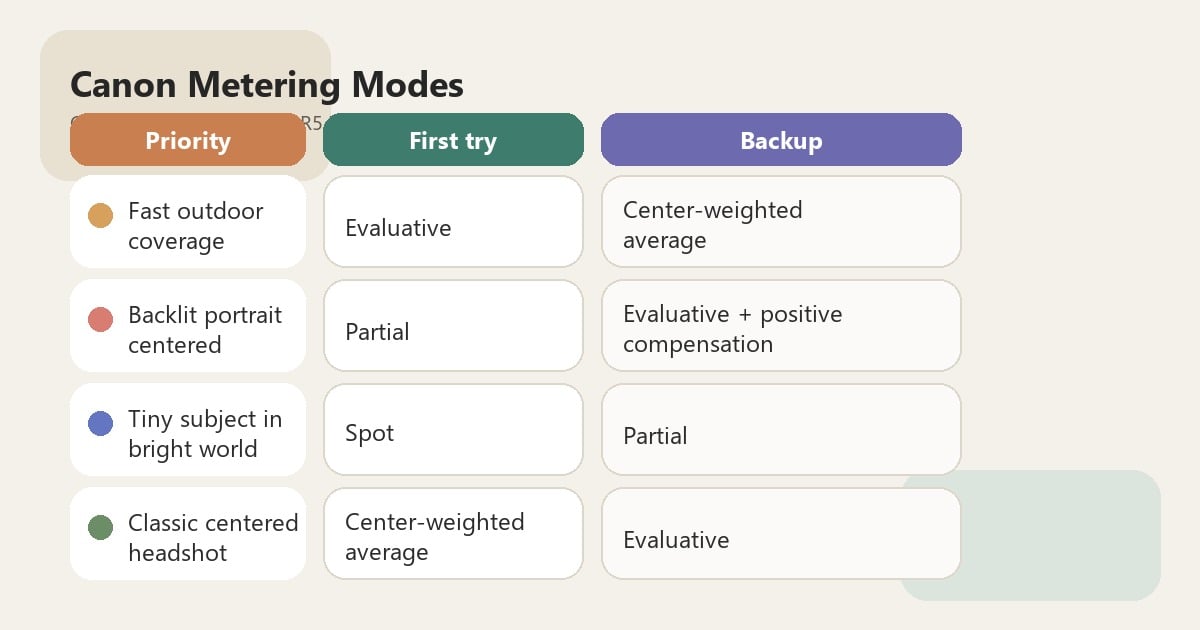
Practical Comparison Table (Canon R5 Mark II Stills)
Use the table as a starting ladder, then adjust for your own grip and how much of the frame your subject actually owns. If you batch on macOS and want non-Evoto desktop options in the same month, bookmark 12 Best Free Photo Editing Software for Mac in 2026: Complete Guide—it sits here so the Post Workflow section can stay light on links.
On paid portrait and event jobs, canon metering modes work best when you lock one mode to one lighting block instead of re-deciding every frame.
| Your priority | Strong first try | Backup |
|---|---|---|
| Fast outdoor coverage | Evaluative | Center-weighted average if subject stays centered |
| Backlit portrait centered | Partial | Evaluative + positive compensation |
| Tiny subject in bright world | Spot | Partial if spot feels twitchy |
| Classic centered headshot | Center-weighted average | Evaluative if background is calm |
Step-by-Step: A Canon Field Workflow You Can Repeat
The steps below assume stills work on an EOS R5 Mark II or equivalent Canon mirrorless. Menu paths differ by firmware, but metering mode usually lives in the shooting menu, on a Q / Quick Control style screen, or in a custom Fn bank—set the control before the job, not during vows.
Step 1: Lock Your Exposure Priority in One Line (Canon Habit)
Before you touch Q or the dial, decide what failure is unacceptable: muddy skin, blown satin, or a dead sky gradient. Write it on a note, voice-memo it, or say it once to an assistant—whatever stops accidental mode swaps mid-pose.
Examples you can steal:
- “Cheeks and eyes stay printable—background can go.”
- “Charcoal suit texture matters more than a hot window.”
- “We can lift shadows; we cannot rebuild clipped lace.”

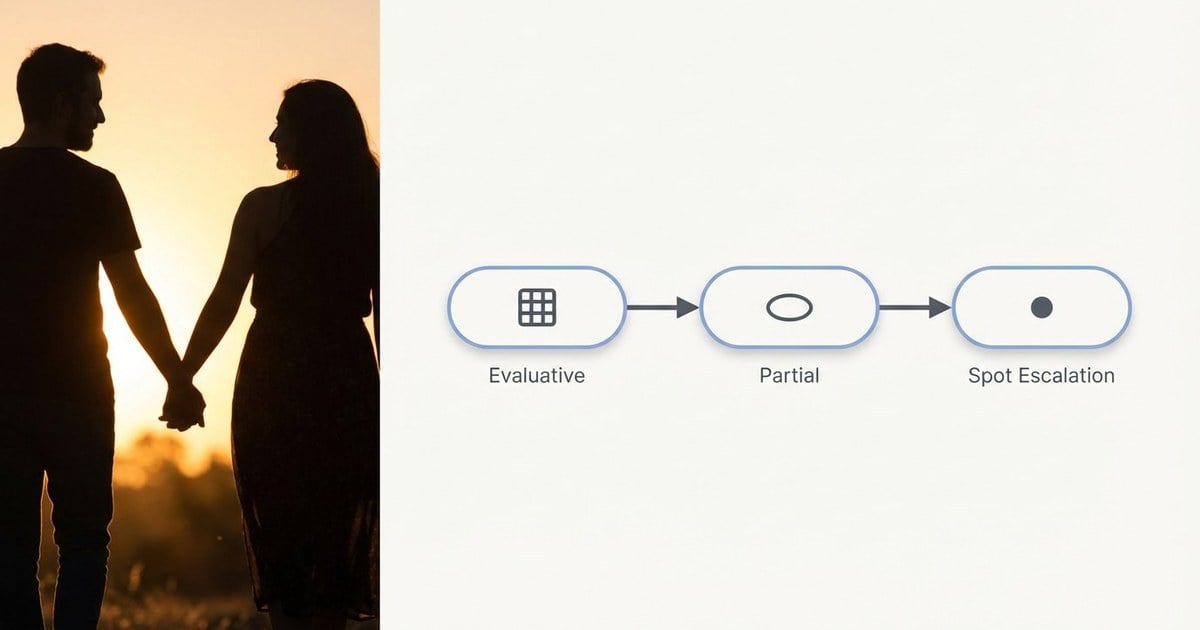
Step 2: Start Evaluative, Then Escalate Contrast Tools Before Compensation
Evaluative is the fast lane for most blocks. If rim light pulls faces under, switch toward partial or spot instead of hammering +2 EV blindly—that stacks noise and flattens backgrounds faster than faces recover.
When you are already nudging ISO because light is thin, What Is ISO in Photography? A Complete Beginner Guide to ISO Settings reminds you how the third edge of the triangle interacts with whatever the meter suggests.
Step 3: Shoot a Test Frame, Then Trust Spot Indication Like You Trust Focus
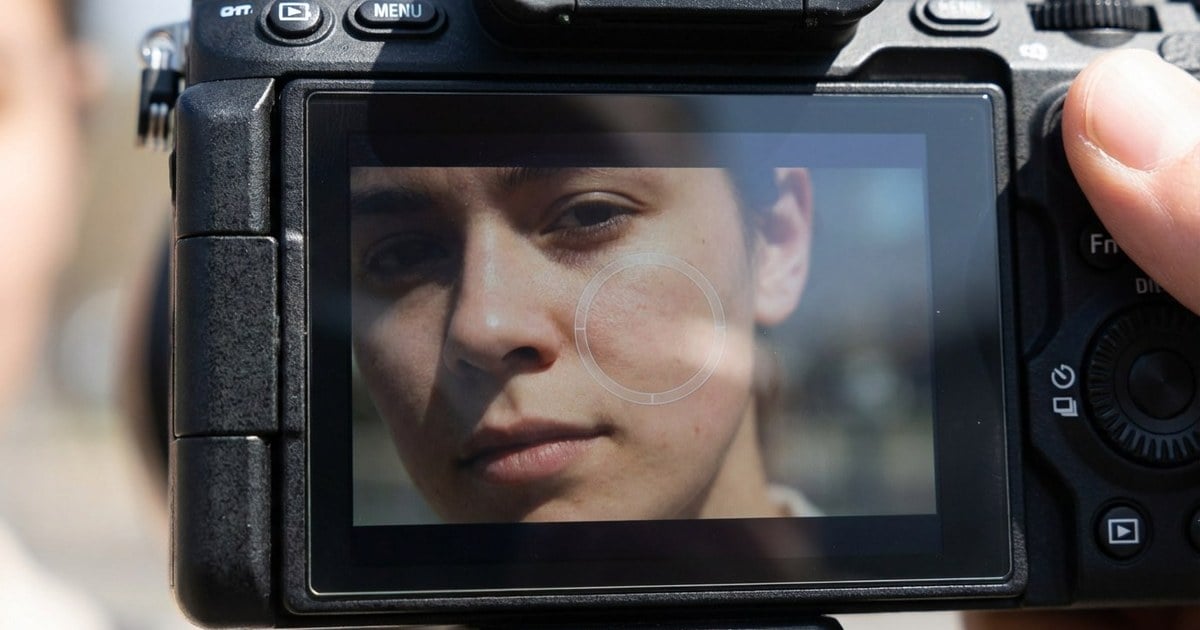
Canon documents that the spot metering area is indicated on the screen—use that overlay the way you confirm focus: breathe, place, read, then decide whether to recompose. Know whether spot follows your active AF point on your firmware build before the critical moment.
If you want wedding-day framing ideas that sit upstream of this step, Bridal Portrait Photography: How to Get Stronger Portraits Under Wedding-Day Pressure pairs well with centered-backlight drills.
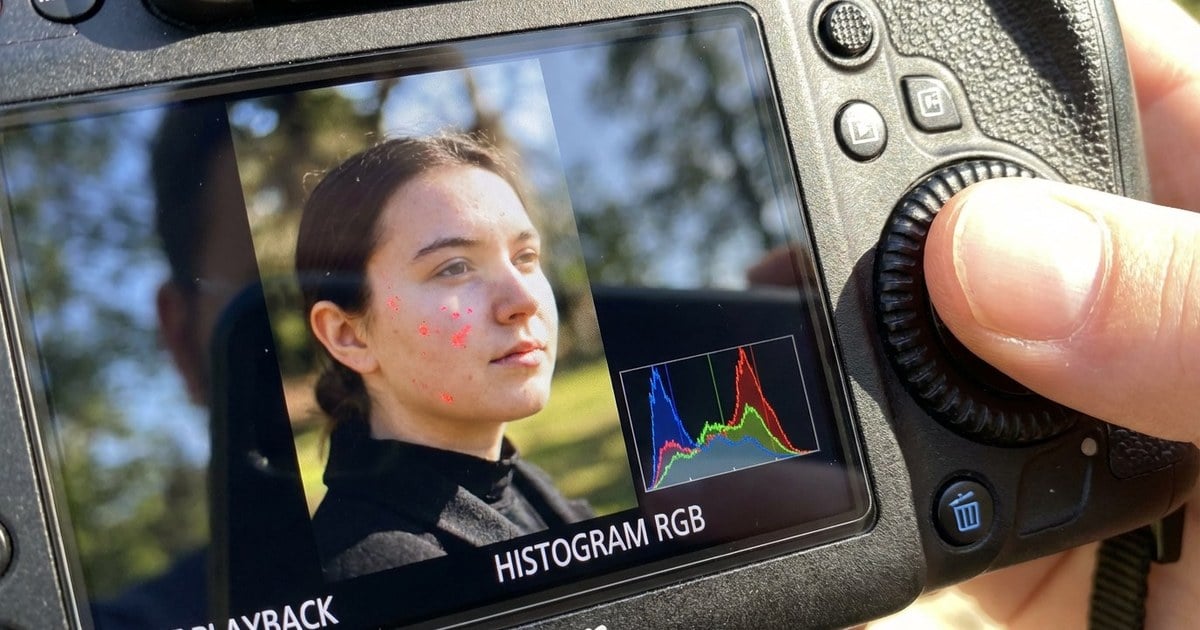
Step 4: Confirm With the Histogram, Then Lock One Strategy per Lighting Block
Ceremony shade, family formals in sun, reception LED—each block gets one metering lane and one compensation habit so your gallery does not look like three different photographers.
Playback checklist before you commit to a burst:
- Open the RGB histogram when the body allows it; brightness-only graphs lie on saturated reds.
- Turn on highlight warnings for satin, jewelry, and specular skin—they spike before your eye agrees.
- Ride exposure compensation in 1/3-stop clicks; full-stop jumps read as “which frame is real?” in the edit.
If the graph still feels abstract, see Histogram (photography).
Common Canon Metering Mistakes
These are rhythm failures, not “bad gear.” None of them break the canon metering modes ladder above; they just burn frames while you relearn what the meter already told you.
The spot that never sits still. Spot metering saves tiny targets in hard light, but only if your aim is stable. On scattered group photos, return to evaluative until subjects cluster again.
The +2 EV panic button. Backlight hurts, yet stacking huge positive compensation before you change weighting often lifts noise and blows backgrounds faster than faces recover. Change partial or spot first, then nudge compensation in small steps.
The surprise Servo shift. Canon documents exposure behavior differences between One-Shot AF and Servo-style contexts in the metering material—skim it once on a quiet night, not during a paid toast.
Metering protects pixels; editing protects consistency. Below are a few Evoto tools for finishing and noise; if you need the full desktop installer (Mac or Windows), use the download page link at the end—earlier in-page download prompts skew toward the phone and tablet flow.
- Finish the look where you metered with intent: AI Photo Editor.
- High-ISO blocks (reception, dim prep rooms): AI Image Denoiser without plastic skin.
- Batch color and presets: browse the Evoto features directory.
Desktop install: Download Evoto—pick the macOS or Windows build that matches your editing machine.


Powerful AI Photo Editor
Final Takeaway
You came for canon metering modes on a specific body, not a philosophy seminar. The through-line is simple: learn evaluative for speed, partial for centered backlight battles, spot for precision when you can aim, center-weighted average for classic center portraits—then verify with histogram and highlights, not LCD bravado alone.
FAQ
1. Does the EOS R5 Mark II Use Different Metering Names Than Older Canon DSLRs?
The four stills modes here match Canon’s contemporary mirrorless language; always verify in your manual if firmware updates add options.
2. Is Evaluative Metering “Smarter” Than Spot?
It is broader, not smarter. Spot can be more precise when you know exactly what to measure.
3. Should Wedding Photographers Default to Evaluative?
Many do for pace, then switch when backlight intensifies.
4. Can I Rely on the LCD for Exposure?
Use histogram and highlight tools for critical scenes.
5. Where Should I Read Official Wording?
Canon’s EOS R5 Mark II manual: Metering Mode Selection.
6. Does This Article Cover Movie Mode Metering?
Stills behavior is the focus; confirm movie-specific options in Canon’s movie manual pages for your firmware.



